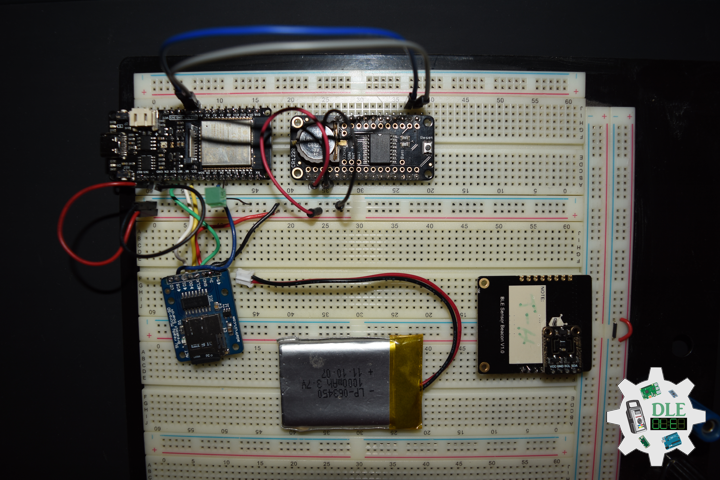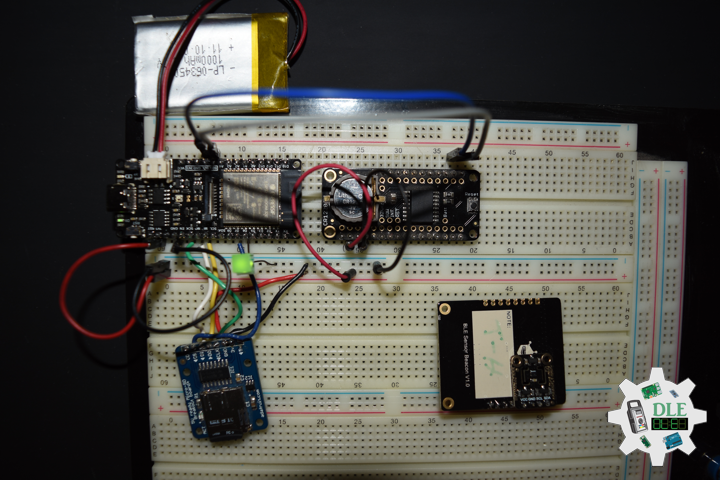
Project #15: Environment – RTC – Mk50

——

#DonLucElectronics #DonLuc #RTC #C4002 #BME280 #ENS160 #Environment #FireBeetle2ESP32E #ESP32 #Display #IoT #Project #Fritzing #Programming #Electronics #Microcontrollers #Consultant

——
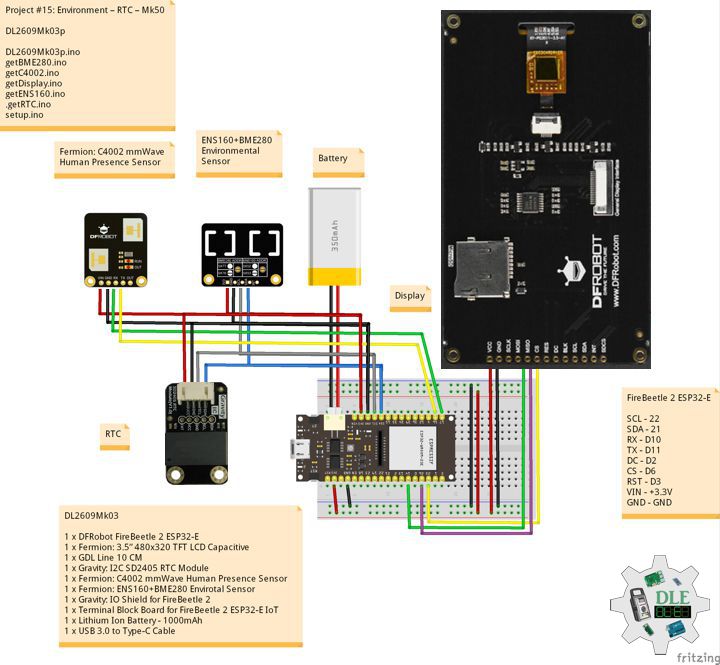
RTC

——

RTC

—

RTC

——

Gravity: I2C SD2405 RTC Module

The I2C SD2405 RTC module features accurate real-time clock, dual power supply, low power consumption, periodic interrupts, and a high precision time trimming circuit. The SD2405AL is dual power supply system. When the primary power supply goes down to an assigned value or resumes from low power, the system can switch between the primary power supply and battery automatically. Even there is no external power, it can still work for 5~8 years, 1uA ultra-low power consumption.

DL2609Mk03

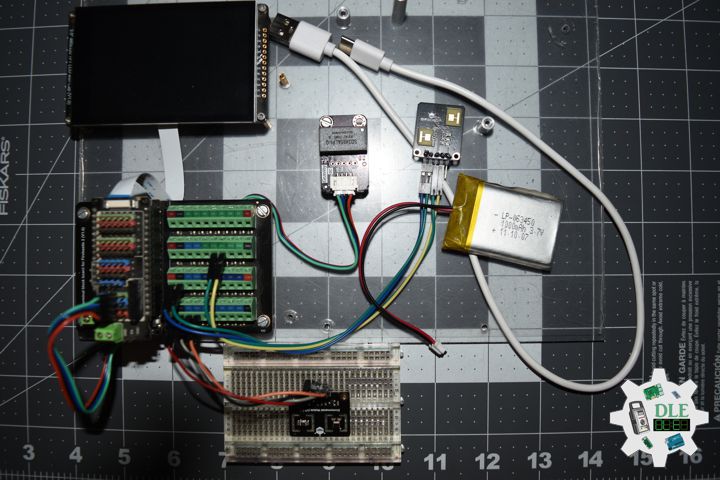
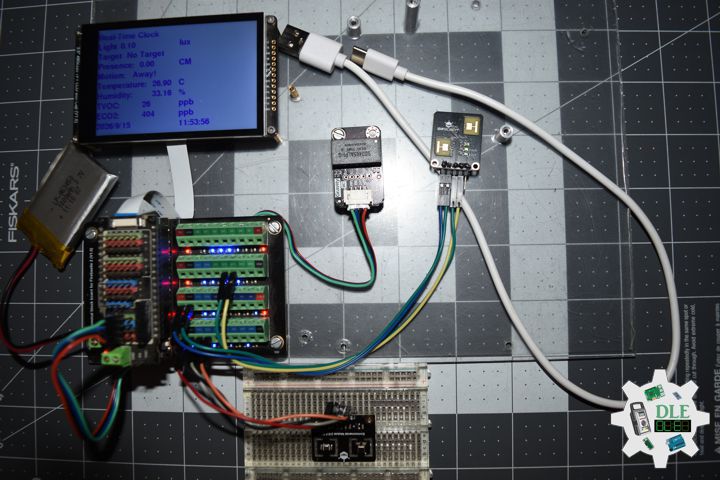
1 x DFRobot FireBeetle 2 ESP32-E
1 x Fermion: 3.5” 480×320 TFT LCD Capacitive
1 x GDL Line 10 CM
1 x Gravity: I2C SD2405 RTC Module
1 x Fermion: C4002 mmWave Human Presence Sensor
1 x Fermion: ENS160+BME280 Envirotal Sensor
1 x Gravity: IO Shield for FireBeetle 2
1 x Terminal Block Board for FireBeetle 2 ESP32-E IoT
1 x Lithium Ion Battery – 1000mAh
1 x USB 3.0 to Type-C Cable

DL2609Mk03p

DL2609Mk03p.ino

/****** Don Luc Electronics © ******
Software Version Information
Project #15: Environment – RTC – Mk50
15-50
DL2609Mk03p.ino
DL2609Mk03
1 x DFRobot FireBeetle 2 ESP32-E
1 x Fermion: 3.5” 480x320 TFT LCD Capacitive
1 x GDL Line 10 CM
1 x Gravity: I2C SD2405 RTC Module
1 x Fermion: C4002 mmWave Human Presence Sensor
1 x Fermion: ENS160+BME280 Envirotal Sensor
1 x Gravity: IO Shield for FireBeetle 2
1 x Terminal Block Board for FireBeetle 2 ESP32-E IoT
1 x Lithium Ion Battery - 1000mAh
1 x USB 3.0 to Type-C Cable
*/

// Include the Library Code
// DFRobot Display GDL API
#include <DFRobot_GDL.h>
// C4002 mmWave Human Presence
#include "DFRobot_C4002.h"
// BME280 Environmental
#include <DFRobot_BME280.h>
// ENS160 Air Quality Sensor
#include <DFRobot_ENS160.h>
// RTC (Real-Time Clock)
#include "GravityRtc.h"

// RTC Initialization
GravityRtc rtc;
// Date and Time
String dateRTC = "";
String timeRTC = "";

// ENS160 Air Quality Sensor
// I2C communication.
#define I2C_COMMUNICATION  
// I2C address is 0x53
DFRobot_ENS160_I2C ENS160(&Wire, 0x53);
// Status
uint8_t Status;
// AQI
uint8_t AQI;
// TVOC
uint16_t TVOC;
// ECO2
uint16_t ECO2;

// BME280 Environmental
typedef DFRobot_BME280_IIC BME;
// Wire
BME   bme(&Wire, 0x76);
// Sea Level Pressure
#define SEA_LEVEL_PRESSURE 1015.0f
// Temperature
float   temp = bme.getTemperature();
// Pressure
uint32_t    press = bme.getPressure();
// Altitude
float alti;
// Humidity
float humi;

// C4002 mmWave Human Presence
DFRobot_C4002 c4002(&Serial1, 115200, /*D0*/ D11, /*D1*/ D10);
//float light;
String sLight;
// Get Target State
String sTarget;
// Get Presence distance gate target info
String sPreDis;
// Get motion distance gate index
String sMot;

// Defined ESP32
#define TFT_DC  D2
#define TFT_CS  D6
#define TFT_RST D3

/*dc=*/ /*cs=*/ /*rst=*/
// DFRobot Display 320x480
DFRobot_ILI9488_320x480_HW_SPI screen(TFT_DC, TFT_CS, TFT_RST);

// Software Version Information
String sver = "15-50";

void loop() {
  
  // isBME280
  isBME280();

  // isENS160
  isENS160();
  
  // isC4002
  isC4002();

  // RTC (Real-Time Clock)
  isRTC();
  
  // isDisplay C4002
  isDisplayC4002();

  // Delay 0.1 Second
  delay( 100 );
  
}

getBME280.ino

// BME280 Environmental
// isBME280
void isBME280(){

  // Temperature
  temp = bme.getTemperature();
  // Pressure
  press = bme.getPressure();
  // Altitude
  alti = bme.calAltitude(SEA_LEVEL_PRESSURE, press);
  // Humidity
  humi = bme.getHumidity();

}

getC4002.ino

// C4002 mmWave Human Presence
// isSetupC4002
void isSetupC4002(){

  // C4002 mmWave Human Presence
  // Initialize the C4002 sensor
  while (c4002.begin() != true) {
    Serial.println("C4002 begin failed!");
    delay(1000);
  }
  //Serial.println("C4002 begin success!");
  delay(50);

  // Set the run led to On

  if (c4002.setRunLedState(eLedOn)) {
    //Serial.println("Set run led success!");
  } else {
    Serial.println("Set run led failed!");
  }
  delay(50);

  // Set the out led to On
  if (c4002.setOutLedState(eLedOn)) {
    //Serial.println("Set out led success!");
  } else {
    Serial.println("Set out led failed!");
  }
  delay(50);

  // Set the Resolution mode to 20cm.
  // eResolution20Cm: This indicates that the resolution of the "distance gate"
  // is 20cm. With a resolution of 20 cm, it supports up to 25 distance gates, 
  //with a maximum distance of 4.9 meters
  //c4002.setResolutionMode(eResolution20Cm);
  if (c4002.setResolutionMode(eResolution20Cm)) {
    //Serial.println("Set resolution mode success!");
  } else {
    Serial.println("Set resolution mode failed!");
  }
  delay(50);

  // Set the detect range to 0-200 cm
  uint16_t clostRange = 0;
  uint16_t farRange   = 200;
  if (c4002.setDetectRange(clostRange, farRange)) {    // Max detect range(0-1100cm)
    //Serial.println("Set detect range success!");
  } else {
    Serial.println("Set detect range failed!");
  }

  // Set the light threshold to 0 lux.range: 0-50 lux
  if (c4002.setLightThresh(0)) {
    //Serial.println("Set light threshold success!");
  } else {
    Serial.println("Set light threshold failed!");
  }
  delay(50);

  // Resolution mode:eResolution20Cm
  // Enable the 'distance gate'
  // Resolution mode:eResolution20Cm,This means that the number of 'distance gates' 
  // we can operate is 25
  //disable : C4002_DISABLE, enable: C4002_ENABLE
  uint8_t gateState[25] = { C4002_ENABLE, C4002_ENABLE, C4002_ENABLE, C4002_ENABLE, 
  C4002_ENABLE, C4002_ENABLE, C4002_ENABLE, C4002_ENABLE, C4002_ENABLE,
   C4002_ENABLE, C4002_ENABLE, C4002_ENABLE, C4002_ENABLE, C4002_ENABLE, 
   C4002_ENABLE, C4002_ENABLE, C4002_ENABLE, C4002_ENABLE, C4002_ENABLE, C4002_ENABLE,
   C4002_ENABLE, C4002_ENABLE, C4002_ENABLE, C4002_ENABLE, C4002_ENABLE };

  // Operation motion distance gate
  if (c4002.configureGate(eMotionDistGate, gateState)) { 
    //Serial.println("Enable motion distance gate success!");
  }

  // Delay
  delay(50);

  // Operation presence distance gate
  if (c4002.configureGate(ePresenceDistGate, gateState)) { 
    //Serial.println("Enable presence distance gate success!");
  }
  
  // Delay
  delay(50);

  // Set the target disappear delay time to 1s,range: 0-65535s
  if (c4002.setTargetDisappearDelay(1)) {
    //Serial.println("Set target disappear delay time success!");
  } else {
    Serial.println("Set target disappear delay time failed!");
  }
 
  // Delay
  delay(50);

  // Set the report period to 10 * 0.1s = 1s
  if (c4002.setReportPeriod(10)) {
    //Serial.println("Set report period success!");
  } else {
    Serial.println("Set report period failed!");
  }

}
// isC4002
void isC4002(){

  // Get all the results of the C4002 sensor
  sRetResult_t retResult = c4002.getNoteInfo();

  if (retResult.noteType == eResult) {
    //Serial.println("------- Get all results --------");
    // get the light intensity
    float light = c4002.getLightIntensity();
    //Serial.print("Light: ");
    //Serial.print(light);
    //Serial.println(" lux");
    sLight = light;

    // get Target state
    eTargetState_t targetState = c4002.getTargetState();
    //Serial.print("Target state: ");
    if (targetState == eNoTarget) {

      //Serial.println("No Target");
      sTarget = "No Target";

    } else if (targetState == ePresence) {
      
      //Serial.println("Static Presence");
      sTarget = "Static Presence";

    } else if (targetState == eMotion) {
      
      //Serial.println("Motion");
      sTarget = "Motion";

    }

    // Get Presence distance gate target info
    sPresenceTarget_t presenceTarget = c4002.getPresenceTargetInfo();
    //Serial.print("Presence distance: ");
    //Serial.print(presenceTarget.distance);
    sPreDis = presenceTarget.distance;
    //Serial.println(" m");

    // Get motion distance gate index
    sMotionTarget_t motionTarget = c4002.getMotionTargetInfo();

    //Serial.print("Motion direction: ");
    if (motionTarget.direction == eAway) {
      
      //Serial.println("Away!");
      sMot = "Away!";

    } else if (motionTarget.direction == eNoDirection) {
      
      //Serial.println("No Direction!");
      sMot = "No Direction!";

    } else if (motionTarget.direction == eApproaching) {
      
      //Serial.println("Approaching!");
      sMot = "Approaching!";

    }
  }

}

getDisplay.ino

// DFRobot Display 320x480
// DFRobot Display 320x480 - UID
void isDisplayUID(){

  // DFRobot Display 240x320
  // Text Display
  // Text Wrap
  screen.setTextWrap(false);
  // Rotation
  screen.setRotation(3);
  // Fill Screen => black
  screen.fillScreen(0x0000);
  // Text Color => white
  screen.setTextColor(0xffff);
    // Font => Free Sans Bold 12pt
  screen.setFont(&FreeSansBold12pt7b);
  // TextSize => 1.5
  screen.setTextSize(1.5);
  // Don Luc Electronics
  screen.setCursor(0, 30);
  screen.println("Don Luc Electronics");
  // BME280 Environmental
  screen.setCursor(0, 60);
  screen.println("Real-Time Clock");
  // Version
  screen.setCursor(0, 90);
  screen.println("Version");
  screen.setCursor(0, 120);
  screen.println( sver );

}
// isDisplay C4002
void isDisplayC4002(){

  // DFRobot Display 320x480
  // Text Display
  // Text Wrap
  screen.setTextWrap(false);
  // Rotation
  screen.setRotation(3);
  // Fill Screen => white
  screen.fillScreen(0xffff);
  // Text Color => blue
  screen.setTextColor(0x001F);
    // Font => Free Sans Bold 12pt
  screen.setFont(&FreeSansBold12pt7b);
  // TextSize => 1.5
  screen.setTextSize(1.5);
  // ENS160 Air Quality Sensor
  screen.setCursor(0, 30);
  screen.println("Real-Time Clock");
  // Status
  screen.setCursor(0, 60);
  screen.print("Light ");
  screen.setCursor(70, 60);
  screen.print( sLight );
  screen.setCursor(250, 60);
  screen.println("lux");
  // Target
  screen.setCursor(0, 90);
  screen.print("Target ");
  screen.setCursor(90, 90);
  screen.println( sTarget );
  // Presence
  screen.setCursor(0, 120);
  screen.print("Presence: ");
  screen.setCursor(130, 120);
  screen.println( sPreDis );
  screen.setCursor(250, 120);
  screen.println( "CM" );
  // Motion
  screen.setCursor(0, 150);
  screen.print("Motion: ");
  screen.setCursor(110, 150);
  screen.println( sMot );
  // Temperature
  screen.setCursor(0, 180);
  screen.print("Temperature: ");
  screen.setCursor(170, 180);
  screen.println( temp );
  screen.setCursor(250, 180);
  screen.println( "C" );
  // Humidity
  screen.setCursor(0, 210);
  screen.print("Humidity: ");
  screen.setCursor(170, 210);
  screen.println( humi );
  screen.setCursor(250, 210);
  screen.println( "%" );
  // TVOC - Return value range: 0–65000, unit: ppb
  screen.setCursor(0, 240);
  screen.print("TVOC: ");
  screen.setCursor(140, 240);
  screen.println( TVOC );
  screen.setCursor(250, 240);
  screen.println( "ppb" );
  // ECO2 = Return value range: 400–65000, unit: ppm
  // Five levels: Excellent(400 - 600), Good(600 - 800), Moderate(800 - 1000), 
  // Poor(1000 - 1500), Unhealthy(> 1500)
  screen.setCursor(0, 270);
  screen.print("ECO2: ");
  screen.setCursor(140, 270);
  screen.println( ECO2 );
  screen.setCursor(250, 270);
  screen.println( "ppb" );
  // Real-Time Clock
  screen.setCursor(0, 300);
  screen.print( dateRTC );
  screen.setCursor(250, 300);
  screen.println( timeRTC );
  //screen.setCursor(250, 270);
  //screen.println( "ppb" );

}

getENS160.ino

// ENS160 Air Quality Sensor
// isENS160
void isENS160(){

  // Status - Return value: 0-Normal operation 1-Warm-Up phase 
  // 2-Initial Start-Up phase
  Status = ENS160.getENS160Status();

  // AQI - Return value: 1-Excellent, 2-Good, 3-Moderate, 4-Poor, 5-Unhealthy
  AQI = ENS160.getAQI();

  // TVOC - Return value range: 0–65000, unit: ppb
  TVOC = ENS160.getTVOC();

  // ECO2 = Return value range: 400–65000, unit: ppm
  // Five levels: Excellent(400 - 600), Good(600 - 800), Moderate(800 - 1000), 
  // Poor(1000 - 1500), Unhealthy(> 1500)
  ECO2 = ENS160.getECO2();

}

getRTC.ino

// Real-Time Clock
// Date and Time RTC
void isRTC () {

  // Date and Time
  dateRTC = "";
  timeRTC = "";
  rtc.read();
  
  // Date
  dateRTC = rtc.year; 
  dateRTC = dateRTC + "/";
  dateRTC = dateRTC + rtc.month;
  dateRTC = dateRTC + "/";
  dateRTC = dateRTC + rtc.day;

  // Time
  timeRTC = rtc.hour;
  timeRTC = timeRTC + ":";
  timeRTC = timeRTC + rtc.minute;
  timeRTC = timeRTC + ":";
  timeRTC = timeRTC + rtc.second;
  
}

setup.ino

// Setup
void setup()
{
 
  // Delay
  delay(100);

  Serial.begin(115200);

    // Delay
  delay( 100 );

  // C4002 mmWave Human Presence
  isSetupC4002();

  // Delay
  delay(100);

  // BME280 Environmental
  bme.begin();

  // Delay
  delay(100);

  // ENS160 Air Quality Sensor
  ENS160.begin();
  /**
   * Set power mode
   * mode Configurable power mode:
   * ENS160_SLEEP_MODE: DEEP SLEEP mode (low power standby)
   * ENS160_IDLE_MODE: IDLE mode (low-power)
   * ENS160_STANDARD_MODE: STANDARD Gas Sensing Modes
   */
  ENS160.setPWRMode(ENS160_STANDARD_MODE);

  /**
   * Users write ambient temperature and relative humidity into ENS160 for
   * calibration and compensation of the measured gas data.
   * ambientTemp Compensate the current ambient temperature, float type, unit: C
   * relativeHumidity Compensate the current ambient humidity, float type, unit: %rH
   * Temperature
   * Humidity=
   */
  ENS160.setTempAndHum(temp, humi);

  // Delay
  delay( 100 );

  // Setup RTC
  rtc.setup();

  //Set the RTC time automatically: Calibrate RTC time by your computer time
  rtc.adjustRtc(F(__DATE__), F(__TIME__));

  // Delay
  delay( 100 );

  // DFRobot Display 320x480
  screen.begin();

  // Delay
  delay( 100 );

  // DFRobot Display 320x480 - UID
  // Don Luc Electronics
  // Versioc
  isDisplayUID();
  
  // Delay
  delay( 5000 );

}

——

People can contact us: https://www.donluc.com/?page_id=1927

Consultant, R&D, Electronics, IoT, Teacher and Instructor

  • Programming Language
  • Single-Board Microcontrollers (PIC, Arduino, Raspberry Pi, Arm, Silicon Labs, Espressif, Etc…)
  • IoT
  • Wireless (Radio Frequency, Bluetooth, WiFi, Etc…)
  • Robotics
  • Automation
  • Camera and Video Capture Receiver Stationary, Wheel/Tank , Underwater and UAV Vehicle
  • Unmanned Vehicles Terrestrial, Marine and UAV
  • Machine Learning
  • Artificial Intelligence (AI)
  • RTOS
  • Sensors, eHealth Sensors, Biosensor, and Biometric
  • Research & Development (R & D)
  • Consulting

Follow Us

Luc Paquin – Curriculum Vitae – 2026
https://www.donluc.com/luc/LucPaquinCVEng2026Mk01.pdf
https://www.donluc.com/luc/

Web: https://www.donluc.com/
Web: https://www.jlpconsultants.com/
Facebook: https://www.facebook.com/neosteam.labs.9/
YouTube: https://www.youtube.com/@thesass2063
DFRobot: https://learn.dfrobot.com/user-10186.html
TikTok: https://www.tiktok.com/@luc.paquin8
Hackster: https://www.hackster.io/luc-paquin
LinkedIn: https://www.linkedin.com/in/jlucpaquin/

Don Luc
Project #30 – UNIHIKER – RTC – Mk18

——

#DonLucElectronics #DonLuc #RTC #UNIHIKER #Display #IoT #Project #DFRobot #Fritzing #Programming #Electronics #Microcontrollers #Consultant

——

RTC

——

RTC

——

RTC

——

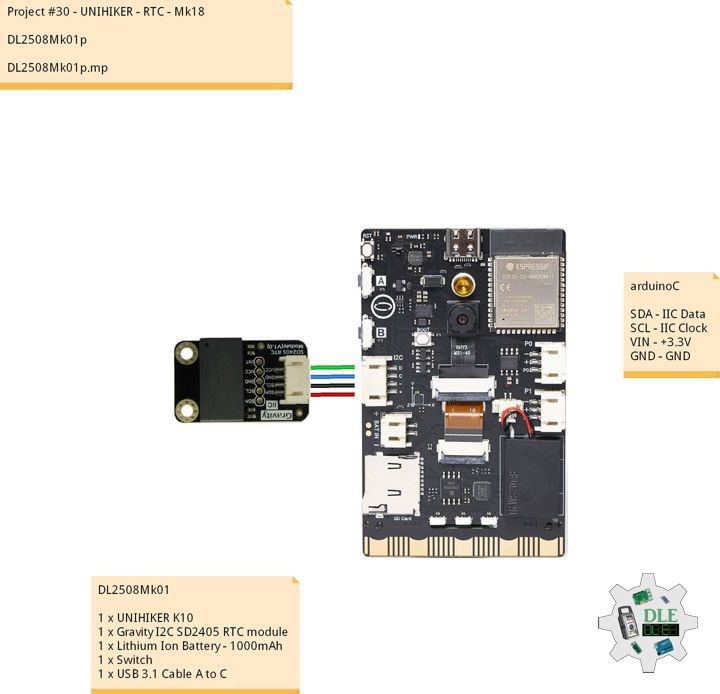
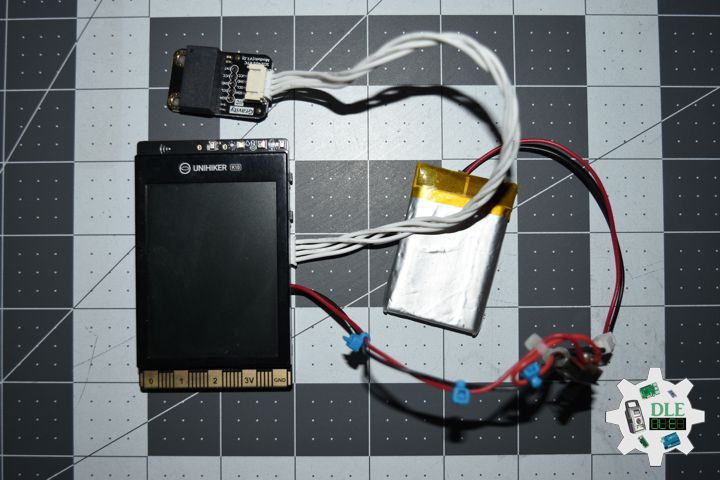
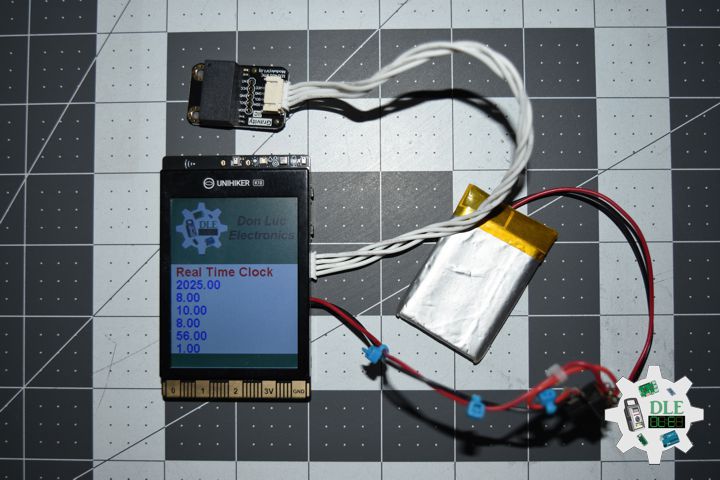
Gravity I2C SD2405 RTC module

We’re glad to introduce a new member in Gravity family: Gravity I2C SD2405 RTC module. This is an extremely accurate I2C Real Time Clock (RTC) with crystal compensation, inner chargeable battery. The SD2405AL is available in industrial temperature ranges.

The SD2405AL is dual power supply system. When the primary power supply goes down to an assigned value or resumes from low power, the system can switch between the primary power supply and battery automatically. Even there is no external power, it can still work for 5~8 years, 1uA ultra-low power consumption (inner battery.

The SD2405AL can generates various periodic interrupt clock pulses lasting for long period, and three alarm interrupts can be made by year, month, date, days of the week, hours, and minutes, seconds. It also provides a selectable 32.768 KHz~1Hz clock output for an external MCU. The product incorporates a time trimming circuit that adjusts the clock with higher precision by adjusting any errors in crystal oscillator frequencies based on signals from the CPU. A 12-bytes general SRAM is implemented in the SD2405AL.

DL2508Mk01

1 x UNIHIKER K10
1 x Gravity I2C SD2405 RTC module
1 x Lithium Ion Battery – 1000mAh
1 x Switch
1 x USB 3.1 Cable A to C

DL2508Mk01p

DL2508Mk01p.mp

/****** Don Luc Electronics © ******
Software Version Information
Project #30 - UNIHIKER - RTC - Mk18
DL2508Mk01p.mp
DL2508Mk01
1 x UNIHIKER K10
1 x Gravity I2C SD2405 RTC module
1 x Lithium Ion Battery - 1000mAh
1 x Switch
1 x USB 3.1 Cable A to C
*/

// Include the Library Code
// Unihiker K10
#include "unihiker_k10.h"
// Gravity I2C SD2405 RTC module
DFRobot_DS0469 ds0469;
// Create an object
UNIHIKER_K10  k10;
// Screen
uint8_t screen_dir=2;

// Main program start
void setup() {
	
  // Begin
  k10.begin();
  // Init Screen
  k10.initScreen(screen_dir);
  // Canver
  k10.creatCanvas();
  // Gravity I2C SD2405 RTC module
  ds0469.begin();
  // Image
  k10.canvas->canvasDrawBitmap(0,0,240,320,image_data1);

}
// Loop
void loop() {
	
  // Gravity I2C SD2405 RTC module
  k10.canvas->canvasText("Real Time Clock", 6, 0xFF0000);
  // RTC
  // Year
  k10.canvas->canvasText(ds0469.getTime(ds0469.YEAR), 7, 0x0000FF);
  // Month
  k10.canvas->canvasText(ds0469.getTime(ds0469.MONTH), 8, 0x0000FF);
  // Date
  k10.canvas->canvasText(ds0469.getTime(ds0469.DATE), 9, 0x0000FF);
  // Hour
  k10.canvas->canvasText(ds0469.getTime(ds0469.HOUR), 10, 0x0000FF);
  // Minute
  k10.canvas->canvasText(ds0469.getTime(ds0469.MINUTE), 11, 0x0000FF);
  // Seconds
  k10.canvas->canvasText(ds0469.getTime(ds0469.SECONDS), 12, 0x0000FF);
  // Update Canvas
  k10.canvas->updateCanvas();

}

——

People can contact us: https://www.donluc.com/?page_id=1927

Consultant, R&D, Electronics, IoT, Teacher and Instructor

  • Programming Language
  • Single-Board Microcontrollers (PIC, Arduino, Raspberry Pi, Arm, Silicon Labs, Espressif, Etc…)
  • IoT
  • Wireless (Radio Frequency, Bluetooth, WiFi, Etc…)
  • Robotics
  • Automation
  • Camera and Video Capture Receiver Stationary, Wheel/Tank and Underwater Vehicle
  • Unmanned Vehicles Terrestrial and Marine
  • Machine Learning
  • Artificial Intelligence (AI)
  • RTOS
  • Sensors, eHealth Sensors, Biosensor, and Biometric
  • Research & Development (R & D)
  • Consulting

Follow Us

Luc Paquin – Curriculum Vitae – 2024
https://www.donluc.com/luc/

Web: https://www.donluc.com/
Facebook: https://www.facebook.com/neosteam.labs.9/
YouTube: https://www.youtube.com/@thesass2063
Twitter: https://twitter.com/labs_steam
Pinterest: https://www.pinterest.com/NeoSteamLabs/
Instagram: https://www.instagram.com/neosteamlabs/
Patreon: https://patreon.com/DonLucElectronics59
DFRobot: https://learn.dfrobot.com/user-10186.html
Hackster.io: https://www.hackster.io/neosteam-labs
Elecrow: https://www.elecrow.com/share/sharepj/center/no/760816d385ebb1edc0732fd873bfbf13
TikTok: https://www.tiktok.com/@luc.paquin8
Twitch: https://www.twitch.tv/lucpaquin
Hackster: https://www.hackster.io/luc-paquin
LinkedIn: https://www.linkedin.com/in/jlucpaquin/

Don Luc
Project #15: Environment – RTC – Mk26

——

#DonLucElectronics #DonLuc #Arduino #RTC #EEPROM #DHT11 #ASM #Display #Elecrow #Project #Patreon #Electronics #Microcontrollers #IoT #Fritzing #Programming #Consultant

——

RTC

——

RTC

——

RTC

——

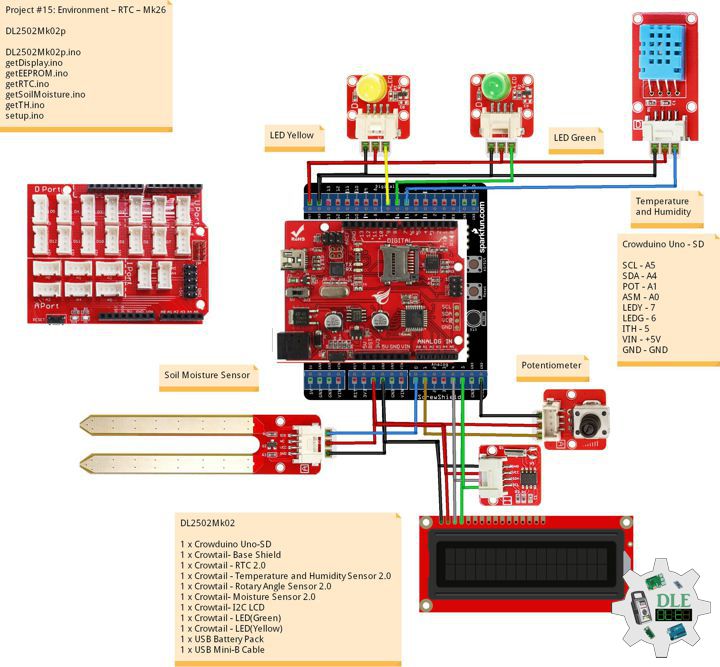
Crowtail – RTC 2.0

If you want to make your own electronic watch a RTC module is necessary to generate you the right time, with very low power consumption. This tiny RTC module is based on the clock chip DS1307 which communicates with microcontrollers with I2C protocol. The clock/calendar provides seconds, minutes, hours, day, date, month, and year information. The end of the month date is automatically adjusted for months with fewer than 31 days, including corrections for leap year. This module is really low power consumption, it can serves you more than a month with a CR1220 battery.

DL2502Mk02

1 x Crowduino Uno – SD
1 x Crowtail – Base Shield
1 x Crowtail – RTC 2.0
1 x Crowtail – Temperature and Humidity Sensor 2.0
1 x Crowtail – Rotary Angle Sensor 2.0
1 x Crowtail – Moisture Sensor 2.0
1 x Crowtail – I2C LCD
1 x Crowtail – LED(Green)
1 x Crowtail – LED(Yellow)
1 x USB Battery Pack
1 x USB Mini-B Cable

Crowduino Uno – SD

SCL – A5
SDA – A4
POT – A1
ASM – A0
LEDY – 7
LEDG – 6
ITH – 5
VIN – +5V
GND – GND

DL2502Mk02p

DL2502Mk02p.ino

/****** Don Luc Electronics © ******
Software Version Information
Project #15: Environment – RTC – Mk26
DL2502Mk02p.ino
DL2502Mk02
1 x Crowduino Uno - SD
1 x Crowtail - Base Shield
1 x Crowtail - RTC 2.0
1 x Crowtail - Temperature and Humidity Sensor 2.0
1 x Crowtail - Rotary Angle Sensor 2.0
1 x Crowtail - Moisture Sensor 2.0
1 x Crowtail - I2C LCD
1 x Crowtail - LED(Green)
1 x Crowtail - LED(Yellow)
1 x USB Battery Pack
1 x USB Mini-B Cable
*/

// Include the Library Code
// EEPROM library to read and write EEPROM with unique ID for unit
#include <EEPROM.h>
// Wire
#include <Wire.h>
// Liquid Crystal
#include "LiquidCrystal.h"
// Temperature and Humidity Sensor
#include "DHT.h"
// RTC (Real-Time Clock)
#include "RTClib.h"

// RTC (Real-Time Clock)
RTC_DS1307 RTC;
String dateRTC = "";
String timeRTC = "";

// Temperature and Humidity Sensor
#define DHTPIN 5
// DHT 11
#define DHTTYPE DHT11
DHT dht(DHTPIN, DHTTYPE);
// Temperature and Humidity Sensor
float h = 0;
float t = 0;

// Potentiometer
int iPotentiometer = A1;
// Change Your Threshold Here
int Threshold = 0;
int zz = 0;

// Liquid Crystal
// Connect via i2c
LiquidCrystal lcd(0);

// Crowtail Moisture Sensor
int iSoilMoisture = A0;
int iSoilMoistureVal = 0;

// LED Yellow
int iLEDYellow = 7;

// LED Green
int iLEDGreen = 6;

// EEPROM Unique ID Information
String uid = "";

// Software Version Information
String sver = "15-26";

void loop() {

  // Crowtail Moisture Sensor
  isSoilMoisture();

  // Temperature and Humidity Sensor
  isTH();

  // RTC (Real-Time Clock)
  isRTC();

  // Delay 2 Second
  delay( 2000 );

  // Display Temperature and Humidity
  isDisplayTH();

  // Delay 2 Second
  delay( 2000 );

  // Display EEPROM
  isDisplayEEPROM();

  // Delay 2 Second
  delay( 2000 );

  // Display RTC
  isDisplayRTC();

  // Delay 2 Second
  delay( 2000 );

}

getDisplay.ino

/****** Don Luc Electronics © ******
Software Version Information
Project #15: Environment – RTC – Mk26
DL2502Mk02p.ino
DL2502Mk02
1 x Crowduino Uno - SD
1 x Crowtail - Base Shield
1 x Crowtail - RTC 2.0
1 x Crowtail - Temperature and Humidity Sensor 2.0
1 x Crowtail - Rotary Angle Sensor 2.0
1 x Crowtail - Moisture Sensor 2.0
1 x Crowtail - I2C LCD
1 x Crowtail - LED(Green)
1 x Crowtail - LED(Yellow)
1 x USB Battery Pack
1 x USB Mini-B Cable
*/

// Include the Library Code
// EEPROM library to read and write EEPROM with unique ID for unit
#include <EEPROM.h>
// Wire
#include <Wire.h>
// Liquid Crystal
#include "LiquidCrystal.h"
// Temperature and Humidity Sensor
#include "DHT.h"
// RTC (Real-Time Clock)
#include "RTClib.h"

// RTC (Real-Time Clock)
RTC_DS1307 RTC;
String dateRTC = "";
String timeRTC = "";

// Temperature and Humidity Sensor
#define DHTPIN 5
// DHT 11
#define DHTTYPE DHT11
DHT dht(DHTPIN, DHTTYPE);
// Temperature and Humidity Sensor
float h = 0;
float t = 0;

// Potentiometer
int iPotentiometer = A1;
// Change Your Threshold Here
int Threshold = 0;
int zz = 0;

// Liquid Crystal
// Connect via i2c
LiquidCrystal lcd(0);

// Crowtail Moisture Sensor
int iSoilMoisture = A0;
int iSoilMoistureVal = 0;

// LED Yellow
int iLEDYellow = 7;

// LED Green
int iLEDGreen = 6;

// EEPROM Unique ID Information
String uid = "";

// Software Version Information
String sver = "15-26";

void loop() {

  // Crowtail Moisture Sensor
  isSoilMoisture();

  // Temperature and Humidity Sensor
  isTH();

  // RTC (Real-Time Clock)
  isRTC();

  // Delay 2 Second
  delay( 2000 );

  // Display Temperature and Humidity
  isDisplayTH();

  // Delay 2 Second
  delay( 2000 );

  // Display EEPROM
  isDisplayEEPROM();

  // Delay 2 Second
  delay( 2000 );

  // Display RTC
  isDisplayRTC();

  // Delay 2 Second
  delay( 2000 );

}

getEEPROM.ino

// EEPROM
// isUID EEPROM Unique ID
void isUID() {
  
  // Is Unit ID
  uid = "";
  for (int x = 0; x < 7; x++)
  {
    uid = uid + char(EEPROM.read(x));
  }
  
}

getRTC.ino

// RTC (Real-Time Clock)
// Setup RTC
void isSetupRTC(){

  // RTC (Real-Time Clock)
  RTC.begin();

  // RTC Running
  if (! RTC.isrunning()) {
    
    // following line sets the RTC to the date & time
    //this sketch was compiled
    RTC.adjust(DateTime(__DATE__, __TIME__));
    // This line sets the RTC with an explicit date & time, for example to set
    // January 21, 2014 at 3am you would call:
    // RTC.adjust(DateTime(2014, 1, 21, 3, 0, 0))
    
  }
  
}
// RTC (Real-Time Clock)
void isRTC(){

  // RTC (Real-Time Clock)
  DateTime now = RTC.now();
  
  // Date
  dateRTC = now.year(), DEC; 
  dateRTC = dateRTC + "/";
  dateRTC = dateRTC + now.month(), DEC;
  dateRTC = dateRTC + "/";
  dateRTC = dateRTC + now.day(), DEC;
  
  // Time
  timeRTC = now.hour(), DEC;
  timeRTC = timeRTC + ":";
  timeRTC = timeRTC + now.minute(), DEC;
  timeRTC = timeRTC + ":";
  timeRTC = timeRTC + now.second(), DEC;

}

getSoilMoisture.ino

// Crowtail Moisture Sensor
// Soil Moisture
void isSoilMoisture(){

  // Connect Soil Moisture Sensor to Analog 0
  // iSoilMoistureVal => 0~700 Soil Moisture
  iSoilMoistureVal = analogRead( iSoilMoisture );

  // Threshold => 200~500
  zz = analogRead( iPotentiometer );
  Threshold = map( zz, 0, 1024, 200, 500);

  // Threshold
  if (iSoilMoistureVal > Threshold) {

    // 300~700 - Humid Soil
    // LED Yellow
    digitalWrite(iLEDYellow, LOW);
    // Display Green
    isDisplayG();
    // LED Green
    digitalWrite(iLEDGreen, HIGH);
    
  }
  else {
    
    // 0-300 Dry Soil
    // LED Green
    digitalWrite(iLEDGreen, LOW);
    // Display Yellow
    isDisplayY();
    digitalWrite(iLEDYellow, HIGH);
    
  }

}

getTH.ino

// Temperature and Humidity Sensor
void isTH(){

  // Temperature
  t = dht.readTemperature();
  // Humidity
  h = dht.readHumidity();
  
}

setup.ino

// Setup
void setup()
{
 
  // Delay
  delay(100);
  
  // isUID EEPROM Unique ID
  isUID();
  
  // Delay
  delay(100);

  // Initialize the LED iLED Yellow
  pinMode(iLEDYellow, OUTPUT);

  // Initialize the LED LED Green
  pinMode(iLEDGreen, OUTPUT);

  // Temperature and Humidity Sensor
  dht.begin();

  // Delay
  delay(100);
  
  // Setup RTC
  isSetupRTC();
  
  // Delay
  delay(100);

  // Display UID
  isDisplayUID();
  
  // Delay 5 Second
  delay( 5000 );

}

——

People can contact us: https://www.donluc.com/?page_id=1927

Electronics, IoT, Teacher, Instructor, R&D and Consulting

  • Programming Language
  • Single-Board Microcontrollers (PIC, Arduino, Raspberry Pi, Arm, Silicon Labs, Espressif, Etc…)
  • IoT
  • Wireless (Radio Frequency, Bluetooth, WiFi, Etc…)
  • Robotics
  • Automation
  • Camera and Video Capture Receiver Stationary, Wheel/Tank and Underwater Vehicle
  • Unmanned Vehicles Terrestrial and Marine
  • Machine Learning
  • Artificial Intelligence (AI)
  • RTOS
  • Sensors, eHealth Sensors, Biosensor, and Biometric
  • Research & Development (R & D)
  • Consulting

Follow Us

Luc Paquin – Curriculum Vitae – 2024
https://www.donluc.com/luc/

Web: https://www.donluc.com/
Facebook: https://www.facebook.com/neosteam.labs.9/
YouTube: https://www.youtube.com/@thesass2063
Twitter: https://twitter.com/labs_steam
Pinterest: https://www.pinterest.com/NeoSteamLabs/
Instagram: https://www.instagram.com/neosteamlabs/
Patreon: https://patreon.com/DonLucElectronics59
DFRobot: https://learn.dfrobot.com/user-10186.html
Hackster.io: https://www.hackster.io/neosteam-labs
Elecrow: https://www.elecrow.com/share/sharepj/center/no/760816d385ebb1edc0732fd873bfbf13
TikTok: https://www.tiktok.com/@luc.paquin8
Twitch: https://www.twitch.tv/lucpaquin
LinkedIn: https://www.linkedin.com/in/jlucpaquin/

Don Luc
Project #25 – Movement – RTC – Mk10

——

#DonLucElectronics #DonLuc #RTC #EEPROM #Compass #Accelerometer #Movement #ESP32 #Bluetooth #Elecrow #DFRobot #Arduino #Project #Patreon #Electronics #Microcontrollers #IoT #Fritzing #Programming #Consultant

——

RTC

——

RTC

——

RTC

——

Adafruit DS3231 Precision RTC FeatherWing

This is the DS3231 Precision RTC FeatherWing: it adds an extremely accurate I2C-integrated Real Time Clock (RTC) with a Temperature Compensated Crystal Oscillator to any Feather main board. This RTC is the most precise you can get in a small, low power package. Most RTCs use an external 32kHz timing crystal that is used to keep time with low current draw. And that’s all well and good, but those crystals have slight drift, particularly when the temperature changes (the temperature changes the oscillation frequency very very very slightly but it does add up!) This RTC is in a beefy package because the crystal is inside the chip! And right next to the integrated crystal is a temperature sensor. That sensor compensates for the frequency changes by adding or removing clock ticks so that the timekeeping stays on schedule. With a CR1220 12mm coin cell plugged into the top of the FeatherWing, you can get years of precision timekeeping, even when main power is lost. Great for datalogging and clocks, or anything where you need to really know the time.

DL2502Mk01

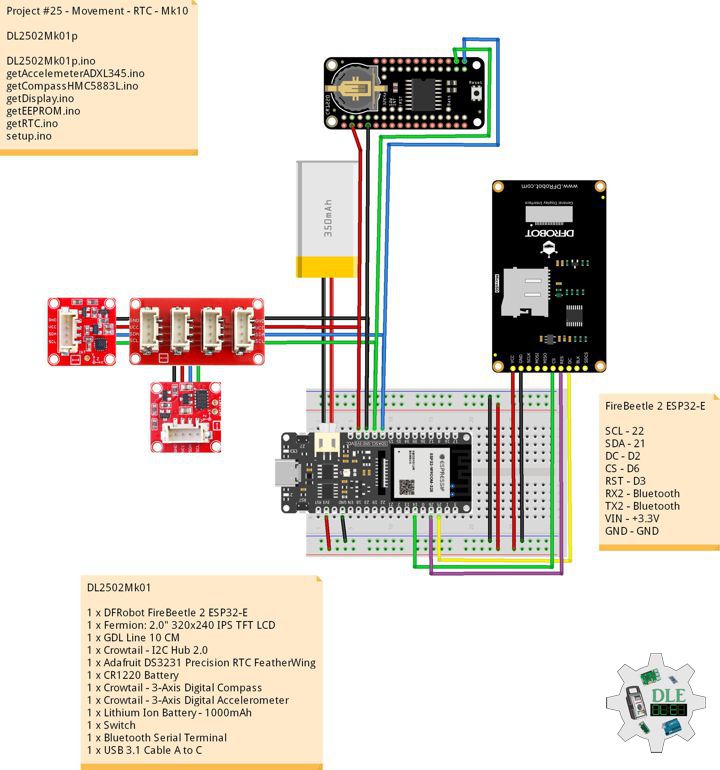
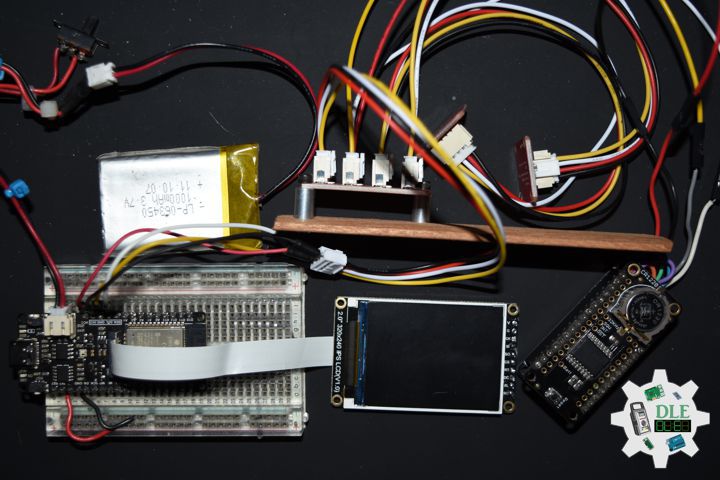
1 x DFRobot FireBeetle 2 ESP32-E
1 x Fermion: 2.0″ 320×240 IPS TFT LCD
1 x GDL Line 10 CM
1 x Crowtail – I2C Hub 2.0
1 x Adafruit DS3231 Precision RTC FeatherWing
1 x CR1220 Battery
1 x Crowtail – 3-Axis Digital Compass
1 x Crowtail – 3-Axis Digital Accelerometer
1 x Lithium Ion Battery – 1000mAh
1 x Switch
1 x Bluetooth Serial Terminal
1 x USB 3.1 Cable A to C

FireBeetle 2 ESP32-E

SCL – 22
SDA – 21
DC – D2
CS – D6
RST – D3
RX2 – Bluetooth
TX2 – Bluetooth
VIN – +3.3V
GND – GND

——

DL2502Mk01p

DL2502Mk01p.ino

/****** Don Luc Electronics © ******
Software Version Information
Project #25 - Movement - RTC - Mk10
25-10
DL2502Mk01p.ino
DL2502Mk01
1 x DFRobot FireBeetle 2 ESP32-E
1 x Fermion: 2.0" 320x240 IPS TFT LCD
1 x GDL Line 10 CM
1 x Crowtail - I2C Hub 2.0
1 x Adafruit DS3231 Precision RTC FeatherWing
1 x CR1220 Battery
1 x Crowtail - 3-Axis Digital Compass
1 x Crowtail - 3-Axis Digital Accelerometer
1 x Lithium Ion Battery - 1000mAh
1 x Switch
1 x Bluetooth Serial Terminal
1 x USB 3.1 Cable A to C
*/

// Include the Library Code
// EEPROM Library to Read and Write EEPROM
// with Unique ID for Unit
#include "EEPROM.h"
// Arduino
#include <Arduino.h>
// Wire
#include <Wire.h>
// DFRobot Display GDL API
#include <DFRobot_GDL.h>
// Bluetooth Serial
#include "BluetoothSerial.h"
#if !defined(CONFIG_BT_ENABLED) || !defined(CONFIG_BLUEDROID_ENABLED)
#error Bluetooth is not enabled! Please run `make menuconfig` to and enable it
#endif
// Accelemeter ADXL345
#include <ADXL345.h>
// Compass HMC5883L
#include <HMC5883L.h>
// RTC (Real-Time Clock)
#include "RTClib.h"

// RTC (Real-Time Clock)
RTC_DS3231 rtc;
String dateRTC = "";
String timeRTC = "";

// Compass HMC5883L
HMC5883L compass;
// Heading
float heading;
// Heading Degrees
float headingDegrees;

// Variable ADXL345 library
ADXL345 adxl;
// Accelerometer ADXL345
// x, y, z
int x;
int y;
int z;
// Standard Gravity
// xyz
double xyz[3];
double ax;
double ay;
double az;

// FullString
String FullString = "";

// Bluetooth Serial
BluetoothSerial SerialBT;

// Defined ESP32
#define TFT_DC  D2
#define TFT_CS  D6
#define TFT_RST D3

/*dc=*/ /*cs=*/ /*rst=*/
// DFRobot Display 240x320
DFRobot_ST7789_240x320_HW_SPI screen(TFT_DC, TFT_CS, TFT_RST);

// EEPROM Unique ID Information
#define EEPROM_SIZE 64
String uid = "";

// Software Version Information
String sver = "25-10";

void loop() {

  // Accelemeter ADXL345
  isADXL345();

  // Compass HMC5883L
  isHMC5883L();

  // isEEPROM
  isEEPROM();

  // RTC (Real-Time Clock)
  isRTC();

  // Accelemeter and Compass, ADXL345 and HMC5883L
  isDisplayADXL345HMC5883L();

  // Delay 0.5 Second
  delay( 500 );

}

getAccelemeterADXL345.ino

// Accelemeter ADXL345
// Setup Accelemeter ADXL345
void isSetupADXL345(){

  // Power On
  adxl.powerOn();

  // Set activity inactivity thresholds (0-255)
  // 62.5mg per increment
  adxl.setActivityThreshold(75);
  // 62.5mg per increment
  adxl.setInactivityThreshold(75);
  // How many seconds of no activity is inactive?
  adxl.setTimeInactivity(10);
 
  //look of activity movement on this axes - 1 == on; 0 == off 
  adxl.setActivityX(1);
  adxl.setActivityY(1);
  adxl.setActivityZ(1);
 
  //look of inactivity movement on this axes - 1 == on; 0 == off
  adxl.setInactivityX(1);
  adxl.setInactivityY(1);
  adxl.setInactivityZ(1);
 
  // Look of tap movement on this axes - 1 == on; 0 == off
  adxl.setTapDetectionOnX(0);
  adxl.setTapDetectionOnY(0);
  adxl.setTapDetectionOnZ(1);
 
  // Set values for what is a tap, and what is a double tap (0-255)
  // 62.5mg per increment
  adxl.setTapThreshold(50);
  // 625us per increment
  adxl.setTapDuration(15);
  // 1.25ms per increment
  adxl.setDoubleTapLatency(80);
  // 1.25ms per increment
  adxl.setDoubleTapWindow(200);
 
  // set values for what is considered freefall (0-255)
  // (5 - 9) recommended - 62.5mg per increment
  adxl.setFreeFallThreshold(7);
  // (20 - 70) recommended - 5ms per increment
  adxl.setFreeFallDuration(45);
 
  // Setting all interrupts to take place on int pin 1
  // I had issues with int pin 2, was unable to reset it
  adxl.setInterruptMapping( ADXL345_INT_SINGLE_TAP_BIT,   ADXL345_INT1_PIN );
  adxl.setInterruptMapping( ADXL345_INT_DOUBLE_TAP_BIT,   ADXL345_INT1_PIN );
  adxl.setInterruptMapping( ADXL345_INT_FREE_FALL_BIT,    ADXL345_INT1_PIN );
  adxl.setInterruptMapping( ADXL345_INT_ACTIVITY_BIT,     ADXL345_INT1_PIN );
  adxl.setInterruptMapping( ADXL345_INT_INACTIVITY_BIT,   ADXL345_INT1_PIN );
 
  // Register interrupt actions - 1 == on; 0 == off  
  adxl.setInterrupt( ADXL345_INT_SINGLE_TAP_BIT, 1);
  adxl.setInterrupt( ADXL345_INT_DOUBLE_TAP_BIT, 1);
  adxl.setInterrupt( ADXL345_INT_FREE_FALL_BIT,  1);
  adxl.setInterrupt( ADXL345_INT_ACTIVITY_BIT,   1);
  adxl.setInterrupt( ADXL345_INT_INACTIVITY_BIT, 1);

}
// Accelemeter ADXL345
void isADXL345(){

  // Read the accelerometer values and store them in variables  x,y,z
  adxl.readXYZ(&x, &y, &z);

  // Output
  // FullString
  // ************
  FullString = "************\r\n";
  // FullString Bluetooth Serial + Serial
  for(int i = 0; i < FullString.length(); i++)
  {
    
    // Bluetooth Serial
    SerialBT.write(FullString.c_str()[i]);
    // Serial
    Serial.write(FullString.c_str()[i]);
       
  }
  
  // FullString
  FullString = "Values of X , Y , Z: " + String(x) + " , " + 
  String(y) + " , " + String(z) + + "\r\n";

  // FullString Bluetooth Serial + Serial
  for(int i = 0; i < FullString.length(); i++)
  {

    // Bluetooth Serial
    SerialBT.write(FullString.c_str()[i]);
    // Serial
    Serial.write(FullString.c_str()[i]);
    
  }
  
  // Standard Gravity
  // Acceleration
  adxl.getAcceleration(xyz);

  // Output
  ax = xyz[0];
  ay = xyz[1];
  az = xyz[2];
  
  // FullString
  // ************
  FullString = "************\r\n";
  // FullString Bluetooth Serial + Serial
  for(int i = 0; i < FullString.length(); i++)
  {
    
    // Bluetooth Serial
    SerialBT.write(FullString.c_str()[i]);
    // Serial
    Serial.write(FullString.c_str()[i]);
       
  }

  // FullString
  // xg
  FullString = "X = " + String(ax) + " g" + "\r\n";
  // FullString Bluetooth Serial + Serial
  for(int i = 0; i < FullString.length(); i++)
  {

    // Bluetooth Serial
    SerialBT.write(FullString.c_str()[i]);
    // Serial
    Serial.write(FullString.c_str()[i]);
    
  }
  // yg
  FullString = "y = " + String(ay) + " g" + "\r\n";
  // FullString Bluetooth Serial + Serial
  for(int i = 0; i < FullString.length(); i++)
  {

    // Bluetooth Serial
    SerialBT.write(FullString.c_str()[i]);
    // Serial
    Serial.write(FullString.c_str()[i]);
    
  }
  // zg
  FullString = "z = " + String(az) + " g" + "\r\n";
  // FullString Bluetooth Serial + Serial
  for(int i = 0; i < FullString.length(); i++)
  {

    // Bluetooth Serial
    SerialBT.write(FullString.c_str()[i]);
    // Serial
    Serial.write(FullString.c_str()[i]);
    
  }

}

getCompassHMC5883L.ino

// HMC5883L Triple Axis Digital Compass
// Setup HMC5883L
void isSetupHMC5883L(){

  // Initialize Initialize HMC5883L
  compass.begin();

  // Set measurement range
  compass.setRange(HMC5883L_RANGE_1_3GA);

  // Set measurement mode
  compass.setMeasurementMode(HMC5883L_CONTINOUS);

  // Set data rate
  compass.setDataRate(HMC5883L_DATARATE_30HZ);

  // Set number of samples averaged
  compass.setSamples(HMC5883L_SAMPLES_8);

  // Set calibration offset
  compass.setOffset(0, 0);
  
}
// Compass HMC5883L
void isHMC5883L(){

  // Vector norm
  Vector norm = compass.readNormalize();

  // Calculate heading
  heading = atan2(norm.YAxis, norm.XAxis);

  // Set declination angle on your location and fix heading
  // You can find your declination on: http://magnetic-declination.com/
  // (+) Positive or (-) for negative
  // Latitude: 32° 39' 7.9" N
  // Longitude: 115° 28' 6.2" W
  // Magnetic Declination: +10° 35'
  // Declination is POSITIVE (EAST)
  // Inclination: 58° 4'
  // Magnetic field strength: 45759.1 nT
  // Formula: (deg + (min / 60.0)) / (180 / M_PI);
  float declinationAngle = (10.0 + (35.0 / 60.0)) / (180 / M_PI);
  heading += declinationAngle;

  // Correct for heading < 0deg and heading > 360deg
  if (heading < 0)
  {
    heading += 2 * PI;
  }

  if (heading > 2 * PI)
  {
    heading -= 2 * PI;
  }

  // Convert to degrees
  headingDegrees = heading * 180/M_PI; 

  // Output
  // FullString
  // ************
  FullString = "************\r\n";
  // FullString Bluetooth Serial + Serial
  for(int i = 0; i < FullString.length(); i++)
  {
    
    // Bluetooth Serial
    SerialBT.write(FullString.c_str()[i]);
    // Serial
    Serial.write(FullString.c_str()[i]);
    
  }

  // FullString
  // Heading
  FullString = "Heading = " + String( heading ) + "\r\n";
  // FullString Bluetooth Serial + Serial
  for(int i = 0; i < FullString.length(); i++)
  {

    // Bluetooth Serial
    SerialBT.write(FullString.c_str()[i]);
    // Serial
    Serial.write(FullString.c_str()[i]);
    
  }

  // FullString
  // Degress
  FullString = "Degress = " + String( headingDegrees ) + "\r\n";
  // FullString Bluetooth Serial + Serial
  for(int i = 0; i < FullString.length(); i++)
  {

    // Bluetooth Serial
    SerialBT.write(FullString.c_str()[i]);
    // Serial
    Serial.write(FullString.c_str()[i]);
    
  }
  
}

getDisplay.ino

// DFRobot Display 240x320
// DFRobot Display 240x320 - UID
void isDisplayUID(){

  // DFRobot Display 240x320
  // Text Display
  // Text Wrap
  screen.setTextWrap(false);
  // Rotation
  screen.setRotation(3);
  // Fill Screen => black
  screen.fillScreen(0x0000);
  // Text Color => white
  screen.setTextColor(0xffff);
  // Font => Free Sans Bold 12pt
  screen.setFont(&FreeSansBold12pt7b);
  // TextSize => 1.5
  screen.setTextSize(1.5);
  // Don Luc Electronics
  screen.setCursor(0, 30);
  screen.println("Don Luc Electronics");
  // Real-Time Clock
  screen.setCursor(0, 60);
  screen.println("Real-Time Clock");
  // Version
  screen.setCursor(0, 90);
  screen.println("Version");
  screen.setCursor(0, 120);
  screen.println( sver );
  // EEPROM
  screen.setCursor(0, 150);
  screen.println("EEPROM");
  screen.setCursor(0, 180);
  screen.println( uid );

}
// Accelemeter and Compass, ADXL345 and HMC5883L
void isDisplayADXL345HMC5883L(){

  // DFRobot Display 240x320
  // Text Display
  // Text Wrap
  screen.setTextWrap(false);
  // Rotation
  screen.setRotation(3);
  // Fill Screen => white
  screen.fillScreen(0xffff);
  // Text Color => blue
  screen.setTextColor(0x001F);
  // Font => Free Sans Bold 12pt
  screen.setFont(&FreeSansBold12pt7b);
  // TextSize => 1.5
  screen.setTextSize(1.5);
  // Accelemeter ADXL345
  screen.setCursor(0, 30);
  screen.println("Accelemeter ADXL345");
  // Accelemeter ADXL345 X
  screen.setCursor(0, 60);
  screen.println("X: ");
  screen.setCursor(40, 60);
  screen.println( x );
  // Accelemeter ADXL345 Y
  screen.setCursor(0, 90);
  screen.println( "Y: " );
  screen.setCursor(40, 90);
  screen.println( y );
  // Accelemeter ADXL345 Z
  screen.setCursor(0, 120);
  screen.println( "Z: " );
  screen.setCursor(40, 120);
  screen.println( z );
  // Compass HMC5883L
  screen.setCursor(0, 150);
  screen.println( "Compass HMC5883L" );
  // Heading
  screen.setCursor(0, 180);
  screen.println( "Heading = " );
  screen.setCursor(130, 180);
  screen.println( heading );
  // Degress
  screen.setCursor(0, 210);
  screen.println( "Degress = " );
  screen.setCursor(130, 210);
  screen.println( headingDegrees );
  
}

getEEPROM.ino

// EEPROM
// isUID EEPROM Unique ID
void isUID() {
  
  // Is Unit ID
  uid = "";
  for (int x = 0; x < 7; x++)
  {
    uid = uid + char(EEPROM.read(x));
  }
  
}
// isEEPROM
void isEEPROM(){

  // FullString
  // ************
  FullString = "************\r\n";
  // FullString Bluetooth Serial + Serial
  for(int i = 0; i < FullString.length(); i++)
  {
    
    // Bluetooth Serial
    SerialBT.write(FullString.c_str()[i]);
    // Serial
    Serial.write(FullString.c_str()[i]);
    
  }

  // FullString
  // EEPROM
  FullString = "EEPROM = " + String( uid ) + "\r\n";
  // FullString Bluetooth Serial + Serial
  for(int i = 0; i < FullString.length(); i++)
  {

    // Bluetooth Serial
    SerialBT.write(FullString.c_str()[i]);
    // Serial
    Serial.write(FullString.c_str()[i]);
    
  }
  
}

getRTC.ino

// RTC (Real-Time Clock)
// Setup RTC
void isSetupRTC(){

  // RTC (Real-Time Clock)
  rtc.begin();
  
  // RTC Lost Power
  if (rtc.lostPower()) {
 
    // When time needs to be set on a new device, or after a power loss, the
    // following line sets the RTC to the date & time this sketch was compiled
    rtc.adjust(DateTime(F(__DATE__), F(__TIME__)));
    // This line sets the RTC with an explicit date & time, for example to set
    // January 21, 2014 at 3am you would call:
    // rtc.adjust(DateTime(2014, 1, 21, 3, 0, 0))
    
  }
  
}
// RTC (Real-Time Clock)
void isRTC(){

  // RTC (Real-Time Clock)
  DateTime now = rtc.now();
  
  // Date
  dateRTC = now.year(), DEC; 
  dateRTC = dateRTC + "/";
  dateRTC = dateRTC + now.month(), DEC;
  dateRTC = dateRTC + "/";
  dateRTC = dateRTC + now.day(), DEC;
  
  // Time
  timeRTC = now.hour(), DEC;
  timeRTC = timeRTC + ":";
  timeRTC = timeRTC + now.minute(), DEC;
  timeRTC = timeRTC + ":";
  timeRTC = timeRTC + now.second(), DEC;

  // FullString
  // ************
  FullString = "************\r\n";
  // FullString Bluetooth Serial + Serial
  for(int i = 0; i < FullString.length(); i++)
  {
    
    // Bluetooth Serial
    SerialBT.write(FullString.c_str()[i]);
    // Serial
    Serial.write(FullString.c_str()[i]);
    
  }

  // FullString
  // Date
  FullString = "Date = " + String( timeRTC ) + "\r\n";
  // FullString Bluetooth Serial + Serial
  for(int i = 0; i < FullString.length(); i++)
  {

    // Bluetooth Serial
    SerialBT.write(FullString.c_str()[i]);
    // Serial
    Serial.write(FullString.c_str()[i]);
    
  }

  // FullString
  // Time
  FullString = "Time = " + String( dateRTC ) + "\r\n";
  // FullString Bluetooth Serial + Serial
  for(int i = 0; i < FullString.length(); i++)
  {

    // Bluetooth Serial
    SerialBT.write(FullString.c_str()[i]);
    // Serial
    Serial.write(FullString.c_str()[i]);
    
  }

  // FullString
  // Temperature
  FullString = "Temperature = " + String( rtc.getTemperature() ) 
  + String( " C" ) + "\r\n";
  // FullString Bluetooth Serial + Serial
  for(int i = 0; i < FullString.length(); i++)
  {

    // Bluetooth Serial
    SerialBT.write(FullString.c_str()[i]);
    // Serial
    Serial.write(FullString.c_str()[i]);
    
  }

}

setup.ino

// Setup
void setup()
{
 
  // Serial Begin
  Serial.begin(115200);
  Serial.println("Starting BLE work!");

  // Bluetooth Serial
  SerialBT.begin("DL2502Mk01");
  Serial.println("Bluetooth Started! Ready to pair...");

  // Delay
  delay( 100 );

  // EEPROM Size
  EEPROM.begin(EEPROM_SIZE);
  
  // EEPROM Unique ID
  isUID();
  
  // Delay
  delay(100);

  // Wire
  Wire.begin();

  // Delay
  delay(100);
  
  // Setup RTC
  isSetupRTC();
  
  // Delay
  delay(100);
  
  // DFRobot Display 240x320
  screen.begin();

  // Delay
  delay(100);

  // Setup Accelemeter ADXL345
  isSetupADXL345();

  // Setup HMC5883L
  isSetupHMC5883L();

  // DFRobot Display 240x320 - UID
  // Don Luc Electronics
  // Version
  isDisplayUID();

  // Delay 5 Second
  delay( 5000 );

}

——

People can contact us: https://www.donluc.com/?page_id=1927

Electronics, IoT, Teacher, Instructor, R&D and Consultant

  • Programming Language
  • Single-Board Microcontrollers (PIC, Arduino, Raspberry Pi, Arm, Silicon Labs, Espressif, Etc…)
  • IoT
  • Wireless (Radio Frequency, Bluetooth, WiFi, Etc…)
  • Robotics
  • Automation
  • Camera and Video Capture Receiver Stationary, Wheel/Tank and Underwater Vehicle
  • Unmanned Vehicles Terrestrial and Marine
  • Machine Learning
  • Artificial Intelligence (AI)
  • RTOS
  • Sensors, eHealth Sensors, Biosensor, and Biometric
  • Research & Development (R & D)
  • Consulting

Follow Us

Luc Paquin – Curriculum Vitae – 2025
https://www.donluc.com/luc/

Web: https://www.donluc.com/
Facebook: https://www.facebook.com/neosteam.labs.9/
YouTube: https://www.youtube.com/@thesass2063
Twitter: https://twitter.com/labs_steam
Pinterest: https://www.pinterest.com/NeoSteamLabs/
Instagram: https://www.instagram.com/neosteamlabs/
Patreon: https://patreon.com/DonLucElectronics59
DFRobot: https://learn.dfrobot.com/user-10186.html
Hackster.io: https://www.hackster.io/neosteam-labs
Elecrow: https://www.elecrow.com/share/sharepj/center/no/760816d385ebb1edc0732fd873bfbf13
TikTok: https://www.tiktok.com/@luc.paquin8
Twitch: https://www.twitch.tv/lucpaquin
LinkedIn: https://www.linkedin.com/in/jlucpaquin/

Don Luc
Project #29 – DFRobot – RTC – Mk31

——

#DonLucElectronics #DonLuc #DFRobot #RTC #SD #ASM #SHTC3 #FireBeetle2ESP32C6 #Display #EEPROM #ESP32 #IoT #SparkFun #Adafruit #Arduino #Project #Fritzing #Programming #Electronics #Microcontrollers #Consultant

——

RTC

——

RTC

——

RTC

——

Real-Time Clock

A Real-Time Clock (RTC) is an electronic device, most often in the form of an integrated circuit, that measures the passage of time. Although the term often refers to the devices in personal computers, servers and embedded systems, RTCs are present in almost any electronic device which needs to keep accurate time of day.

Although keeping time can be done without an RTC, using one has benefits:

  • Reliably maintains and provides current time through disruptive system states such as hangs, sleep, reboots, or if given sufficient backup power, full shutdown and hardware reassembly, without the need to have its time set again.
  • Low power consumption, important when running from alternate power.
  • Frees the main system for time-critical tasks.
  • Sometimes more accurate than other methods.

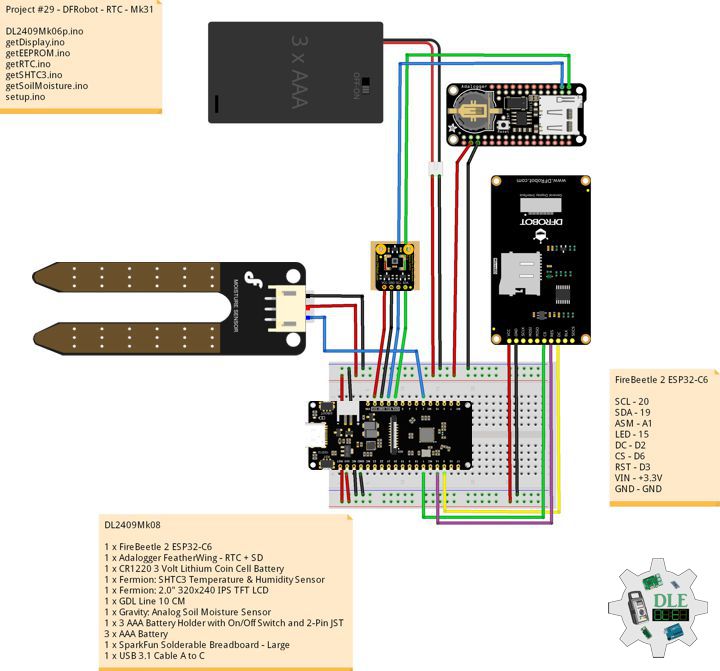
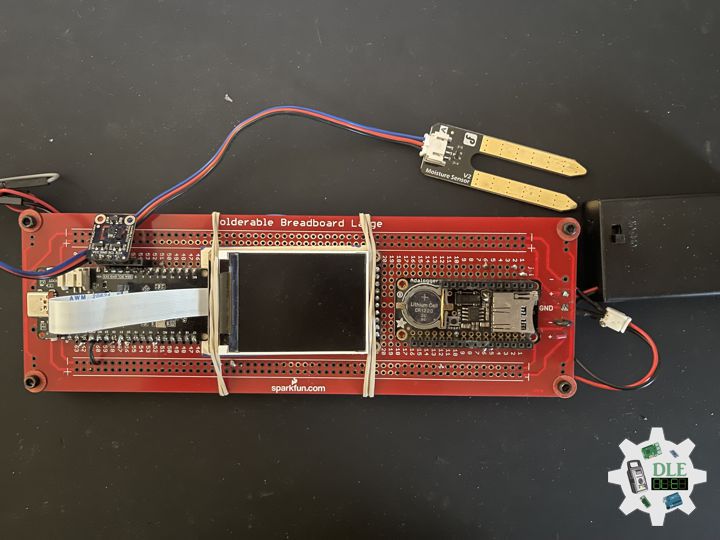
DL2409Mk08

1 x FireBeetle 2 ESP32-C6
1 x Adalogger FeatherWing – RTC + SD
1 x CR1220 3 Volt Lithium Coin Cell Battery
1 x Fermion: SHTC3 Temperature & Humidity Sensor
1 x Fermion: 2.0″ 320×240 IPS TFT LCD
1 x GDL Line 10 CM
1 x Gravity: Analog Soil Moisture Sensor
1 x 3 AAA Battery Holder with On/Off Switch and 2-Pin JST
3 x AAA Battery
1 x SparkFun Solderable Breadboard – Large
1 x USB 3.1 Cable A to C

FireBeetle 2 ESP32-C6

SCL – 20
SDA – 19
ASM – A1
LED – 15
DC – D2
CS – D6
RST – D3
VIN – +3.3V
GND – GND

DL2409Mk08p

DL2409Mk08p.ino

/****** Don Luc Electronics © ******
Software Version Information
Project #29 - DFRobot - RTC - Mk31
29-31
DL2409Mk08p.ino
DL2409Mk08
1 x FireBeetle 2 ESP32-C6
1 x Adalogger FeatherWing - RTC + SD
1 x CR1220 3 Volt Lithium Coin Cell Battery
1 x Fermion: SHTC3 Temperature & Humidity Sensor
1 x Fermion: 2.0" 320x240 IPS TFT LCD
1 x GDL Line 10 CM
1 x Gravity: Analog Soil Moisture Sensor
1 x 3 AAA Battery Holder with On/Off Switch and 2-Pin JST
3 x AAA Battery
1 x SparkFun Solderable Breadboard - Large
1 x USB 3.1 Cable A to C
*/

// Include the Library Code
// EEPROM Library to Read and Write EEPROM
// with Unique ID for Unit
#include "EEPROM.h"
// Arduino
#include <Arduino.h>
// Wire
#include <Wire.h>
// DFRobot Display GDL API
#include <DFRobot_GDL.h>
// Fermion: SHTC3 Temperature & Humidity Sensor
#include"DFRobot_SHTC3.h"
// Date and Time Functions PCF8523 RTC
#include <RTClib.h>

// Date and Time PCF8523 RTC
RTC_PCF8523 rtc;
String dateRTC = "";
String timeRTC = "";

// Fermion: SHTC3 Temperature & Humidity Sensor
DFRobot_SHTC3 SHTC3;
uint32_t id = 0;
float temperature;
float humidity;

// Defined ESP32
#define TFT_DC  D2
#define TFT_CS  D6
#define TFT_RST D3

/*dc=*/ /*cs=*/ /*rst=*/
// DFRobot Display 240x320
DFRobot_ST7789_240x320_HW_SPI screen(TFT_DC, TFT_CS, TFT_RST);

// Gravity: Analog Soil Moisture Sensor
int iSoilMoisture = A1;
int iSoilMoistureVal = 0;
int zz = 0;
// Change Your Threshold Here
int Threshold = 300;
String SM = "";

// LED Green
int iLEDGreen = 15;

// EEPROM Unique ID Information
#define EEPROM_SIZE 64
String uid = "";

// Software Version Information
String sver = "29-31";

void loop() {

  // Date and Time PCF8523 RTC
  isRTC();
  
  // SHTC3 Temperature and Humidity Sensor
  isSHTC3();
  
  // Gravity: Analog Soil Moisture Sensor
  isSoilMoisture();

  // DFRobot Display 240x320 - ASM - Temperature and Humidity - Date and Time
  isDisplayTH();

  // Delay 5 Second
  delay( 5000 );

}

getDisplay.ino

// DFRobot Display 240x320
// DFRobot Display 240x320 - UID
void isDisplayUID() {

    // DFRobot Display 240x320
    // Text Display
    // Text Wrap
    screen.setTextWrap(false);
    // Rotation
    screen.setRotation(3);
    // Fill Screen => black
    screen.fillScreen(0x0000);
    // Text Color => white
    screen.setTextColor(0xffff);
    // Font => Free Mono 9pt
    screen.setFont(&FreeMono9pt7b);
    // TextSize => 1.5
    screen.setTextSize(1.5);
    // DFRobot Display
    screen.setCursor(0, 30);
    screen.println("DFRobot Display");
    // Don Luc Electronics
    screen.setCursor(0, 60);
    screen.println("Don Luc Electronics");
    // Version
    screen.setCursor(0, 90);
    screen.println("Version");
    screen.setCursor(0, 120);
    screen.println( sver );
    // EEPROM
    screen.setCursor(0, 150);
    screen.println("EEPROM");
    screen.setCursor(0, 180);
    screen.println( uid );

}
// DFRobot Display 240x320 - ASM - Temperature and Humidity
void isDisplayTH() {
  
    // DFRobot Display 240x320
    // Text Display
    // Text Wrap
    screen.setTextWrap(false);
    // Rotation
    screen.setRotation(3);
    // Fill Screen => black
    screen.fillScreen(0x0000);
    // Text Color => white
    screen.setTextColor(0xffff);
    // Font => Free Mono 9pt
    screen.setFont(&FreeMono9pt7b);
    // TextSize => 1.5
    screen.setTextSize(1.5);
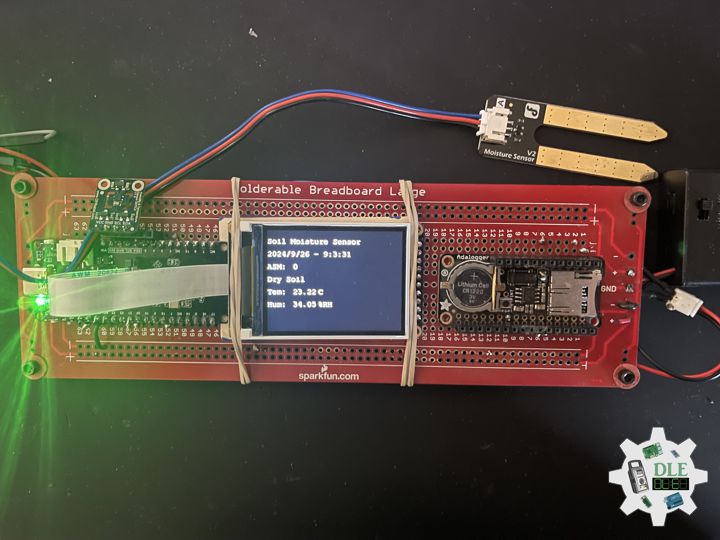
    // Soil Moisture Sensor
    screen.setCursor(0, 30);
    screen.println("Soil Moisture Sensor");
    // Date and Time
    screen.setCursor(0, 60);
    screen.println( dateRTC + " - " + timeRTC );
    // Gravity: Analog Soil Moisture Sensor
    screen.setCursor(0, 90);
    screen.println( "ASM: " );
    screen.setCursor(60, 90);
    screen.println( iSoilMoistureVal );
    screen.setCursor(0, 120);
    screen.println( SM );
    // SHTC3 Temperature
    screen.setCursor(0, 150);
    screen.println( "Tem: " );
    screen.setCursor(60, 150);
    screen.println( temperature );
    screen.setCursor(120, 150);
    screen.println( "C" );
    // SHTC3 Humidity
    screen.setCursor(0, 180);
    screen.println( "Hum: " );
    screen.setCursor(60, 180);
    screen.println( humidity );
    screen.setCursor(120, 180);
    screen.println( "%RH" );

}

getEEPROM.ino

// EEPROM
// isUID EEPROM Unique ID
void isUID() {
  
  // Is Unit ID
  uid = "";
  for (int x = 0; x < 7; x++)
  {
    uid = uid + char(EEPROM.read(x));
  }
  
}

getRTC.ino

// Date and Time PCF8523 RTC 
// Setup Date and Time PCF8523 RTC 
void isSetupRTC() {

  // Date and Time PCF8523 RTC   
  if (! rtc.begin()) {
    while (1);
  }  
  if (! rtc.initialized()) {
    
    // Following line sets the RTC to the date & time this sketch was compiled
    rtc.adjust(DateTime(F(__DATE__), F(__TIME__)));
    // This line sets the RTC with an explicit date & time, for example to set
    // January 21, 2014 at 3am you would call:
    // rtc.adjust(DateTime(2024, 9, 26, 9, 1, 0));
    
  }

  // When the RTC was stopped and stays connected to the battery, it has
  // to be restarted by clearing the STOP bit. Let's do this to ensure
  // the RTC is running.
  rtc.start();

   // The PCF8523 can be calibrated for:
  //  - Aging adjustment
  //  - Temperature compensation
  //  - Accuracy tuning
  // The offset mode to use, once every two hours or once every minute.
  // The offset Offset value from -64 to +63. 
  // See the Application Note for calculation of offset values.
  // https://www.nxp.com/docs/en/application-note/AN11247.pdf
  // The deviation in parts per million can be calculated over 
  // a period of observation. Both the drift (which can be negative)
  // and the observation period must be in seconds. For accuracy 
  // the variation should be observed over about 1 week.
  // Note: any previous calibration should cancelled prior to 
  // any new observation period.
  // Seconds plus or minus over oservation period - set to 
  // 0 to cancel previous calibration.
  float drift = 43;
  // total obsevation period in seconds (86400 = seconds in 1 day: 
  // 7 days = (7 * 86400) seconds )
  float period_sec = (7 * 86400);
  // Deviation in parts per million (μs)
  float deviation_ppm = (drift / period_sec * 1000000);
  // Use with offset mode PCF8523_TwoHours
  float drift_unit = 4.34;
  //For corrections every min the drift_unit is 4.069 ppm 
  // (use with offset mode PCF8523_OneMinute)
  // float drift_unit = 4.069; 
  int offset = round(deviation_ppm / drift_unit);

}
// Date and Time PCF8523 RTC 
void isRTC () {

  // Date and Time
  DateTime now = rtc.now();
  // Date
  dateRTC = now.year(), DEC; 
  dateRTC = dateRTC + "/";
  dateRTC = dateRTC + now.month(), DEC;
  dateRTC = dateRTC + "/";
  dateRTC = dateRTC + now.day(), DEC;
  // Time
  timeRTC = now.hour(), DEC;
  timeRTC = timeRTC + ":";
  timeRTC = timeRTC + now.minute(), DEC;
  timeRTC = timeRTC + ":";
  timeRTC = timeRTC + now.second(), DEC;
  
}

getSHTC3.ino

// SHTC3 Temperature and Humidity Sensor
// SHTC3
void isSHTC3(){

  // SHTC3 Temperature and Humidity Sensor
  /**
   *    Mode  For configuring sensor working mode    
   *    SHTC3:
           PRECISION_HIGH_CLKSTRETCH_ON Clock Stretching Enabled 
   *       PRECISION_HIGH_CLKSTRETCH_OFF Clock Stretching Disabled 
   *       PRECISION_LOW_CLKSTRETCH_ON Clock Stretching Enabled & Low Power
   *       PRECISION_LOW_CLKSTRETCH_OFF Clock Stretching Disabled & Low Power
   */
  temperature = SHTC3.getTemperature(PRECISION_HIGH_CLKSTRETCH_ON);
  /**
   *    Mode  For configuring sensor working mode 
   *    SHTC3
   *       PRECISION_HIGH_CLKSTRETCH_ON Clock Stretching Enabled 
   *       PRECISION_HIGH_CLKSTRETCH_OFF Clock Stretching Disabled 
   *       PRECISION_LOW_CLKSTRETCH_ON Clock Stretching Enabled & Low Power
   *       PRECISION_LOW_CLKSTRETCH_OFF Clock Stretching Disabled & Low Power
   */
  humidity = SHTC3.getHumidity(PRECISION_HIGH_CLKSTRETCH_OFF);

}

getSoilMoisture.ino

// Gravity: Analog Soil Moisture Sensor
// Soil Moisture
void isSoilMoisture(){

  // Connect Soil Moisture Sensor to Analog 0
  zz = analogRead( iSoilMoisture );

  // iSoilMoistureVal => 0~900 Soil Moisture
  iSoilMoistureVal = map( zz, 0, 4095, 0, 900);

  // Threshold
  if (iSoilMoistureVal > Threshold)

    // 300~950 - Humid Soil
    SM = "Humid Soil";
    
  else {
    
    // 0-300 Dry Soil
    SM = "Dry Soil";

  }

}

setup.ino

// Setup
void setup()
{
  
  // Give display time to power on
  delay(100);

  // EEPROM Size
  EEPROM.begin(EEPROM_SIZE);
  
  // EEPROM Unique ID
  isUID();
  
  // Delay
  delay( 100 );

  // Wire
  Wire.begin();

  // Delay
  delay( 100 );
  
  // DFRobot Display 240x320
  screen.begin();

  // Delay
  delay(100);

  // Fermion: SHTC3 Temperature & Humidity Sensor
  SHTC3.begin();
  /*SHTC3 is set to sleep mode by default. Please wake it up before use. 
  Use SHTC3.sleep() to let SHTC3 enter sleep mode; SHTC3 
  stops working in sleep mode*/
  SHTC3.wakeup();
  
  // Delay
  delay(100);

  // Setup Date and Time PCF8523 RTC 
  isSetupRTC();

  // Date and Time PCF8523 RTC
  isRTC();

  // Delay
  delay(100);

  // Initialize the LED Green
  pinMode(iLEDGreen, OUTPUT);

  // iLEDGreen HIGH
  digitalWrite(iLEDGreen, HIGH );

  // DFRobot Display 240x320 - UID
  // Don Luc Electronics
  // Version
  // EEPROM
  isDisplayUID();

  // Delay 5 Second
  delay( 5000 );

}

——

People can contact us: https://www.donluc.com/?page_id=1927

Electronics, IoT, Teacher, Instructor, R&D and Consulting

  • Programming Language
  • Single-Board Microcontrollers (PIC, Arduino, Raspberry Pi, Arm, Silicon Labs, Espressif, Etc…)
  • IoT
  • Wireless (Radio Frequency, Bluetooth, WiFi, Etc…)
  • Robotics
  • Automation
  • Camera and Video Capture Receiver Stationary, Wheel/Tank and Underwater Vehicle
  • Unmanned Vehicles Terrestrial and Marine
  • Machine Learning
  • Artificial Intelligence (AI)
  • RTOS
  • Sensors, eHealth Sensors, Biosensor, and Biometric
  • Research & Development (R & D)
  • Consulting

Follow Us

Luc Paquin – Curriculum Vitae – 2024
https://www.donluc.com/luc/

Web: https://www.donluc.com/
Facebook: https://www.facebook.com/neosteam.labs.9/
YouTube: https://www.youtube.com/@thesass2063
Twitter: https://twitter.com/labs_steam
Pinterest: https://www.pinterest.com/NeoSteamLabs/
Instagram: https://www.instagram.com/neosteamlabs/
DFRobot Luc.Paquin: https://edu.dfrobot.com/dashboard/makelogs
Hackster.io: https://www.hackster.io/neosteam-labs
ELECROW: https://www.elecrow.com/share/sharepj/center/no/760816d385ebb1edc0732fd873bfbf13
TikTok: www.tiktok.com/@luc.paquin8
LinkedIn: https://www.linkedin.com/in/jlucpaquin/

Don Luc

Project #29 – DFRobot – EEPROM, RTC, SD – Mk010

——

#DonLucElectronics #DonLuc #DFRobot #SHT40 #FireBeetle2ESP32E #EEPROM #RTC #SD #Adafruit #ESP32 #IoT #Arduino #Project #Fritzing #Programming #Electronics #Microcontrollers #Consultant

——

EEPROM, RTC, SD

——

EEPROM, RTC, SD

——

EEPROM, RTC, SD

——

EEPROM

EEPROM is a type of non-volatile memory. It is used in computers, usually integrated in microcontrollers such as smart cards and remote keyless systems, or as a separate chip device, to store relatively small amounts of data by allowing individual bytes to be erased and reprogrammed.

RTC

A real-time clock (RTC) is an electronic device, most often in the form of an integrated circuit, that measures the passage of time. Although the term often refers to the devices in personal computers, servers and embedded systems, RTCs are present in almost any electronic device which needs to keep accurate time of day.

Micro SD Card Breakout Board

If you have a project with any audio, video, graphics, data logging, etc in it, you’ll find that having a removable storage option is essential. Most microcontrollers have extremely limited built-in storage. If you’re doing any sort of data logging, graphics or audio, you’ll need at least a megabyte of storage, and gigabytes. To get that kind of storage we’re going to use the same type that’s in every digital camera and mp3 player: flash cards. Often called microSD cards, they can pack gigabytes into a space smaller than a coin. They’re also available in every electronics shop so you can easily get more and best of all, many computers have microSD card readers built in so you can move data back.

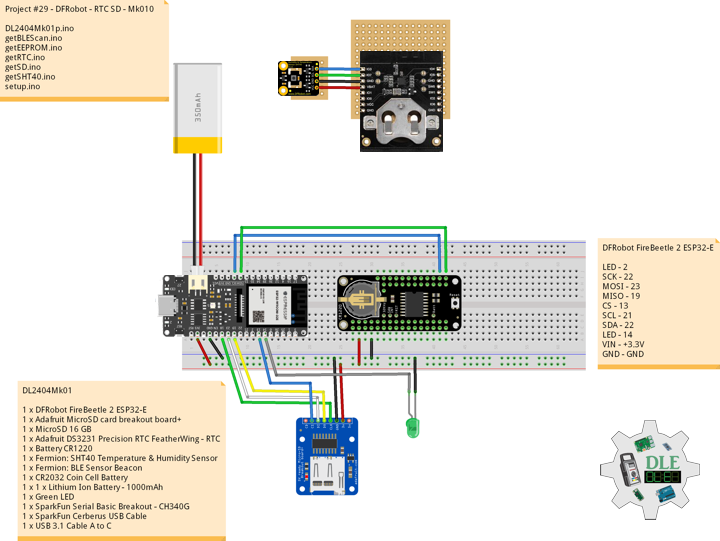
DL2404Mk01

1 x DFRobot FireBeetle 2 ESP32-E
1 x Adafruit MicroSD card breakout board+
1 x MicroSD 16 GB
1 x Adafruit DS3231 Precision RTC FeatherWing – RTC
1 x Battery CR1220
1 x Fermion: SHT40 Temperature & Humidity Sensor
1 x Fermion: BLE Sensor Beacon
1 x CR2032 Coin Cell Battery
1 x 1 x Lithium Ion Battery – 1000mAh
1 x Green LED
1 x SparkFun Serial Basic Breakout – CH340G
1 x SparkFun Cerberus USB Cable
1 x USB 3.1 Cable A to C

DFRobot FireBeetle 2 ESP32-E

LED – 2
SCK – 22
MOSI – 23
MISO – 19
CS – 13
SCL – 21
SDA – 22
LED – 14
VIN – +3.3V
GND – GND

——

DL2404Mk01p.ino

/****** Don Luc Electronics © ******
Software Version Information
Project #29 - DFRobot - RTC SD - Mk10
29-10
DL2404Mk01p.ino
1 x DFRobot FireBeetle 2 ESP32-E
1 x Adafruit MicroSD card breakout board+
1 x MicroSD 16 GB
1 x Adafruit DS3231 Precision RTC FeatherWing - RTC
1 x Battery CR1220
1 x Fermion: SHT40 Temperature & Humidity Sensor
1 x Fermion: BLE Sensor Beacon
1 x CR2032 Coin Cell Battery
1 x 1 x Lithium Ion Battery - 1000mAh
1 x Green LED
1 x SparkFun Serial Basic Breakout - CH340G
1 x SparkFun Cerberus USB Cable
1 x USB 3.1 Cable A to C
*/

// Include the Library Code
// EEPROM Library to Read and Write EEPROM
// with Unique ID for Unit
#include "EEPROM.h"
// Wire
#include <Wire.h>
// Arduino
#include <Arduino.h>
// BLE Device
#include <BLEDevice.h>
// BLE Utils
#include <BLEUtils.h>
// BLEScan
#include <BLEScan.h>
// BLE Advertised Device
#include <BLEAdvertisedDevice.h>
// BLE Eddystone URL
#include <BLEEddystoneURL.h>
// BLE Eddystone TLM
#include <BLEEddystoneTLM.h>
// BLE Beacon
#include <BLEBeacon.h>
// DS3231 RTC Date and Time
#include <RTClib.h>
// SD Card
#include "FS.h"
#include "SD.h"
#include "SPI.h"

// ENDIAN_CHANGE
#define ENDIAN_CHANGE_U16(x) ((((x)&0xFF00) >> 8) + (((x)&0xFF) << 8))

// DS3231 RTC Date and Time
RTC_DS3231 rtc;
String sDate;
String sTime;

// MicroSD Card
const int chipSelect = 13;
String zzzzzz = "";

// LED Green
int iLEDGreen = 2;

// Define LED
int iLED = 14;

// Fermion: SHT40 Temperature & Humidity Sensor
// Temperature
float TemperatureData;
float Temperature;
// Humidity
float HumidityData;
float Humidity;
// In seconds
int scanTime = 5;
// BLE Scan
BLEScan *pBLEScan;

// My Advertised Device Callbacks
class MyAdvertisedDeviceCallbacks : public BLEAdvertisedDeviceCallbacks
{

    // onResult
    void onResult(BLEAdvertisedDevice advertisedDevice)
    {
      // Advertised Device
      if (advertisedDevice.haveName())
      {
        // Name: Fermion: Sensor Beacon
        if(String(advertisedDevice.getName().c_str()) == "SHT40"){
          
          // strManufacturerData
          std::string strManufacturerData = advertisedDevice.getManufacturerData();
          uint8_t cManufacturerData[100];
          strManufacturerData.copy((char *)cManufacturerData, strManufacturerData.length(), 0);
          
          // strManufacturerData.length
          for (int i = 0; i < strManufacturerData.length(); i++)
          {

             // cManufacturerData[i]
             cManufacturerData[i];
             
          }

          // TemperatureData
          TemperatureData = int(cManufacturerData[2]<<8 | cManufacturerData[3]);
          // HumidityData
          HumidityData = int(cManufacturerData[5]<<8 | cManufacturerData[6]);
   
        }        
      }
    }
};

// EEPROM Unique ID Information
#define EEPROM_SIZE 64
String uid = "";

// Software Version Information
String sver = "29-10";

void loop() {

  // DS3231 RTC Date and Time
  isRTC();
  
  // ScanResults
  isBLEScanResults();

  // Fermion: SHT40 Temperature & Humidity Sensor
  isSHT40();

  // Delay 3 Second
  delay(3000);

  // MicroSD Card
  isSD();

  // iLED HIGH
  digitalWrite(iLED, HIGH );

  // Delay 1 Second
  delay(1000);

}

getBLEScan.ino

// getBLEScan
// Setup BLE Scan
void isSetupBLEScan(){

  // BLE Device
  BLEDevice::init("");
  // Create new scan
  pBLEScan = BLEDevice::getScan();
  // Set Advertised Device Callbacks
  pBLEScan->setAdvertisedDeviceCallbacks(new MyAdvertisedDeviceCallbacks());
  // Active scan uses more power, but get results faster
  pBLEScan->setActiveScan(true);
  // Set Interval
  pBLEScan->setInterval(100);
  // Less or equal setInterval value
  pBLEScan->setWindow(99);
  
}
// BLE Scan Results
void isBLEScanResults(){

  // Put your main code here, to run repeatedly:
  BLEScanResults foundDevices = pBLEScan->start(scanTime, false);
  // Delete results fromBLEScan buffer to release memory
  pBLEScan->clearResults();
  
}

getEEPROM.ino

// EEPROM
// isUID EEPROM Unique ID
void isUID()
{
  
  // Is Unit ID
  uid = "";
  for (int x = 0; x < 7; x++)
  {
    uid = uid + char(EEPROM.read(x));
  }
  
}

getRTC.ino

// DS3231 RTC Date and Time
// Setup DS3231 RTC
void isSetupRTC() {

  if (! rtc.begin()) {
    while (1);
  }

  if (rtc.lostPower()) {
    // Following line sets the RTC to the date & time this sketch was compiled
    rtc.adjust(DateTime(F(__DATE__), F(__TIME__)));
    // This line sets the RTC with an explicit date & time, for example to set
    // January 21, 2014 at 3am you would call:
    // rtc.adjust(DateTime(2014, 1, 21, 3, 0, 0));
  }
  
}
// DS3231 RTC Date and Time
void isRTC(){
 
    // Date and Time
    sDate = "";
    sTime = "";
    // Date Time
    DateTime now = rtc.now();

    // sData
    sDate += String(now.year(), DEC);
    sDate += "/";
    sDate += String(now.month(), DEC);
    sDate += "/";
    sDate += String(now.day(), DEC);

    // sTime
    sTime += String(now.hour(), DEC);
    sTime += ":";
    sTime += String(now.minute(), DEC);
    sTime += ":";
    sTime += String(now.second(), DEC);

}

getSD.ino

// MicroSD Card
// MicroSD Setup
void setupSD() {

    // MicroSD Card
    pinMode( chipSelect , OUTPUT );
    if(!SD.begin( chipSelect )){
        ;  
        return;
    }
    
    uint8_t cardType = SD.cardType();

    // CARD NONE
    if(cardType == CARD_NONE){
        ; 
        return;
    }

    // SD Card Type
    if(cardType == CARD_MMC){
        ; 
    } else if(cardType == CARD_SD){
        ; 
    } else if(cardType == CARD_SDHC){
        ; 
    } else {
        ; 
    } 

    // Size
    uint64_t cardSize = SD.cardSize() / (1024 * 1024);
 
}
// MicroSD Card
void isSD() {

  zzzzzz = "";

  // DFR|EEPROM Unique ID|Version|Date|Time|Temperature|Humidity|*\r
  zzzzzz = "DFR|" + uid + "|" + sver + "|" + sDate + "|" + sTime + "|" 
  + String(Temperature) + "C|" + String(Humidity) + "%|*\r";

  // msg + 1
  char msg[zzzzzz.length() + 1];

  zzzzzz.toCharArray(msg, zzzzzz.length() + 1);

  // Append File
  appendFile(SD, "/dfrdata.txt", msg );
  
}
// List Dir
void listDir(fs::FS &fs, const char * dirname, uint8_t levels){
    
    // List Dir
    dirname;
    
    File root = fs.open(dirname);
    
    if(!root){
        return;
    }
    
    if(!root.isDirectory()){
        return;
    }

    File file = root.openNextFile();
    
    while(file){
        if(file.isDirectory()){
            file.name();
            if(levels){
                listDir(fs, file.name(), levels -1);
            }
        } else {
            file.name();
            file.size();
        }
        file = root.openNextFile();
    }
    
}
// Write File
void writeFile(fs::FS &fs, const char * path, const char * message){
    
    // Write File
    path;
    
    File file = fs.open(path, FILE_WRITE);
    
    if(!file){
        return;
    }
    
    if(file.print(message)){
        ;  
    } else {
        ;  
    }
    
    file.close();
    
}
// Append File
void appendFile(fs::FS &fs, const char * path, const char * message){
    
    // Append File
    path;
    
    File file = fs.open(path, FILE_APPEND);
    
    if(!file){
        return;
    }
    
    if(file.print(message)){
        ;  
    } else {
        ;  
    }
    
    file.close();
    
}

getSHT40.ino

// Fermion: SHT40 Temperature & Humidity Sensor
// SHT40 Temperature & Humidity
void isSHT40(){

  // Fermion: SHT40 Temperature & Humidity Sensor
  // Temperature
  Temperature = (175 * TemperatureData/65535) - 45;
  // Humidity
  Humidity = (125 * HumidityData/65535) - 6;

}

setup.ino

// Setup
void setup()
{
  
  // Give display time to power on
  delay(100);

  // EEPROM Size
  EEPROM.begin(EEPROM_SIZE);
  
  // EEPROM Unique ID
  isUID();

  // Give display
  delay(100);

  // Set up I2C bus
  Wire.begin();

  // Give display
  delay(100);

  // Setup BLE Scan
  isSetupBLEScan();

  // Setup DS3231 RTC
  isSetupRTC();

  //MicroSD Card
  setupSD();

  // Initialize digital pin iLED as an output
  pinMode(iLED, OUTPUT);

  // Outputting high, the LED turns on
  digitalWrite(iLED, HIGH);

  // Initialize the LED Green
  pinMode(iLEDGreen, OUTPUT);

  // iLEDGreen HIGH
  digitalWrite(iLEDGreen, HIGH );
  
  // Delay 5 Second
  delay( 5000 );

}

——

People can contact us: https://www.donluc.com/?page_id=1927

Teacher, Instructor, E-Mentor, R&D and Consulting

  • Programming Language
  • Single-Board Microcontrollers (PIC, Arduino, Raspberry Pi, Arm, Silicon Labs, Espressif, Etc…)
  • IoT
  • Wireless (Radio Frequency, Bluetooth, WiFi, Etc…)
  • Robotics
  • Automation
  • Camera and Video Capture Receiver Stationary, Wheel/Tank and Underwater Vehicle
  • Unmanned Vehicles Terrestrial and Marine
  • Machine Learning
  • Artificial Intelligence (AI)
  • RTOS
  • Sensors, eHealth Sensors, Biosensor, and Biometric
  • Research & Development (R & D)
  • Consulting

Follow Us

Luc Paquin – Curriculum Vitae – 2024
https://www.donluc.com/luc/

Web: https://www.donluc.com/
Facebook: https://www.facebook.com/neosteam.labs.9/
YouTube: https://www.youtube.com/@thesass2063
Twitter: https://twitter.com/labs_steam
Pinterest: https://www.pinterest.com/NeoSteamLabs/
Instagram: https://www.instagram.com/neosteamlabs/
LinkedIn: https://www.linkedin.com/in/jlucpaquin/

Don Luc