
——
#DonLucElectronics #DonLuc #Vibration #Buzzer #SparkFunESP32WROOM #ESP32 #Display #IoT #Project #Fritzing #Programming #Electronics #Microcontrollers #Consultant
——
——
——
——
Crowtail – Vibration Sensor 2.0
The Crowtail – Vibration Sensor is Used to trigger the effect of various vibration with Normally closed type vibration sensor SW – 420. It is widely used to reported the theft alarm, intelligent car, earthquake alarm, motorcycle alarm, etc. This module is compared with the normally open type vibration sensor module, vibration trigger for longer periods of time, can drive the relay module .
Crowtail – Buzzer 2.0
The buzzer module is for making sound in your project. It sounds when activated by a logic HIGH signal. The buzzer module can be also connected to an analog pluse-width modulation (PWM) output to generate various of tones.
DL2601Mk02
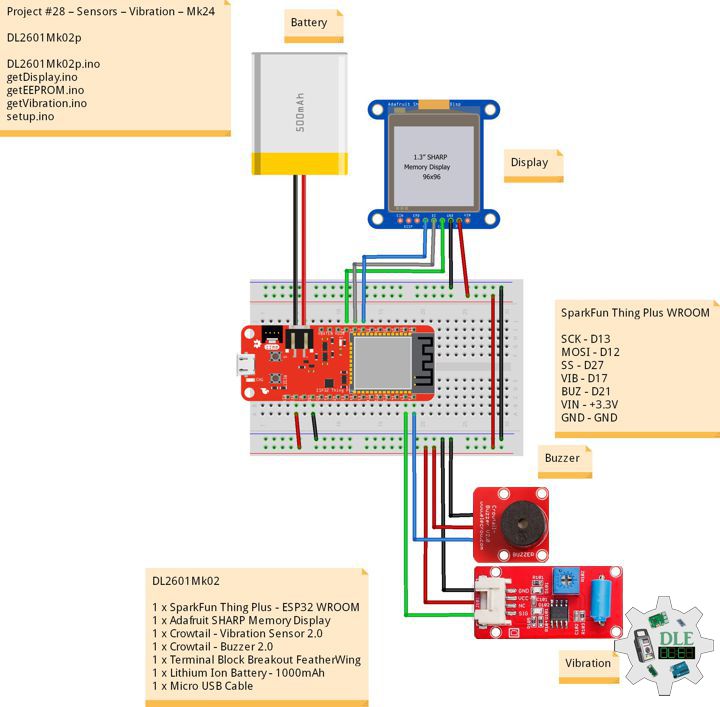
1 x SparkFun Thing Plus – ESP32 WROOM
1 x Adafruit SHARP Memory Display
1 x Crowtail – Vibration Sensor 2.0
1 x Crowtail – Buzzer 2.0
1 x Terminal Block Breakout FeatherWing
1 x Lithium Ion Battery – 1000mAh
1 x Micro USB Cable
DL2601Mk02p
DL2601Mk02p.ino
/****** Don Luc Electronics © ******
Software Version Information
Project #28 – Sensors – Vibration – Mk24
28-24
DL2601Mk02p.ino
DL2601Mk02
1 x SparkFun Thing Plus - ESP32 WROOM
1 x Adafruit SHARP Memory Display
1 x Crowtail - Vibration Sensor 2.0
1 x Crowtail - Buzzer 2.0
1 x Terminal Block Breakout FeatherWing
1 x Lithium Ion Battery - 1000mAh
1 x Micro USB Cable
*/

// Include the Library Code
// EEPROM Library to Read and Write EEPROM with Unique ID for Unit
#include "EEPROM.h"
// SHARP Memory Display
#include <Adafruit_SharpMem.h>
#include <Adafruit_GFX.h>

// Vibration Sensor
// Declare the pin for the Vibration sensor
int iVibration = 17;
// Declare the pin for the buzzer
int iBuzzer = 21;
// Initialize soundValue to 0
int iVibrationValue = 0;
// Vibration
String sVibration = "";

// SHARP Memory Display
#define SHARP_SCK  13
#define SHARP_MOSI 12
#define SHARP_SS   27
// Set the size of the display here, e.g. 144x168!
Adafruit_SharpMem display(SHARP_SCK, SHARP_MOSI, SHARP_SS, 144, 168);
// The currently-available SHARP Memory Display (144x168 pixels)
// requires > 4K of microcontroller RAM; it WILL NOT WORK on Arduino Uno
// or other <4K "classic" devices.
#define BLACK 0
#define WHITE 1

// Software Version Information
// EEPROM Unique ID Information
#define EEPROM_SIZE 64
String uid = "";

// Software Version Information
String sver = "28-24";

void loop() {

  // Vibration Sensor
  isVibration();

  // isDisplayVibration
  isDisplayVibration();

}
getDisplay.ino
// SHARP Memory Display
// SHARP Memory Display - UID
void isDisplayUID() {

    // Text Display
    // Clear Display
    display.clearDisplay();
    display.setRotation(4);
    display.setTextSize(3);
    display.setTextColor(BLACK);
    // Don Luc Electronics
    display.setCursor(0,10);
    display.println( "Don Luc" );
    display.setTextSize(2);
    display.setCursor(0,40);
    display.println( "Electronics" );
    // Version
    //display.setTextSize(3);
    display.setCursor(0,70);
    display.println( "Version" );
    //display.setTextSize(2);
    display.setCursor(0,95);
    display.println( sver );
    // EEPROM
    display.setCursor(0,120);
    display.println( "EEPROM" );
    display.setCursor(0,140);
    display.println( uid );
    // Refresh
    display.refresh();
    delay( 100 );

}
// Display Vibration
void isDisplayVibration() {

    // Text Display Vibration
    // Clear Display
    display.clearDisplay();
    display.setRotation(4);
    display.setTextSize(2);
    display.setTextColor(BLACK);
    // Sound Sensor
    display.setCursor(0,5);
    display.println( "Vibration" );
    display.setTextSize(3);
    display.setCursor(0,55);
    display.println( sVibration );
    // Refresh
    display.refresh();
    delay( 100 );

}
getEEPROM.ino
// isUID EEPROM Unique ID
void isUID()
{

  // Is Unit ID
  uid = "";
  for (int x = 0; x < 7; x++)
  {
    uid = uid + char(EEPROM.read(x));
  }

}
getVibration.ino
// Vibration Sensor
// is Vibration
void isVibration(){

  // Sound
  iVibrationValue = digitalRead( iVibration );

  // If the sensor value is HIGH?
  if( iVibrationValue == HIGH )
	{

    // Buzzer
    digitalWrite( iBuzzer, LOW);

    // No, return false
    sVibration = "False";


	}
	else
	{


    // Buzzer
    digitalWrite( iBuzzer, HIGH);

    // Yes, return true
    sVibration = "True";


	}

}
setup.ino
// Setup
void setup()
{

  // Delay
  delay( 100 );

   // EEPROM Size
  EEPROM.begin(EEPROM_SIZE);

  // EEPROM Unique ID
  isUID();

  // Delay
  delay( 100 );

  // SHARP Display Start & Clear the Display
  display.begin();
  // Clear Display
  display.clearDisplay();

  // Delay
  delay( 100 );

  // Vibration Sensor
  pinMode( iVibration, INPUT);
  // Buzzer
  pinMode(iBuzzer, OUTPUT);

  // Delay
  delay( 100 );

  // Display UID
  // Don Luc
  // Electronic
  // Version
  // EEPROM
  isDisplayUID();

  // Delay 5 Second
  delay( 5000 );

}
——
People can contact us: https://www.donluc.com/?page_id=1927
Consultant, R&D, Electronics, IoT, Teacher and Instructor
- Programming Language
- Single-Board Microcontrollers (PIC, Arduino, Raspberry Pi, Arm, Silicon Labs, Espressif, Etc…)
- IoT
- Wireless (Radio Frequency, Bluetooth, WiFi, Etc…)
- Robotics
- Automation
- Camera and Video Capture Receiver Stationary, Wheel/Tank , Underwater and UAV Vehicle
- Unmanned Vehicles Terrestrial, Marine and UAV
- Machine Learning
- Artificial Intelligence (AI)
- RTOS
- Sensors, eHealth Sensors, Biosensor, and Biometric
- Research & Development (R & D)
- Consulting
Follow Us
Luc Paquin – Curriculum Vitae – 2026
https://www.donluc.com/luc/LucPaquinCVEng2026Mk01.pdf
https://www.donluc.com/luc/
Web: https://www.donluc.com/
Web: https://www.jlpconsultants.com/
Facebook: https://www.facebook.com/neosteam.labs.9/
YouTube: https://www.youtube.com/@thesass2063
DFRobot: https://learn.dfrobot.com/user-10186.html
Elecrow: https://www.elecrow.com/share/sharepj/center/no/760816d385ebb1edc0732fd873bfbf13
TikTok: https://www.tiktok.com/@luc.paquin8
Hackster: https://www.hackster.io/luc-paquin
LinkedIn: https://www.linkedin.com/in/jlucpaquin/
Don Luc