Project #28 – Sensors – GPS Receiver GP-20U7 – Mk10

——

#DonLucElectronics #DonLuc #Sensors #GPSReceiver #Adafruit #SparkFun #Arduino #Project #Fritzing #Programming #Electronics #Microcontrollers #Consultant

——
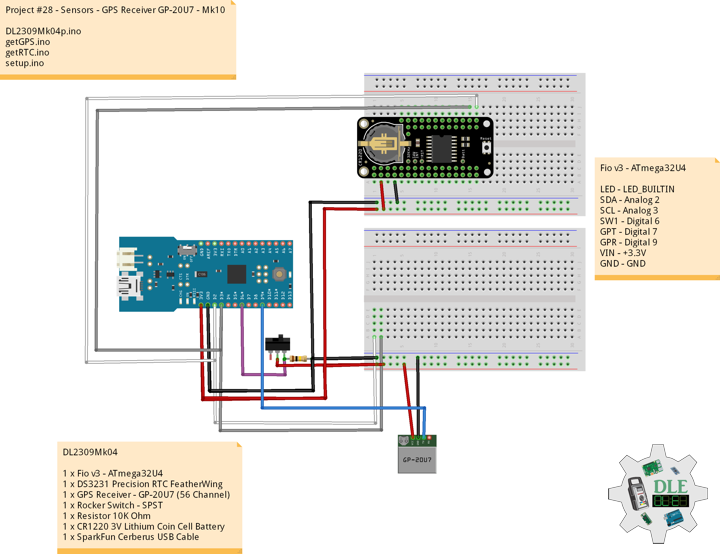
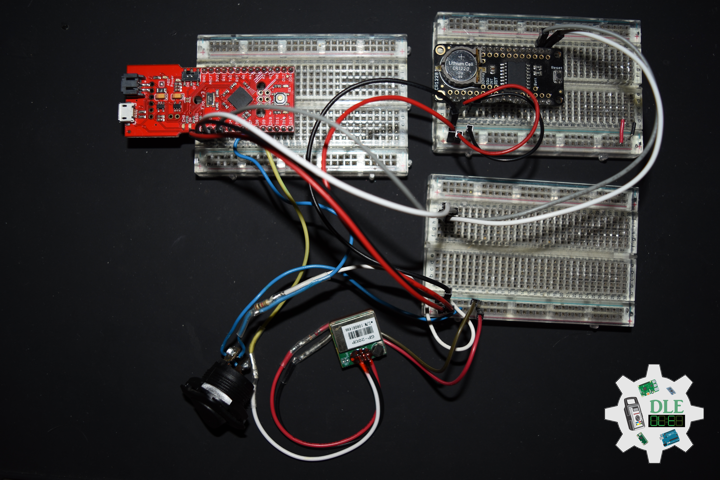
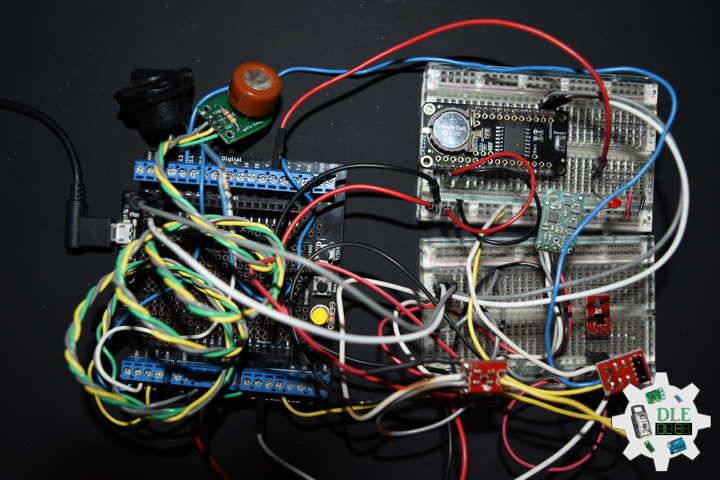
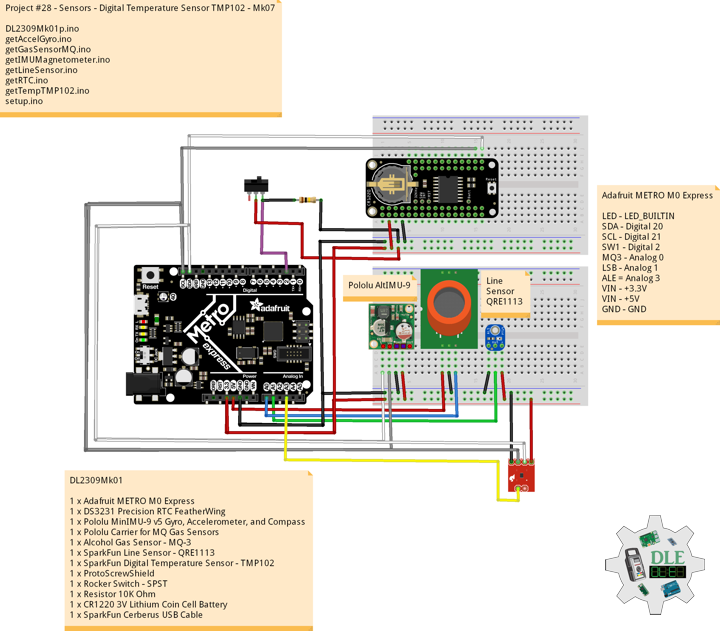
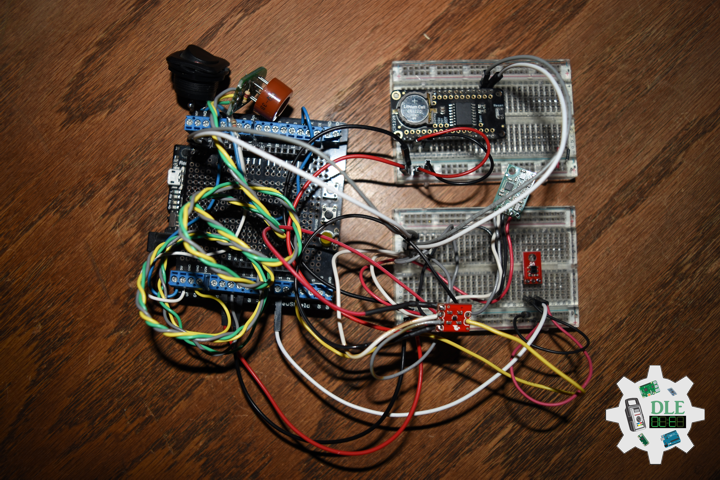
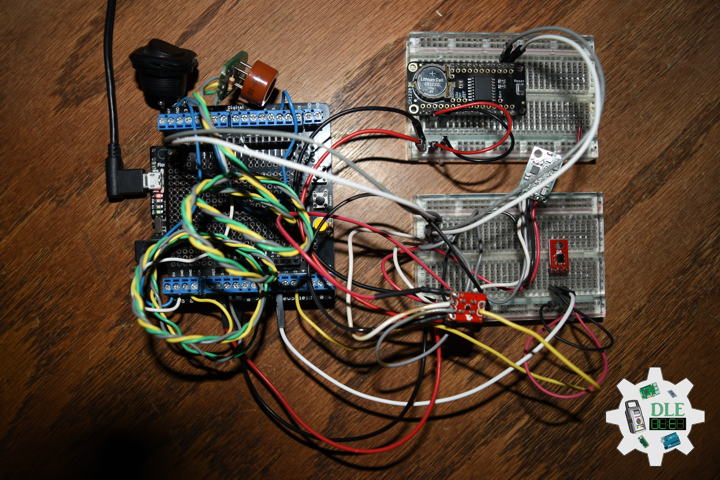
GPS Receiver GP-20U7

——

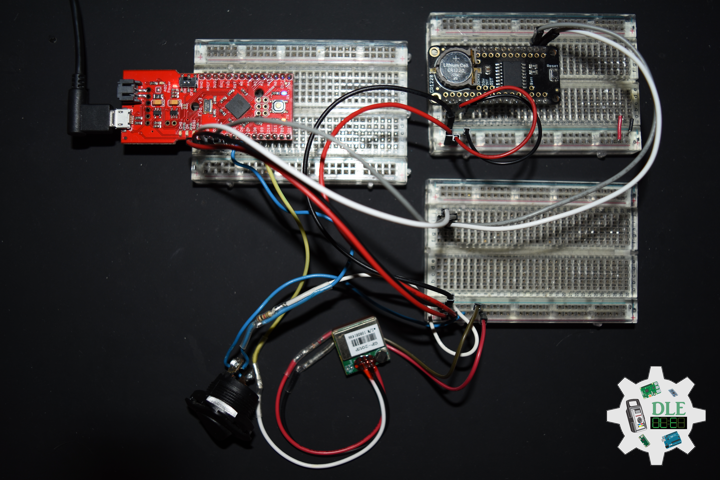
GPS Receiver GP-20U7

——

GPS Receiver GP-20U7

——

GPS Receiver – GP-20U7

The GP-20U7 is a compact GPS receiver with a built-in high performances All-In-One GPS chipset. The GP-20U7 accurately provides position, velocity, and time readings as well possessing high sensitivity and tracking capabilities. Thanks to the low power consumption this receiver requires, the GP-20U7 is ideal for portable applications such as tablet PCs, smart phones, and other devices requiring positioning capability. This 56-Channel GPS module, that supports a standard NMEA-0183 and uBlox 7 protocol, has low power consumption of 40mA@3.3V (max), an antenna on board, and -162dBm tracking sensitivity. With 56 channels in search mode and 22 channels “All-In-View” tracking, the GP-20U7 is quite the work horse for its size.

DL2309Mk04

1 x Fio v3 – ATmega32U4
1 x DS3231 Precision RTC FeatherWing
1 x GPS Receiver – GP-20U7 (56 Channel)
1 x Rocker Switch – SPST
1 x Resistor 10K Ohm
1 x CR1220 3V Lithium Coin Cell Battery
1 x SparkFun Cerberus USB Cable

Fio v3 – ATmega32U4

LED – LED_BUILTIN
SDA – Digital 2
SCL – Digital 3
SW1 – Digital 6
GPT – Digital 7
GPR – Digital 9
VIN – +3.3V
GND – GND

——

DL2309Mk04p.ino

/****** Don Luc Electronics © ******
Software Version Information
Project #28 - Sensors - GPS Receiver GP-20U7 - Mk10
28-10
DL2309Mk04p.ino
1 x Fio v3 - ATmega32U4
1 x DS3231 Precision RTC FeatherWing
1 x GPS Receiver - GP-20U7 (56 Channel)
1 x Rocker Switch - SPST
1 x Resistor 10K Ohm
1 x CR1220 3V Lithium Coin Cell Battery
1 x SparkFun Cerberus USB Cable
*/

// Include the Library Code
// DS3231 Precision RTC 
#include <RTClib.h>
// Two Wire Interface (TWI/I2C)
#include <Wire.h>
// Keyboard
#include <Keyboard.h>
// GPS Receiver
#include <TinyGPS++.h>
// Software Serial
#include <SoftwareSerial.h>

// Keyboard
String sKeyboard = "";

// DS3231 Precision RTC 
RTC_DS3231 rtc;
String dateRTC = "";
String timeRTC = "";

// GPS Receiver
#define gpsRXPIN 9
// This one is unused and doesnt have a conection
#define gpsTXPIN 7
// The TinyGPS++ object
TinyGPSPlus gps;
// Latitude
float TargetLat;
// Longitude
float TargetLon;
// GPS Date, Time
// GPS Date
String TargetDat;
// GPS Time
String TargetTim;
// GPS Status
String GPSSt = "";

// The serial connection to the GPS device
SoftwareSerial tGPS(gpsRXPIN, gpsTXPIN);

// The number of the Rocker Switch pin
int iSwitch = 6;
// Variable for reading the button status
int SwitchState = 0;

// Software Version Information
String sver = "28-10";

void loop() {

  // Date and Time RTC
  isRTC ();

  // isGPS
  isGPS();

  // GPS Keyboard
  isGPSKeyboard();

  // Read the state of the Switch value:
  SwitchState = digitalRead(iSwitch);

  // Check if the button is pressed. If it is, the SwitchState is HIGH:
  if (SwitchState == HIGH) {

     Keyboard.println(sKeyboard);
    
  }

  // Delay 1 Second
  delay(1000);

}

getGPS.ino

// GPS Receiver
// Setup GPS
void setupGPS() {

  // Setup GPS
  tGPS.begin( 9600 );

}
// isGPS
void isGPS(){

  // Receives NEMA data from GPS receiver
  // This sketch displays information every time a new sentence is correctly encoded
  while ( tGPS.available() > 0)
    
    if (gps.encode( tGPS.read() ))
    {
     
       // GPS Vector Pointer Target
       displayInfo();

       // GPS Date, Time
       displayDTS();

    }
 
  if (millis() > 5000 && gps.charsProcessed() < 10)
  {
   
     while(true);
    
  }

}
// GPS Vector Pointer Target
void displayInfo(){

  // Location
  if (gps.location.isValid())
  {
    
     // Latitude
     TargetLat = gps.location.lat();
     // Longitude
     TargetLon = gps.location.lng();
     // GPS Status 2
     GPSSt = "Yes";
    
  }
  else
  {

     // GPS Status 0
     GPSSt = "No";
     TargetLat = 0;
     TargetLon = 0;
    
  }


}
// GPS Date, Time
void displayDTS(){

  // Date
  TargetDat = ""; 
  if (gps.date.isValid())
  {
    
     // Date
     // Year
     TargetDat += String(gps.date.year(), DEC);
     TargetDat += "/";
     // Month
     TargetDat += String(gps.date.month(), DEC);
     TargetDat += "/";
     // Day
     TargetDat += String(gps.date.day(), DEC);
    
  }

  // Time
  TargetTim = "";
  if (gps.time.isValid())
  {
    
     // Time
     // Hour
     TargetTim += String(gps.time.hour(), DEC);
     TargetTim += ":";
     // Minute
     TargetTim += String(gps.time.minute(), DEC);
     TargetTim += ":";
     // Secound
     TargetTim += String(gps.time.second(), DEC);
    
  }

}
// GPS Keyboard
void isGPSKeyboard(){

  // GPS Keyboard
  // Keyboard
  // GPS Vector Pointer Target
  sKeyboard = sKeyboard + GPSSt + "|" + String(TargetLat) 
  + "|" + String(TargetLon) + "|";

  // Keyboard
  // GPS Date, Time
  sKeyboard = sKeyboard + TargetDat + "|" + 
  TargetTim + "|*";

}

getRTC.ino

// Date & Time
// DS3231 Precision RTC
void setupRTC() {

  // DS3231 Precision RTC
  if (! rtc.begin()) {
    //Serial.println("Couldn't find RTC");
    //Serial.flush();
    while (1) delay(10);
  }

  if (rtc.lostPower()) {
    //Serial.println("RTC lost power, let's set the time!");
    // When time needs to be set on a new device, or after a power loss, the
    // following line sets the RTC to the date & time this sketch was compiled
    rtc.adjust(DateTime(F(__DATE__), F(__TIME__)));
    // This line sets the RTC with an explicit date & time, for example to set
    // January 21, 2014 at 3am you would call:
    //rtc.adjust(DateTime(2023, 8, 10, 11, 0, 0));
  }
  
}
// Date and Time RTC
void isRTC () {

  // Date and Time
  dateRTC = "";
  timeRTC = "";
  DateTime now = rtc.now();
  
  // Date
  dateRTC = now.year(), DEC; 
  dateRTC = dateRTC + "/";
  dateRTC = dateRTC + now.month(), DEC;
  dateRTC = dateRTC + "/";
  dateRTC = dateRTC + now.day(), DEC;

  // Time
  timeRTC = now.hour(), DEC;
  timeRTC = timeRTC + ":";
  timeRTC = timeRTC + now.minute(), DEC;
  timeRTC = timeRTC + ":";
  timeRTC = timeRTC + now.second(), DEC;

  // Keyboard
  sKeyboard = "SEN|" + sver + "|" + String(dateRTC) + "|" + 
  String(timeRTC) + "|";
  
}

setup.ino

// Setup
void setup()
{
  
  // Give display time to power on
  delay(100);
  
  // Wire - Inialize I2C Hardware
  Wire.begin();

  // Give display time to power on
  delay(100);

  // Date & Time RTC
  // DS3231 Precision RTC 
  setupRTC();
  
  // Initialize control over the keyboard:
  Keyboard.begin();

  // Give display time to power on
  delay(100);
  
  // GPS Receiver
  // Setup GPS
  setupGPS();

  // Initialize the Switch pin as an input
  pinMode(iSwitch, INPUT);

  // Initialize digital pin LED_BUILTIN as an output
  pinMode(LED_BUILTIN, OUTPUT);
  // Turn the LED on HIGH
  digitalWrite(LED_BUILTIN, HIGH);

  // Delay 5 Second
  delay( 5000 );

}

——

People can contact us: https://www.donluc.com/?page_id=1927

Technology Experience

  • Programming Language
  • Single-Board Microcontrollers (PIC, Arduino, Raspberry Pi,Espressif, etc…)
  • IoT
  • Wireless (Radio Frequency, Bluetooth, WiFi, Etc…)
  • Robotics
  • Camera and Video Capture Receiver Stationary, Wheel/Tank and Underwater Vehicle
  • Unmanned Vehicles Terrestrial and Marine
  • Machine Learning
  • RTOS
  • Research & Development (R & D)

Instructor, E-Mentor, STEAM, and Arts-Based Training

  • Programming Language
  • IoT
  • PIC Microcontrollers
  • Arduino
  • Raspberry Pi
  • Espressif
  • Robotics

Follow Us

Luc Paquin – Curriculum Vitae – 2023
https://www.donluc.com/luc/

Web: https://www.donluc.com/
Facebook: https://www.facebook.com/neosteam.labs.9/
YouTube: https://www.youtube.com/@thesass2063
Twitter: https://twitter.com/labs_steam
Pinterest: https://www.pinterest.com/NeoSteamLabs/
Instagram: https://www.instagram.com/neosteamlabs/

Don Luc
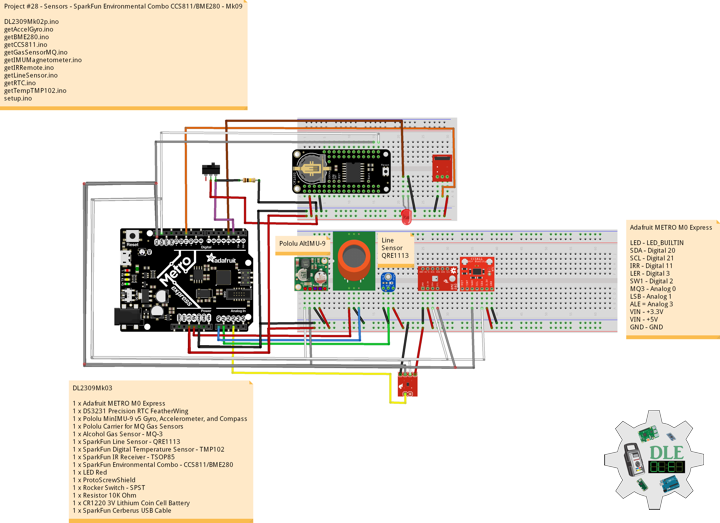
Project #28 – Sensors – SparkFun Environmental Combo CCS811/BME280 – Mk09

——

#DonLucElectronics #DonLuc #Sensors #CCS811 #BME280 #TSOP85 #TMP102 #LineSensor #AlcoholGasSensor #MinIMU9 #Pololu #Adafruit #SparkFun #Arduino #Project #Fritzing #Programming #Electronics #Microcontrollers #Consultant

——

SparkFun Environmental Combo CCS811/BME280

——

SparkFun Environmental Combo CCS811/BME280

——

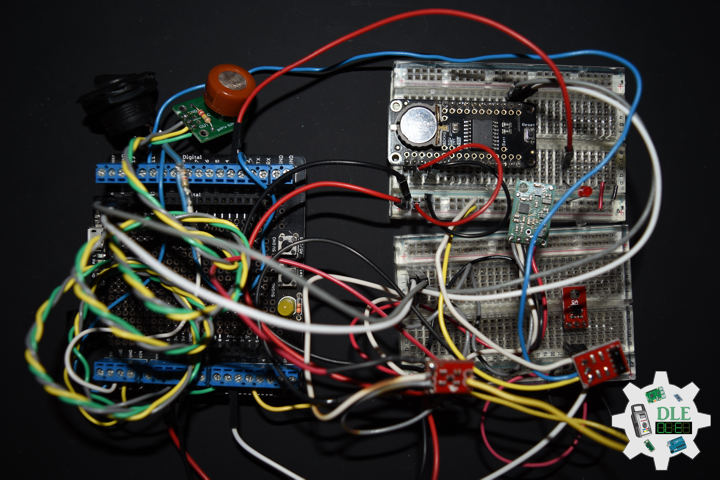
SparkFun Environmental Combo CCS811/BME280

——

SparkFun Environmental Combo – CCS811/BME280

The SparkFun CCS811/BME280 Environmental Combo Breakout takes care of all your atmospheric-quality sensing needs with the popular CCS811 and BME280 ICs. This unique breakout provides a variety of environmental data, including barometric pressure, humidity, temperature, TVOCs and equivalent eCO2 levels.

The CCS811 is an exceedingly popular sensor, providing readings for equivalent eCO2 in the parts per million (PPM) and total volatile organic compounds in the parts per billion (PPB). The CCS811 also has a feature that allows it to fine-tune its readings if it has access to the current humidity and temperature. Luckily for us, the BME280 provides humidity, temperature and barometric pressure. This allows the sensors to work together to give us more accurate readings than they’d be able to provide on their own. We also made it easy to interface with them via I2C.

DL2309Mk03

1 x Adafruit METRO M0 Express
1 x DS3231 Precision RTC FeatherWing
1 x Pololu MinIMU-9 v5 Gyro, Accelerometer, and Compass
1 x Pololu Carrier for MQ Gas Sensors
1 x Alcohol Gas Sensor – MQ-3
1 x SparkFun Line Sensor – QRE1113
1 x SparkFun Digital Temperature Sensor – TMP102
1 x SparkFun IR Receiver – TSOP85
1 x SparkFun Environmental Combo – CCS811/BME280
1 x LED Red
1 x ProtoScrewShield
1 x Rocker Switch – SPST
2 x Resistor 10K Ohm
1 x CR1220 3V Lithium Coin Cell Battery
1 x SparkFun Cerberus USB Cable

Adafruit METRO M0 Express

LED – LED_BUILTIN
SDA – Digital 20
SCL – Digital 21
IRR – Digital 11
LER – Digital 3
SW1 – Digital 2
MQ3 – Analog 0
LSB – Analog 1
ALE = Analog 3
VIN – +3.3V
VIN – +5V
GND – GND

——

DL2309Mk03p.ino

/****** Don Luc Electronics © ******
Software Version Information
Project #28 - Sensors - SparkFun Environmental Combo CCS811/BME280 - Mk09
28-09
DL2309Mk03p.ino
1 x Adafruit METRO M0 Express
1 x DS3231 Precision RTC FeatherWing
1 x Pololu MinIMU-9 v5 Gyro, Accelerometer, and Compass
1 x Pololu Carrier for MQ Gas Sensors
1 x Alcohol Gas Sensor - MQ-3
1 x SparkFun Line Sensor - QRE1113
1 x SparkFun Digital Temperature Sensor - TMP102
1 x SparkFun IR Receiver - TSOP85
1 x SparkFun Environmental Combo - CCS811/BME280
1 x LED Red
1 x ProtoScrewShield
1 x Rocker Switch - SPST
2 x Resistor 10K Ohm
1 x CR1220 3V Lithium Coin Cell Battery
1 x SparkFun Cerberus USB Cable
*/

// Include the Library Code
// DS3231 Precision RTC 
#include <RTClib.h>
// Two Wire Interface (TWI/I2C)
#include <Wire.h>
// Keyboard
#include <Keyboard.h>
// Includes and variables for IMU integration
// STMicroelectronics LSM6DS33 Gyroscope and Accelerometer
#include <LSM6.h>
// STMicroelectronics LIS3MDL Magnetometer
#include <LIS3MDL.h>
// SparkFun Digital Temperature Sensor TMP102
#include <SparkFunTMP102.h>
// SparkFun IR Receiver - TSOP85
#include <IRremote.h>
// SparkFun BME280 - Temperature, Humidity, Barometric Pressure, and Altitude
#include <SparkFunBME280.h>
// SparkFun CCS811 - eCO2 & tVOC
#include <SparkFunCCS811.h>

// Keyboard
String sKeyboard = "";

// DS3231 Precision RTC 
RTC_DS3231 rtc;
String dateRTC = "";
String timeRTC = "";

// Pololu 9DoF IMU
// STMicroelectronics LSM6DS33 Gyroscope and Accelerometer
LSM6 imu;
// Accelerometer and Gyroscopes
// Accelerometer
int imuAX;
int imuAY;
int imuAZ;
// Gyroscopes 
int imuGX;
int imuGY;
int imuGZ;
// STMicroelectronics LIS3MDL Magnetometer
LIS3MDL mag;
// Magnetometer
int magX;
int magY;
int magZ;

// Gas Sensors MQ
// Alcohol Gas Sensor - MQ-3
int iMQ3 = A0;
int iMQ3Raw = 0;
int iMQ3ppm = 0;

// SparkFun Line Sensor - QRE1113 (Analog)
int iLine = A1;
int iLineSensor = 0;

// SparkFun Digital Temperature Sensor TMP102
const int ALERT_PIN = A3;
TMP102 sensor0;
float temperature;
boolean alertPinState;
boolean alertRegisterState;

// SparkFun IR Receiver - TSOP85
int RECV_PIN = 11;
IRrecv irrecv(RECV_PIN);
decode_results results;
String IRValue = "";
int iLEDRed = 3;

// SparkFun BME280 - Temperature, Humidity, Barometric Pressure, and Altitude
BME280 myBME280;
float BMEtempC = 0;
float BMEhumid = 0;
float BMEpressure = 0;
float BMEaltitudeM = 0;

// SparkFun CCS811 - eCO2 & tVOC
// Default I2C Address
#define CCS811_ADDR 0x5B 
CCS811 myCCS811(CCS811_ADDR);
float CCS811CO2 = 0;
float CCS811TVOC = 0;

// The number of the Rocker Switch pin
int iSwitch = 2;
// Variable for reading the button status
int SwitchState = 0;

// Software Version Information
String sver = "28-09";

void loop() {

  // Date and Time RTC
  isRTC ();

  // Pololu Accelerometer and Gyroscopes
  isIMU();

  // Pololu Magnetometer
  isMag();

  // Gas Sensors MQ
  isGasSensor();

  // SparkFun Line Sensor
  isLineSensor();

  // SparkFun Temperature TMP102
  isTMP102();

  // SparkFun IR Receiver - TSOP85
  isIR();

  // SparkFun BME280 - Temperature, Humidity, Barometric Pressure, and Altitude
  isBME280();

  // SparkFun CCS811 - eCO2 & tVOC
  isCCS811();

  // Read the state of the Switch value:
  SwitchState = digitalRead(iSwitch);

  // Check if the button is pressed. If it is, the SwitchState is HIGH:
  if (SwitchState == HIGH) {

     Keyboard.println(sKeyboard);
    
  }

  // Delay 1 Second
  delay(1000);

}

getAccelGyro.ino

// Accelerometer and Gyroscopes
// Setup IMU
void setupIMU() {

  // Setup IMU
  imu.init();
  // Default
  imu.enableDefault();
  
}
// Accelerometer and Gyroscopes
void isIMU() {

  // Accelerometer and Gyroscopes
  imu.read();
  // Accelerometer x, y, z
  imuAX = imu.a.x;
  imuAY = imu.a.y;
  imuAZ = imu.a.z;
  // Gyroscopes x, y, z
  imuGX = imu.g.x;
  imuGY = imu.g.y;
  imuGZ = imu.g.z;

  // Keyboard
  sKeyboard = sKeyboard + String(imuAX) + "|" + String(imuAY) + "|"
  + String(imuAZ) + "|";
  sKeyboard = sKeyboard + String(imuGX) + "|" + String(imuGY) + "|"
  + String(imuGZ) + "|";
  
}

getBME280.ino

// SparkFun BME280 - Temperature, Humidity, Barometric Pressure, and Altitude
// isBME280 - Temperature, Humidity, Barometric Pressure, and Altitude
void isBME280(){

  // Temperature Celsius
  BMEtempC = myBME280.readTempC();
  // Humidity
  BMEhumid = myBME280.readFloatHumidity();
  // Barometric Pressure
  BMEpressure = myBME280.readFloatPressure();
  // Altitude Meters
  BMEaltitudeM = (myBME280.readFloatAltitudeMeters(), 2);

  // Keyboard
  sKeyboard = sKeyboard + String(BMEtempC) + "|" + String(BMEhumid) + "|" +
  String(BMEpressure) + "|" + String(BMEaltitudeM) + "|";

}

getCCS811.ino

// CCS811 - eCO2 & tVOC
// isCCS811 - eCO2 & tVOC
void isCCS811(){

  // This sends the temperature & humidity data to the CCS811
  myCCS811.setEnvironmentalData(BMEhumid, BMEtempC);

  // Calling this function updates the global tVOC and eCO2 variables
  myCCS811.readAlgorithmResults();

  // eCO2 Concentration
  CCS811CO2 = myCCS811.getCO2();
  
  // tVOC Concentration
  CCS811TVOC = myCCS811.getTVOC();

  // Keyboard
  sKeyboard = sKeyboard + String(CCS811CO2) + "|" + String(CCS811TVOC) + "|*";

}

getGasSensorMQ.ino

// Gas Sensors MQ
// Gas Sensor
void isGasSensor() {

  // Read in analog value from each gas sensors
  // Alcohol Gas Sensor - MQ-3
  iMQ3ppm = isMQ3( iMQ3Raw );

  // Keyboard
  sKeyboard = sKeyboard + String(iMQ3ppm) + "|";

}
// Alcohol Gas Sensor - MQ-3
int isMQ3(double rawValue) {

  double RvRo = rawValue;
  // % BAC = breath mg/L * 0.21
  double bac = RvRo * 0.21;
  return bac;
  
}

getIMUMagnetometer.ino

// IMU Magnetometer
// Setup Magnetometer
void setupMag() {

  // Setup Magnetometer
  mag.init();
  // Default
  mag.enableDefault();
  
}
// Magnetometer
void isMag() {

  // Magnetometer
  mag.read();
  // Magnetometer x, y, z
  magX = mag.m.x;
  magY = mag.m.y;
  magZ = mag.m.z;

  // Keyboard
  sKeyboard = sKeyboard + String(magX) + "|" + String(magY) + "|" 
  + String(magZ) + "|";
  
}

getIRRemote.ino

// SparkFun IR Receiver - TSOP85
// Setup
void isSetupIR(){

  // Initialize digital pin LED Red as an output
  pinMode(iLEDRed, OUTPUT);
  
  // Start the receiver
  irrecv.enableIRIn();
  
}
//
void isIR(){

  if (irrecv.decode(&results))
  {
    
    // LED Red HIGH
    digitalWrite(iLEDRed, HIGH);
    
    //Serial.print("IR RECV Code = 0x ");
    //Serial.println(results.value, HEX);

    IRValue = "0x ";
    IRValue = IRValue + String(results.value, HEX);

    // LED Red LOW
    digitalWrite(iLEDRed, LOW);

    // IR Resume
    irrecv.resume();
    
  }
  else {

    IRValue = "0";
    
  }

  // Keyboard
  sKeyboard = sKeyboard + String(IRValue) + "|";
  
}

getLineSensor.ino

// Line Sensor
// isLine Sensor
void isLineSensor(){

  // Line Sensor
  iLineSensor = analogRead(iLine);

  // Keyboard
  sKeyboard = sKeyboard + String(iLineSensor) + "|";
  
}

getRTC.ino

// Date & Time
// DS3231 Precision RTC
void setupRTC() {

  // DS3231 Precision RTC
  if (! rtc.begin()) {
    //Serial.println("Couldn't find RTC");
    //Serial.flush();
    while (1) delay(10);
  }

  if (rtc.lostPower()) {
    //Serial.println("RTC lost power, let's set the time!");
    // When time needs to be set on a new device, or after a power loss, the
    // following line sets the RTC to the date & time this sketch was compiled
    rtc.adjust(DateTime(F(__DATE__), F(__TIME__)));
    // This line sets the RTC with an explicit date & time, for example to set
    // January 21, 2014 at 3am you would call:
    //rtc.adjust(DateTime(2023, 8, 10, 11, 0, 0));
  }
  
}
// Date and Time RTC
void isRTC () {

  // Date and Time
  dateRTC = "";
  timeRTC = "";
  DateTime now = rtc.now();
  
  // Date
  dateRTC = now.year(), DEC; 
  dateRTC = dateRTC + "/";
  dateRTC = dateRTC + now.month(), DEC;
  dateRTC = dateRTC + "/";
  dateRTC = dateRTC + now.day(), DEC;

  // Time
  timeRTC = now.hour(), DEC;
  timeRTC = timeRTC + ":";
  timeRTC = timeRTC + now.minute(), DEC;
  timeRTC = timeRTC + ":";
  timeRTC = timeRTC + now.second(), DEC;

  // Keyboard
  sKeyboard = "SEN|" + sver + "|" + String(dateRTC) + "|" + 
  String(timeRTC) + "|";
  
}

getTempTMP102.ino

// SparkFun Digital Temperature Sensor TMP102
// Setup TMP102
void isSetupTMP102(){

  // Declare alertPin as an input
  pinMode(ALERT_PIN,INPUT);
  
  // Begin
  //It will return true on success or false on failure to communicate
  if(!sensor0.begin())
  {
    
    while(1);
    
  }
  
  // set the Conversion Rate
  //0-3: 0:0.25Hz, 1:1Hz, 2:4Hz, 3:8Hz
  sensor0.setConversionRate(2);
  
  //set Extended Mode.
  //0:12-bit Temperature(-55C to +128C) 1:13-bit Temperature(-55C to +150C)
  sensor0.setExtendedMode(0);
  
  // Set T_HIGH, the upper limit to trigger the alert on
  // Set T_HIGH in C
  sensor0.setHighTempC(29.4);
  
  // Set T_LOW, the lower limit to shut turn off the alert
  // set T_LOW in C
  sensor0.setLowTempC(27.67);

}
// is TMP102
void isTMP102(){

  // Turn sensor on to start temperature measurement.
  // Current consumtion typically ~10uA.
  sensor0.wakeup();

  // read temperature data C
  temperature = sensor0.readTempC();

  // Check for Alert
  // Read the Alert from pin
  alertPinState = digitalRead(ALERT_PIN);
  
  // Read the Alert from register
  alertRegisterState = sensor0.alert();
  
  // Place sensor in sleep mode to save power.
  // Current consumtion typically <0.5uA.
  sensor0.sleep();

  // Keyboard
  sKeyboard = sKeyboard + String(temperature) + "|" + 
  String(alertPinState) + "|" + String(alertRegisterState) + "|";

}

setup.ino

// Setup
void setup()
{
  
  // Give display time to power on
  delay(100);
  
  // Wire - Inialize I2C Hardware
  Wire.begin();

  // Give display time to power on
  delay(100);

  // Date & Time RTC
  // DS3231 Precision RTC 
  setupRTC();
  
  // Initialize control over the keyboard:
  Keyboard.begin();

  // Pololu Setup IMU
  setupIMU();

  // Pololu Setup Magnetometer
  setupMag();

  // Setup TMP102
  isSetupTMP102();

  // SetupTSOP85
  isSetupIR();

  // SparkFun BME280 - Temperature, Humidity, Barometric Pressure, and Altitude 
  myBME280.begin();

  // CCS811 - eCO2 & tVOC
  myCCS811.begin();

  // Initialize the Switch pin as an input
  pinMode(iSwitch, INPUT);

  // Initialize digital pin LED_BUILTIN as an output
  pinMode(LED_BUILTIN, OUTPUT);
  // Turn the LED on HIGH
  digitalWrite(LED_BUILTIN, HIGH);

  // Delay 5 Second
  delay( 5000 );

}

——

People can contact us: https://www.donluc.com/?page_id=1927

Technology Experience

  • Programming Language
  • Single-Board Microcontrollers (PIC, Arduino, Raspberry Pi,Espressif, etc…)
  • IoT
  • Wireless (Radio Frequency, Bluetooth, WiFi, Etc…)
  • Robotics
  • Camera and Video Capture Receiver Stationary, Wheel/Tank and Underwater Vehicle
  • Unmanned Vehicles Terrestrial and Marine
  • Machine Learning
  • RTOS
  • Research & Development (R & D)

Instructor, E-Mentor, STEAM, and Arts-Based Training

  • Programming Language
  • IoT
  • PIC Microcontrollers
  • Arduino
  • Raspberry Pi
  • Espressif
  • Robotics

Follow Us

Luc Paquin – Curriculum Vitae – 2023
https://www.donluc.com/luc/

Web: https://www.donluc.com/
Facebook: https://www.facebook.com/neosteam.labs.9/
YouTube: https://www.youtube.com/@thesass2063
Twitter: https://twitter.com/labs_steam
Pinterest: https://www.pinterest.com/NeoSteamLabs/
Instagram: https://www.instagram.com/neosteamlabs/

Don Luc
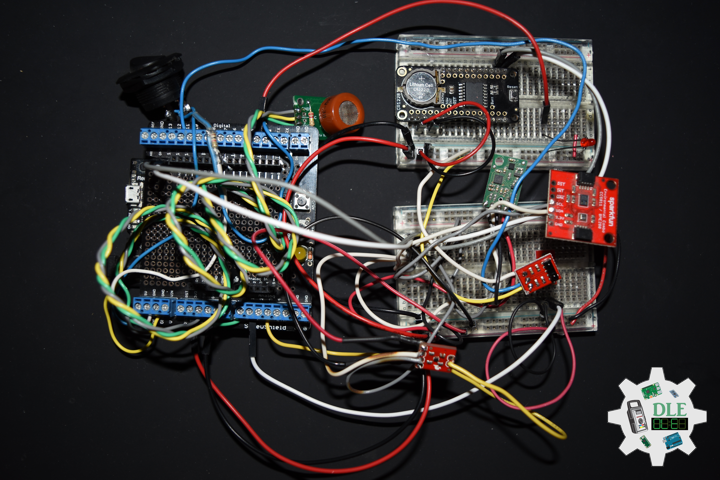
Project #28 – Sensors – SparkFun IR Receiver TSOP85 – Mk08

——

#DonLucElectronics #DonLuc #Sensors #TMP102 #LineSensor #AlcoholGasSensor #MinIMU9 #Pololu #Adafruit #SparkFun #Arduino #Project #Fritzing #Programming #Electronics #Microcontrollers #Consultant

——

SparkFun IR Receiver TSOP85

——

SparkFun IR Receiver TSOP85

——

SparkFun IR Receiver TSOP85

——

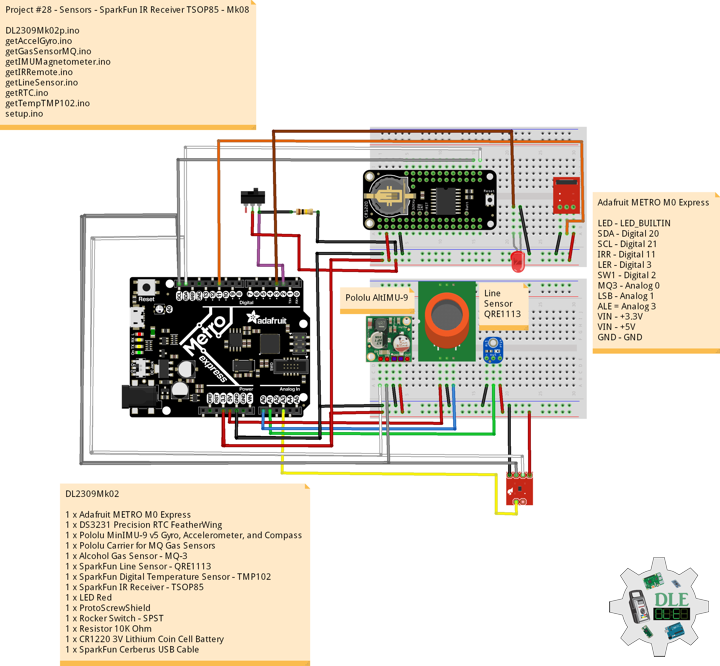
SparkFun IR Receiver – TSOP85

This is a very small infrared receiver based on the TSOP85 receiver from Vishay. This receiver has all the filtering and 38kHz demodulation built into the unit. Simply point a IR remote at the receiver, hit a button, and you’ll see a stream of 1s and 0s out of the data pin.

DL2309Mk02

1 x Adafruit METRO M0 Express
1 x DS3231 Precision RTC FeatherWing
1 x Pololu MinIMU-9 v5 Gyro, Accelerometer, and Compass
1 x Pololu Carrier for MQ Gas Sensors
1 x Alcohol Gas Sensor – MQ-3
1 x SparkFun Line Sensor – QRE1113
1 x SparkFun Digital Temperature Sensor – TMP102
1 x SparkFun IR Receiver – TSOP85
1 x LED Red
1 x ProtoScrewShield
1 x Rocker Switch – SPST
2 x Resistor 10K Ohm
1 x CR1220 3V Lithium Coin Cell Battery
1 x SparkFun Cerberus USB Cable

Adafruit METRO M0 Express

LED – LED_BUILTIN
SDA – Digital 20
SCL – Digital 21
IRR – Digital 11
LER – Digital 3
SW1 – Digital 2
MQ3 – Analog 0
LSB – Analog 1
ALE = Analog 3
VIN – +3.3V
VIN – +5V
GND – GND

——

DL2309Mk02p.ino

/****** Don Luc Electronics © ******
Software Version Information
Project #28 - Sensors - SparkFun IR Receiver TSOP85 - Mk08
28-08
DL2309Mk02p.ino
1 x Adafruit METRO M0 Express
1 x DS3231 Precision RTC FeatherWing
1 x Pololu MinIMU-9 v5 Gyro, Accelerometer, and Compass
1 x Pololu Carrier for MQ Gas Sensors
1 x Alcohol Gas Sensor - MQ-3
1 x SparkFun Line Sensor - QRE1113
1 x SparkFun Digital Temperature Sensor - TMP102
1 x SparkFun IR Receiver - TSOP85
1 x LED Red
1 x ProtoScrewShield
1 x Rocker Switch - SPST
2 x Resistor 10K Ohm
1 x CR1220 3V Lithium Coin Cell Battery
1 x SparkFun Cerberus USB Cable
*/

// Include the Library Code
// DS3231 Precision RTC 
#include <RTClib.h>
// Two Wire Interface (TWI/I2C)
#include <Wire.h>
// Keyboard
#include <Keyboard.h>
// Includes and variables for IMU integration
// STMicroelectronics LSM6DS33 Gyroscope and Accelerometer
#include <LSM6.h>
// STMicroelectronics LIS3MDL Magnetometer
#include <LIS3MDL.h>
// SparkFun Digital Temperature Sensor TMP102
#include <SparkFunTMP102.h>
// SparkFun IR Receiver - TSOP85
#include <IRremote.h>

// Keyboard
String sKeyboard = "";

// DS3231 Precision RTC 
RTC_DS3231 rtc;
String dateRTC = "";
String timeRTC = "";

// Pololu 9DoF IMU
// STMicroelectronics LSM6DS33 Gyroscope and Accelerometer
LSM6 imu;
// Accelerometer and Gyroscopes
// Accelerometer
int imuAX;
int imuAY;
int imuAZ;
// Gyroscopes 
int imuGX;
int imuGY;
int imuGZ;
// STMicroelectronics LIS3MDL Magnetometer
LIS3MDL mag;
// Magnetometer
int magX;
int magY;
int magZ;

// Gas Sensors MQ
// Alcohol Gas Sensor - MQ-3
int iMQ3 = A0;
int iMQ3Raw = 0;
int iMQ3ppm = 0;

// SparkFun Line Sensor - QRE1113 (Analog)
int iLine = A1;
int iLineSensor = 0;

// SparkFun Digital Temperature Sensor TMP102
const int ALERT_PIN = A3;
TMP102 sensor0;
float temperature;
boolean alertPinState;
boolean alertRegisterState;

// SparkFun IR Receiver - TSOP85
int RECV_PIN = 11;
IRrecv irrecv(RECV_PIN);
decode_results results;
String IRValue = "";
int iLEDRed = 3;

// The number of the Rocker Switch pin
int iSwitch = 2;
// Variable for reading the button status
int SwitchState = 0;

// Software Version Information
String sver = "28-08";

void loop() {

  // Date and Time RTC
  isRTC ();

  // Pololu Accelerometer and Gyroscopes
  isIMU();

  // Pololu Magnetometer
  isMag();

  // Gas Sensors MQ
  isGasSensor();

  // SparkFun Line Sensor
  isLineSensor();

  // SparkFun Temperature TMP102
  isTMP102();

  // SparkFun IR Receiver - TSOP85
  isIR();

  // Read the state of the Switch value:
  SwitchState = digitalRead(iSwitch);

  // Check if the button is pressed. If it is, the SwitchState is HIGH:
  if (SwitchState == HIGH) {

     Keyboard.println(sKeyboard);
    
  }

  // Delay 1 Second
  delay(1000);

}

getAccelGyro.ino

// Accelerometer and Gyroscopes
// Setup IMU
void setupIMU() {

  // Setup IMU
  imu.init();
  // Default
  imu.enableDefault();
  
}
// Accelerometer and Gyroscopes
void isIMU() {

  // Accelerometer and Gyroscopes
  imu.read();
  // Accelerometer x, y, z
  imuAX = imu.a.x;
  imuAY = imu.a.y;
  imuAZ = imu.a.z;
  // Gyroscopes x, y, z
  imuGX = imu.g.x;
  imuGY = imu.g.y;
  imuGZ = imu.g.z;

  // Keyboard
  sKeyboard = sKeyboard + String(imuAX) + "|" + String(imuAY) + "|"
  + String(imuAZ) + "|";
  sKeyboard = sKeyboard + String(imuGX) + "|" + String(imuGY) + "|"
  + String(imuGZ) + "|";
  
}

getGasSensorMQ.ino

// Gas Sensors MQ
// Gas Sensor
void isGasSensor() {

  // Read in analog value from each gas sensors
  // Alcohol Gas Sensor - MQ-3
  iMQ3ppm = isMQ3( iMQ3Raw );

  // Keyboard
  sKeyboard = sKeyboard + String(iMQ3ppm) + "|";

}
// Alcohol Gas Sensor - MQ-3
int isMQ3(double rawValue) {

  double RvRo = rawValue;
  // % BAC = breath mg/L * 0.21
  double bac = RvRo * 0.21;
  return bac;
  
}

getIMUMagnetometer.ino

// IMU Magnetometer
// Setup Magnetometer
void setupMag() {

  // Setup Magnetometer
  mag.init();
  // Default
  mag.enableDefault();
  
}
// Magnetometer
void isMag() {

  // Magnetometer
  mag.read();
  // Magnetometer x, y, z
  magX = mag.m.x;
  magY = mag.m.y;
  magZ = mag.m.z;

  // Keyboard
  sKeyboard = sKeyboard + String(magX) + "|" + String(magY) + "|" 
  + String(magZ) + "|";
  
}

getIRRemote.ino

// SparkFun IR Receiver - TSOP85
// Setup
void isSetupIR(){

  // Initialize digital pin LED Red as an output
  pinMode(iLEDRed, OUTPUT);
  
  // Start the receiver
  irrecv.enableIRIn();
  
}
//
void isIR(){

  if (irrecv.decode(&results))
  {
    
    // LED Red HIGH
    digitalWrite(iLEDRed, HIGH);
    
    //Serial.print("IR RECV Code = 0x ");
    //Serial.println(results.value, HEX);

    IRValue = "0x ";
    IRValue = IRValue + String(results.value, HEX);

    // LED Red LOW
    digitalWrite(iLEDRed, LOW);

    // IR Resume
    irrecv.resume();
    
  }
  else {

    IRValue = "0";
    
  }

  // Keyboard
  sKeyboard = sKeyboard + String(IRValue) + "|*";
  
}

getLineSensor.ino

// Line Sensor
// isLine Sensor
void isLineSensor(){

  // Line Sensor
  iLineSensor = analogRead(iLine);

  // Keyboard
  sKeyboard = sKeyboard + String(iLineSensor) + "|";
  
}

getRTC.ino

// Date & Time
// DS3231 Precision RTC
void setupRTC() {

  // DS3231 Precision RTC
  if (! rtc.begin()) {
    //Serial.println("Couldn't find RTC");
    //Serial.flush();
    while (1) delay(10);
  }

  if (rtc.lostPower()) {
    //Serial.println("RTC lost power, let's set the time!");
    // When time needs to be set on a new device, or after a power loss, the
    // following line sets the RTC to the date & time this sketch was compiled
    rtc.adjust(DateTime(F(__DATE__), F(__TIME__)));
    // This line sets the RTC with an explicit date & time, for example to set
    // January 21, 2014 at 3am you would call:
    //rtc.adjust(DateTime(2023, 8, 10, 11, 0, 0));
  }
  
}
// Date and Time RTC
void isRTC () {

  // Date and Time
  dateRTC = "";
  timeRTC = "";
  DateTime now = rtc.now();
  
  // Date
  dateRTC = now.year(), DEC; 
  dateRTC = dateRTC + "/";
  dateRTC = dateRTC + now.month(), DEC;
  dateRTC = dateRTC + "/";
  dateRTC = dateRTC + now.day(), DEC;

  // Time
  timeRTC = now.hour(), DEC;
  timeRTC = timeRTC + ":";
  timeRTC = timeRTC + now.minute(), DEC;
  timeRTC = timeRTC + ":";
  timeRTC = timeRTC + now.second(), DEC;

  // Keyboard
  sKeyboard = "SEN|" + sver + "|" + String(dateRTC) + "|" + 
  String(timeRTC) + "|";
  
}

getTempTMP102.ino

// SparkFun Digital Temperature Sensor TMP102
// Setup TMP102
void isSetupTMP102(){

  // Declare alertPin as an input
  pinMode(ALERT_PIN,INPUT);
  
  // Begin
  //It will return true on success or false on failure to communicate
  if(!sensor0.begin())
  {
    
    while(1);
    
  }
  
  // set the Conversion Rate
  //0-3: 0:0.25Hz, 1:1Hz, 2:4Hz, 3:8Hz
  sensor0.setConversionRate(2);
  
  //set Extended Mode.
  //0:12-bit Temperature(-55C to +128C) 1:13-bit Temperature(-55C to +150C)
  sensor0.setExtendedMode(0);
  
  // Set T_HIGH, the upper limit to trigger the alert on
  // Set T_HIGH in C
  sensor0.setHighTempC(29.4);
  
  // Set T_LOW, the lower limit to shut turn off the alert
  // set T_LOW in C
  sensor0.setLowTempC(27.67);

}
// is TMP102
void isTMP102(){

  // Turn sensor on to start temperature measurement.
  // Current consumtion typically ~10uA.
  sensor0.wakeup();

  // read temperature data C
  temperature = sensor0.readTempC();

  // Check for Alert
  // Read the Alert from pin
  alertPinState = digitalRead(ALERT_PIN);
  
  // Read the Alert from register
  alertRegisterState = sensor0.alert();
  
  // Place sensor in sleep mode to save power.
  // Current consumtion typically <0.5uA.
  sensor0.sleep();

  // Keyboard
  sKeyboard = sKeyboard + String(temperature) + "|" + 
  String(alertPinState) + "|" + String(alertRegisterState) + "|";

}

setup.ino

// Setup
void setup()
{
  
  // Give display time to power on
  delay(100);
  
  // Wire - Inialize I2C Hardware
  Wire.begin();

  // Give display time to power on
  delay(100);

  // Date & Time RTC
  // DS3231 Precision RTC 
  setupRTC();
  
  // Initialize control over the keyboard:
  Keyboard.begin();

  // Pololu Setup IMU
  setupIMU();

  // Pololu Setup Magnetometer
  setupMag();

  // Setup TMP102
  isSetupTMP102();

  // SetupTSOP85
  isSetupIR();

  // Initialize the Switch pin as an input
  pinMode(iSwitch, INPUT);

  // Initialize digital pin LED_BUILTIN as an output
  pinMode(LED_BUILTIN, OUTPUT);
  // Turn the LED on HIGH
  digitalWrite(LED_BUILTIN, HIGH);

  // Delay 5 Second
  delay( 5000 );

}

——

People can contact us: https://www.donluc.com/?page_id=1927

Technology Experience

  • Programming Language
  • Single-Board Microcontrollers (PIC, Arduino, Raspberry Pi,Espressif, etc…)
  • IoT
  • Wireless (Radio Frequency, Bluetooth, WiFi, Etc…)
  • Robotics
  • Camera and Video Capture Receiver Stationary, Wheel/Tank and Underwater Vehicle
  • Unmanned Vehicles Terrestrial and Marine
  • Machine Learning
  • RTOS
  • Research & Development (R & D)

Instructor, E-Mentor, STEAM, and Arts-Based Training

  • Programming Language
  • IoT
  • PIC Microcontrollers
  • Arduino
  • Raspberry Pi
  • Espressif
  • Robotics

Follow Us

Luc Paquin – Curriculum Vitae – 2023
https://www.donluc.com/luc/

Web: https://www.donluc.com/
Facebook: https://www.facebook.com/neosteam.labs.9/
YouTube: https://www.youtube.com/@thesass2063
Twitter: https://twitter.com/labs_steam
Pinterest: https://www.pinterest.com/NeoSteamLabs/
Instagram: https://www.instagram.com/neosteamlabs/

Don Luc
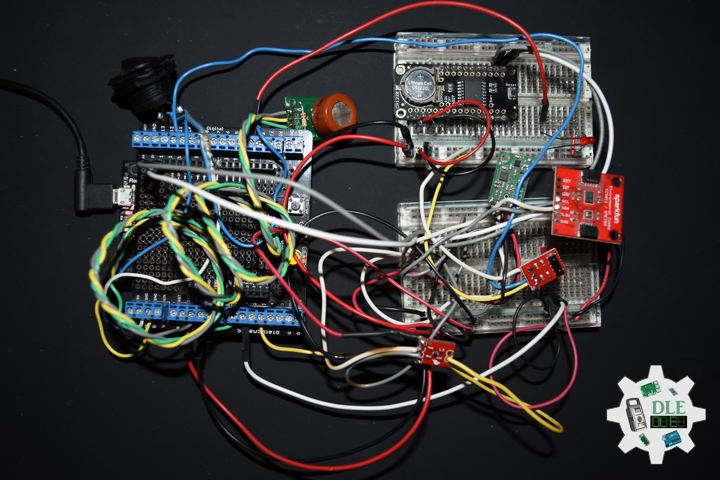
Project #28 – Sensors – Digital Temperature Sensor TMP102 – Mk07

——

#DonLucElectronics #DonLuc #Sensors #TMP102 #LineSensor #AlcoholGasSensor #MinIMU9 #Pololu #Adafruit #SparkFun #Arduino #Project #Fritzing #Programming #Electronics #Microcontrollers #Consultant

——

Digital Temperature Sensor TMP102

——

Digital Temperature Sensor TMP102

——

Digital Temperature Sensor TMP102

——

SparkFun Digital Temperature Sensor – TMP102

The TMP102 is an easy-to-use digital temperature sensor from Texas Instruments. The TMP102 breakout allows you to easily incorporate the digital temperature sensor into your project. While some temperature sensors use an analog voltage to represent the temperature, the TMP102 uses the I2C bus of the Arduino to communicate the temperature. Needless to say, this is a very handy sensor that doesn’t require much setup.

The TMP102 is capable of reading temperatures to a resolution of 0.0625°C, and is accurate up to 0.5°C. The breakout has built-in 4.7k Ohm pull-up resistors for I2C communications and runs from 1.4V to 3.6V. I2C communication uses an open drain signaling, so there is no need to use level shifting.

DL2309Mk01

1 x Adafruit METRO M0 Express
1 x DS3231 Precision RTC FeatherWing
1 x Pololu MinIMU-9 v5 Gyro, Accelerometer, and Compass
1 x Pololu Carrier for MQ Gas Sensors
1 x Alcohol Gas Sensor – MQ-3
1 x SparkFun Line Sensor – QRE1113
1 x SparkFun Digital Temperature Sensor – TMP102
1 x ProtoScrewShield
1 x Rocker Switch – SPST
2 x Resistor 10K Ohm
1 x CR1220 3V Lithium Coin Cell Battery
1 x SparkFun Cerberus USB Cable

Adafruit METRO M0 Express

LED – LED_BUILTIN
SDA – Digital 20
SCL – Digital 21
SW1 – Digital 2
MQ3 – Analog 0
LSB – Analog 1
ALE = Analog 3
VIN – +3.3V
VIN – +5V
GND – GND

——

DL2309Mk01p.ino

/****** Don Luc Electronics © ******
Software Version Information
Project #28 - Sensors - Digital Temperature Sensor TMP102 - Mk07
28-07
DL2309Mk01p.ino
1 x Adafruit METRO M0 Express
1 x DS3231 Precision RTC FeatherWing
1 x Pololu MinIMU-9 v5 Gyro, Accelerometer, and Compass
1 x Pololu Carrier for MQ Gas Sensors
1 x Alcohol Gas Sensor - MQ-3
1 x SparkFun Line Sensor - QRE1113
1 x SparkFun Digital Temperature Sensor - TMP102
1 x ProtoScrewShield
1 x Rocker Switch - SPST
2 x Resistor 10K Ohm
1 x CR1220 3V Lithium Coin Cell Battery
1 x SparkFun Cerberus USB Cable
*/

// Include the Library Code
// DS3231 Precision RTC 
#include <RTClib.h>
// Two Wire Interface (TWI/I2C)
#include <Wire.h>
// Keyboard
#include <Keyboard.h>
// Includes and variables for IMU integration
// STMicroelectronics LSM6DS33 Gyroscope and Accelerometer
#include <LSM6.h>
// STMicroelectronics LIS3MDL Magnetometer
#include <LIS3MDL.h>
// SparkFun Digital Temperature Sensor TMP102
#include <SparkFunTMP102.h>

// Keyboard
String sKeyboard = "";

// DS3231 Precision RTC 
RTC_DS3231 rtc;
String dateRTC = "";
String timeRTC = "";

// Pololu 9DoF IMU
// STMicroelectronics LSM6DS33 Gyroscope and Accelerometer
LSM6 imu;
// Accelerometer and Gyroscopes
// Accelerometer
int imuAX;
int imuAY;
int imuAZ;
// Gyroscopes 
int imuGX;
int imuGY;
int imuGZ;
// STMicroelectronics LIS3MDL Magnetometer
LIS3MDL mag;
// Magnetometer
int magX;
int magY;
int magZ;

// Gas Sensors MQ
// Alcohol Gas Sensor - MQ-3
int iMQ3 = A0;
int iMQ3Raw = 0;
int iMQ3ppm = 0;

// SparkFun Line Sensor - QRE1113 (Analog)
int iLine = A1;
int iLineSensor = 0;

// SparkFun Digital Temperature Sensor TMP102
const int ALERT_PIN = A3;
TMP102 sensor0;
float temperature;
boolean alertPinState;
boolean alertRegisterState;

// The number of the Rocker Switch pin
int iSwitch = 2;
// Variable for reading the button status
int SwitchState = 0;

// Software Version Information
String sver = "28-07";

void loop() {

  // Date and Time RTC
  isRTC ();

  // Pololu Accelerometer and Gyroscopes
  isIMU();

  // Pololu Magnetometer
  isMag();

  // Gas Sensors MQ
  isGasSensor();

  // SparkFun Line Sensor
  isLineSensor();

  // SparkFun Temperature TMP102
  isTMP102();

  // Read the state of the Switch value:
  SwitchState = digitalRead(iSwitch);

  // Check if the button is pressed. If it is, the SwitchState is HIGH:
  if (SwitchState == HIGH) {

     Keyboard.println(sKeyboard);
    
  }

  // Delay 1 Second
  delay(1000);

}

getAccelGyro.ino

// Accelerometer and Gyroscopes
// Setup IMU
void setupIMU() {

  // Setup IMU
  imu.init();
  // Default
  imu.enableDefault();
  
}
// Accelerometer and Gyroscopes
void isIMU() {

  // Accelerometer and Gyroscopes
  imu.read();
  // Accelerometer x, y, z
  imuAX = imu.a.x;
  imuAY = imu.a.y;
  imuAZ = imu.a.z;
  // Gyroscopes x, y, z
  imuGX = imu.g.x;
  imuGY = imu.g.y;
  imuGZ = imu.g.z;

  // Keyboard
  sKeyboard = sKeyboard + String(imuAX) + "|" + String(imuAY) + "|"
  + String(imuAZ) + "|";
  sKeyboard = sKeyboard + String(imuGX) + "|" + String(imuGY) + "|"
  + String(imuGZ) + "|";
  
}

getGasSensorMQ.ino

// Gas Sensors MQ
// Gas Sensor
void isGasSensor() {

  // Read in analog value from each gas sensors
  // Alcohol Gas Sensor - MQ-3
  iMQ3ppm = isMQ3( iMQ3Raw );

  // Keyboard
  sKeyboard = sKeyboard + String(iMQ3ppm) + "|";

}
// Alcohol Gas Sensor - MQ-3
int isMQ3(double rawValue) {

  double RvRo = rawValue;
  // % BAC = breath mg/L * 0.21
  double bac = RvRo * 0.21;
  return bac;
  
}

getIMUMagnetometer.ino

// IMU Magnetometer
// Setup Magnetometer
void setupMag() {

  // Setup Magnetometer
  mag.init();
  // Default
  mag.enableDefault();
  
}
// Magnetometer
void isMag() {

  // Magnetometer
  mag.read();
  // Magnetometer x, y, z
  magX = mag.m.x;
  magY = mag.m.y;
  magZ = mag.m.z;

  // Keyboard
  sKeyboard = sKeyboard + String(magX) + "|" + String(magY) + "|" 
  + String(magZ) + "|";
  
}

getLineSensor.ino

// Line Sensor
// isLine Sensor
void isLineSensor(){

  // Line Sensor
  iLineSensor = analogRead(iLine);

  // Keyboard
  sKeyboard = sKeyboard + String(iLineSensor) + "|";
  
}

getRTC.ino

// Date & Time
// DS3231 Precision RTC
void setupRTC() {

  // DS3231 Precision RTC
  if (! rtc.begin()) {
    //Serial.println("Couldn't find RTC");
    //Serial.flush();
    while (1) delay(10);
  }

  if (rtc.lostPower()) {
    //Serial.println("RTC lost power, let's set the time!");
    // When time needs to be set on a new device, or after a power loss, the
    // following line sets the RTC to the date & time this sketch was compiled
    rtc.adjust(DateTime(F(__DATE__), F(__TIME__)));
    // This line sets the RTC with an explicit date & time, for example to set
    // January 21, 2014 at 3am you would call:
    //rtc.adjust(DateTime(2023, 8, 10, 11, 0, 0));
  }
  
}
// Date and Time RTC
void isRTC () {

  // Date and Time
  dateRTC = "";
  timeRTC = "";
  DateTime now = rtc.now();
  
  // Date
  dateRTC = now.year(), DEC; 
  dateRTC = dateRTC + "/";
  dateRTC = dateRTC + now.month(), DEC;
  dateRTC = dateRTC + "/";
  dateRTC = dateRTC + now.day(), DEC;

  // Time
  timeRTC = now.hour(), DEC;
  timeRTC = timeRTC + ":";
  timeRTC = timeRTC + now.minute(), DEC;
  timeRTC = timeRTC + ":";
  timeRTC = timeRTC + now.second(), DEC;

  // Keyboard
  sKeyboard = "SEN|" + sver + "|" + String(dateRTC) + "|" + 
  String(timeRTC) + "|";
  
}

getTempTMP102.ino

// SparkFun Digital Temperature Sensor TMP102
// Setup TMP102
void isSetupTMP102(){

  // Declare alertPin as an input
  pinMode(ALERT_PIN,INPUT);
  
  // Begin
  //It will return true on success or false on failure to communicate
  if(!sensor0.begin())
  {
    
    while(1);
    
  }
  
  // set the Conversion Rate
  //0-3: 0:0.25Hz, 1:1Hz, 2:4Hz, 3:8Hz
  sensor0.setConversionRate(2);
  
  //set Extended Mode.
  //0:12-bit Temperature(-55C to +128C) 1:13-bit Temperature(-55C to +150C)
  sensor0.setExtendedMode(0);
  
  // Set T_HIGH, the upper limit to trigger the alert on
  // Set T_HIGH in C
  sensor0.setHighTempC(29.4);
  
  // Set T_LOW, the lower limit to shut turn off the alert
  // set T_LOW in C
  sensor0.setLowTempC(27.67);

}
// is TMP102
void isTMP102(){

  // Turn sensor on to start temperature measurement.
  // Current consumtion typically ~10uA.
  sensor0.wakeup();

  // read temperature data C
  temperature = sensor0.readTempC();

  // Check for Alert
  // Read the Alert from pin
  alertPinState = digitalRead(ALERT_PIN);
  
  // Read the Alert from register
  alertRegisterState = sensor0.alert();
  
  // Place sensor in sleep mode to save power.
  // Current consumtion typically <0.5uA.
  sensor0.sleep();

  // Keyboard
  sKeyboard = sKeyboard + String(temperature) + "|" + 
  String(alertPinState) + "|" + String(alertRegisterState) + "|*";

}

setup.ino

// Setup
void setup()
{
  
  // Give display time to power on
  delay(100);
  
  // Wire - Inialize I2C Hardware
  Wire.begin();

  // Give display time to power on
  delay(100);

  // Date & Time RTC
  // DS3231 Precision RTC 
  setupRTC();
  
  // Initialize control over the keyboard:
  Keyboard.begin();

  // Pololu Setup IMU
  setupIMU();

  // Pololu Setup Magnetometer
  setupMag();

  // Setup TMP102
  isSetupTMP102();

  // Initialize the Switch pin as an input
  pinMode(iSwitch, INPUT);

  // Initialize digital pin LED_BUILTIN as an output
  pinMode(LED_BUILTIN, OUTPUT);
  // Turn the LED on HIGH
  digitalWrite(LED_BUILTIN, HIGH);

  // Delay 5 Second
  delay( 5000 );

}

——

People can contact us: https://www.donluc.com/?page_id=1927

Technology Experience

  • Programming Language
  • Single-Board Microcontrollers (PIC, Arduino, Raspberry Pi,Espressif, etc…)
  • IoT
  • Wireless (Radio Frequency, Bluetooth, WiFi, Etc…)
  • Robotics
  • Camera and Video Capture Receiver Stationary, Wheel/Tank and Underwater Vehicle
  • Unmanned Vehicles Terrestrial and Marine
  • Machine Learning
  • RTOS
  • Research & Development (R & D)

Instructor, E-Mentor, STEAM, and Arts-Based Training

  • Programming Language
  • IoT
  • PIC Microcontrollers
  • Arduino
  • Raspberry Pi
  • Espressif
  • Robotics

Follow Us

Luc Paquin – Curriculum Vitae – 2023
https://www.donluc.com/luc/

Web: https://www.donluc.com/
Facebook: https://www.facebook.com/neosteam.labs.9/
YouTube: https://www.youtube.com/@thesass2063
Twitter: https://twitter.com/labs_steam
Pinterest: https://www.pinterest.com/NeoSteamLabs/
Instagram: https://www.instagram.com/neosteamlabs/

Don Luc