Project #25 – Movement – Accelerometer ADXL335 – Mk02

——

#DonLucElectronics #DonLuc #SparkFunRedBoard #Movement #Accelerometer #Arduino #Project #Fritzing #Programming #Electronics #Microcontrollers #Consultant

——
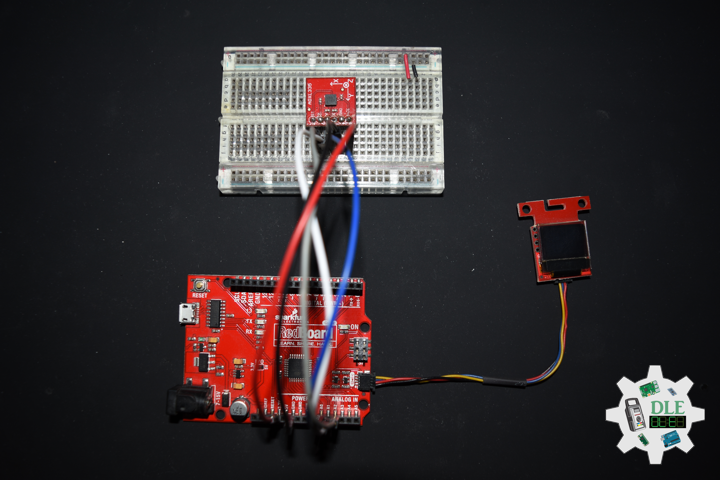
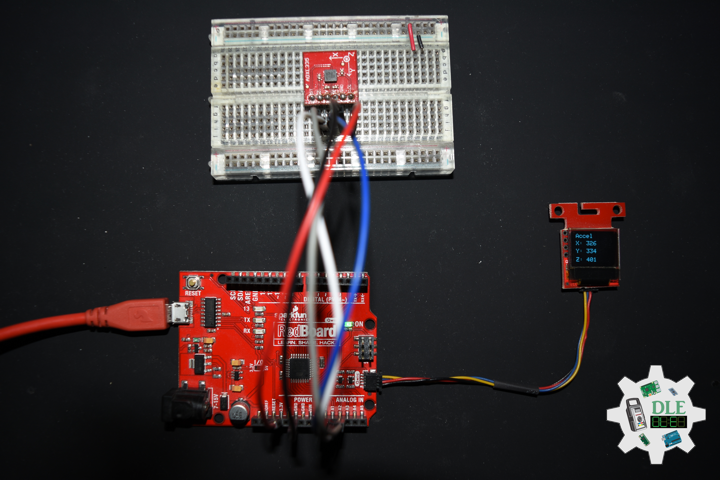
Accelerometer ADXL335

——

Accelerometer ADXL335

——

Accelerometer ADXL335

——

Accelerometer

An accelerometer is a tool that measures proper acceleration. Proper acceleration is the acceleration of a body in its own instantaneous rest frame, this is different from coordinate acceleration, which is acceleration in a fixed coordinate system. For example, an accelerometer at rest on the surface of the Earth will measure an acceleration due to Earth’s gravity, straight upwards 9.81 m/s2. By contrast, accelerometers in free fall, falling toward the center of the Earth at a rate of about 9.81 m/s2, will measure zero.

Accelerometers have many uses in industry and science. Highly sensitive accelerometers are used in inertial navigation systems for aircraft and missiles. Vibration in rotating machines is monitored by accelerometers. They are used in tablet computers and digital cameras so that images on screens are always displayed upright. In unmanned aerial vehicles, accelerometers help to stabilise flight. Micromachined microelectromechanical systems accelerometers are increasingly present in portable electronic devices and video-game controllers, to detect changes in the positions of these devices.

SparkFun Triple Axis Accelerometer Breakout – ADXL335

Breakout board for the 3 axis ADXL335 from Analog Devices. This is the latest in a long, proven line of analog sensors, the holy grail of accelerometers. The ADXL335 is a triple axis MEMS accelerometer with extremely low noise and power consumption, only 320uA. The sensor has a full sensing range of +/-3g. There is no on-board regulation, provided power should be between 1.8 and 3.6VDC. Board comes fully assembled and tested with external components installed. The included 0.1uF capacitors set the bandwidth of each axis to 50Hz.

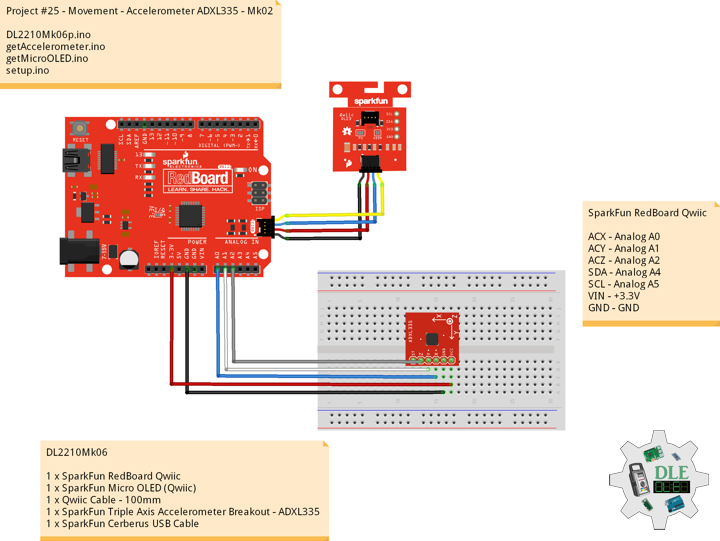
DL2210Mk06

1 x SparkFun RedBoard Qwiic
1 x SparkFun Micro OLED (Qwiic)
1 x Qwiic Cable – 100mm
1 x SparkFun Triple Axis Accelerometer Breakout – ADXL335
1 x SparkFun Cerberus USB Cable

SparkFun RedBoard Qwiic

ACX – Analog A0
ACY – Analog A1
ACZ – Analog A2
SDA – Analog A4
SCL – Analog A5
VIN – +3.3V
GND – GND

——

DL2210Mk06p.ino

/* ***** Don Luc Electronics © *****
Software Version Information
Project #25 - Movement - Accelerometer ADXL335 - Mk02
25-02
DL2210Mk06p.ino
1 x SparkFun RedBoard Qwiic
1 x SparkFun Micro OLED (Qwiic)
1 x Qwiic Cable - 100mm
1 x SparkFun Triple Axis Accelerometer Breakout - ADXL335
1 x SparkFun Cerberus USB Cable
*/

// Include the Library Code
// Two Wire Interface (TWI/I2C)
#include <Wire.h>
// SparkFun Micro OLED
#include <SFE_MicroOLED.h>

// Accelerometer
int iX = A0;
int iY = A1;
int iZ = A2;
// Accelerometer
int X = 0;
int Y = 0;
int Z = 0;

// SparkFun Micro OLED
#define PIN_RESET 9
#define DC_JUMPER 1
// I2C declaration
MicroOLED oled(PIN_RESET, DC_JUMPER);

// Software Version Information
String sver = "25-02";

void loop() {

  // Accelerometer
  isAccelerometer(),
  
  // Micro OLED
  isMicroOLED();

  // One delay in between reads
  delay(1000);
  
}

getAccelerometer.ino

// Accelerometer
// Accelerometer
void isAccelerometer(){

  // Accelerometer X, Y, Z
  // X
  X = analogRead(iX);
  // Y
  Y = analogRead(iY);
  // Z
  Z = analogRead(iZ);

}

getMicroOLED.ino

// SparkFun Micro OLED
// Setup Micro OLED
void isSetupMicroOLED() {

  // Initialize the OLED
  oled.begin();
  // Clear the display's internal memory
  oled.clear(ALL);
  // Display what's in the buffer (splashscreen)
  oled.display();

  // Delay 1000 ms
  delay(1000);

  // Clear the buffer.
  oled.clear(PAGE);
  
}
// Micro OLED
void isMicroOLED() {

  // Text Display Accelerometer
  // Clear the display
  oled.clear(PAGE);
  // Set cursor to top-left
  oled.setCursor(0, 0);
  // Set font to type 0
  oled.setFontType(0);
  // Magnetometer
  oled.print("Accel");
  oled.setCursor(0, 12);
  // X
  oled.print("X: ");
  oled.print(X);
  oled.setCursor(0, 25);
  // Y
  oled.print("Y: ");
  oled.print(Y);
  oled.setCursor(0, 39);
  // Z
  oled.print("Z: ");
  oled.print(Z);
  oled.display();

}

setup.ino

// Setup
void setup() {

  // Give display time to power on
  delay(100);
  
  // Set up I2C bus
  Wire.begin();

  // Setup Micro OLED
  isSetupMicroOLED();
  
}

——

People can contact us: https://www.donluc.com/?page_id=1927

Technology Experience

  • Single-Board Microcontrollers (PIC, Arduino, Raspberry Pi,Espressif, etc…)
  • IoT
  • Wireless (Radio Frequency, Bluetooth, WiFi, Etc…)
  • Robotics
  • Camera and Video Capture Receiver Stationary, Wheel/Tank and Underwater Vehicle
  • Unmanned Vehicles Terrestrial and Marine
  • Machine Learning
  • RTOS
  • Research & Development (R & D)

Instructor and E-Mentor

  • IoT
  • PIC Microcontrollers
  • Arduino
  • Raspberry Pi
  • Espressif
  • Robotics

Follow Us

Luc Paquin – Curriculum Vitae – 2022
https://www.donluc.com/luc/

Web: https://www.donluc.com/
Facebook: https://www.facebook.com/neosteam.labs.9/
YouTube: https://www.youtube.com/channel/UC5eRjrGn1CqkkGfZy0jxEdA
Twitter: https://twitter.com/labs_steam
Pinterest: https://www.pinterest.com/NeoSteamLabs/
Instagram: https://www.instagram.com/neosteamlabs/

Don Luc
Project #25 – Movement – Sensors – Mk01

——

#DonLucElectronics #DonLuc #SparkFunRedBoard #Movement #Magnetometer #Arduino #Project #Fritzing #Programming #Electronics #Microcontrollers #Consultant

——

Sensors

——

Sensors

——

Sensors

——

Movement

Accelerometers, gyroscopes, and magnetometers are the three main sensors we use for detecting motion and orientation. We can sense motion with an accelerometer.

Accelerometers are used to measure acceleration, that means linear motion in X, Y or Z. They can be used to detect when they are being moved around, detect motion, shock or vibration. They can also be used to detect gravitational pull in order to detect orientation or tilt.

Gyroscopes are used to measure rotational motion in X, Y or Z. They are often paired with accelerometers for inertial guidance systems, 3D motion capture and inverted pendulum type applications.

Magnetometers can sense where the strongest magnetic force is coming from, generally used to detect magnetic north, but can also be used for measuring magnetic fields. When combined with accelerometers and gyroscopes you can stabilize orientation calculations and also determine orientation with respect to the Earth.

Many 6-DoF sensors, which combine accelerometer and gyroscope or compass, accelerometer and magnetometer, and 9-DoF sensors that have 9DoF IMU accelerometers and gyroscopes and magnetometers.

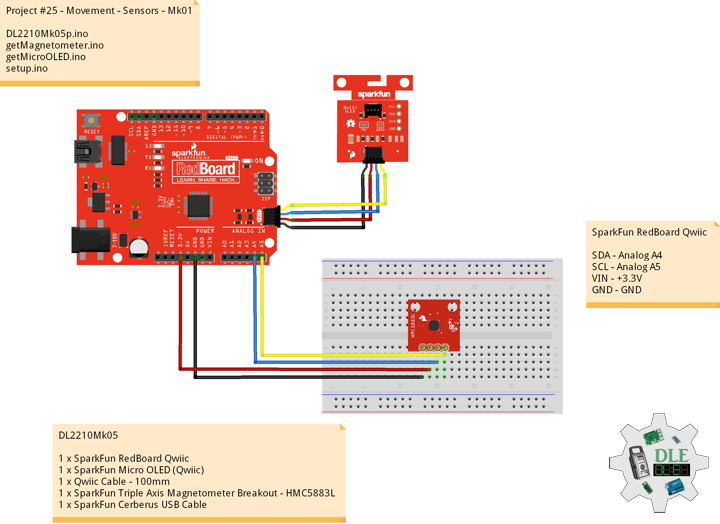
DL2210Mk05

1 x SparkFun RedBoard Qwiic
1 x SparkFun Micro OLED (Qwiic)
1 x Qwiic Cable – 100mm
1 x SparkFun Triple Axis Magnetometer Breakout – HMC5883L
1 x SparkFun Cerberus USB Cable

SparkFun RedBoard Qwiic

SDA – Analog A4
SCL – Analog A5
VIN – +3.3V
GND – GND

DL2210Mk05p.ino

/* ***** Don Luc Electronics © *****
Software Version Information
Project #25 - Movement - Sensors - Mk01
25-01
DL2210Mk05p.ino
1 x SparkFun RedBoard Qwiic
1 x SparkFun Micro OLED (Qwiic)
1 x Qwiic Cable - 100mm
1 x SparkFun Triple Axis Magnetometer Breakout - HMC5883L
1 x SparkFun Cerberus USB Cable
*/

// Include the Library Code
// Two Wire Interface (TWI/I2C)
#include <Wire.h>
// Triple Axis Magnetometer
#include <HMC5883L.h>
// SparkFun Micro OLED
#include <SFE_MicroOLED.h>

// Triple Axis Magnetometer
HMC5883L compass;

// SparkFun Micro OLED
#define PIN_RESET 9
#define DC_JUMPER 1
// I2C declaration
MicroOLED oled(PIN_RESET, DC_JUMPER);

// Triple Axis Magnetometer
int X = 0;
int Y = 0;
int Z = 0;

// Software Version Information
String sver = "25-01";

void loop() {

  // Triple Axis Magnetometer
  isMagnetometer(),
  
  // Micro OLED
  isMicroOLED();

  // One delay in between reads
  delay(1000);
  
}

getMagnetometer.ino

// Magnetometer
// Setup Magnetometer
void isSetupMagnetometer(){

  // Magnetometer Serial
  // Initialize HMC5883L
  while (!compass.begin())
  {
    delay(500);
  }

  // Set measurement range
  // +/- 1.30 Ga: HMC5883L_RANGE_1_3GA (default)
  compass.setRange(HMC5883L_RANGE_1_3GA);

  // Set measurement mode
  // Continuous-Measurement: HMC5883L_CONTINOUS (default)
  compass.setMeasurementMode(HMC5883L_CONTINOUS);
 
  // Set data rate
  // 15.00Hz: HMC5883L_DATARATE_15HZ (default)
  compass.setDataRate(HMC5883L_DATARATE_15HZ);

  // Set number of samples averaged
  // 1 sample:  HMC5883L_SAMPLES_1 (default)
  compass.setSamples(HMC5883L_SAMPLES_1);
  
}
// Magnetometer
void isMagnetometer(){

  // Vector Norm
  Vector norm = compass.readNormalize();
  // Vector X, Y, Z
  // X Normalize
  X = norm.XAxis;
  // Y Normalize
  Y = norm.YAxis;
  // Z Normalize
  Z = norm.ZAxis;

}

getMicroOLED.ino

// SparkFun Micro OLED
// Setup Micro OLED
void isSetupMicroOLED() {

  // Initialize the OLED
  oled.begin();
  // Clear the display's internal memory
  oled.clear(ALL);
  // Display what's in the buffer (splashscreen)
  oled.display();

  // Delay 1000 ms
  delay(1000);

  // Clear the buffer.
  oled.clear(PAGE);
  
}
// Micro OLED
void isMicroOLED() {

  // Text Display Magnetometer
  // Clear the display
  oled.clear(PAGE);
  // Set cursor to top-left
  oled.setCursor(0, 0);
  // Set font to type 0
  oled.setFontType(0);
  // Magnetometer
  oled.print("Magneto");
  oled.setCursor(0, 12);
  // X Normalize
  oled.print("X: ");
  oled.print(X);
  oled.setCursor(0, 25);
  // Y Normalize
  oled.print("Y: ");
  oled.print(Y);
  oled.setCursor(0, 39);
  // Z Normalize
  oled.print("Z: ");
  oled.print(Z);
  oled.display();

}

setup.ino

// Setup
void setup() {

  // Give display time to power on
  delay(100);
  
  // Set up I2C bus
  Wire.begin();

  // Setup Triple Axis Magnetometer
  isSetupMagnetometer();

  // Setup Micro OLED
  isSetupMicroOLED();
  
}

——

People can contact us: https://www.donluc.com/?page_id=1927

Technology Experience

  • Single-Board Microcontrollers (PIC, Arduino, Raspberry Pi,Espressif, etc…)
  • IoT
  • Wireless (Radio Frequency, Bluetooth, WiFi, Etc…)
  • Robotics
  • Camera and Video Capture Receiver Stationary, Wheel/Tank and Underwater Vehicle
  • Unmanned Vehicles Terrestrial and Marine
  • Machine Learning
  • RTOS
  • Research & Development (R & D)

Instructor and E-Mentor

  • IoT
  • PIC Microcontrollers
  • Arduino
  • Raspberry Pi
  • Espressif
  • Robotics

Follow Us

J. Luc Paquin – Curriculum Vitae – 2022 English & Español
https://www.jlpconsultants.com/luc/

Web: https://www.donluc.com/
Web: https://www.jlpconsultants.com/
Facebook: https://www.facebook.com/neosteam.labs.9/
YouTube: https://www.youtube.com/channel/UC5eRjrGn1CqkkGfZy0jxEdA
Twitter: https://twitter.com/labs_steam
Pinterest: https://www.pinterest.com/NeoSteamLabs/
Instagram: https://www.instagram.com/neosteamlabs/

Don Luc
Project #24 – RTOS – Bluetooth – Mk03

——

#DonLucElectronics #DonLuc #ESP32 #RTOS #FreeRTOS #Bluetooth #ThumbJoystick #Keyboard #Arduino #Project #Fritzing #Programming #Electronics #Microcontrollers #Consultant

——

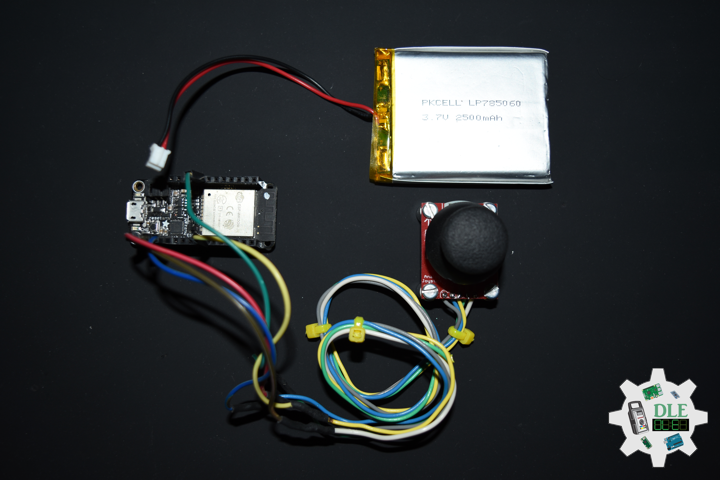
Bluetooth

——

Bluetooth

——

Bluetooth

——

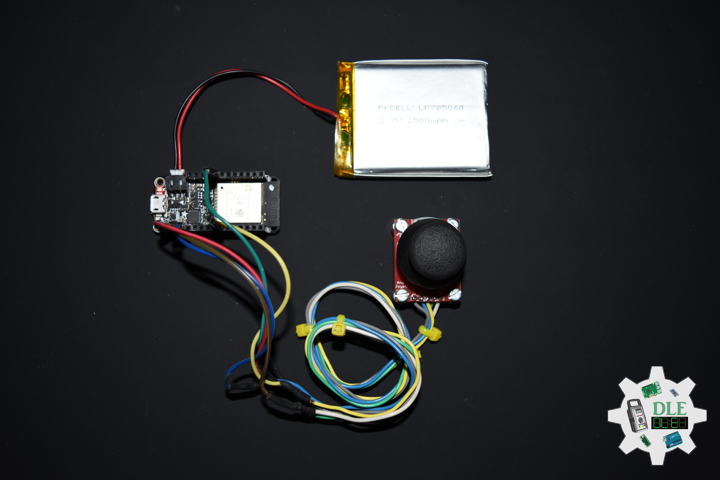
Joystick

A joystick is an input device consisting of a stick that pivots on a base and reports its angle or direction to the device it is controlling. Joysticks are often used to control video games, and usually have one or more push-buttons whose state can also be read by the computer. A popular variation of the joystick used on modern video game consoles is the analog stick. Joysticks are also used for controlling machines such as cranes, trucks, underwater unmanned vehicles, wheelchairs, surveillance cameras, and zero turning radius lawn mowers. This is a joystick very similar to the analog joysticks on PS2 controllers. Directional movements are simply two potentiometers, one for each axis. Pots are 10k Ohm each. This joystick also has a select button that is actuated when the joystick is pressed down.

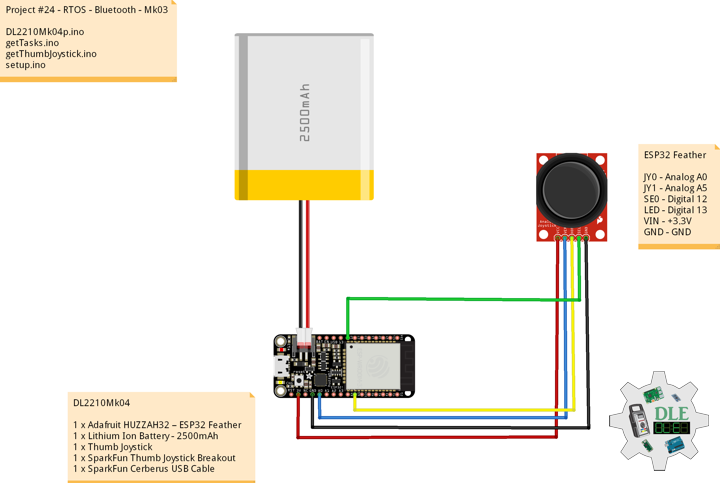
DL2210Mk04

1 x Adafruit HUZZAH32 – ESP32 Feather
1 x Lithium Ion Battery – 2500mAh
1 x Thumb Joystick
1 x SparkFun Thumb Joystick Breakout
1 x SparkFun Cerberus USB Cable

ESP32 Feather

JY0 – Analog A0
JY1 – Analog A5
SE0 – Digital 12
LED – Digital 13
VIN – +3.3V
GND – GND

——

DL2210Mk04p.ino

/* ***** Don Luc Electronics © *****
Software Version Information
Project #24 - RTOS - Bluetooth - Mk03
24-03
DL2210Mk04p.ino
1 x Adafruit HUZZAH32 – ESP32 Feather
1 x Lithium Ion Battery - 2500mAh
1 x Thumb Joystick
1 x SparkFun Thumb Joystick Breakout
1 x SparkFun Cerberus USB Cable
*/

// Include the Library Code
// FreeRTOS ESP32
#if CONFIG_FREERTOS_UNICORE
#define ARDUINO_RUNNING_CORE 0
#else
#define ARDUINO_RUNNING_CORE 1
#endif
// ESP32 BLE Keyboard
#include <BleKeyboard.h>

// ESP32 BLE Keyboard
BleKeyboard bleKeyboard;

// Connections to joystick
// Vertical
const int VERT = A0;
// Horizontal
const int HORIZ = A5;
// Pushbutton
const int SEL = 12;
// Initialize variables for analog and digital values
int vertical;
int horizontal;
int selec;

// Led Built In
#ifndef LED_BUILTIN
#define LED_BUILTIN 13
#endif

// Define two tasks for Blink
void isTaskBlink( void *pvParameters );

// Software Version Information
String sver = "24-03";

void loop() {

  // ESP32 BLE Keyboard
  if(bleKeyboard.isConnected()) {

    // Thumb Joystick
    isThumbJoystick();

  }

  // Delay
  delay( 1000 );
  
}

getTasks.ino

// Tasks
// Setup Task
void isSetupTask(){

  // Now set up two tasks to run independently
  // TaskBlink
  xTaskCreatePinnedToCore(
    isTaskBlink
    ,  "TaskBlink"   // A name just for humans
    ,  1024  // This stack size can be checked & adjusted by reading.
    ,  NULL
    ,  2  // Priority, with 2 being the highest, and 0 being the lowest.
    ,  NULL 
    ,  ARDUINO_RUNNING_CORE);

  // Now the task scheduler, which takes over control of scheduling individual tasks,
  // is automatically started.
  
}
// This is a Task Blink
void isTaskBlink(void *pvParameters)
{
  
  (void) pvParameters;

  // Blink
  // Turns on an LED on for 2 second, then off for 2 second, repeatedly

  // Initialize digital LED_BUILTIN on pin 13 as an output.
  pinMode(LED_BUILTIN, OUTPUT);

  // A Task shall never return or exit
  for (;;) 
  {
    
    // Turn the LED on (HIGH is the voltage level)
    digitalWrite(LED_BUILTIN, HIGH);
    // One tick delay in between reads
    vTaskDelay(2000);
    // Turn the LED off by making the voltage LOW
    digitalWrite(LED_BUILTIN, LOW);
    // One tick delay in between reads
    vTaskDelay(2000);
    
  }
  
}

getThumbJoystick.ino

// Thumb Joystick
void isThumbJoystick() {

  // Read all values from the joystick
  // Joystick was sitting around 2047 for the vertical and horizontal values
  // Will be 0-4095
  // Vertical
  vertical = analogRead(VERT);
  if (vertical == 4095) {

    // Volume Up
    bleKeyboard.write(KEY_MEDIA_VOLUME_UP);
    
  } else if (vertical == 0) {

    // Volume Down
    bleKeyboard.write(KEY_MEDIA_VOLUME_DOWN);
    
  }
  // Horizontal
  // Will be 0-4095
  horizontal = analogRead(HORIZ);
  if (horizontal == 4095) {

    // Previous Track
    bleKeyboard.write(KEY_MEDIA_PREVIOUS_TRACK);
    
  } else if (horizontal == 0) {

    // Next Track
    bleKeyboard.write(KEY_MEDIA_NEXT_TRACK);
    
  }
  // Will be HIGH (1) if not pressed, and LOW (0) if pressed
  selec = digitalRead(SEL);
  if (selec == 0) {

    // Play/Pause media key
    bleKeyboard.write(KEY_MEDIA_PLAY_PAUSE);
    
  }

}

setup.ino

// Setup
void setup() {

  // Make the SEL line an input
  pinMode(SEL, INPUT_PULLUP);

  // ESP32 BLE Keyboard
  bleKeyboard.begin();

  // Setup Task
  isSetupTask();
  
}

——

People can contact us: https://www.donluc.com/?page_id=1927

Technology Experience

  • Single-Board Microcontrollers (PIC, Arduino, Raspberry Pi,Espressif, etc…)
  • IoT
  • Wireless (Radio Frequency, Bluetooth, WiFi, Etc…)
  • Robotics
  • Camera and Video Capture Receiver Stationary, Wheel/Tank and Underwater Vehicle
  • Unmanned Vehicles Terrestrial and Marine
  • Machine Learning
  • RTOS
  • Research & Development (R & D)

Instructor and E-Mentor

  • IoT
  • PIC Microcontrollers
  • Arduino
  • Raspberry Pi
  • Espressif
  • Robotics

Follow Us

J. Luc Paquin – Curriculum Vitae – 2022 English & Español
https://www.jlpconsultants.com/luc/

Web: https://www.donluc.com/
Web: https://www.jlpconsultants.com/
Facebook: https://www.facebook.com/neosteam.labs.9/
YouTube: https://www.youtube.com/channel/UC5eRjrGn1CqkkGfZy0jxEdA
Twitter: https://twitter.com/labs_steam
Pinterest: https://www.pinterest.com/NeoSteamLabs/
Instagram: https://www.instagram.com/neosteamlabs/

Don Luc
Project #24 – RTOS – Magnetometers HMC5883L – Mk02

——

#DonLucElectronics #DonLuc #SparkFunRedBoard #RTOS #FreeRTOS #Magnetometer #Arduino #Project #Fritzing #Programming #Electronics #Microcontrollers #Consultant

——

Magnetometers HMC5883L

——

Magnetometers HMC5883L

——

Magnetometers HMC5883L

——

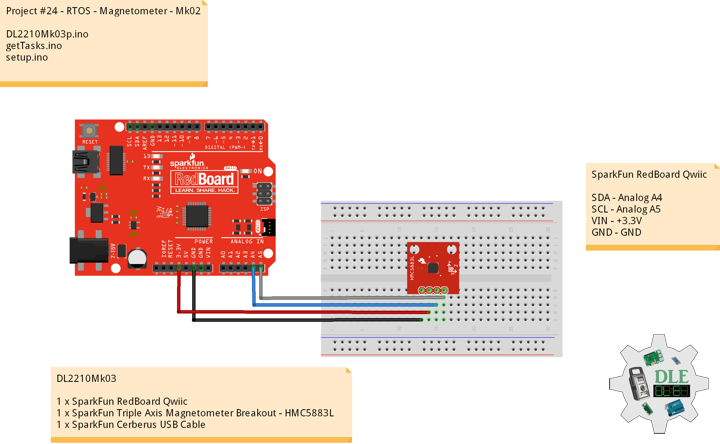
SparkFun Triple Axis Magnetometer Breakout – HMC5883L

This is a breakout board for Honeywell’s HMC5883L, a 3-axis digital compass. Communication with the HMC5883L is simple and all done through an I2C interface. There is no on-board regulator, so a regulated voltage of 2.16-3.6VDC should be supplied. The breakout board includes the HMC5883L sensor and all filtering capacitors as shown. The power and 2-wire interface pins are all broken out to a 0.1″ pitch header.

Magnetometers have a wide range of uses. The most common include using the chip as a digital compass to sense direction or using them to detect ferrous (magnetic) metals. Magnetic fields and current go hand-in-hand. When current flows through a wire, a magnetic field is created. This is the basic principle behind electromagnets. This is also the principle used to measure magnetic fields with a magnetometer. The direction of Earth’s magnetic fields affects the flow of electrons in the sensor, and those changes in current can be measured and calculated to derive a compass heading or other useful information.

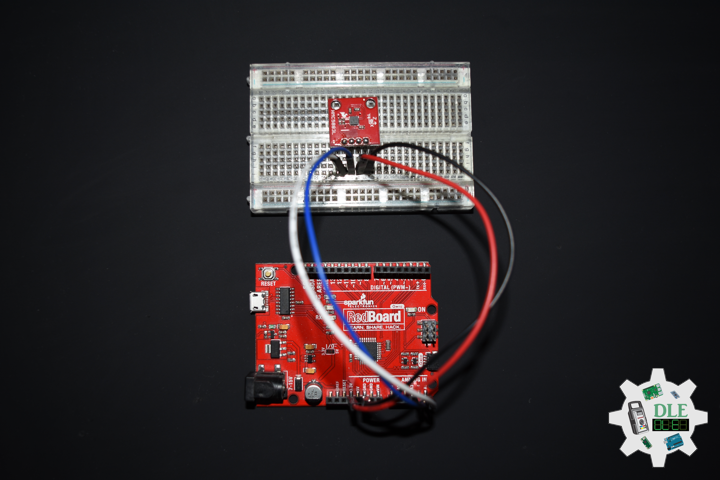
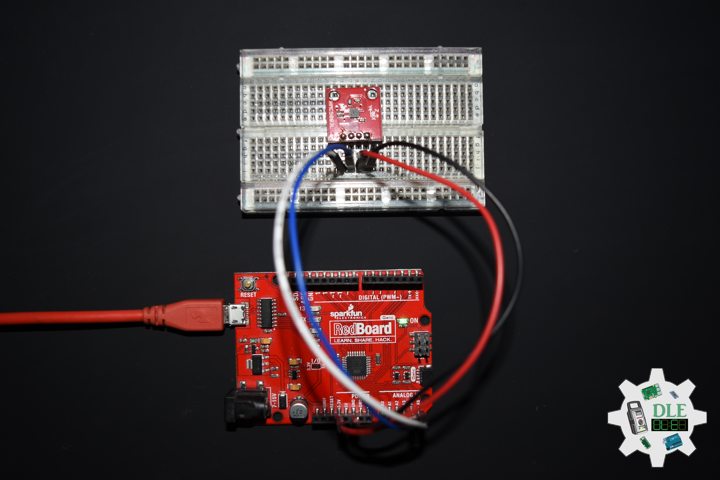
DL2210Mk03

1 x SparkFun RedBoard Qwiic
1 x SparkFun Triple Axis Magnetometer Breakout – HMC5883L
1 x SparkFun Cerberus USB Cable

SparkFun RedBoard Qwiic

SDA – Analog A4
SCL – Analog A5
VIN – +3.3V
GND – GND

DL2210Mk03p.ino

/* ***** Don Luc Electronics © *****
Software Version Information
Project #24 - RTOS - Magnetometer - Mk02
24-02
DL2210Mk03p.ino
1 x SparkFun RedBoard Qwiic
1 x SparkFun Triple Axis Magnetometer Breakout - HMC5883L
1 x SparkFun Cerberus USB Cable
*/

// Include the Library Code
// FreeRTOS
#include <Arduino_FreeRTOS.h>
// Two Wire Interface (TWI/I2C)
#include <Wire.h>
// Triple Axis Magnetometer
#include <HMC5883L.h>

// Define two tasks for Triple Axis Magnetometer
void isTaskMagnetometer( void *pvParameters );

// Software Version Information
String sver = "24-02";

void loop() {

  // Empty. Things are done in Tasks.
  
}

getTasks.ino

// Tasks
// Setup Task
void isSetupTask(){

  // Now set up one tasks to run independently
  // Magnetometer
  //xTaskCreatePinnedToCore(
  xTaskCreate(
    isTaskMagnetometer
    ,  "Magnetometer"
    ,  128  // Stack size
    ,  NULL
    ,  1  // Priority
    ,  NULL);

  // Now the task scheduler, which takes over control of scheduling individual tasks,
  // is automatically started.
  
}
// This is a Task Magnetometer Serial
void isTaskMagnetometer(void *pvParameters)
{
  
  (void) pvParameters;
  
  // Triple Axis Magnetometer
  HMC5883L compass;

  // Magnetometer Serial
  // Initialize HMC5883L
  Serial.println("Initialize HMC5883L");
  while (!compass.begin())
  {
    Serial.println("Could not find a valid HMC5883L sensor, check wiring!");
    delay(500);
  }

  // Set measurement range
  // +/- 1.30 Ga: HMC5883L_RANGE_1_3GA (default)
  compass.setRange(HMC5883L_RANGE_1_3GA);

  // Set measurement mode
  // Continuous-Measurement: HMC5883L_CONTINOUS (default)
  compass.setMeasurementMode(HMC5883L_CONTINOUS);
 
  // Set data rate
  // 15.00Hz: HMC5883L_DATARATE_15HZ (default)
  compass.setDataRate(HMC5883L_DATARATE_15HZ);

  // Set number of samples averaged
  // 1 sample:  HMC5883L_SAMPLES_1 (default)
  compass.setSamples(HMC5883L_SAMPLES_1);

  for (;;)
  {
    
    // Vector Norm
    Vector norm = compass.readNormalize();
    // Vector X, Y, Z
    Serial.print("Xnorm = ");
    Serial.print(norm.XAxis);
    Serial.print(" Ynorm = ");
    Serial.print(norm.YAxis);
    Serial.print(" ZNorm = ");
    Serial.print(norm.ZAxis);
    Serial.println();  
    // One tick delay in between reads
    vTaskDelay(500);
    
  }
  
}

setup.ino

// Setup
void setup() {

  // Initialize serial communication
  // at 9600 bits per second:
  Serial.begin(9600);

  // Setup Task
  isSetupTask();
  
}

——

People can contact us: https://www.donluc.com/?page_id=1927

Technology Experience

  • Single-Board Microcontrollers (PIC, Arduino, Raspberry Pi,Espressif, etc…)
  • IoT
  • Robotics
  • Camera and Video Capture Receiver Stationary, Wheel/Tank and Underwater Vehicle
  • Unmanned Vehicles Terrestrial and Marine
  • Research & Development (R & D)

Instructor and E-Mentor

  • IoT
  • PIC Microcontrollers
  • Arduino
  • Raspberry Pi
  • Espressif
  • Robotics

Follow Us

J. Luc Paquin – Curriculum Vitae – 2022 English & Español
https://www.jlpconsultants.com/luc/

Web: https://www.donluc.com/
Web: https://www.jlpconsultants.com/
Facebook: https://www.facebook.com/neosteam.labs.9/
YouTube: https://www.youtube.com/channel/UC5eRjrGn1CqkkGfZy0jxEdA
Twitter: https://twitter.com/labs_steam
Pinterest: https://www.pinterest.com/NeoSteamLabs/
Instagram: https://www.instagram.com/neosteamlabs/

Don Luc