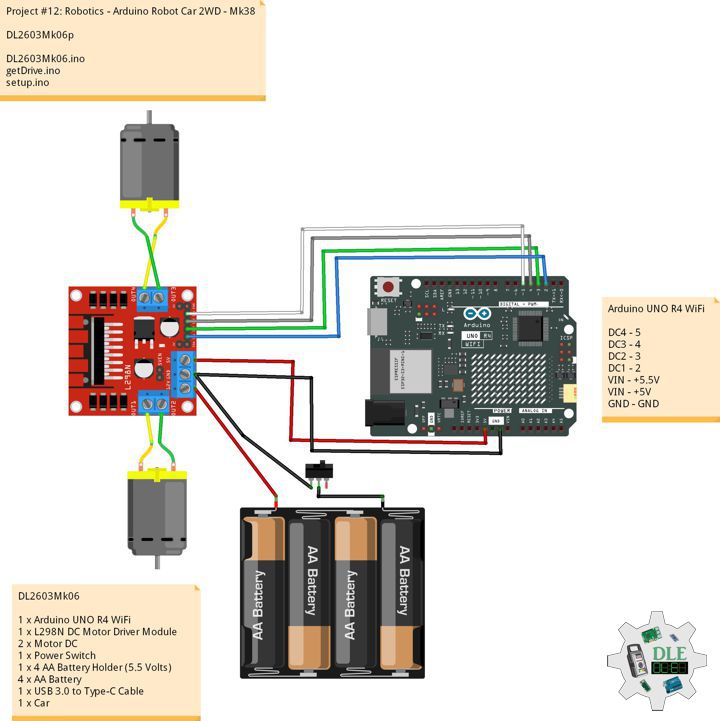
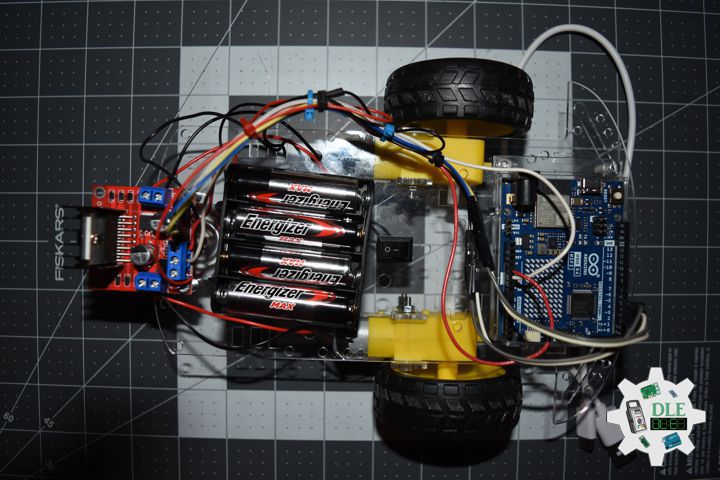
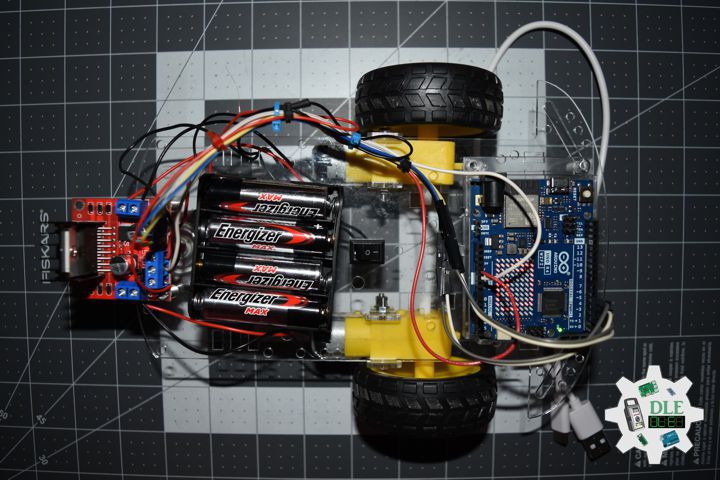
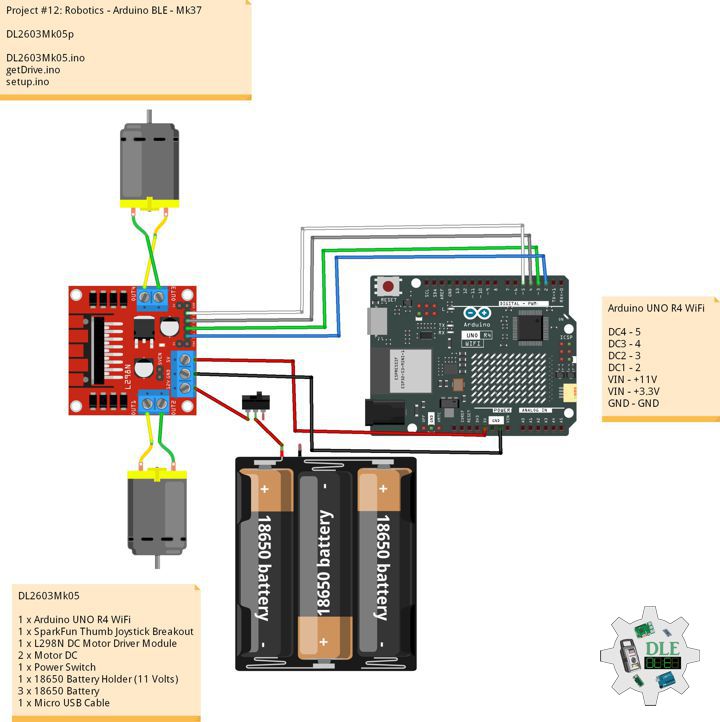
Project #12: Robotics – Arduino BLE – Mk37

——

#DonLucElectronics #DonLuc #Robotics #BLE #L298N #MotorDC #ArduinoUNOR4 #Project #Fritzing #Programming #Electronics #Microcontrollers #Consultant

——

Arduino BLE

——

Arduino BLE

——

Arduino BLE

——

Arduino Bluetooth Low Energy

Bluetooth Low Energy, often referred to as Bluetooth LE, is a wireless communication technology designed for short-range data exchange between electronic devices. It emerged as a response to the need for energy-efficient wireless communication in various applications, especially those where power consumption is a critical concern.

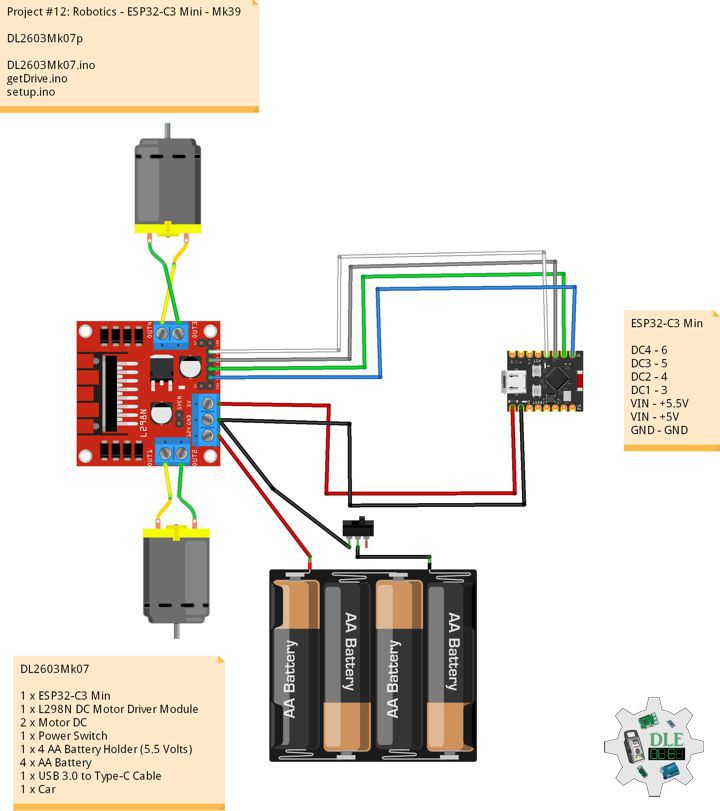
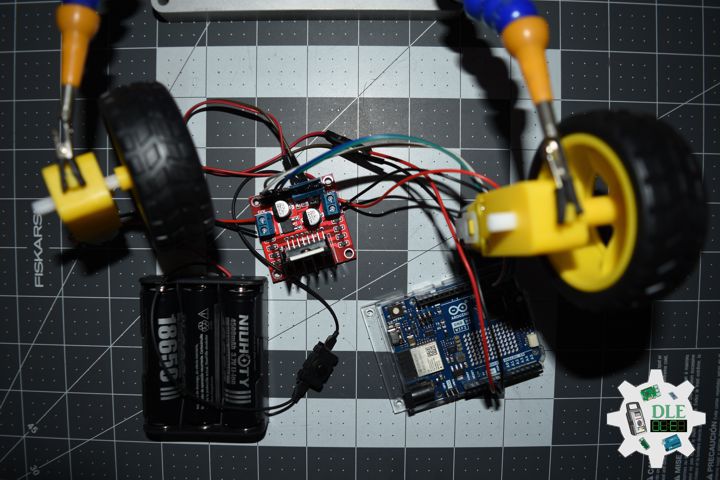
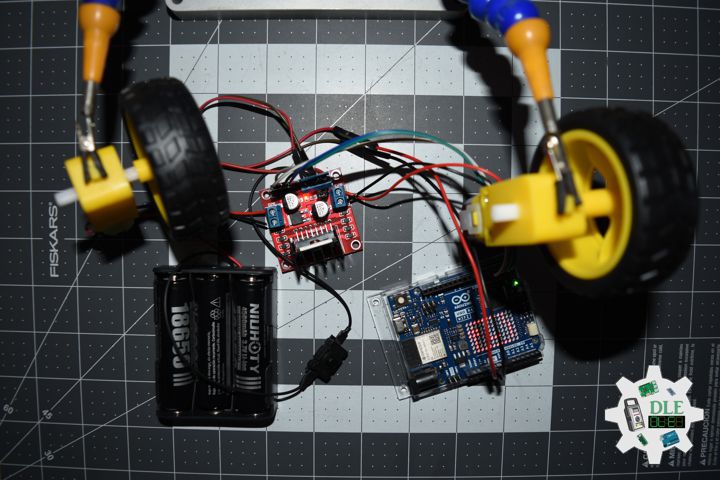
DL2603Mk05

1 x Arduino UNO R4 WiFi
1 x L298N DC Motor Driver Module
2 x Motor DC
1 x Power Switch
1 x 18650 Battery Holder (11 Volts)
3 x 18650 Battery
1 x USB 3.0 to Type-C Cable

DL2603Mk05p

DL2603Mk05p.ino

/****** Don Luc Electronics © ******
Software Version Information
Project #12: Robotics - Arduino BLE - Mk37
12-37
DL2603Mk05p.ino
DL2603Mk05
1 x Arduino UNO R4 WiFi
1 x L298N DC Motor Driver Module
2 x Motor DC
1 x Power Switch
1 x 18650 Battery Holder (11 Volts)
3 x 18650 Battery
1 x Micro USB Cable
*/

// Include the Library Code
// LED_Matrix library
#include "Arduino_LED_Matrix.h" 
// Arduino BLE
#include <ArduinoBLE.h>

// Arduino UNO R4 WiFi
// Car Service
BLEService carService("546b10ec-9c23-4f5e-ab33-cd415313439f");
// Command Char
BLECharacteristic commandChar("c607bca7-4832-4032-a0ab-e9c180dcce1e", BLEWrite, 20);

// Create an instance of the ArduinoLEDMatrix class
ArduinoLEDMatrix matrix;

// Motor DC 1 
int motor1pin1 = 2;
int motor1pin2 = 3;

// Motor DC 2
int motor2pin1 = 4;
int motor2pin2 = 5;

// CMD
char cmd;

// Software Version Information
String sver = "12-37";

void loop() {

  // BLE Device Central
  BLEDevice central = BLE.central();
  // Central
  if (central) {
    
    // Connected
    while (central.connected()) {

      // Written
      if (commandChar.written()) {

        // CMD
        cmd = commandChar.value()[0];
       
        // Drive
        drive(cmd);

      }

    }

  }

}

getDrive.ino

// Drive
void drive(char cmd) {
  // Forward
       if (cmd == 'F') { forward();  }  
    // Backward
  else if (cmd == 'B') { backward(); }  
  // Left
  else if (cmd == 'L') { left(); } 
  // Right     
  else if (cmd == 'R') { right(); }
  // Stop
  else { stopCar(); }
}

// Forward
void forward()  { digitalWrite(motor1pin1, LOW);  digitalWrite(motor1pin2, HIGH); digitalWrite(motor2pin1, HIGH); digitalWrite(motor2pin2, LOW); }
// Backward
void backward() { digitalWrite(motor1pin1, HIGH); digitalWrite(motor1pin2, LOW);  digitalWrite(motor2pin1, LOW);  digitalWrite(motor2pin2,HIGH); }
// Left
void left()     { digitalWrite(motor1pin1, LOW);  digitalWrite(motor1pin2, HIGH); digitalWrite(motor2pin1, LOW);  digitalWrite(motor2pin2, LOW); }
// Right
void right()    { digitalWrite(motor1pin1, LOW);  digitalWrite(motor1pin2, LOW);  digitalWrite(motor2pin1, HIGH); digitalWrite(motor2pin2, LOW); }
// Stop
void stopCar()  { digitalWrite(motor1pin1, LOW);  digitalWrite(motor1pin2, LOW);  digitalWrite(motor2pin1, LOW);  digitalWrite(motor2pin2, LOW); }

setup.ino

// Setup
void setup()
{
 
  // Initialize the LED matrix
  matrix.begin();

  // Load and display the basic emoji frame on the LED matrix
  matrix.loadFrame(LEDMATRIX_UNO);
  
  // Motor DC 1
  pinMode(motor1pin1, OUTPUT);
  pinMode(motor1pin2, OUTPUT);

  // Motor DC 2
  pinMode(motor2pin1, OUTPUT);
  pinMode(motor2pin2, OUTPUT);

  // Serial Begin
  Serial.begin(9600);
  
  // BLE Begin
  if (!BLE.begin()) {
    
    while (1);

  }

  // Name
  BLE.setLocalName("UnoR4Car");
  // Advertised Service
  BLE.setAdvertisedService(carService);
  // Characteristic
  carService.addCharacteristic(commandChar);
  // Service
  BLE.addService(carService);
  // Advertise
  BLE.advertise();

}

——

People can contact us: https://www.donluc.com/?page_id=1927

Consultant, R&D, Electronics, IoT, Teacher and Instructor

  • Programming Language
  • Single-Board Microcontrollers (PIC, Arduino, Raspberry Pi, Arm, Silicon Labs, Espressif, Etc…)
  • IoT
  • Wireless (Radio Frequency, Bluetooth, WiFi, Etc…)
  • Robotics
  • Automation
  • Camera and Video Capture Receiver Stationary, Wheel/Tank , Underwater and UAV Vehicle
  • Unmanned Vehicles Terrestrial, Marine and UAV
  • Machine Learning
  • Artificial Intelligence (AI)
  • RTOS
  • Sensors, eHealth Sensors, Biosensor, and Biometric
  • Research & Development (R & D)
  • Consulting

Follow Us

Luc Paquin – Curriculum Vitae – 2026
https://www.donluc.com/luc/LucPaquinCVEng2026Mk01.pdf
https://www.donluc.com/luc/

Web: https://www.donluc.com/
Web: https://www.jlpconsultants.com/
Facebook: https://www.facebook.com/neosteam.labs.9/
YouTube: https://www.youtube.com/@thesass2063
DFRobot: https://learn.dfrobot.com/user-10186.html
Elecrow: https://www.elecrow.com/share/sharepj/center/no/760816d385ebb1edc0732fd873bfbf13
TikTok: https://www.tiktok.com/@luc.paquin8
Hackster: https://www.hackster.io/luc-paquin
LinkedIn: https://www.linkedin.com/in/jlucpaquin/

Don Luc

Project #15: Environment – Gravity: I2C SD2405 RTC – Mk38

——

#DonLucElectronics #DonLuc #RTC #SD #Buzzer #FlameSensor #AHT20 #FireBeetle2ESP32E #ESP32 #Display #IoT #Project #Fritzing #Programming #Electronics #Microcontrollers #Consultant

——
Gravity: I2C SD2405 RTC

——

Gravity: I2C SD2405 RTC

——

Gravity: I2C SD2405 RTC

——

Gravity: I2C SD2405 RTC Module

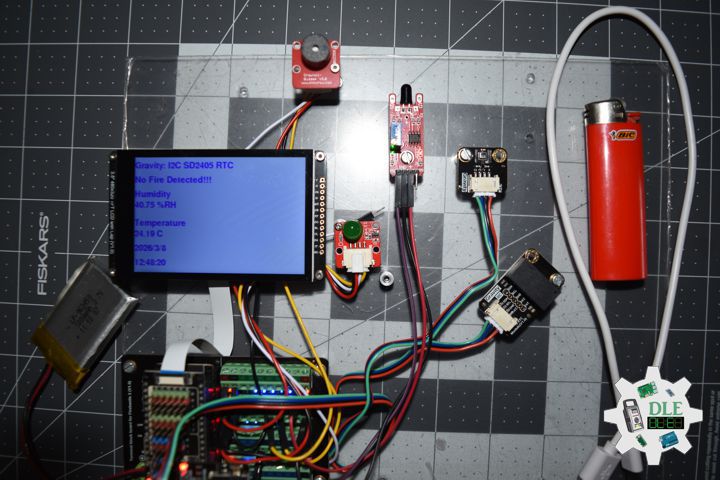
This is an extremely accurate I2C Real Time Clock (RTC) with crystal compensation, inner chargeable battery. The SD2405AL is available in industrial temperature ranges. The SD2405AL is dual power supply system. When the primary power supply goes down to an assigned value or resumes from low power, the system can switch between the primary power supply and battery automatically. Even there is no external power, it can still work for 5~8 years, 1uA ultra-low power consumption (inner battery).

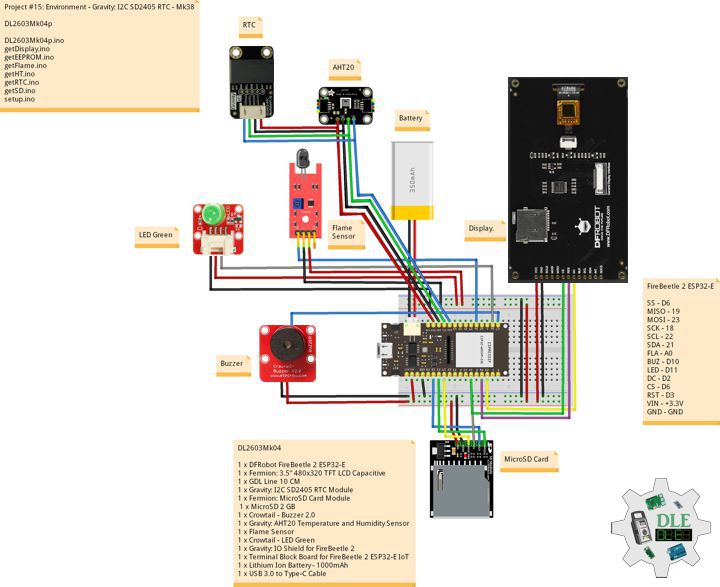
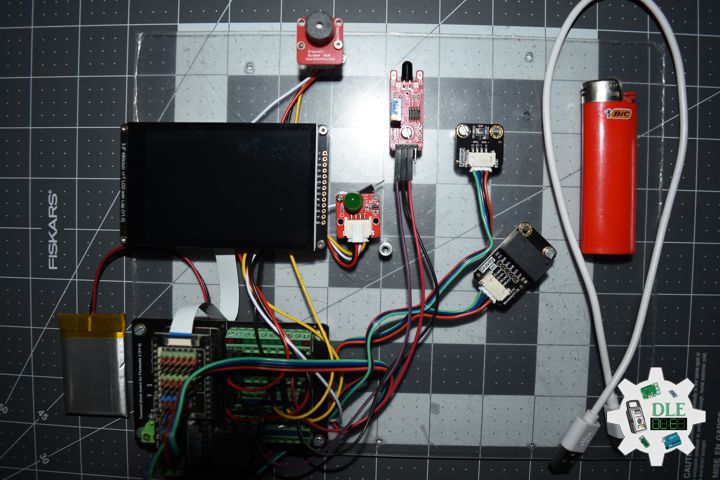
DL2603Mk04

1 x DFRobot FireBeetle 2 ESP32-E
1 x Fermion: 3.5” 480×320 TFT LCD Capacitive
1 x GDL Line 10 CM
1 x Gravity: I2C SD2405 RTC Module
1 x Fermion: MicroSD Card Module
1 x MicroSD 2 GB
1 x Crowtail – Buzzer 2.0
1 x Gravity: AHT20 Temperature and Humidity Sensor
1 x Flame Sensor
1 x Crowtail – LED Green
1 x Gravity: IO Shield for FireBeetle 2
1 x Terminal Block Board for FireBeetle 2 ESP32-E IoT
1 x Lithium Ion Battery – 1000mAh
1 x USB 3.0 to Type-C Cable

DL2603Mk04p

DL2603Mk04p.ino

/****** Don Luc Electronics © ******
Software Version Information
Project #15: Environment - Gravity: I2C SD2405 RTC - Mk38
15-38
DL2603Mk04p.ino
DL2603Mk04
1 x DFRobot FireBeetle 2 ESP32-E
1 x Fermion: 3.5” 480x320 TFT LCD Capacitive
1 x GDL Line 10 CM
1 x Gravity: I2C SD2405 RTC Module
1 x Fermion: MicroSD Card Module
1 x MicroSD 2 GB
1 x Crowtail - Buzzer 2.0
1 x Gravity: AHT20 Temperature and Humidity Sensor
1 x Flame Sensor
1 x Crowtail - LED Green
1 x Gravity: IO Shield for FireBeetle 2
1 x Terminal Block Board for FireBeetle 2 ESP32-E IoT
1 x Lithium Ion Battery - 1000mAh
1 x Micro USB Cable
*/

// Include the Library Code
// EEPROM Library to Read and Write EEPROM with Unique ID for Unit
#include "EEPROM.h"
// Wire
#include <Wire.h>
// DFRobot Display GDL API
#include <DFRobot_GDL.h>
// AHT20 Humidity and Temperature Sensor
#include <DFRobot_AHT20.h>
// SD Card
#include "FS.h"
#include "SD.h"
#include "SPI.h"
// RTC (Real-Time Clock)
#include <GravityRtc.h>

// RTC (Real-Time Clock) Initialization
GravityRtc rtc;
String dateRTC = "";
String timeRTC = "";

// MicroSD Card
const int chipSelect = D6;
String zzzzzz = "";

// Buzzer
int iBuzzer = D10;

// AHT20 Humidity and Temperature Sensor
DFRobot_AHT20 aht20;
// AHT20 Humidity and Temperature Sensor
float h = 0;
float t = 0;

// Flame Sensor
// LED Green
int iLEDG = D11;
// Flame Sensor
int iFlame =  A0;
String sF = "";

// Defined ESP32
#define TFT_DC  D2
#define TFT_CS  D6
#define TFT_RST D3

/*dc=*/ /*cs=*/ /*rst=*/
// DFRobot Display 320x480
DFRobot_ILI9488_320x480_HW_SPI screen(TFT_DC, TFT_CS, TFT_RST);

// Software Version Information
// EEPROM Unique ID Information
#define EEPROM_SIZE 64
String uid = "";

// Software Version Information
String sver = "15-38";

void loop() {
  
  // RTC (Real-Time Clock)
  isRTC();
  
  // AHT20 Humidity and Temperature Sensor
  isHT();
  
  // Flame Sensor
  isFlame();

  // isDisplay HT
  isDisplayHT();

  // Delay 0.1 Second
  delay( 100 );

}

getDisplay.ino

// DFRobot Display 320x480
// DFRobot Display 320x480 - UID
void isDisplayUID(){

  // DFRobot Display 320x480
  // Text Display
  // Text Wrap
  screen.setTextWrap(false);
  // Rotation
  screen.setRotation(3);
  // Fill Screen => black
  screen.fillScreen(0x0000);
  // Text Color => white
  screen.setTextColor(0xffff);
  // Font => Free Sans Bold 12pt
  screen.setFont(&FreeSansBold12pt7b);
  // TextSize => 1.5
  screen.setTextSize(1.5);
  // Don Luc Electronics
  screen.setCursor(0, 30);
  screen.println("Don Luc Electronics");
  // Tilt Switch
  screen.setCursor(0, 60);
  screen.println("Gravity: I2C SD2405 RTC");
  // Version
  screen.setCursor(0, 90);
  screen.println("Version");
  screen.setCursor(0, 120);
  screen.println( sver );
  // EEPROM
  screen.setCursor(0, 150);
  screen.println("EEPROM");
  screen.setCursor(0, 180);
  screen.println( uid );

}
// isDisplay HT
void isDisplayHT(){

  // DFRobot Display 320x480
  // Text Display
  // Text Wrap
  screen.setTextWrap(false);
  // Rotation
  screen.setRotation(3);
  // Fill Screen => white
  screen.fillScreen(0xffff);
  // Text Color => blue
  screen.setTextColor(0x001F);
  // Font => Free Sans Bold 12pt
  screen.setFont(&FreeSansBold12pt7b);
  // TextSize => 1.5
  screen.setTextSize(1.5);
  // RTC (Real-Time Clock)
  screen.setCursor(0, 30);
  screen.println("Gravity: I2C SD2405 RTC");
  // Flame Switch
  screen.setCursor(0, 70);
  screen.println( sF );
  // Humidity
  screen.setCursor(0, 110);
  screen.println("Humidity");
  screen.setCursor(0, 140);
  screen.print( h );
  screen.setCursor(65, 140);
  screen.println( "%RH" );
  // Temperature
  screen.setCursor(0, 190);
  screen.println("Temperature");
  screen.setCursor(0, 220);
  screen.print( t );
  screen.setCursor(65, 220);
  screen.println( "C" );
  // Date
  screen.setCursor(0, 260);
  screen.print( dateRTC );
  // Time
  screen.setCursor(0, 300);
  screen.print( timeRTC );

}

getEEPROM.ino

// isUID EEPROM Unique ID
void isUID()
{
  
  // Is Unit ID
  uid = "";
  for (int x = 0; x < 7; x++)
  {
    uid = uid + char(EEPROM.read(x));
  }
  
}

getFlame.ino

// Flame Sensor
// is Tilt
void isFlame(){

  // Flame
  // Check if Flame Sensor
  if(digitalRead( iFlame) == 0 ){   
    
    // Turn LED HIGH
    digitalWrite(iLEDG, HIGH);
    sF = "Fire Detected!!!";

    // iBuzzer On
    digitalWrite(iBuzzer, HIGH);

    // MicroSD Card
    isSD();

  } 
  else {
    
    // Turn LED LOW
    digitalWrite(iLEDG, LOW);
    sF = "No Fire Detected!!!";

    // iBuzzer Off
    digitalWrite(iBuzzer, LOW);
    
  }

}

getHT.ino

// AHT20 Humidity and Temperature Sensor
void isHT(){

  if(aht20.startMeasurementReady(true)){

    // Humidity
    h = aht20.getHumidity_RH();
  
   // Temperature
   t = aht20.getTemperature_C();
   }
  
}

getRTC.ino

// RTC (Real-Time Clock)
// is RTC (Real-Time Clock)
void isRTC(){

  // RTC (Real-Time Clock)
  rtc.read();
  
  // Date
  dateRTC = rtc.year; 
  dateRTC = dateRTC + "/";
  dateRTC = dateRTC + rtc.month;
  dateRTC = dateRTC + "/";
  dateRTC = dateRTC + rtc.day;
  
  // Time
  timeRTC = rtc.hour;
  timeRTC = timeRTC + ":";
  timeRTC = timeRTC + rtc.minute;
  timeRTC = timeRTC + ":";
  timeRTC = timeRTC + rtc.second;

}

getSD.ino

// MicroSD Card
// MicroSD Setup
void isSetupSD() {

    // MicroSD Card
    pinMode( chipSelect , OUTPUT );
    if(!SD.begin( chipSelect )){
        ;  
        return;
    }
    
    uint8_t cardType = SD.cardType();

    // CARD NONE
    if(cardType == CARD_NONE){
        ; 
        return;
    }

    // SD Card Type
    if(cardType == CARD_MMC){
        ; 
    } else if(cardType == CARD_SD){
        ; 
    } else if(cardType == CARD_SDHC){
        ; 
    } else {
        ; 
    } 

    // Size
    uint64_t cardSize = SD.cardSize() / (1024 * 1024);
 
}
// MicroSD Card
void isSD() {

  zzzzzz = "";

  //DLE|EEPROM Unique ID|Version|Flame|Date|Time|Humidity|Temperature|*\r
  zzzzzz = "DLE|" + uid + "|" + sver + "|" + String( sF ) + "|" 
  + String( dateRTC ) + "|" + String( timeRTC ) + "|" 
  + String( h ) + "|" + String( t ) + "|*\r";

  // msg + 1
  char msg[zzzzzz.length() + 1];

  zzzzzz.toCharArray(msg, zzzzzz.length() + 1);

  // Append File
  appendFile(SD, "/dledata.txt", msg );
  
}
// List Dir
void listDir(fs::FS &fs, const char * dirname, uint8_t levels){
    
    // List Dir
    dirname;
    
    File root = fs.open(dirname);
    
    if(!root){
        return;
    }
    
    if(!root.isDirectory()){
        return;
    }

    File file = root.openNextFile();
    
    while(file){
        if(file.isDirectory()){
            file.name();
            if(levels){
                listDir(fs, file.name(), levels -1);
            }
        } else {
            file.name();
            file.size();
        }
        file = root.openNextFile();
    }
    
}
// Write File
void writeFile(fs::FS &fs, const char * path, const char * message){
    
    // Write File
    path;
    
    File file = fs.open(path, FILE_WRITE);
    
    if(!file){
        return;
    }
    
    if(file.print(message)){
        ;  
    } else {
        ;  
    }
    
    file.close();
    
}
// Append File
void appendFile(fs::FS &fs, const char * path, const char * message){
    
    // Append File
    path;
    
    File file = fs.open(path, FILE_APPEND);
    
    if(!file){
        return;
    }
    
    if(file.print(message)){
        ;  
    } else {
        ;  
    }
    
    file.close();
    
}

setup.ino

// Setup
void setup()
{
 
  // Delay
  delay( 100 );

   // EEPROM Size
  EEPROM.begin(EEPROM_SIZE);
  
  // EEPROM Unique ID
  isUID();

  // Delay
  delay(100);

  // Wire
  Wire.begin();

  // Delay
  delay( 100 );
 
  // DFRobot Display 320x480
  screen.begin();

  // Delay
  delay( 100 );
  
  // Flame Sensor
  // LED Green 
  pinMode(iLEDG, OUTPUT);
  // Flame Sensor
  pinMode(iFlame, INPUT);

  // Delay
  delay( 100 );

  // AHT20 Humidity and Temperature Sensor
  aht20.begin();
  
  // Delay
  delay( 100 );

  // iBuzzer
  pinMode(iBuzzer, OUTPUT);

  // Delay
  delay(100);

  //MicroSD Card
  isSetupSD();

  // Delay
  delay(100);

  // RTC (Real-Time Clock)
  rtc.setup();

  // Set the RTC time automatically
  // Calibrate RTC time by your computer time
  rtc.adjustRtc(F(__DATE__), F(__TIME__));

  // Delay
  delay( 100 );

  // DFRobot Display 320x480 - UID
  // Don Luc Electronics
  // Version
  // EEPROM
  isDisplayUID();

  // Delay 5 Second
  delay( 5000 );

}

——

People can contact us: https://www.donluc.com/?page_id=1927

Consultant, R&D, Electronics, IoT, Teacher and Instructor

  • Programming Language
  • Single-Board Microcontrollers (PIC, Arduino, Raspberry Pi, Arm, Silicon Labs, Espressif, Etc…)
  • IoT
  • Wireless (Radio Frequency, Bluetooth, WiFi, Etc…)
  • Robotics
  • Automation
  • Camera and Video Capture Receiver Stationary, Wheel/Tank , Underwater and UAV Vehicle
  • Unmanned Vehicles Terrestrial, Marine and UAV
  • Machine Learning
  • Artificial Intelligence (AI)
  • RTOS
  • Sensors, eHealth Sensors, Biosensor, and Biometric
  • Research & Development (R & D)
  • Consulting

Follow Us

Luc Paquin – Curriculum Vitae – 2026
https://www.donluc.com/luc/LucPaquinCVEng2026Mk01.pdf
https://www.donluc.com/luc/

Web: https://www.donluc.com/
Web: https://www.jlpconsultants.com/
Facebook: https://www.facebook.com/neosteam.labs.9/
YouTube: https://www.youtube.com/@thesass2063
DFRobot: https://learn.dfrobot.com/user-10186.html
Elecrow: https://www.elecrow.com/share/sharepj/center/no/760816d385ebb1edc0732fd873bfbf13
TikTok: https://www.tiktok.com/@luc.paquin8
Hackster: https://www.hackster.io/luc-paquin
LinkedIn: https://www.linkedin.com/in/jlucpaquin/

Don Luc
Project #12: Robotics – Arduino UNO R4 WiFi – Mk36

——

#DonLucElectronics #DonLuc #Robotics #Joystick #L298N #MotorDC #ArduinoUNOR4 #Project #Fritzing #Programming #Electronics #Microcontrollers #Consultant

——

Arduino UNO R4 WiFi

——

Arduino UNO R4 WiFi

——

Arduino UNO R4 WiFi

——

Arduino UNO R4 WiFi LED Matrix

We’ve designed a gallery of frames and animations that are included in the library! You may load and display them on your UNO R4 WiFi with the following code snippet: LEDMATRIX_UNO

DL2603Mk03

1 x Arduino UNO R4 WiFi
1 x Thumb Joystick
1 x SparkFun Thumb Joystick Breakout
1 x L298N DC Motor Driver Module
2 x Motor DC
1 x Power Switch
1 x 18650 Battery Holder (11 Volts)
3 x 18650 Battery
1 x USB 3.0 to Type-C Cable

DL2603Mk03p

DL2603Mk03p.ino

/****** Don Luc Electronics © ******
Software Version Information
Project #12: Robotics - Arduino UNO R4 WiFi - Mk36
12-36
DL2603Mk03p.ino
DL2603Mk03
1 x Arduino UNO R4 WiFi
1 x Thumb Joystick
1 x SparkFun Thumb Joystick Breakout
1 x L298N DC Motor Driver Module
2 x Motor DC
1 x Power Switch
1 x 18650 Battery Holder (11 Volts)
3 x 18650 Battery
1 x Micro USB Cable
*/

// Include the Library Code
// LED_Matrix library
#include "Arduino_LED_Matrix.h" 

// Create an instance of the ArduinoLEDMatrix class
ArduinoLEDMatrix matrix;

// Joystick
// Vertical
const int VERT = A0;
int vertical;
// Horizontal
const int HORIZ = A1;
int horizontal;
// Sel
const int SEL = 7;
int select;

// Motor DC 1 
int motor1pin1 = 2;
int motor1pin2 = 3;

// Motor DC 2
int motor2pin1 = 4;
int motor2pin2 = 5;

// Software Version Information
String sver = "12-36";

void loop() {

  // is Joystick
  isJoystick();

}

getJoystick.ino

// Joystick
// is Joystick
void isJoystick(){

  // Vertical
  vertical = analogRead(VERT);

  // Moving Forward
  if (vertical < 20) {
      
    // Moving Forward
    digitalWrite(motor1pin1, HIGH);
    digitalWrite(motor1pin2, LOW);
    digitalWrite(motor2pin1, HIGH); 
    digitalWrite(motor2pin2, LOW);    
    
  }
  
  // Moving Backwards
  if (vertical > 500) {
    
    // Moving Backwards
    digitalWrite(motor1pin1, LOW);
    digitalWrite(motor1pin2, HIGH);
    digitalWrite(motor2pin1, LOW); 
    digitalWrite(motor2pin2, HIGH);
  
  }

  // Horizontal
  horizontal = analogRead(HORIZ);

  // Moving Right
  if (horizontal < 25){

    // Moving Right
    digitalWrite(motor1pin1, LOW);
    digitalWrite(motor1pin2, HIGH);
    digitalWrite(motor2pin1, LOW); 
    digitalWrite(motor2pin2, LOW);

  }

// Moving Left
  if (horizontal > 500 ){

    // Moving Left
    digitalWrite(motor1pin1, LOW);
    digitalWrite(motor1pin2, LOW);
    digitalWrite(motor2pin1, LOW); 
    digitalWrite(motor2pin2, HIGH);

  }

  // LOW (0) if pressed
  select = digitalRead(SEL);

  // Select
  if (select == LOW) {
      
    // Stop
    digitalWrite(motor1pin1, LOW);
    digitalWrite(motor1pin2, LOW);
    digitalWrite(motor2pin1, LOW); 
    digitalWrite(motor2pin2, LOW);

  }

}

setup.ino

// Setup
void setup()
{
 
  // Motor DC 1
  pinMode(motor1pin1, OUTPUT);
  pinMode(motor1pin2, OUTPUT);

  // Motor DC 2
  pinMode(motor2pin1, OUTPUT);
  pinMode(motor2pin2, OUTPUT);

  // SEL Input
  pinMode(SEL, INPUT_PULLUP);

  // Initialize the LED matrix
  matrix.begin();

  // Load and display the basic emoji frame on the LED matrix
  matrix.loadFrame(LEDMATRIX_UNO);

}

——

People can contact us: https://www.donluc.com/?page_id=1927

Consultant, R&D, Electronics, IoT, Teacher and Instructor

  • Programming Language
  • Single-Board Microcontrollers (PIC, Arduino, Raspberry Pi, Arm, Silicon Labs, Espressif, Etc…)
  • IoT
  • Wireless (Radio Frequency, Bluetooth, WiFi, Etc…)
  • Robotics
  • Automation
  • Camera and Video Capture Receiver Stationary, Wheel/Tank , Underwater and UAV Vehicle
  • Unmanned Vehicles Terrestrial, Marine and UAV
  • Machine Learning
  • Artificial Intelligence (AI)
  • RTOS
  • Sensors, eHealth Sensors, Biosensor, and Biometric
  • Research & Development (R & D)
  • Consulting

Follow Us

Luc Paquin – Curriculum Vitae – 2026
https://www.donluc.com/luc/LucPaquinCVEng2026Mk01.pdf
https://www.donluc.com/luc/

Web: https://www.donluc.com/
Web: https://www.jlpconsultants.com/
Facebook: https://www.facebook.com/neosteam.labs.9/
YouTube: https://www.youtube.com/@thesass2063
DFRobot: https://learn.dfrobot.com/user-10186.html
Elecrow: https://www.elecrow.com/share/sharepj/center/no/760816d385ebb1edc0732fd873bfbf13
TikTok: https://www.tiktok.com/@luc.paquin8
Hackster: https://www.hackster.io/luc-paquin
LinkedIn: https://www.linkedin.com/in/jlucpaquin/

Don Luc
Project #15: Environment – SD Card Module – Mk37

——

#DonLucElectronics #DonLuc #SD #Buzzer #FlameSensor #AHT20 #FireBeetle2ESP32E #ESP32 #Display #IoT #Project #Fritzing #Programming #Electronics #Microcontrollers #Consultant

——

SD Card Module
SD Card Module

——

SD Card Module
SD Card Module

——

SD Card Module
SD Card Module

——

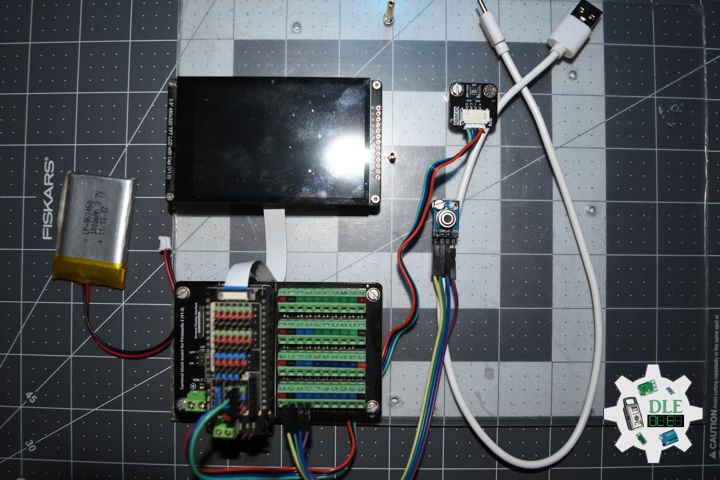
Fermion: SD Card Module

This DFRobot SD card shield is a Break out board for standard SD card. It allows you to add mass storage and data logging to your project. Specification Compatible with standard SD cards and Micro SD (TF) cards. Can be directly plugged into Arduino shields. Can also be used with other microcontrollers (via SPI communication).

DL2603Mk02

1 x DFRobot FireBeetle 2 ESP32-E
1 x Fermion: 3.5” 480×320 TFT LCD Capacitive
1 x GDL Line 10 CM
1 x Fermion: MicroSD Card Module
1 x MicroSD 2 GB
1 x Crowtail – Buzzer 2.0
1 x Gravity: AHT20 Temperature and Humidity Sensor
1 x Flame Sensor
1 x Crowtail – LED Green
1 x Gravity: IO Shield for FireBeetle 2
1 x Terminal Block Board for FireBeetle 2 ESP32-E IoT
1 x Lithium Ion Battery – 1000mAh
1 x USB 3.0 to Type-C Cable

DL2603Mk02p

DL2603Mk02p.ino

/****** Don Luc Electronics © ******
Software Version Information
Project #15: Environment - SD Card Module - Mk37
15-37
DL2603Mk02p.ino
DL2603Mk02
1 x DFRobot FireBeetle 2 ESP32-E
1 x Fermion: 3.5” 480x320 TFT LCD Capacitive
1 x GDL Line 10 CM
1 x Fermion: MicroSD Card Module
1 x MicroSD 2 GB
1 x Crowtail - Buzzer 2.0
1 x Gravity: AHT20 Temperature and Humidity Sensor
1 x Flame Sensor
1 x Crowtail - LED Green
1 x Gravity: IO Shield for FireBeetle 2
1 x Terminal Block Board for FireBeetle 2 ESP32-E IoT
1 x Lithium Ion Battery - 1000mAh
1 x Micro USB Cable
*/

// Include the Library Code
// EEPROM Library to Read and Write EEPROM with Unique ID for Unit
#include "EEPROM.h"
// DFRobot Display GDL API
#include <DFRobot_GDL.h>
// AHT20 Humidity and Temperature Sensor
#include <DFRobot_AHT20.h>
// SD Card
#include "FS.h"
#include "SD.h"
#include "SPI.h"

// MicroSD Card
const int chipSelect = D6;
String zzzzzz = "";

// Buzzer
int iBuzzer = D10;

// AHT20 Humidity and Temperature Sensor
DFRobot_AHT20 aht20;
// AHT20 Humidity and Temperature Sensor
float h = 0;
float t = 0;

// Flame Sensor
// LED Green
int iLEDG = D11;
// Flame Sensor
int iFlame =  A0;
String sF = "";

// Defined ESP32
#define TFT_DC  D2
#define TFT_CS  D6
#define TFT_RST D3

/*dc=*/ /*cs=*/ /*rst=*/
// DFRobot Display 320x480
DFRobot_ILI9488_320x480_HW_SPI screen(TFT_DC, TFT_CS, TFT_RST);

// Software Version Information
// EEPROM Unique ID Information
#define EEPROM_SIZE 64
String uid = "";

// Software Version Information
String sver = "15-37";

void loop() {
  
  // AHT20 Humidity and Temperature Sensor
  isHT();
  
  // Flame Sensor
  isFlame();

  // isDisplay HT
  isDisplayHT();

  // Delay 0.1 Second
  delay( 100 );

}

getDisplay.ino

// DFRobot Display 320x480
// DFRobot Display 320x480 - UID
void isDisplayUID(){

  // DFRobot Display 320x480
  // Text Display
  // Text Wrap
  screen.setTextWrap(false);
  // Rotation
  screen.setRotation(3);
  // Fill Screen => black
  screen.fillScreen(0x0000);
  // Text Color => white
  screen.setTextColor(0xffff);
  // Font => Free Sans Bold 12pt
  screen.setFont(&FreeSansBold12pt7b);
  // TextSize => 1.5
  screen.setTextSize(1.5);
  // Don Luc Electronics
  screen.setCursor(0, 30);
  screen.println("Don Luc Electronics");
  // Tilt Switch
  screen.setCursor(0, 60);
  screen.println("MicroSD Card");
  // Version
  screen.setCursor(0, 90);
  screen.println("Version");
  screen.setCursor(0, 120);
  screen.println( sver );
  // EEPROM
  screen.setCursor(0, 150);
  screen.println("EEPROM");
  screen.setCursor(0, 180);
  screen.println( uid );

}
// isDisplay HT
void isDisplayHT(){

  // DFRobot Display 320x480
  // Text Display
  // Text Wrap
  screen.setTextWrap(false);
  // Rotation
  screen.setRotation(3);
  // Fill Screen => white
  screen.fillScreen(0xffff);
  // Text Color => blue
  screen.setTextColor(0x001F);
  // Font => Free Sans Bold 12pt
  screen.setFont(&FreeSansBold12pt7b);
  // TextSize => 1.5
  screen.setTextSize(1.5);
  // Tilt Switch
  screen.setCursor(0, 30);
  screen.println("MicroSD Card");
  screen.setCursor(0, 70);
  screen.println( sF );
  screen.setCursor(0, 120);
  screen.println("Humidity");
  screen.setCursor(0, 150);
  screen.print( h );
  screen.setCursor(65, 150);
  screen.println( "%RH" );
  screen.setCursor(0, 200);
  screen.println("Temperature");
  screen.setCursor(0, 230);
  screen.print( t );
  screen.setCursor(65, 230);
  screen.println( "C" );

}

getEEPROM.ino

// isUID EEPROM Unique ID
void isUID()
{
  
  // Is Unit ID
  uid = "";
  for (int x = 0; x < 7; x++)
  {
    uid = uid + char(EEPROM.read(x));
  }
  
}

getFlame.ino

// Flame Sensor
// is Tilt
void isFlame(){

  // Flame
  // Check if Flame Sensor
  if(digitalRead( iFlame) == 0 ){   
    
    // Turn LED HIGH
    digitalWrite(iLEDG, HIGH);
    sF = "Fire Detected!!!";

    // iBuzzer On
    digitalWrite(iBuzzer, HIGH);

    // MicroSD Card
    isSD();

  } 
  else {
    
    // Turn LED LOW
    digitalWrite(iLEDG, LOW);
    sF = "No Fire Detected!!!";

    // iBuzzer Off
    digitalWrite(iBuzzer, LOW);
    
  }

}

getHT.ino

// AHT20 Humidity and Temperature Sensor
void isHT(){

  if(aht20.startMeasurementReady(true)){

    // Humidity
    h = aht20.getHumidity_RH();
  
   // Temperature
   t = aht20.getTemperature_C();
   }
  
}

getSD.ino

// MicroSD Card
// MicroSD Setup
void isSetupSD() {

    // MicroSD Card
    pinMode( chipSelect , OUTPUT );
    if(!SD.begin( chipSelect )){
        ;  
        return;
    }
    
    uint8_t cardType = SD.cardType();

    // CARD NONE
    if(cardType == CARD_NONE){
        ; 
        return;
    }

    // SD Card Type
    if(cardType == CARD_MMC){
        ; 
    } else if(cardType == CARD_SD){
        ; 
    } else if(cardType == CARD_SDHC){
        ; 
    } else {
        ; 
    } 

    // Size
    uint64_t cardSize = SD.cardSize() / (1024 * 1024);
 
}
// MicroSD Card
void isSD() {

  zzzzzz = "";

  //DLE|EEPROM Unique ID|Version|Flame|Humidity|Temperature|*\r
  zzzzzz = "DLE|" + uid + "|" + sver + "|" + String( sF ) + "|" 
  + String( h ) + "|" + String( t ) + "|*\r";

  // msg + 1
  char msg[zzzzzz.length() + 1];

  zzzzzz.toCharArray(msg, zzzzzz.length() + 1);

  // Append File
  appendFile(SD, "/dledata.txt", msg );
  
}
// List Dir
void listDir(fs::FS &fs, const char * dirname, uint8_t levels){
    
    // List Dir
    dirname;
    
    File root = fs.open(dirname);
    
    if(!root){
        return;
    }
    
    if(!root.isDirectory()){
        return;
    }

    File file = root.openNextFile();
    
    while(file){
        if(file.isDirectory()){
            file.name();
            if(levels){
                listDir(fs, file.name(), levels -1);
            }
        } else {
            file.name();
            file.size();
        }
        file = root.openNextFile();
    }
    
}
// Write File
void writeFile(fs::FS &fs, const char * path, const char * message){
    
    // Write File
    path;
    
    File file = fs.open(path, FILE_WRITE);
    
    if(!file){
        return;
    }
    
    if(file.print(message)){
        ;  
    } else {
        ;  
    }
    
    file.close();
    
}
// Append File
void appendFile(fs::FS &fs, const char * path, const char * message){
    
    // Append File
    path;
    
    File file = fs.open(path, FILE_APPEND);
    
    if(!file){
        return;
    }
    
    if(file.print(message)){
        ;  
    } else {
        ;  
    }
    
    file.close();
    
}

setup.ino

// Setup
void setup()
{
 
  // Delay
  delay( 100 );

   // EEPROM Size
  EEPROM.begin(EEPROM_SIZE);
  
  // EEPROM Unique ID
  isUID();

  // Delay
  delay( 100 );
 
  // DFRobot Display 320x480
  screen.begin();

  // Delay
  delay( 100 );
  
  // Flame Sensor
  // LED Green 
  pinMode(iLEDG, OUTPUT);
  // Flame Sensor
  pinMode(iFlame, INPUT);

  // Delay
  delay( 100 );

  // AHT20 Humidity and Temperature Sensor
  aht20.begin();
  
  // Delay
  delay( 100 );

  // iBuzzer
  pinMode(iBuzzer, OUTPUT);

  // Delay
  delay(100);

  //MicroSD Card
  isSetupSD();

  // Delay
  delay( 100 );

  // DFRobot Display 320x480 - UID
  // Don Luc Electronics
  // Version
  // EEPROM
  isDisplayUID();

  // Delay 5 Second
  delay( 5000 );

}

——

People can contact us: https://www.donluc.com/?page_id=1927

Consultant, R&D, Electronics, IoT, Teacher and Instructor

  • Programming Language
  • Single-Board Microcontrollers (PIC, Arduino, Raspberry Pi, Arm, Silicon Labs, Espressif, Etc…)
  • IoT
  • Wireless (Radio Frequency, Bluetooth, WiFi, Etc…)
  • Robotics
  • Automation
  • Camera and Video Capture Receiver Stationary, Wheel/Tank , Underwater and UAV Vehicle
  • Unmanned Vehicles Terrestrial, Marine and UAV
  • Machine Learning
  • Artificial Intelligence (AI)
  • RTOS
  • Sensors, eHealth Sensors, Biosensor, and Biometric
  • Research & Development (R & D)
  • Consulting

Follow Us

Luc Paquin – Curriculum Vitae – 2026
https://www.donluc.com/luc/LucPaquinCVEng2026Mk01.pdf
https://www.donluc.com/luc/

Web: https://www.donluc.com/
Web: https://www.jlpconsultants.com/
Facebook: https://www.facebook.com/neosteam.labs.9/
YouTube: https://www.youtube.com/@thesass2063
DFRobot: https://learn.dfrobot.com/user-10186.html
Elecrow: https://www.elecrow.com/share/sharepj/center/no/760816d385ebb1edc0732fd873bfbf13
TikTok: https://www.tiktok.com/@luc.paquin8
Hackster: https://www.hackster.io/luc-paquin
LinkedIn: https://www.linkedin.com/in/jlucpaquin/

Don Luc
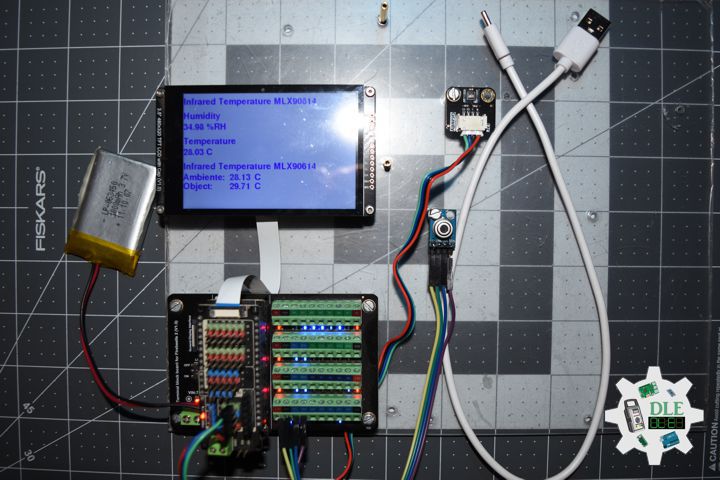
Project #12: Robotics – Joystick – Mk35

——

#DonLucElectronics #DonLuc #Robotics #Joystick #L298N #MotorDC #SparkFunRedBoard #Project #Fritzing #Programming #Electronics #Microcontrollers #Consultant

——

Joystick

——

Joystick

——

Joystick

——

Thumb Joystick

The classic ‘PS2-style’ analog joystick. Features smooth dual-axis control (two 10k pots) and a satisfying integrated push-button click.

SparkFun Thumb Joystick Breakout

Stop struggling with weird pin spacing. This breakout board routes the Thumb Joystick connections to a standard 0.1″ header for easy breadboarding.

DL2603Mk01

1 x SparkFun RedBoard Qwiic
1 x Thumb Joystick
1 x SparkFun Thumb Joystick Breakout
1 x L298N DC Motor Driver Module
2 x Motor DC
1 x Power Switch
1 x 18650 Battery Holder (11 Volts)
3 x 18650 Battery
1 x Micro USB Cable

DL2603Mk01p

DL2603Mk01p.ino

/****** Don Luc Electronics © ******
Software Version Information
Project #12: Robotics - Joystick - Mk35
12-35
DL2603Mk01p.ino
DL2603Mk01
1 x SparkFun RedBoard Qwiic
1 x Thumb Joystick
1 x SparkFun Thumb Joystick Breakout
1 x L298N DC Motor Driver Module
2 x Motor DC
1 x Power Switch
1 x 18650 Battery Holder (11 Volts)
3 x 18650 Battery
1 x Micro USB Cable
*/

// Include the Library Code

// Joystick
// Vertical
const int VERT = A0;
int vertical;
// Horizontal
const int HORIZ = A1;
int horizontal;
// Sel
const int SEL = 7;
int select;

// Motor DC 1 
int motor1pin1 = 2;
int motor1pin2 = 3;

// Motor DC 2
int motor2pin1 = 4;
int motor2pin2 = 5;

// Software Version Information
String sver = "12-35";

void loop() {

  // is Joystick
  isJoystick();

}

getJoystick.ino

// Joystick
// is Joystick
void isJoystick(){

  // Vertical
  vertical = analogRead(VERT);

  // Moving Forward
  if (vertical < 20) {
      
    // Moving Forward
    digitalWrite(motor1pin1, HIGH);
    digitalWrite(motor1pin2, LOW);
    digitalWrite(motor2pin1, HIGH); 
    digitalWrite(motor2pin2, LOW);    
    
  }
  
  // Moving Backwards
  if (vertical > 500) {
    
    // Moving Backwards
    digitalWrite(motor1pin1, LOW);
    digitalWrite(motor1pin2, HIGH);
    digitalWrite(motor2pin1, LOW); 
    digitalWrite(motor2pin2, HIGH);
  
  }

  // Horizontal
  horizontal = analogRead(HORIZ);

  // Moving Right
  if (horizontal < 25){

    // Moving Right
    digitalWrite(motor1pin1, LOW);
    digitalWrite(motor1pin2, HIGH);
    digitalWrite(motor2pin1, LOW); 
    digitalWrite(motor2pin2, LOW);

  }

// Moving Left
  if (horizontal > 500 ){

    // Moving Left
    digitalWrite(motor1pin1, LOW);
    digitalWrite(motor1pin2, LOW);
    digitalWrite(motor2pin1, LOW); 
    digitalWrite(motor2pin2, HIGH);

  }

  // LOW (0) if pressed
  select = digitalRead(SEL);

  // Select
  if (select == LOW) {
      
    // Stop
    digitalWrite(motor1pin1, LOW);
    digitalWrite(motor1pin2, LOW);
    digitalWrite(motor2pin1, LOW); 
    digitalWrite(motor2pin2, LOW);

  }

}

setup.ino

// Setup
void setup()
{
 
  // Motor DC 1
  pinMode(motor1pin1, OUTPUT);
  pinMode(motor1pin2, OUTPUT);

  // Motor DC 2
  pinMode(motor2pin1, OUTPUT);
  pinMode(motor2pin2, OUTPUT);

  // SEL Input
  pinMode(SEL, INPUT_PULLUP);

}

——

People can contact us: https://www.donluc.com/?page_id=1927

Consultant, R&D, Electronics, IoT, Teacher and Instructor

  • Programming Language
  • Single-Board Microcontrollers (PIC, Arduino, Raspberry Pi, Arm, Silicon Labs, Espressif, Etc…)
  • IoT
  • Wireless (Radio Frequency, Bluetooth, WiFi, Etc…)
  • Robotics
  • Automation
  • Camera and Video Capture Receiver Stationary, Wheel/Tank , Underwater and UAV Vehicle
  • Unmanned Vehicles Terrestrial, Marine and UAV
  • Machine Learning
  • Artificial Intelligence (AI)
  • RTOS
  • Sensors, eHealth Sensors, Biosensor, and Biometric
  • Research & Development (R & D)
  • Consulting

Follow Us

Luc Paquin – Curriculum Vitae – 2026
https://www.donluc.com/luc/LucPaquinCVEng2026Mk01.pdf
https://www.donluc.com/luc/

Web: https://www.donluc.com/
Web: https://www.jlpconsultants.com/
Facebook: https://www.facebook.com/neosteam.labs.9/
YouTube: https://www.youtube.com/@thesass2063
DFRobot: https://learn.dfrobot.com/user-10186.html
Elecrow: https://www.elecrow.com/share/sharepj/center/no/760816d385ebb1edc0732fd873bfbf13
TikTok: https://www.tiktok.com/@luc.paquin8
Hackster: https://www.hackster.io/luc-paquin
LinkedIn: https://www.linkedin.com/in/jlucpaquin/

Don Luc
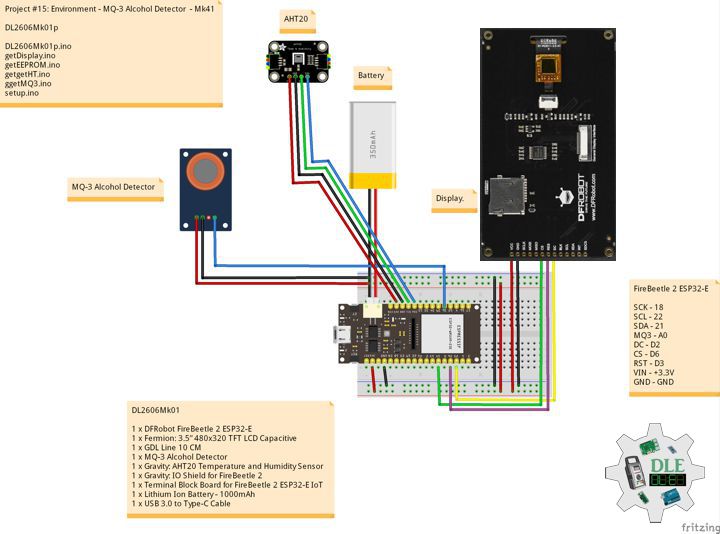
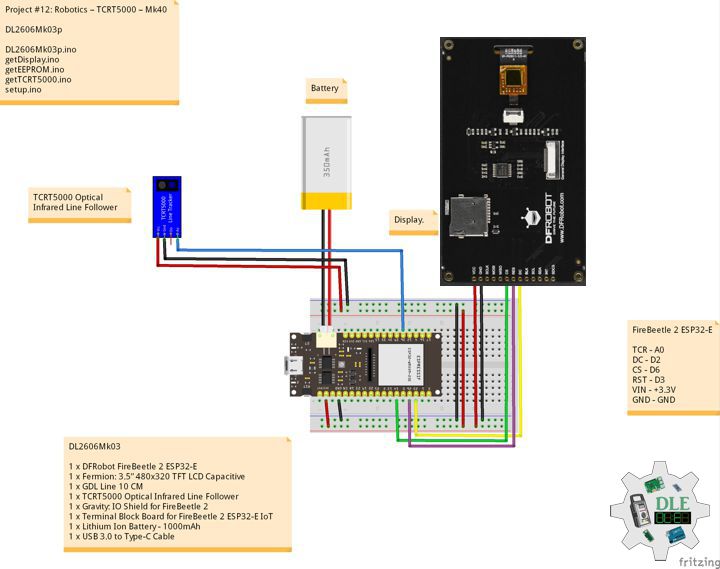
Project #15: Environment – Buzzer – Mk36

——

#DonLucElectronics #DonLuc #Buzzer #FlameSensor #AHT20 #FireBeetle2ESP32E #ESP32 #Display #IoT #Project #Fritzing #Programming #Electronics #Microcontrollers #Consultant

——

Buzzer

——

Buzzer

——

Buzzer

——

Crowtail – Buzzer 2.0

The buzzer module is for making sound in your project. It sounds when activated by a logic HIGH signal. Connect the buzzer to any of the D (digital) ports of you can easily make it sounds with setting the related ports to logic HIGH. The buzzer module can be also connected to an analog pluse-width modulation (PWM) output to generate various of tones.

DL2602Mk09

1 x DFRobot FireBeetle 2 ESP32-E
1 x Fermion: 3.5” 480×320 TFT LCD Capacitive
1 x GDL Line 10 CM
1 x Crowtail – Buzzer 2.0
1 x Gravity: AHT20 Temperature and Humidity Sensor
1 x Flame Sensor
1 x Crowtail – LED Green
1 x Gravity: IO Shield for FireBeetle 2
1 x Terminal Block Board for FireBeetle 2 ESP32-E IoT
1 x Lithium Ion Battery – 1000mAh
1 x USB 3.0 to Type-C Cable

DL2602Mk09p

DL2602Mk09p.ino

/****** Don Luc Electronics © ******
Software Version Information
Project #15: Environment - Buzzer - Mk36
15-36
DL2602Mk09p.ino
DL2602Mk09
1 x DFRobot FireBeetle 2 ESP32-E
1 x Fermion: 3.5” 480x320 TFT LCD Capacitive
1 x GDL Line 10 CM
1 x Crowtail - Buzzer 2.0
1 x Gravity: AHT20 Temperature and Humidity Sensor
1 x Flame Sensor
1 x Crowtail - LED Green
1 x Gravity: IO Shield for FireBeetle 2
1 x Terminal Block Board for FireBeetle 2 ESP32-E IoT
1 x Lithium Ion Battery - 1000mAh
1 x Micro USB Cable
*/

// Include the Library Code
// EEPROM Library to Read and Write EEPROM with Unique ID for Unit
#include "EEPROM.h"
// DFRobot Display GDL API
#include <DFRobot_GDL.h>
// AHT20 Humidity and Temperature Sensor
#include <DFRobot_AHT20.h>

// Buzzer
int iBuzzer = D10;

// AHT20 Humidity and Temperature Sensor
DFRobot_AHT20 aht20;
// AHT20 Humidity and Temperature Sensor
float h = 0;
float t = 0;

// Flame Sensor
// LED Green
int iLEDG = D11;
// Flame Sensor
int iFlame =  A0;
String sF = "";

// Defined ESP32
#define TFT_DC  D2
#define TFT_CS  D6
#define TFT_RST D3

/*dc=*/ /*cs=*/ /*rst=*/
// DFRobot Display 320x480
DFRobot_ILI9488_320x480_HW_SPI screen(TFT_DC, TFT_CS, TFT_RST);

// Software Version Information
// EEPROM Unique ID Information
#define EEPROM_SIZE 64
String uid = "";

// Software Version Information
String sver = "15-36";

void loop() {
  
  // AHT20 Humidity and Temperature Sensor
  isHT();
  
  // Flame Sensor
  isFlame();

  // isDisplay HT
  isDisplayHT();

  // Delay 0.1 Second
  delay( 100 );

}

getDisplay.ino

// DFRobot Display 320x480
// DFRobot Display 320x480 - UID
void isDisplayUID(){

  // DFRobot Display 320x480
  // Text Display
  // Text Wrap
  screen.setTextWrap(false);
  // Rotation
  screen.setRotation(3);
  // Fill Screen => black
  screen.fillScreen(0x0000);
  // Text Color => white
  screen.setTextColor(0xffff);
  // Font => Free Sans Bold 12pt
  screen.setFont(&FreeSansBold12pt7b);
  // TextSize => 1.5
  screen.setTextSize(1.5);
  // Don Luc Electronics
  screen.setCursor(0, 30);
  screen.println("Don Luc Electronics");
  // Tilt Switch
  screen.setCursor(0, 60);
  screen.println("Buzzer");
  // Version
  screen.setCursor(0, 90);
  screen.println("Version");
  screen.setCursor(0, 120);
  screen.println( sver );
  // EEPROM
  screen.setCursor(0, 150);
  screen.println("EEPROM");
  screen.setCursor(0, 180);
  screen.println( uid );

}
// isDisplay HT
void isDisplayHT(){

  // DFRobot Display 320x480
  // Text Display
  // Text Wrap
  screen.setTextWrap(false);
  // Rotation
  screen.setRotation(3);
  // Fill Screen => white
  screen.fillScreen(0xffff);
  // Text Color => blue
  screen.setTextColor(0x001F);
  // Font => Free Sans Bold 12pt
  screen.setFont(&FreeSansBold12pt7b);
  // TextSize => 1.5
  screen.setTextSize(1.5);
  // Tilt Switch
  screen.setCursor(0, 30);
  screen.println("Buzzer");
  screen.setCursor(0, 70);
  screen.println( sF );
  screen.setCursor(0, 120);
  screen.println("Humidity");
  screen.setCursor(0, 150);
  screen.print( h );
  screen.setCursor(65, 150);
  screen.println( "%RH" );
  screen.setCursor(0, 200);
  screen.println("Temperature");
  screen.setCursor(0, 230);
  screen.print( t );
  screen.setCursor(65, 230);
  screen.println( "C" );

}

getEEPROM.ino

// isUID EEPROM Unique ID
void isUID()
{
  
  // Is Unit ID
  uid = "";
  for (int x = 0; x < 7; x++)
  {
    uid = uid + char(EEPROM.read(x));
  }
  
}

getFlame.ino

// Flame Sensor
// is Tilt
void isFlame(){

  // Flame
  // Check if Flame Sensor
  if(digitalRead( iFlame) == 0 ){   
    
    // Turn LED HIGH
    digitalWrite(iLEDG, HIGH);
    sF = "Fire Detected!!!";

    // iBuzzer On
    digitalWrite(iBuzzer, HIGH);

  } 
  else {
    
    // Turn LED LOW
    digitalWrite(iLEDG, LOW);
    sF = "No Fire Detected!!!";

    // iBuzzer Off
    digitalWrite(iBuzzer, LOW);
    
  }

}

getHT.ino

// AHT20 Humidity and Temperature Sensor
void isHT(){

  if(aht20.startMeasurementReady(true)){

    // Humidity
    h = aht20.getHumidity_RH();
  
   // Temperature
   t = aht20.getTemperature_C();
   }
  
}

setup.ino

// Setup
void setup()
{
 
  // Delay
  delay( 100 );

   // EEPROM Size
  EEPROM.begin(EEPROM_SIZE);
  
  // EEPROM Unique ID
  isUID();

  // Delay
  delay( 100 );
 
  // DFRobot Display 320x480
  screen.begin();

  // Delay
  delay( 100 );
  
  // Flame Sensor
  // LED Green 
  pinMode(iLEDG, OUTPUT);
  // Flame Sensor
  pinMode(iFlame, INPUT);

  // Delay
  delay( 100 );

  // AHT20 Humidity and Temperature Sensor
  aht20.begin();
  
  // Delay
  delay( 100 );

  // iBuzzer
  pinMode(iBuzzer, OUTPUT);

  // Delay
  delay( 100 );

  // DFRobot Display 320x480 - UID
  // Don Luc Electronics
  // Version
  // EEPROM
  isDisplayUID();

  // Delay 5 Second
  delay( 5000 );

}

——

People can contact us: https://www.donluc.com/?page_id=1927

Consultant, R&D, Electronics, IoT, Teacher and Instructor

  • Programming Language
  • Single-Board Microcontrollers (PIC, Arduino, Raspberry Pi, Arm, Silicon Labs, Espressif, Etc…)
  • IoT
  • Wireless (Radio Frequency, Bluetooth, WiFi, Etc…)
  • Robotics
  • Automation
  • Camera and Video Capture Receiver Stationary, Wheel/Tank , Underwater and UAV Vehicle
  • Unmanned Vehicles Terrestrial, Marine and UAV
  • Machine Learning
  • Artificial Intelligence (AI)
  • RTOS
  • Sensors, eHealth Sensors, Biosensor, and Biometric
  • Research & Development (R & D)
  • Consulting

Follow Us

Luc Paquin – Curriculum Vitae – 2026
https://www.donluc.com/luc/LucPaquinCVEng2026Mk01.pdf
https://www.donluc.com/luc/

Web: https://www.donluc.com/
Web: https://www.jlpconsultants.com/
Facebook: https://www.facebook.com/neosteam.labs.9/
YouTube: https://www.youtube.com/@thesass2063
DFRobot: https://learn.dfrobot.com/user-10186.html
Elecrow: https://www.elecrow.com/share/sharepj/center/no/760816d385ebb1edc0732fd873bfbf13
TikTok: https://www.tiktok.com/@luc.paquin8
Hackster: https://www.hackster.io/luc-paquin
LinkedIn: https://www.linkedin.com/in/jlucpaquin/

Don Luc
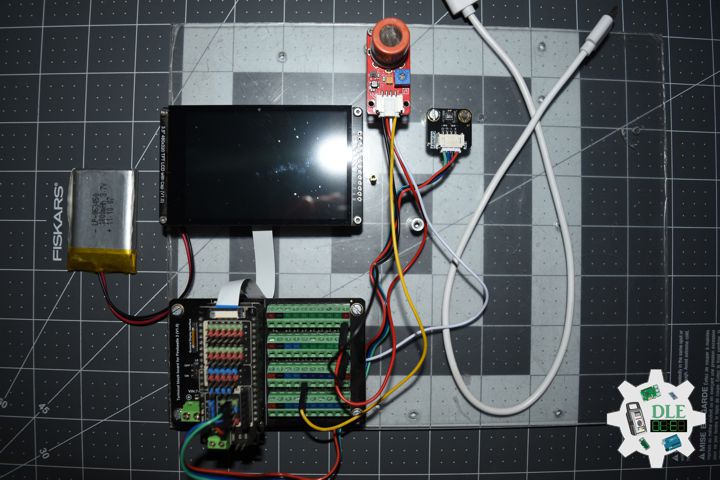
Project #12: Robotics – 4WD Robot Car – Mk34

——

#DonLucElectronics #DonLuc #L298N #MotorDC #ESP32CAM #ESP32 #IoT #Project #Fritzing #Programming #Electronics #Microcontrollers #Consultant

——

4WD Robot Car

——

4WD Robot Car

——

4WD Robot Car

——

4WD Robot Car

4WD Robot Car uses SparkFun RedBoard Qwiic as the main control board and is combined with L298N motor drive board, forming a powerful intelligent mobile device. As for L298N motor drive board, since it provides stable power output and flexible steering control, it is responsible for driving wheels.

DL2602Mk08

1 x SparkFun RedBoard Qwiic
1 x L298N DC Motor Driver Module
4 x Motor DC
1 x Power Switch
1 x 18650 Battery Holder (11 Volts)
3 x 18650 Battery
1 x Micro USB Cable

DL2602Mk08p

DL2602Mk08p.ino

/****** Don Luc Electronics © ******
Software Version Information
Project #12: Robotics - 4WD Robot Car - Mk34
12-34
DL2602Mk08p.ino
DL2602Mk08
1 x SparkFun RedBoard Qwiic
1 x L298N DC Motor Driver Module
4 x Motor DC
1 x Power Switch
1 x 18650 Battery Holder (11 Volts)
3 x 18650 Battery
1 x Micro USB Cable
*/

// Include the Library Code

// Motor DC 1 
int motor1pin1 = 2;
int motor1pin2 = 3;

// Motor DC 2
int motor2pin1 = 4;
int motor2pin2 = 5;

// Software Version Information
String sver = "12-34";

void loop() {

  // is Motor
  isMotor();

}

getMotor.ino

// Motor
// is Motor
void isMotor(){

  // Moving Forward
  digitalWrite(motor1pin1, HIGH);
  digitalWrite(motor1pin2, LOW);
  digitalWrite(motor2pin1, HIGH); 
  digitalWrite(motor2pin2, LOW);
  delay(3000);

  // Stop
  digitalWrite(motor1pin1, LOW);
  digitalWrite(motor1pin2, LOW);
  digitalWrite(motor2pin1, LOW); 
  digitalWrite(motor2pin2, LOW);
  delay(3000);

  // Moving Backwards
  digitalWrite(motor1pin1, LOW);
  digitalWrite(motor1pin2, HIGH);
  digitalWrite(motor2pin1, LOW); 
  digitalWrite(motor2pin2, HIGH);
  delay(3000);

  // Stop
  digitalWrite(motor1pin1, LOW);
  digitalWrite(motor1pin2, LOW);
  digitalWrite(motor2pin1, LOW); 
  digitalWrite(motor2pin2, LOW);
  delay(3000);

  // Moving Right
  digitalWrite(motor1pin1, LOW);
  digitalWrite(motor1pin2, HIGH);
  digitalWrite(motor2pin1, LOW); 
  digitalWrite(motor2pin2, LOW);
  delay(3000);

  // Stop
  digitalWrite(motor1pin1, LOW);
  digitalWrite(motor1pin2, LOW);
  digitalWrite(motor2pin1, LOW); 
  digitalWrite(motor2pin2, LOW);
  delay(3000);

  // Moving Left
  digitalWrite(motor1pin1, LOW);
  digitalWrite(motor1pin2, LOW);
  digitalWrite(motor2pin1, LOW); 
  digitalWrite(motor2pin2, HIGH);
  delay(3000);

  // Stop
  digitalWrite(motor1pin1, LOW);
  digitalWrite(motor1pin2, LOW);
  digitalWrite(motor2pin1, LOW); 
  digitalWrite(motor2pin2, LOW);
  delay(3000);

}

setup.ino

// Setup
void setup()
{
 
  // Motor DC 1
  pinMode(motor1pin1, OUTPUT);
  pinMode(motor1pin2, OUTPUT);

  // Motor DC 2
  pinMode(motor2pin1, OUTPUT);
  pinMode(motor2pin2, OUTPUT);

}

——

People can contact us: https://www.donluc.com/?page_id=1927

Consultant, R&D, Electronics, IoT, Teacher and Instructor

  • Programming Language
  • Single-Board Microcontrollers (PIC, Arduino, Raspberry Pi, Arm, Silicon Labs, Espressif, Etc…)
  • IoT
  • Wireless (Radio Frequency, Bluetooth, WiFi, Etc…)
  • Robotics
  • Automation
  • Camera and Video Capture Receiver Stationary, Wheel/Tank , Underwater and UAV Vehicle
  • Unmanned Vehicles Terrestrial, Marine and UAV
  • Machine Learning
  • Artificial Intelligence (AI)
  • RTOS
  • Sensors, eHealth Sensors, Biosensor, and Biometric
  • Research & Development (R & D)
  • Consulting

Follow Us

Luc Paquin – Curriculum Vitae – 2026
https://www.donluc.com/luc/LucPaquinCVEng2026Mk01.pdf
https://www.donluc.com/luc/

Web: https://www.donluc.com/
Web: https://www.jlpconsultants.com/
Facebook: https://www.facebook.com/neosteam.labs.9/
YouTube: https://www.youtube.com/@thesass2063
DFRobot: https://learn.dfrobot.com/user-10186.html
Elecrow: https://www.elecrow.com/share/sharepj/center/no/760816d385ebb1edc0732fd873bfbf13
TikTok: https://www.tiktok.com/@luc.paquin8
Hackster: https://www.hackster.io/luc-paquin
LinkedIn: https://www.linkedin.com/in/jlucpaquin/

Don Luc
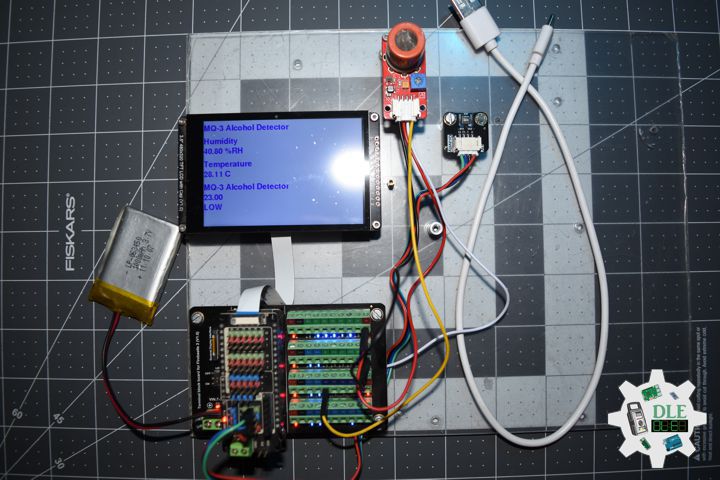
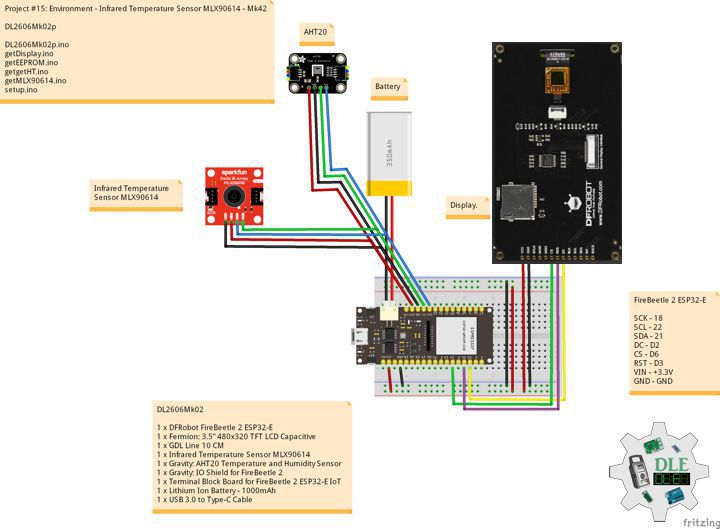
Project #15: Environment – AHT20 Temperature and Humidity – Mk35

——

#DonLucElectronics #DonLuc #FlameSensor #AHT20 #FireBeetle2ESP32E #ESP32 #Display #IoT #Project #Fritzing #Programming #Electronics #Microcontrollers #Consultant

——

AHT20 Temperature and Humidity

——

AHT20 Temperature and Humidity

——

AHT20 Temperature and Humidity

——-

Gravity: AHT20 Temperature and Humidity Sensor

The AHT20 is a high-precision but low-cost temperature and humidity sensor, which is equipped with an improved MEMS semiconductor capacitive humidity sensor element. It features standard I2C interface and a wide voltage supply of 2 Volt – 5 Volt, and with the simple peripheral circuit, it performs stably even in harsh environments in the measuring range of -40C ~ +85C. This sensor can be widely used for measuring the environmental temperature and humidity of home electronic equipment, the temperature and humidity of automobiles, and so on.

DL2602Mk07

1 x DFRobot FireBeetle 2 ESP32-E
1 x Fermion: 3.5” 480×320 TFT LCD Capacitive
1 x GDL Line 10 CM
1 x Gravity: AHT20 Temperature and Humidity Sensor
1 x Flame Sensor
1 x Crowtail – LED Green
1 x Gravity: IO Shield for FireBeetle 2
1 x Terminal Block Board for FireBeetle 2 ESP32-E IoT
1 x Lithium Ion Battery – 1000mAh
1 x USB 3.0 to Type-C Cable

DL2602Mk07p

DL2602Mk07p.ino

/****** Don Luc Electronics © ******
Software Version Information
Project #15: Environment - AHT20 Temperature and Humidity - Mk35
15-35
DL2602Mk07p.ino
DL2602Mk07
1 x DFRobot FireBeetle 2 ESP32-E
1 x Fermion: 3.5” 480x320 TFT LCD Capacitive
1 x GDL Line 10 CM
1 x Gravity: AHT20 Temperature and Humidity Sensor
1 x Flame Sensor
1 x Crowtail - LED Green
1 x Gravity: IO Shield for FireBeetle 2
1 x Terminal Block Board for FireBeetle 2 ESP32-E IoT
1 x Lithium Ion Battery - 1000mAh
1 x Micro USB Cable
*/

// Include the Library Code
// EEPROM Library to Read and Write EEPROM with Unique ID for Unit
#include "EEPROM.h"
// DFRobot Display GDL API
#include <DFRobot_GDL.h>
// AHT20 Humidity and Temperature Sensor
#include <DFRobot_AHT20.h>

// AHT20 Humidity and Temperature Sensor
DFRobot_AHT20 aht20;
// AHT20 Humidity and Temperature Sensor
float h = 0;
float t = 0;

// Flame Sensor
// LED Green
int iLEDG = D11;
// Flame Sensor
int iFlame =  A0;
String sF = "";

// Defined ESP32
#define TFT_DC  D2
#define TFT_CS  D6
#define TFT_RST D3

/*dc=*/ /*cs=*/ /*rst=*/
// DFRobot Display 320x480
DFRobot_ILI9488_320x480_HW_SPI screen(TFT_DC, TFT_CS, TFT_RST);

// Software Version Information
// EEPROM Unique ID Information
#define EEPROM_SIZE 64
String uid = "";

// Software Version Information
String sver = "15-35";

void loop() {
  
  // AHT20 Humidity and Temperature Sensor
  isHT();
  
  // Flame Sensor
  isFlame();

  // isDisplay HT
  isDisplayHT();

  // Delay 0.1 Second
  delay( 100 );

}

getDisplay.ino

// DFRobot Display 320x480
// DFRobot Display 320x480 - UID
void isDisplayUID(){

  // DFRobot Display 320x480
  // Text Display
  // Text Wrap
  screen.setTextWrap(false);
  // Rotation
  screen.setRotation(3);
  // Fill Screen => black
  screen.fillScreen(0x0000);
  // Text Color => white
  screen.setTextColor(0xffff);
  // Font => Free Sans Bold 12pt
  screen.setFont(&FreeSansBold12pt7b);
  // TextSize => 1.5
  screen.setTextSize(1.5);
  // Don Luc Electronics
  screen.setCursor(0, 30);
  screen.println("Don Luc Electronics");
  // Tilt Switch
  screen.setCursor(0, 60);
  screen.println("Humidity and Temperature");
  // Version
  screen.setCursor(0, 90);
  screen.println("Version");
  screen.setCursor(0, 120);
  screen.println( sver );
  // EEPROM
  screen.setCursor(0, 150);
  screen.println("EEPROM");
  screen.setCursor(0, 180);
  screen.println( uid );

}
// isDisplay HT
void isDisplayHT(){

  // DFRobot Display 320x480
  // Text Display
  // Text Wrap
  screen.setTextWrap(false);
  // Rotation
  screen.setRotation(3);
  // Fill Screen => white
  screen.fillScreen(0xffff);
  // Text Color => blue
  screen.setTextColor(0x001F);
  // Font => Free Sans Bold 12pt
  screen.setFont(&FreeSansBold12pt7b);
  // TextSize => 1.5
  screen.setTextSize(1.5);
  // Tilt Switch
  screen.setCursor(0, 30);
  screen.println("Humidity and Temperature");
  screen.setCursor(0, 70);
  screen.println( sF );
  screen.setCursor(0, 120);
  screen.println("Humidity");
  screen.setCursor(0, 150);
  screen.print( h );
  screen.setCursor(65, 150);
  screen.println( "%RH" );
  screen.setCursor(0, 200);
  screen.println("Temperature");
  screen.setCursor(0, 230);
  screen.print( t );
  screen.setCursor(65, 230);
  screen.println( "C" );

}

getEEPROM.ino

// isUID EEPROM Unique ID
void isUID()
{
  
  // Is Unit ID
  uid = "";
  for (int x = 0; x < 7; x++)
  {
    uid = uid + char(EEPROM.read(x));
  }
  
}

getFlame.ino

// Flame Sensor
// is Tilt
void isFlame(){

  // Flame
  // Check if Flame Sensor
  if(digitalRead( iFlame) == 0 ){   
    
    // Turn LED HIGH
    digitalWrite(iLEDG, HIGH);
    sF = "Fire Detected!!!";

  } 
  else {
    
    // Turn LED LOW
    digitalWrite(iLEDG, LOW);
    sF = "No Fire Detected!!!";
    
  }

}

getHT.ino

// AHT20 Humidity and Temperature Sensor
void isHT(){

  if(aht20.startMeasurementReady(true)){

    // Humidity
    h = aht20.getHumidity_RH();
  
   // Temperature
   t = aht20.getTemperature_C();
   }
  
}

setup.ino

// Setup
void setup()
{
 
  // Delay
  delay( 100 );

   // EEPROM Size
  EEPROM.begin(EEPROM_SIZE);
  
  // EEPROM Unique ID
  isUID();

  // Delay
  delay( 100 );
 
  // DFRobot Display 320x480
  screen.begin();

  // Delay
  delay( 100 );
  
  // Flame Sensor
  // LED Green 
  pinMode(iLEDG, OUTPUT);
  // Flame Sensor
  pinMode(iFlame, INPUT);

  // Delay
  delay( 100 );

  // AHT20 Humidity and Temperature Sensor
  aht20.begin();
  
  // Delay
  delay( 100 );

  // DFRobot Display 320x480 - UID
  // Don Luc Electronics
  // Version
  // EEPROM
  isDisplayUID();

  // Delay 5 Second
  delay( 5000 );

}

——

People can contact us: https://www.donluc.com/?page_id=1927

Consultant, R&D, Electronics, IoT, Teacher and Instructor

  • Programming Language
  • Single-Board Microcontrollers (PIC, Arduino, Raspberry Pi, Arm, Silicon Labs, Espressif, Etc…)
  • IoT
  • Wireless (Radio Frequency, Bluetooth, WiFi, Etc…)
  • Robotics
  • Automation
  • Camera and Video Capture Receiver Stationary, Wheel/Tank , Underwater and UAV Vehicle
  • Unmanned Vehicles Terrestrial, Marine and UAV
  • Machine Learning
  • Artificial Intelligence (AI)
  • RTOS
  • Sensors, eHealth Sensors, Biosensor, and Biometric
  • Research & Development (R & D)
  • Consulting

Follow Us

Luc Paquin – Curriculum Vitae – 2026
https://www.donluc.com/luc/LucPaquinCVEng2026Mk01.pdf
https://www.donluc.com/luc/

Web: https://www.donluc.com/
Web: https://www.jlpconsultants.com/
Facebook: https://www.facebook.com/neosteam.labs.9/
YouTube: https://www.youtube.com/@thesass2063
DFRobot: https://learn.dfrobot.com/user-10186.html
Elecrow: https://www.elecrow.com/share/sharepj/center/no/760816d385ebb1edc0732fd873bfbf13
TikTok: https://www.tiktok.com/@luc.paquin8
Hackster: https://www.hackster.io/luc-paquin
LinkedIn: https://www.linkedin.com/in/jlucpaquin/

Don Luc
Project #12: Robotics – L298N DC Motor Driver – Mk33

——

#DonLucElectronics #DonLuc #L298N #MotorDC #ESP32CAM #ESP32 #IoT #Project #Fritzing #Programming #Electronics #Microcontrollers #Consultant

——

L298N DC Motor Driver

——

L298N DC Motor Driver

——

L298N DC Motor Driver

——

L298n Motor Driver

That’s where the L298N motor driver module comes in. It acts as a bridge between your low-power Arduino and your high-power motors. You send small control signals from the Arduino, and the L298N safely handles the higher current required by the Motor DC.

DL2602Mk06

1 x ESP32-CAM
1 x ESP32-CAM-MB Adapter
1 x L298N DC Motor Driver Module
1 x Motor DC
1 x Power Switch
1 x 18650 Battery Holder (11 Volts)
3 x 18650 Battery
1 x Micro USB Cable

DL2602Mk06p

DL2602Mk06p.ino

/****** Don Luc Electronics © ******
Software Version Information
Project #12: Robotics - L298N DC Motor Driver - Mk33
12-33
DL2602Mk06p.ino
DL2602Mk06
1 x ESP32-CAM
1 x ESP32-CAM-MB Adapter
1 x L298N DC Motor Driver Module
1 x Motor DC
1 x Power Switch
1 x 18650 Battery Holder (11 Volts)
3 x 18650 Battery
1 x Micro USB Cable
*/

// Include the Library Code

// Motor DC 1 
int motor1pin1 = 14;

// Software Version Information
String sver = "12-33";

void loop() {
  
  // Motor DC 1 
  digitalWrite(motor1pin1,   HIGH);

  // Delay 3 Seconds
  delay(3000);

  // Motor DC 1 
  digitalWrite(motor1pin1,   LOW);

  // Delay 3 Seconds
  delay(3000);

}

setup.ino

// Setup
void setup()
{
 
  // Motor DC 1
  pinMode(motor1pin1, OUTPUT);

}

——

People can contact us: https://www.donluc.com/?page_id=1927

Consultant, R&D, Electronics, IoT, Teacher and Instructor

  • Programming Language
  • Single-Board Microcontrollers (PIC, Arduino, Raspberry Pi, Arm, Silicon Labs, Espressif, Etc…)
  • IoT
  • Wireless (Radio Frequency, Bluetooth, WiFi, Etc…)
  • Robotics
  • Automation
  • Camera and Video Capture Receiver Stationary, Wheel/Tank , Underwater and UAV Vehicle
  • Unmanned Vehicles Terrestrial, Marine and UAV
  • Machine Learning
  • Artificial Intelligence (AI)
  • RTOS
  • Sensors, eHealth Sensors, Biosensor, and Biometric
  • Research & Development (R & D)
  • Consulting

Follow Us

Luc Paquin – Curriculum Vitae – 2026
https://www.donluc.com/luc/LucPaquinCVEng2026Mk01.pdf
https://www.donluc.com/luc/

Web: https://www.donluc.com/
Web: https://www.jlpconsultants.com/
Facebook: https://www.facebook.com/neosteam.labs.9/
YouTube: https://www.youtube.com/@thesass2063
DFRobot: https://learn.dfrobot.com/user-10186.html
Elecrow: https://www.elecrow.com/share/sharepj/center/no/760816d385ebb1edc0732fd873bfbf13
TikTok: https://www.tiktok.com/@luc.paquin8
Hackster: https://www.hackster.io/luc-paquin
LinkedIn: https://www.linkedin.com/in/jlucpaquin/

Don Luc
Project #28 – Sensors – Flame Sensor – Mk29

——

#DonLucElectronics #DonLuc #FlameSensor #FireBeetle2ESP32E #ESP32 #Display #IoT #Project #Fritzing #Programming #Electronics #Microcontrollers #Consultant

——

Flame Sensor
Flame Sensor

——

Flame Sensor
Flame Sensor

——

Flame Sensor
Flame Sensor

——

Flame Sensor

To prevent causalities or damages, it is necessary to detect the fire, so that warnings can be provided and even automatic fire suppression systems can be activated. There are multiple ways to detect a fire, like detecting temperature change, smoke detection, etc. In all of these, detecting temperature change would be more accurate, since some fires won’t even have detectable smoke. Even the temperature measurement is not too dependable since sometimes it’s too late when the change is detected. To overcome this, we can detect the thermal radiation instead of the temperature variation. The easiest and cheapest way to detect thermal radiation is to use a flame sensor.

DL2602Mk05

1 x DFRobot FireBeetle 2 ESP32-E
1 x Fermion: 3.5” 480×320 TFT LCD Capacitive
1 x GDL Line 10 CM
1 x Flame Sensor
1 x Crowtail – LED Green
1 x Gravity: IO Shield for FireBeetle 2
1 x Terminal Block Board for FireBeetle 2 ESP32-E IoT
1 x Lithium Ion Battery – 1000mAh
1 x USB 3.0 to Type-C Cable

DL2602Mk05p

DL2602Mk05p.ino

/****** Don Luc Electronics © ******
Software Version Information
Project #28 – Sensors – Flame Sensor– Mk28
28-29
DL2602Mk05p.ino
DL2602Mk05
1 x DFRobot FireBeetle 2 ESP32-E
1 x Fermion: 3.5” 480x320 TFT LCD Capacitive
1 x GDL Line 10 CM
1 x Flame Sensor
1 x Crowtail - LED Green
1 x Gravity: IO Shield for FireBeetle 2
1 x Terminal Block Board for FireBeetle 2 ESP32-E IoT
1 x Lithium Ion Battery - 1000mAh
1 x Micro USB Cable
*/

// Include the Library Code
// EEPROM Library to Read and Write EEPROM with Unique ID for Unit
#include "EEPROM.h"
// DFRobot Display GDL API
#include <DFRobot_GDL.h>

// Flame Sensor
// LED Green
int iLEDG = D11;
// Flame Sensor
int iFlame =  A0;
String sF = "";

// Defined ESP32
#define TFT_DC  D2
#define TFT_CS  D6
#define TFT_RST D3

/*dc=*/ /*cs=*/ /*rst=*/
// DFRobot Display 320x480
DFRobot_ILI9488_320x480_HW_SPI screen(TFT_DC, TFT_CS, TFT_RST);

// Software Version Information
// EEPROM Unique ID Information
#define EEPROM_SIZE 64
String uid = "";

// Software Version Information
String sver = "28-29";

void loop() {
  
  // Flame Sensor
  isFlame();

  // isDisplay Flame
  isDisplayFlame();

  // Delay 0.1 Second
  delay( 100 );

}

getDisplay.ino

// DFRobot Display 320x480
// DFRobot Display 320x480 - UID
void isDisplayUID(){

  // DFRobot Display 320x480
  // Text Display
  // Text Wrap
  screen.setTextWrap(false);
  // Rotation
  screen.setRotation(3);
  // Fill Screen => black
  screen.fillScreen(0x0000);
  // Text Color => white
  screen.setTextColor(0xffff);
  // Font => Free Sans Bold 12pt
  screen.setFont(&FreeSansBold12pt7b);
  // TextSize => 1.5
  screen.setTextSize(1.5);
  // Don Luc Electronics
  screen.setCursor(0, 30);
  screen.println("Don Luc Electronics");
  // Tilt Switch
  screen.setCursor(0, 60);
  screen.println("Flame Sensor");
  // Version
  screen.setCursor(0, 90);
  screen.println("Version");
  screen.setCursor(0, 120);
  screen.println( sver );
  // EEPROM
  screen.setCursor(0, 150);
  screen.println("EEPROM");
  screen.setCursor(0, 180);
  screen.println( uid );

}
// isDisplayFlame
void isDisplayFlame(){

  // DFRobot Display 320x480
  // Text Display
  // Text Wrap
  screen.setTextWrap(false);
  // Rotation
  screen.setRotation(3);
  // Fill Screen => white
  screen.fillScreen(0xffff);
  // Text Color => blue
  screen.setTextColor(0x001F);
  // Font => Free Sans Bold 12pt
  screen.setFont(&FreeSansBold12pt7b);
  // TextSize => 1.5
  screen.setTextSize(1.5);
  // Tilt Switch
  screen.setCursor(0, 30);
  screen.println("Flame Sensor");
  screen.setCursor(0, 90);
  screen.println( sF );

}

getEEPROM.ino

// isUID EEPROM Unique ID
void isUID()
{
  
  // Is Unit ID
  uid = "";
  for (int x = 0; x < 7; x++)
  {
    uid = uid + char(EEPROM.read(x));
  }
  
}

getFlame.ino

// Flame Sensor
// is Tilt
void isFlame(){

  // Flame
  // Check if Flame Sensor
  if(digitalRead( iFlame) == 0 ){   
    
    // Turn LED HIGH
    digitalWrite(iLEDG, HIGH);
    sF = "Fire Detected!!!";

  } 
  else {
    
    // Turn LED LOW
    digitalWrite(iLEDG, LOW);
    sF = "No Fire Detected!!!";
    
  }

}

setup.ino

// Setup
void setup()
{
 
  // Delay
  delay( 100 );

   // EEPROM Size
  EEPROM.begin(EEPROM_SIZE);
  
  // EEPROM Unique ID
  isUID();

  // Delay
  delay( 100 );
 
  // DFRobot Display 320x480
  screen.begin();

  // Delay
  delay( 100 );
  
  // Flame Sensor
  // LED Green 
  pinMode(iLEDG, OUTPUT);
  // Flame Sensor
  pinMode(iFlame, INPUT);

  // Delay
  delay( 100 );

  // DFRobot Display 320x480 - UID
  // Don Luc Electronics
  // Version
  // EEPROM
  isDisplayUID();

  // Delay 5 Second
  delay( 5000 );

}

——

People can contact us: https://www.donluc.com/?page_id=1927

Consultant, R&D, Electronics, IoT, Teacher and Instructor

  • Programming Language
  • Single-Board Microcontrollers (PIC, Arduino, Raspberry Pi, Arm, Silicon Labs, Espressif, Etc…)
  • IoT
  • Wireless (Radio Frequency, Bluetooth, WiFi, Etc…)
  • Robotics
  • Automation
  • Camera and Video Capture Receiver Stationary, Wheel/Tank , Underwater and UAV Vehicle
  • Unmanned Vehicles Terrestrial, Marine and UAV
  • Machine Learning
  • Artificial Intelligence (AI)
  • RTOS
  • Sensors, eHealth Sensors, Biosensor, and Biometric
  • Research & Development (R & D)
  • Consulting

Follow Us

Luc Paquin – Curriculum Vitae – 2026
https://www.donluc.com/luc/LucPaquinCVEng2026Mk01.pdf
https://www.donluc.com/luc/

Web: https://www.donluc.com/
Web: https://www.jlpconsultants.com/
Facebook: https://www.facebook.com/neosteam.labs.9/
YouTube: https://www.youtube.com/@thesass2063
DFRobot: https://learn.dfrobot.com/user-10186.html
Elecrow: https://www.elecrow.com/share/sharepj/center/no/760816d385ebb1edc0732fd873bfbf13
TikTok: https://www.tiktok.com/@luc.paquin8
Hackster: https://www.hackster.io/luc-paquin
LinkedIn: https://www.linkedin.com/in/jlucpaquin/

Don Luc