—–
#DonLucElectronics #DonLuc #AHT20 #RTC #TextoSpeech #Environment #SD #FireBeetle2ESP32E #ESP32 #Display #IoT #Project #Fritzing #Programming #Electronics #Microcontrollers #Consultant
——
——
——
——
Gravity: AHT20 Temperature and Humidity Sensor
The AHT20 is a high-precision but low-cost temperature and humidity sensor, which is equipped with an improved MEMS semiconductor capacitive humidity sensor element. It features standard I2C interface and a wide voltage supply of 2 Volt – 5 Volt. And with the simple peripheral circuit, it performs stably even in harsh environments in the measuring range of -40 C ~ +85 C. This sensor can be widely used for measuring the environmental temperature and humidity of home electronic equipment, the temperature and humidity of automobiles, and so on.
Applications
HVAC
Dehumidifier
Testing Equipment
Consumer Appliances
Automobiles
Automatic Control
Data Loggers
Weather Control
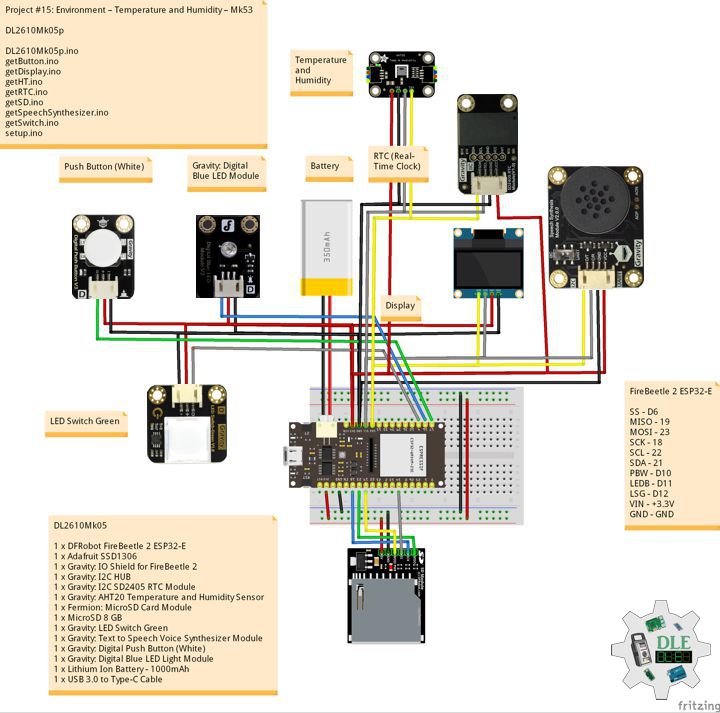
DL2610Mk05
1 x DFRobot FireBeetle 2 ESP32-E
1 x Adafruit SSD1306
1 x Gravity: IO Shield for FireBeetle 2
1 x Gravity: I2C HUB
1 x Gravity: I2C SD2405 RTC Module
1 x Gravity: AHT20 Temperature and Humidity Sensor
1 x Fermion: MicroSD Card Module
1 x MicroSD 8 GB
1 x Gravity: LED Switch Green
1 x Gravity: Text to Speech Voice Synthesizer Module
1 x Gravity: Digital Push Button (White)
1 x Gravity: Digital Blue LED Light Module
1 x Lithium Ion Battery – 1000mAh
1 x USB 3.0 to Type-C Cable
DL2610Mk05p
DL2610Mk05p.ino
/****** Don Luc Electronics © ******
Software Version Information
Project #15: Environment – RTC (Real-Time Clock) – Mk53
15-53
DL2610Mk05p.ino
DL2610Mk05
1 x DFRobot FireBeetle 2 ESP32-E
1 x Adafruit SSD1306
1 x Gravity: IO Shield for FireBeetle 2
1 x Gravity: I2C HUB
1 x Gravity: I2C SD2405 RTC Module
1 x Gravity: AHT20 Temperature and Humidity Sensor
1 x Fermion: MicroSD Card Module
1 x MicroSD 8 GB
1 x Gravity: LED Switch Green
1 x Gravity: Text to Speech Voice Synthesizer Module
1 x Gravity: Digital Push Button (White)
1 x Gravity: Digital Blue LED Light Module
1 x Lithium Ion Battery - 1000mAh
1 x USB 3.0 to Type-C Cable
*/

// Include the Library Code
// Wire
#include <Wire.h>
// SD Card
// File System
#include "FS.h"
// SD Card
#include "SD.h"
// SPI (Serial Peripheral Interface)
#include "SPI.h"
// Speech Synthesis
#include <DFRobot_SpeechSynthesis_V2.h>
// Adafruit SSD1306
#include <Adafruit_SSD1306.h>
// RTC (Real-Time Clock)
#include "GravityRtc.h"
// AHT20 Humidity and Temperature Sensor
#include <DFRobot_AHT20.h>

// Adafruit SSD1306
#define SCREEN_WIDTH 128
#define SCREEN_HEIGHT 64
#define OLED_RESET -1
Adafruit_SSD1306 display(SCREEN_WIDTH, SCREEN_HEIGHT, &Wire, OLED_RESET);

// AHT20 Humidity and Temperature Sensor
DFRobot_AHT20 aht20;
// AHT20 Humidity and Temperature Sensor
float h = 0;
float t = 0;

// RTC Initialization
GravityRtc rtc;
// Date and Time
String dateRTC = "";
String timeRTC = "";

// Speech Synthesis
DFRobot_SpeechSynthesis_I2C ss;

// Button
// The number of the pushbutton pin
const int iButton = D10;
// Variables will change:
int iButtonState = 0;

// Switch
// The number of the pushbutton pin
const int iSwitch = D12;
// variables will change:
int switchState = 0;
int iState = 0;

// SD shield
const int chipSelect = D6;
// FullString
String FullString = "";
long lineToRead = 0;
// Random
long randNumber;
String lineContent = "";
String zzzzzz = "";

// D11 LED Blue
const int iLedBlue = D11;

// Software Version Information
String sver = "15-53";

void loop() {

  // AHT20 Humidity and Temperature Sensor
  isHT();

  // RTC (Real-Time Clock)
  isRTC();

  // isButton
  isButton();

  // isDisplay Button
  isDisplayButton();

}
getButton.ino
// Button
// isButton
void isButton(){

  iButtonState= digitalRead(iButton);  // read input value

  if (iButtonState == HIGH) {

    //  Switch
    isSwitch();

   } else {

      // Turn LED Off
      digitalWrite(iLedBlue, LOW);

   }

}
getDisplay.ino
// Adafruit SSD1306
// isDisplayUID
void isDisplayUID(){

    // Intentar ambas direcciones
  if(!display.begin(SSD1306_SWITCHCAPVCC, 0x3C)) {
    //Serial.println("Error con 0x3C, probando 0x3D...");
    if(!display.begin(SSD1306_SWITCHCAPVCC, 0x3D)) {
      //Serial.println("Error OLED en ambas direcciones");
      return;
    }
  }

  // Clear Display
  display.clearDisplay();
  display.setTextSize(1);
  display.setTextColor(SSD1306_WHITE);
  // Don Luc Electronics
  display.setCursor(0,0);
  display.println("Don Luc Electronics");
  // Motor Drive
  display.setCursor(0,20);
  display.print("DL2610Mk04");
 // Version
  display.setCursor(0,20);
  display.print("Version");
  display.setCursor(0,40);
  display.print( sver );
  // Display
  display.display();

}
// isDisplay Button
void isDisplayButton(){

  // Clear Display
  display.clearDisplay();
  display.setTextSize(1);
  display.setTextColor(SSD1306_WHITE);
  // Don Luc Electronics
  display.setCursor(0,0);
  display.println("Don Luc Electronics");
  //
  display.setCursor(0,20);
  if (iState == 1) {

    // English
    display.print("Book English");

  }
  else {

    // Spanish
    display.print("Book Spanish");

 }

  // Line Content
  display.setCursor(0,40);
  display.print( lineContent );
  // Display
  display.display();

}
getHT.ino
// AHT20 Humidity and Temperature Sensor
void isHT(){

  if(aht20.startMeasurementReady(true)){

    // Humidity
    h = aht20.getHumidity_RH();

    // Temperature
    t = aht20.getTemperature_C();

   }

}
getRTC.ino
// Real-Time Tlock
// Date and Time RTC
void isRTC () {

  // Date and Time
  dateRTC = "";
  timeRTC = "";
  rtc.read();

  // Date
  dateRTC = rtc.year;
  dateRTC = dateRTC + "/";
  dateRTC = dateRTC + rtc.month;
  dateRTC = dateRTC + "/";
  dateRTC = dateRTC + rtc.day;

  // Time
  timeRTC = rtc.hour;
  timeRTC = timeRTC + ":";
  timeRTC = timeRTC + rtc.minute;
  timeRTC = timeRTC + ":";
  timeRTC = timeRTC + rtc.second;

}
getSD.ino
// MicroSD Card
// MicroSD Setup
void isSetupSD() {

    // MicroSD Card
    pinMode( chipSelect , OUTPUT );

    // MicroSD Card
    if(!SD.begin()){
        Serial.print("MicroSD Card No");;
        return;
    }

    uint8_t cardType = SD.cardType();

    // CARD NONE
    if(cardType == CARD_NONE){
        ;
        return;
    }

    // SD Card Type
    if(cardType == CARD_MMC){
        ;
    } else if(cardType == CARD_SD){
        ;
    } else if(cardType == CARD_SDHC){
        ;
    } else {
        ;
    }

    // Size
    uint64_t cardSize = SD.cardSize() / (1024 * 1024);

}
// MicroSD Card English
void isSDEnglish() {

  zzzzzz = "";

  //DLE|Version|Date|Time|
  zzzzzz = "DLE|" + sver + "|" + String( dateRTC ) + "|" + String( timeRTC )  + "|"
  //Humidity|Temperature|
  +  String( h ) + "|" + String( t )
  //|English|lineContent|\r
  + "|English|" + lineContent + "|*\r";

  // msg + 1
  char msg[zzzzzz.length() + 1];

  zzzzzz.toCharArray(msg, zzzzzz.length() + 1);

  // Append File
  appendFile(SD, "/DLEDATA.txt", msg );

}
// MicroSD Card Spanish
void isSDSpanish() {

  zzzzzz = "";

  //DLE|Version|Date|Time|
  zzzzzz = "DLE|" + sver + "|" + String( dateRTC ) + "|" + String( timeRTC )  + "|"
  //Humidity|Temperature|
  +  String( h ) + "|" + String( t )
  //|Spanish|lineContent|\r
  + "|Spanish|" + lineContent + "|*\r";

  // msg + 1
  char msg[zzzzzz.length() + 1];

  zzzzzz.toCharArray(msg, zzzzzz.length() + 1);

  // Append File
  appendFile(SD, "/DLEDATA.txt", msg );

}
// Read a specific line (1-indexed)
String readSpecificLine(fs::FS &fs, const char * path, int targetLine) {
  File file = fs.open(path);
  if(!file || file.isDirectory()){
    return "Error: Failed to open file";
  }

  int currentLine = 1;
  String lineContent = "";

  while(file.available()){
    char ch = file.read();

    if (currentLine == targetLine) {
      if (ch == '\n' || ch == '\r') {
        file.close();
        return lineContent; // Found line, return it
      }
      lineContent += ch;
    }

    if (ch == '\n') {
      currentLine++;
    }

    if (currentLine > targetLine) {
      break;
    }
  }

  file.close();

  if (currentLine == targetLine && lineContent.length() > 0) {
    return lineContent; // Return last line if it lacks a trailing newline
  }

  return "Error: Line not found";
}
// List Dir
void listDir(fs::FS &fs, const char * dirname, uint8_t levels){

    // List Dir
    dirname;

    File root = fs.open(dirname);

    if(!root){
        return;
    }

    if(!root.isDirectory()){
        return;
    }

    File file = root.openNextFile();

    while(file){
        if(file.isDirectory()){
            file.name();
            if(levels){
                listDir(fs, file.name(), levels -1);
            }
        } else {
            file.name();
            file.size();
        }
        file = root.openNextFile();
    }

}
// Write File
void writeFile(fs::FS &fs, const char * path, const char * message){

    // Write File
    path;

    File file = fs.open(path, FILE_WRITE);

    if(!file){
        return;
    }

    if(file.print(message)){
        ;
    } else {
        ;
    }

    file.close();

}
// Append File
void appendFile(fs::FS &fs, const char * path, const char * message){

    // Append File
    path;

    File file = fs.open(path, FILE_APPEND);

    if(!file){
        return;
    }

    if(file.print(message)){
        ;
    } else {
        ;
    }

    file.close();

}
getSpeechSynthesizer.ino
// Speech Synthesis
// isSetupSS
void isSetupSS(){

  // Begin
  ss.begin();
  // Set voice volume to 9
  ss.setVolume(9);
  // Set playback speed to 9
  ss.setSpeed(7);
  // Set tone to 5
  ss.setTone(5);
  // For English, speak word
  ss.setEnglishPron(ss.eWord);

}
getSwitch.ino
// Switch
// isSwitch
void isSwitch(){

  // Turn LED off:
  digitalWrite(iLedBlue, LOW);

  randNumber = random(1, 6);

  if ( randNumber == 4 ) {

     // Switch
     switchState = digitalRead(iSwitch);

     if (switchState == HIGH) {

       // Turn LED On:
       digitalWrite(iLedBlue, HIGH);

       iState = 1;

       // English
       // Example: Read line from "english/engliso.txt"
       lineToRead = random(1, 2048);

       lineContent = readSpecificLine(SD, "/english/engliso.txt", lineToRead);

       if (lineContent != "") {

         Serial.print("Line ");
         Serial.print(lineToRead);
         Serial.print(": ");
         Serial.println(lineContent);
         // Speak
         ss.speak( lineContent );
         // MicroSD Card English
         isSDEnglish();

      } else {

         Serial.println("Line not found or file error.");

      }


    } else {

     // Turn LED On:
     digitalWrite(iLedBlue, HIGH);

     iState = 0;

      // Spanish
      // Example: Read line from "spanish/spanisho.txt"
      lineToRead = random(1, 1938);

      lineContent = readSpecificLine(SD, "/spanish/spanisho.txt", lineToRead);

      if (lineContent != "") {

         Serial.print("Line ");
         Serial.print(lineToRead);
         Serial.print(": ");
         Serial.println(lineContent);
         // Speak
         ss.speak( lineContent );
         // MicroSD Card Spanish
         isSDSpanish();

      } else {

         Serial.println("Line not found or file error.");

      }

    }

  }

}
setup.ino
// Setup
void setup()
{

  // Delay
  delay(100);

  // Serial
  Serial.begin(9600);

  // Delay
  delay( 100 );

  // LED Blue
  pinMode(iLedBlue, OUTPUT);

  // Delay
  delay(100);

  // iButton
  pinMode(iButton, INPUT);

  delay(100);

  // iSwitch
  pinMode(iSwitch, INPUT);

  // Wire
  Wire.begin();

  // Delay
  delay(100);

  // Setup RTC
  rtc.setup();

  //Set the RTC time automatically: Calibrate RTC time by your computer time
  rtc.adjustRtc(F(__DATE__), F(__TIME__));

  // Delay
  delay(100);

  //MicroSD Card
  isSetupSD();

  // Delay
  delay(100);

  // isSetupSS
  isSetupSS();

  // Delay
  delay(100);

  // AHT20 Humidity and Temperature Sensor
  aht20.begin();

  // Delay
  delay( 100 );

  // Random Seed
  randomSeed(analogRead(A3));

  // Delay
  delay( 100 );

  // Adafruit SSD1306 - UID
  // Don Luc Electronics
  // Versioc
  isDisplayUID();

  // Delay
  delay( 5000 );

}
——
People can contact us: https://www.donluc.com/?page_id=1927
Consultant, R&D, Electronics, IoT, Teacher and Instructor
- Programming Language
- Single-Board Microcontrollers (PIC, Arduino, Raspberry Pi, Arm, Silicon Labs, Espressif, Etc…)
- IoT
- Wireless (Radio Frequency, Bluetooth, WiFi, Etc…)
- Robotics
- Automation
- Camera and Video Capture Receiver Stationary, Wheel/Tank, Underwater and UAV Vehicle
- Unmanned Vehicles Terrestrial, Marine and UAV
- Machine Learning
- Artificial Intelligence (AI)
- RTOS
- Sensors, eHealth Sensors, Biosensor, and Biometric
- Research & Development (R & D)
- Consulting
Follow Us
Luc Paquin – Curriculum Vitae – 2026
https://www.donluc.com/luc/LucPaquinCVEng2026Mk01.pdf
https://www.donluc.com/luc/
Web: https://www.donluc.com/
Web: https://www.jlpconsultants.com/
Facebook: https://www.facebook.com/neosteam.labs.9/
YouTube: https://www.youtube.com/@thesass2063
DFRobot: https://learn.dfrobot.com/user-10186.html
TikTok: https://www.tiktok.com/@luc.paquin8
Hackster: https://www.hackster.io/luc-paquin
LinkedIn: https://www.linkedin.com/in/jlucpaquin/
Don Luc