
——
#DonLucElectronics #DonLuc #MQ135 #ArduinoUNOR4 #Display #IoT #Project #Fritzing #Programming #Electronics #Microcontrollers #Consultant
——
——

——

——
MQ-135 Gas Sensor
The gas sensing material used in the MQ135 gas sensor is tin dioxide (SnO2), which has low conductivity in clean air. When there is polluted gas in the environment where the sensor is located, the conductivity of the sensor increases with the increase of the concentration of polluted gas in the air. The MQ135 gas sensor has a high sensitivity to ammonia, sulfide, and benzene-based vapors, and is ideal for monitoring smoke and other harmful gases. This sensor can detect a variety of harmful gases and is a low-cost sensor suitable for a variety of applications.
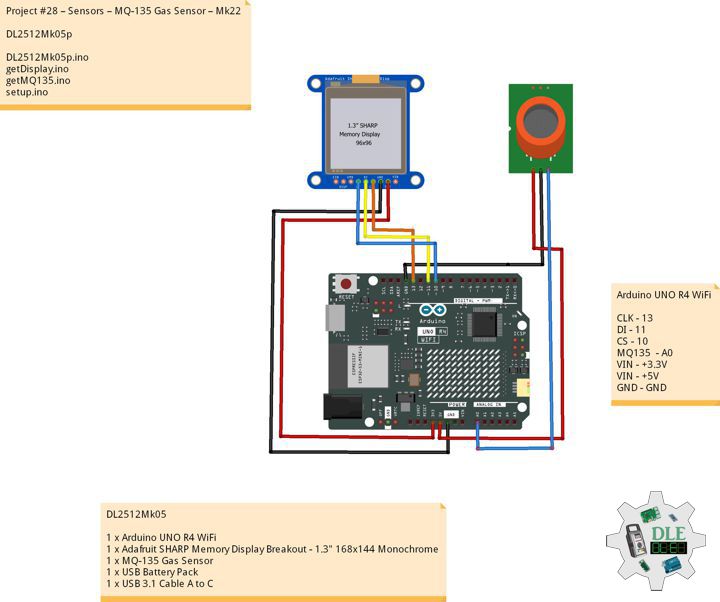
DL2512Mk05
1 x Arduino UNO R4 WiFi
1 x Adafruit SHARP Memory Display Breakout – 1.3″ 168×144 Monochrome
1 x MQ-135 Gas Sensor
1 x USB Battery Pack
1 x USB 3.0 to Type-C Cable
DL2512Mk05p
DL2512Mk05p.ino
/****** Don Luc Electronics © ******
Software Version Information
Project #28 – Sensors – MQ-135 Gas Sensor – Mk22
28-22
DL2512Mk05p.ino
DL2512Mk05
1 x Arduino UNO R4 WiFi
1 x Adafruit SHARP Memory Display Breakout - 1.3" 168x144 Monochrome
1 x MQ-135 Gas Sensor
1 x USB Battery Pack
1 x USB 3.0 to Type-C Cable
*/

// Include the Library Code
// MQ-135 Unified
#include <MQUnifiedsensor.h>
// SHARP Memory Display
#include <Adafruit_SharpMem.h>
#include <Adafruit_GFX.h>

// MQ-135 Unified
#define placa "Arduino UNO R4 WiFi"
#define Voltage_Resolution 5
#define pin A0
#define type "MQ-135"
#define ADC_Bit_Resolution 10
#define RatioMQ135CleanAir 3.6
MQUnifiedsensor MQ135(placa, Voltage_Resolution, ADC_Bit_Resolution, pin, type);
float fV;
float fPPM;

// SHARP Memory Display
// any pins can be used
#define SHARP_SCK  13
#define SHARP_MOSI 11
#define SHARP_SS   10
// Set the size of the display here, e.g. 144x168!
Adafruit_SharpMem display(SHARP_SCK, SHARP_MOSI, SHARP_SS, 144, 168);
// The currently-available SHARP Memory Display (144x168 pixels)
// requires > 4K of microcontroller RAM; it WILL NOT WORK on Arduino Uno
// or other <4K "classic" devices!  The original display (96x96 pixels)
// does work there, but is no longer produced.
#define BLACK 0
#define WHITE 1

// Software Version Information
String sver = "28-22";

void loop() {

  // MQ135
  isMQ135();

  // isDisplayMQ135
  isDisplayMQ135();

  // Delay
  delay( 1000 );

}
getDisplay.ino
// Adafruit SHARP Memory Display
// Adafruit SHARP Memory Display - UID
void isDisplayUID(){

  // text display
  display.setRotation(4);
  display.setTextSize(3);
  display.setTextColor(BLACK);
  display.setCursor(0,2);
  display.println( "Don Luc" );
  //display.setTextSize(2);
  display.setTextColor(BLACK);
  display.setCursor(0,35);
  display.println( sver );
  display.refresh();
  delay( 100 );

}
// isDisplayMQ135
void isDisplayMQ135(){

  // text display MQ135
  display.clearDisplay();
  display.setRotation(4);
  display.setTextSize(3);
  display.setTextColor(BLACK);
  display.setCursor(0,0);
  display.println( "MQ135" );
  display.setCursor(0,35);
  display.println( "Volt" );
  display.setCursor(0,65);
  display.println( fV );
  display.setCursor(0,95);
  display.println( "PPM" );
  display.setCursor(0,125);
  display.print( fPPM );
  display.refresh();
  delay( 100 );

}
getMQ135.ino
// MQ-135 Unified
// is MQ135
void isMQ135(){

  // MQ-135 Unified Analog
  MQ135.update();
  // Volt
  fV = MQ135.getVoltage();
  // PPM
  fPPM = MQ135.readSensor() + 400;

}
setup.ino
// Setup
void setup()
{

  // Delay
  delay( 100 );
  // Delay
  delay( 100 );

  // SHARP Display start & clear the display
  display.begin();
  display.clearDisplay();

  // Delay
  delay(100);

  // MQ-135 Unified
  // PPM =  a*ratio^b
  MQ135.setRegressionMethod(1);
  MQ135.setA(110.47);
  MQ135.setB(-2.862);
  MQ135.init();

  //Calibración
  float calcR0 = 0;
  for (int i = 1; i <= 10; i++) {

    // Analog
    MQ135.update();
    calcR0 += MQ135.calibrate(RatioMQ135CleanAir);

  }

  MQ135.setR0(calcR0 / 10);

  // Delay 2 Second
  delay( 2000 );

  // Don Luc Electronics
  // Version
  isDisplayUID();

  // Delay 5 Second
  delay( 5000 );

}
——
People can contact us: https://www.donluc.com/?page_id=1927
Consultant, R&D, Electronics, IoT, Teacher and Instructor
- Programming Language
- Single-Board Microcontrollers (PIC, Arduino, Raspberry Pi, Arm, Silicon Labs, Espressif, Etc…)
- IoT
- Wireless (Radio Frequency, Bluetooth, WiFi, Etc…)
- Robotics
- Automation
- Camera and Video Capture Receiver Stationary, Wheel/Tank , Underwater and UAV Vehicle
- Unmanned Vehicles Terrestrial, Marine and UAV
- Machine Learning
- Artificial Intelligence (AI)
- RTOS
- Sensors, eHealth Sensors, Biosensor, and Biometric
- Research & Development (R & D)
- Consulting
Follow Us
Luc Paquin – Curriculum Vitae – 2026
https://www.donluc.com/luc/
Web: https://www.donluc.com/
Web: https://www.jlpconsultants.com/
Facebook: https://www.facebook.com/neosteam.labs.9/
YouTube: https://www.youtube.com/@thesass2063
DFRobot: https://learn.dfrobot.com/user-10186.html
Elecrow: https://www.elecrow.com/share/sharepj/center/no/760816d385ebb1edc0732fd873bfbf13
TikTok: https://www.tiktok.com/@luc.paquin8
Hackster: https://www.hackster.io/luc-paquin
LinkedIn: https://www.linkedin.com/in/jlucpaquin/
Don Luc