
——
#DonLucElectronics #DonLuc #Robotics #BLE #L298N #MotorDC #ArduinoUNOR4 #Project #Fritzing #Programming #Electronics #Microcontrollers #Consultant
——
——-
——
——
Arduino Robot Car 2WD
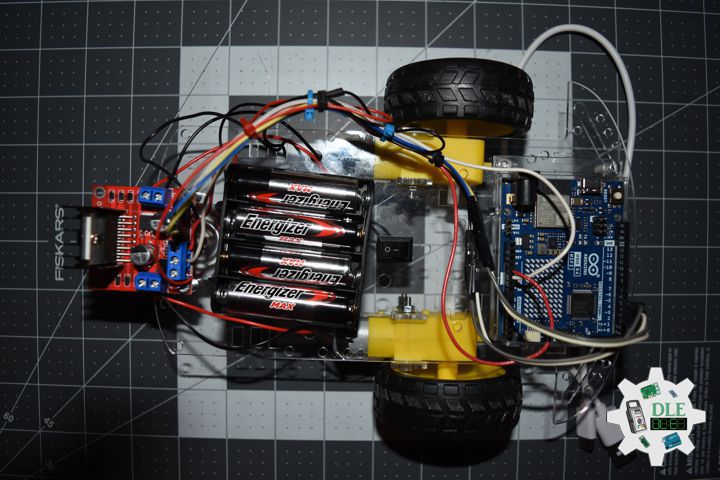
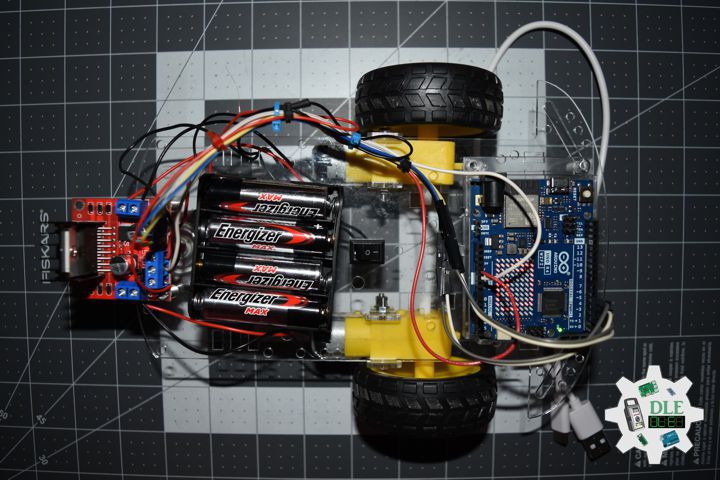
An Arduino Robot Car is a mobile robotic platform controlled by an Arduino microcontroller. The basic architecture consists of a chassis, DC motors for propulsion, a motor driver for controlling those motors, power supply, sensors for environment awareness, and the Arduino brain coordinating everything.
Two-wheel drive robots use two powered wheels at the rear with a ball caster or swivel wheel at the front for balance. This differential drive system allows precise turn in each wheel can rotate independently at different speeds or even in opposite directions, enabling the robot to spin in place. The simplicity means fewer motors to control, less current draw, and easier programming.
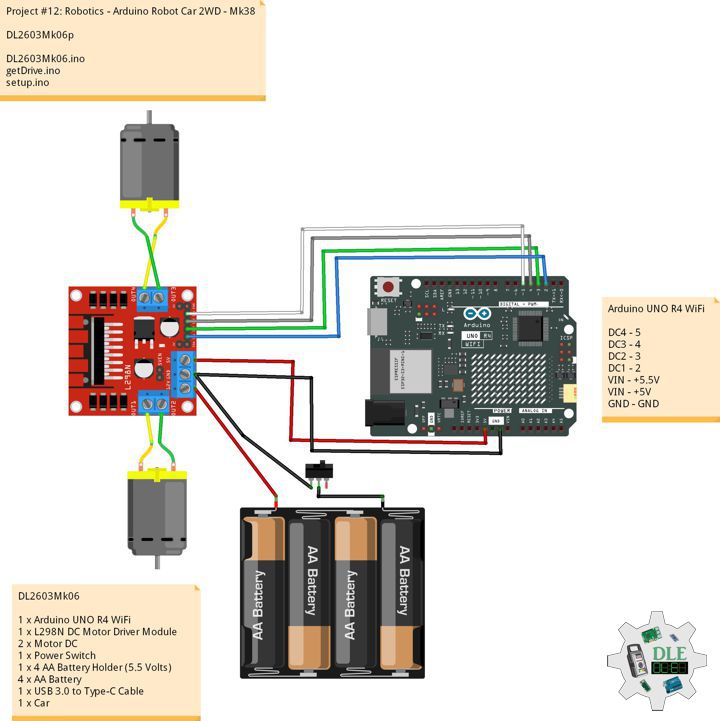
DL2603Mk06
1 x Arduino UNO R4 WiFi
1 x L298N DC Motor Driver Module
2 x Motor DC
1 x Power Switch
1 x 4 AA Battery Holder (5.5 Volts)
4 x AA Battery
1 x USB 3.0 to Type-C Cable
1 x Car
DL2603Mk06p
DL2603Mk06p.ino
/****** Don Luc Electronics © ******
Software Version Information
Project #12: Robotics - Arduino Robot Car 2WD - Mk38
12-38
DL2603Mk06p.ino
DL2603Mk06
1 x Arduino UNO R4 WiFi
1 x L298N DC Motor Driver Module
2 x Motor DC
1 x Power Switch
1 x AA Battery Holder (5.5 Volts)
3 x AA Battery
1 x Micro USB Cable
1 x Car
*/

// Include the Library Code
// LED_Matrix library
#include "Arduino_LED_Matrix.h"
// Arduino BLE
#include <ArduinoBLE.h>

// Arduino UNO R4 WiFi
// Car Service
BLEService carService("546b10ec-9c23-4f5e-ab33-cd415313439f");
// Command Char
BLECharacteristic commandChar("c607bca7-4832-4032-a0ab-e9c180dcce1e", BLEWrite, 20);

// Create an instance of the ArduinoLEDMatrix class
ArduinoLEDMatrix matrix;

// Motor DC 1
int motor1pin1 = 2;
int motor1pin2 = 3;

// Motor DC 2
int motor2pin1 = 4;
int motor2pin2 = 5;

// CMD
char cmd;

// Software Version Information
String sver = "12-36";

void loop() {

  // BLE Device Central
  BLEDevice central = BLE.central();
  // Central
  if (central) {

    // Connected
    while (central.connected()) {

      // Written
      if (commandChar.written()) {

        // CMD
        cmd = commandChar.value()[0];

        // Drive
        drive(cmd);

      }

    }

  }

}
getDrive.ino
// Drive
void drive(char cmd) {
  // Forward
       if (cmd == 'F') { forward();  }
    // Backward
  else if (cmd == 'B') { backward(); }
  // Left
  else if (cmd == 'L') { left(); }
  // Right
  else if (cmd == 'R') { right(); }
  // Spin
  else if (cmd == 'O') { spin(); }
  // Stop
  else { stopCar(); }
}

// Forward
void forward()  { digitalWrite(motor1pin1, LOW);  digitalWrite(motor1pin2, HIGH); digitalWrite(motor2pin1, HIGH); digitalWrite(motor2pin2, LOW); }
// Backward
void backward() { digitalWrite(motor1pin1, HIGH); digitalWrite(motor1pin2, LOW);  digitalWrite(motor2pin1, LOW);  digitalWrite(motor2pin2,HIGH); }
// Left
void left()     { digitalWrite(motor1pin1, LOW);  digitalWrite(motor1pin2, HIGH); digitalWrite(motor2pin1, LOW);  digitalWrite(motor2pin2, LOW); }
// Right
void right()    { digitalWrite(motor1pin1, LOW);  digitalWrite(motor1pin2, LOW);  digitalWrite(motor2pin1, HIGH); digitalWrite(motor2pin2, LOW); }
// Spin
void spin()     { digitalWrite(motor1pin1, HIGH); digitalWrite(motor1pin2, LOW);  digitalWrite(motor2pin1, HIGH); digitalWrite(motor2pin2, LOW); }
// Stop
void stopCar()  { digitalWrite(motor1pin1, LOW);  digitalWrite(motor1pin2, LOW);  digitalWrite(motor2pin1, LOW);  digitalWrite(motor2pin2, LOW); }
setup.ino
// Setup
void setup()
{

  // Initialize the LED matrix
  matrix.begin();

  // Load and display the basic emoji frame on the LED matrix
  matrix.loadFrame(LEDMATRIX_UNO);

  // Motor DC 1
  pinMode(motor1pin1, OUTPUT);
  pinMode(motor1pin2, OUTPUT);

  // Motor DC 2
  pinMode(motor2pin1, OUTPUT);
  pinMode(motor2pin2, OUTPUT);

  // Serial Begin
  Serial.begin(9600);

  // BLE Begin
  if (!BLE.begin()) {

    while (1);

  }

  // Name
  BLE.setLocalName("UnoR4Car");
  // Advertised Service
  BLE.setAdvertisedService(carService);
  // Characteristic
  carService.addCharacteristic(commandChar);
  // Service
  BLE.addService(carService);
  // Advertise
  BLE.advertise();

}
——
People can contact us: https://www.donluc.com/?page_id=1927
Consultant, R&D, Electronics, IoT, Teacher and Instructor
- Programming Language
- Single-Board Microcontrollers (PIC, Arduino, Raspberry Pi, Arm, Silicon Labs, Espressif, Etc…)
- IoT
- Wireless (Radio Frequency, Bluetooth, WiFi, Etc…)
- Robotics
- Automation
- Camera and Video Capture Receiver Stationary, Wheel/Tank , Underwater and UAV Vehicle
- Unmanned Vehicles Terrestrial, Marine and UAV
- Machine Learning
- Artificial Intelligence (AI)
- RTOS
- Sensors, eHealth Sensors, Biosensor, and Biometric
- Research & Development (R & D)
- Consulting
Follow Us
Luc Paquin – Curriculum Vitae – 2026
https://www.donluc.com/luc/LucPaquinCVEng2026Mk01.pdf
https://www.donluc.com/luc/
Web: https://www.donluc.com/
Web: https://www.jlpconsultants.com/
Facebook: https://www.facebook.com/neosteam.labs.9/
YouTube: https://www.youtube.com/@thesass2063
DFRobot: https://learn.dfrobot.com/user-10186.html
Elecrow: https://www.elecrow.com/share/sharepj/center/no/760816d385ebb1edc0732fd873bfbf13
TikTok: https://www.tiktok.com/@luc.paquin8
Hackster: https://www.hackster.io/luc-paquin
LinkedIn: https://www.linkedin.com/in/jlucpaquin/
Don Luc