——
#DonLucElectronics #DonLuc #GPS #RTC #Environment #FireBeetle2ESP32E #ESP32 #Display #IoT #Project #Fritzing #Programming #Electronics #Microcontrollers #Consultant
——-
——
——
——
Gravity: GNSS GPS BeiDou Receiver Module
The GNSS receiver module supports multiple satellite systems for accurate, high-speed positioning in various environments. It’s compatible with I2C/UART devices. GNSS stands for Global Navigation Satellite System. The main GNSS systems include GPS, GLONASS, QZSS, and BeiDou. These satellite systems transmit signals to the earth, allowing the receiver to determine its own position by calculating the propagation time of the signals and the position of the receiving satellite, thus achieving functions such as positioning and navigation.
Gravity: I2C SD2405 RTC Module
The I2C SD2405 RTC module features accurate real-time clock, dual power supply, low power consumption, periodic interrupts, and a high precision time trimming circuit. The SD2405AL is dual power supply system. When the primary power supply goes down to an assigned value or resumes from low power, the system can switch between the primary power supply and battery automatically. Even there is no external power, it can still work for 5~8 years, 1uA ultra-low power consumption.
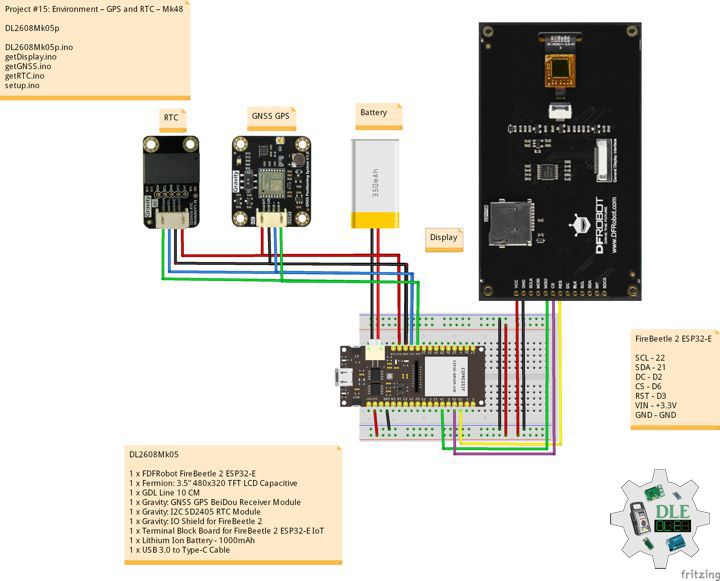
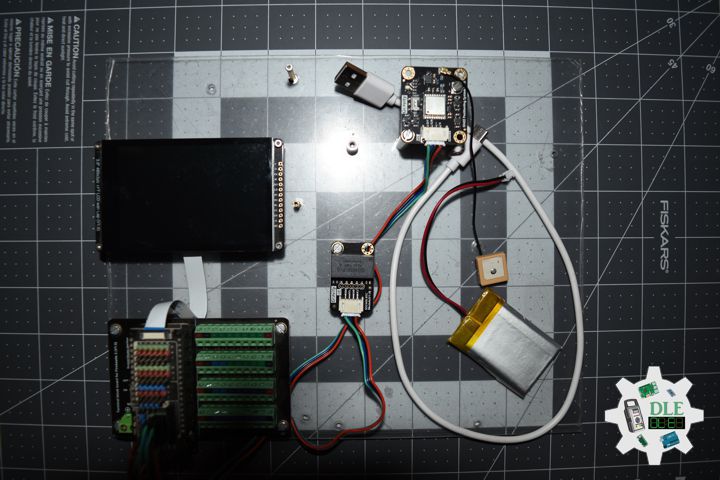
DL2608Mk05
1 x FDFRobot FireBeetle 2 ESP32-E
1 x Fermion: 3.5” 480×320 TFT LCD Capacitive
1 x GDL Line 10 CM
1 x Gravity: GNSS GPS BeiDou Receiver Module
1 x Gravity: I2C SD2405 RTC Module
1 x Gravity: IO Shield for FireBeetle 2
1 x Terminal Block Board for FireBeetle 2 ESP32-E IoT
1 x Lithium Ion Battery – 1000mAh
1 x USB 3.0 to Type-C Cable
DL2608Mk05p
DL2608Mk05p.ino
/****** Don Luc Electronics © ******
Software Version Information
Project #15: Environment – GPS and RTC – Mk48
15-48
DL2608Mk05p.ino
DL2608Mk05
1 x DFRobot FireBeetle 2 ESP32-E
1 x Fermion: 3.5” 480x320 TFT LCD Capacitive
1 x GDL Line 10 CM
1 x Gravity: GNSS GPS BeiDou Receiver Module
1 x Gravity: I2C SD2405 RTC Module
1 x Gravity: IO Shield for FireBeetle 2
1 x Terminal Block Board for FireBeetle 2 ESP32-E IoT
1 x Lithium Ion Battery - 1000mAh
1 x USB 3.0 to Type-C Cable
*/

// Include the Library Code
// DFRobot Display GDL API
#include <DFRobot_GDL.h>
// GNSS GPS
#include <DFRobot_GNSS.h>
// RTC (Real-Time Clock)
#include "GravityRtc.h"

// RTC Initialization
GravityRtc rtc;
// Date and Time
String dateRTC = "";
String timeRTC = "";

// GNSS GPS
// Use I2C for communication, but use the serial port for
// communication if the line of codes were masked
#define I2C_COMMUNICATION
// ESP32 user hardware uart
DFRobot_GNSS_I2C gnss(&Wire, GNSS_DEVICE_ADDR);
String sDate = "";
String sUTC = "";
String sLat = "";
String sLon = "";
String sAlt = "";

// Defined ESP32
#define TFT_DC  D2
#define TFT_CS  D6
#define TFT_RST D3

/*dc=*/ /*cs=*/ /*rst=*/
// DFRobot Display 320x480
DFRobot_ILI9488_320x480_HW_SPI screen(TFT_DC, TFT_CS, TFT_RST);

// Software Version Information
String sver = "15-48";

void loop() {

  // isGNSS
  isGNSS();

  // RTC (Real-Time Clock)
  isRTC();

  // isDisplay GPS RTC
  isDisplayGPSRTC();

  // Delay 1 Second
  delay( 1000 );

}
getDisplay.ino
// DFRobot Display 320x480
// DFRobot Display 320x480 - UID
void isDisplayUID(){

  // DFRobot Display 320x480
  // Text Display
  // Text Wrap
  screen.setTextWrap(false);
  // Rotation
  screen.setRotation(3);
  // Fill Screen => black
  screen.fillScreen(0x0000);
  // Text Color => white
  screen.setTextColor(0xffff);
  // Font => Free Sans Bold 12pt
  screen.setFont(&FreeSansBold12pt7b);
  // TextSize => 1.5
  screen.setTextSize(1.5);
  // Don Luc Electronics
  screen.setCursor(0, 30);
  screen.println("Don Luc Electronics");
  // Tilt Switch
  screen.setCursor(0, 60);
  screen.println("GPS and RTC");
  // Version
  screen.setCursor(0, 90);
  screen.println("Version");
  screen.setCursor(0, 120);
  screen.println( sver );

}
// isDisplay GPS RTC
void isDisplayGPSRTC(){

  // DFRobot Display 320x480
  // Text Display
  // Text Wrap
  screen.setTextWrap(false);
  // Rotation
  screen.setRotation(3);
  // Fill Screen => white
  screen.fillScreen(0xffff);
  // Text Color => blue
  screen.setTextColor(0x001F);
  // Font => Free Sans Bold 12pt
  screen.setFont(&FreeSansBold12pt7b);
  // TextSize => 1.5
  screen.setTextSize(1.5);
  // IP65 Capacitive Soil Moisture Sensor
  screen.setCursor(0, 30);
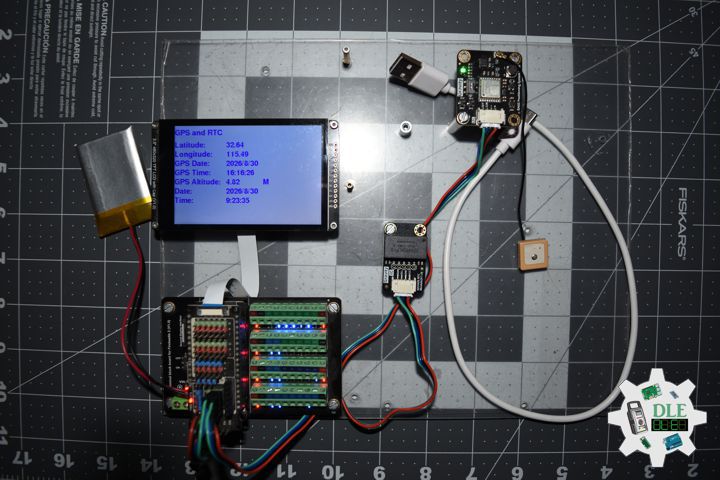
  screen.println("GPS and RTC");
  // Latitude
  screen.setCursor(0, 70);
  screen.println("Latitude: ");
  screen.setCursor(170, 70);
  screen.println( sLat );
  // Longitude
  screen.setCursor(0, 100);
  screen.print("Longitude: ");
  screen.setCursor(170, 100);
  screen.println( sLon );
  // GPS Date
  screen.setCursor(0, 130);
  screen.println("GPS Date: ");
  screen.setCursor(170, 130);
  screen.println( sDate );
  // GPS Time
  screen.setCursor(0, 160);
  screen.println("GPS Time: ");
  screen.setCursor(170, 160);
  screen.println( sUTC );
  // Altitude
  screen.setCursor(0, 190);
  screen.println("GPS Altitude: ");
  screen.setCursor(170, 190);
  screen.print( sAlt );
  screen.setCursor(290, 190);
  screen.println( "M" );
  // Date
  screen.setCursor(0, 220);
  screen.println("Date: ");
  screen.setCursor(170, 220);
  screen.println( dateRTC );
  // Time
  screen.setCursor(0, 250);
  screen.println("Time: ");
  screen.setCursor(170, 250);
  screen.println( timeRTC );

}
getGNSS.ino
// GNSS
// isSetupGNSS
void isSetupGNSS(){

  // GNSS
  gnss.begin();

  // GNSS
  gnss.enablePower();
/** Set the galaxy to be used
 *   eGPS              USE gps
 *   eBeiDou           USE beidou
 *   eGPS_BeiDou       USE gps + beidou
 *   eGLONASS          USE glonass
 *   eGPS_GLONASS      USE gps + glonass
 *   eBeiDou_GLONASS   USE beidou +glonass
 *   eGPS_BeiDou_GLONASS USE gps + beidou + glonass
 */
  gnss.setGnss(eGPS_BeiDou_GLONASS);
  // GNSS
  // gnss.setRgbOff();
  gnss.setRgbOn();

}
// isGNSS
void isGNSS(){

  // GNSS
  sTim_t utc = gnss.getUTC();
  sTim_t date = gnss.getDate();
  sLonLat_t lat = gnss.getLat();
  sLonLat_t lon = gnss.getLon();
  double high = gnss.getAlt();

  sDate = "";
  sUTC = "";
  sLat = "";
  sLon = "";
  sAlt = "";
  // Latitude
  sLat = lat.latitudeDegree;
  // Longitude
  sLon = lon.lonitudeDegree;
  // Date
  sDate = date.year;
  sDate = sDate + "/";
  sDate = sDate + date.month;
  sDate = sDate + "/";
  sDate = sDate + date.date;
  // UTC
  sUTC = utc.hour;
  sUTC = sUTC + ":";
  sUTC = sUTC + utc.hour;
  sUTC = sUTC + ":";
  sUTC = sUTC + utc.minute;
  // Altitude
  sAlt = high;

}
getRTC.ino
// Real-Time Tlock
// Date and Time RTC
void isRTC () {

  // Date and Time
  dateRTC = "";
  timeRTC = "";
  rtc.read();

  // Date
  dateRTC = rtc.year;
  dateRTC = dateRTC + "/";
  dateRTC = dateRTC + rtc.month;
  dateRTC = dateRTC + "/";
  dateRTC = dateRTC + rtc.day;

  // Time
  timeRTC = rtc.hour;
  timeRTC = timeRTC + ":";
  timeRTC = timeRTC + rtc.minute;
  timeRTC = timeRTC + ":";
  timeRTC = timeRTC + rtc.second;

}
setup.ino
// Setup
void setup()
{

  // Delay
  delay( 100 );

  // isSetupGNSS
  isSetupGNSS();

  // Delay
  delay(100);

  // Setup RTC
  rtc.setup();

  //Set the RTC time automatically: Calibrate RTC time by your computer time
  rtc.adjustRtc(F(__DATE__), F(__TIME__));

  // Delay
  delay(100);

  // DFRobot Display 320x480
  screen.begin();

  // Delay
  delay( 100 );

  // DFRobot Display 320x480 - UID
  // Don Luc Electronics
  // Version
  isDisplayUID();

  // Wait for the sensor to heat up for 20 seconds
  delay( 5000 );

}
——
People can contact us: https://www.donluc.com/?page_id=1927
Consultant, R&D, Electronics, IoT, Teacher and Instructor
- Programming Language
- Single-Board Microcontrollers (PIC, Arduino, Raspberry Pi, Arm, Silicon Labs, Espressif, Etc…)
- IoT
- Wireless (Radio Frequency, Bluetooth, WiFi, Etc…)
- Robotics
- Automation
- Camera and Video Capture Receiver Stationary, Wheel/Tank , Underwater and UAV Vehicle
- Unmanned Vehicles Terrestrial, Marine and UAV
- Machine Learning
- Artificial Intelligence (AI)
- RTOS
- Sensors, eHealth Sensors, Biosensor, and Biometric
- Research & Development (R & D)
- Consulting
Follow Us
Luc Paquin – Curriculum Vitae – 2026
https://www.donluc.com/luc/LucPaquinCVEng2026Mk01.pdf
https://www.donluc.com/luc/
Web: https://www.donluc.com/
Web: https://www.jlpconsultants.com/
Facebook: https://www.facebook.com/neosteam.labs.9/
YouTube: https://www.youtube.com/@thesass2063
DFRobot: https://learn.dfrobot.com/user-10186.html
TikTok: https://www.tiktok.com/@luc.paquin8
Hackster: https://www.hackster.io/luc-paquin
LinkedIn: https://www.linkedin.com/in/jlucpaquin/
Don Luc