Project #22: Synthesizer – UltrasonicSynth – Mk03

——

#DonLucElectronics #DonLuc #Synthesizer #UltrasonicSynth #Arduino #ArduinoProMini #Project #Fritzing #Programming #Electronics #Microcontrollers #Consultant

——
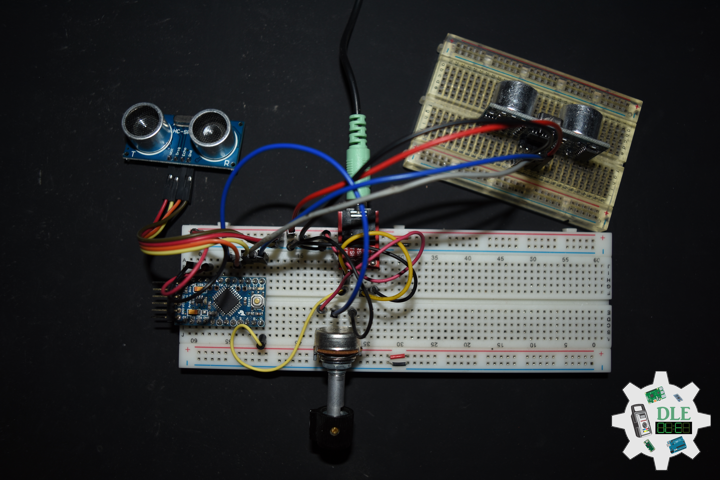
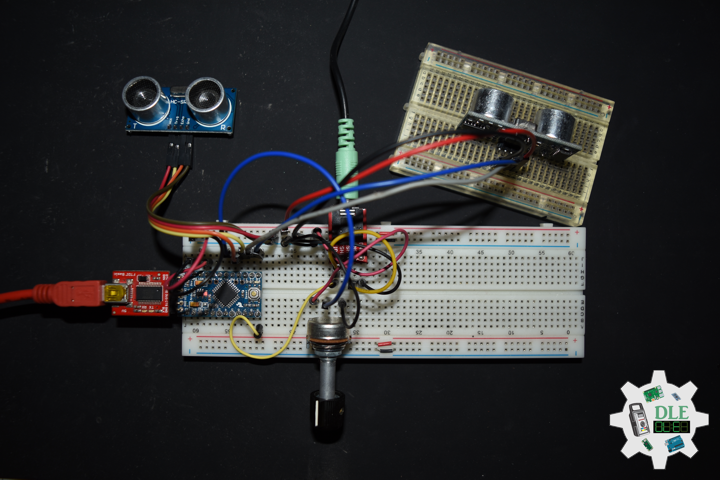
UltrasonicSynth

——

UltrasonicSynth

——

UltrasonicSynth

——

UltrasonicSynth Mozzi

Oscil

Oscil plays a wavetable, cycling through the table to generate an audio or control signal. The frequency of the signal can be set or changed, and the output of an Oscil can be produced with for a simple cycling oscillator, or for a particular sample in the table.

Soundtables

Look-up-tables and python scripts to generate tables or convert sounds. Includes ready-to-use wave tables and a few example samples. Also check out the other scripts in the python folder for templates to use if you want to do your own thing.

Smooth

A simple infinite impulse response low pass filter for smoothing control or audio signals. Smoothness sets how much smoothing the filter will apply to its input. Use a float in the range 0 – 1, where 0 is not very smooth and 0.99 is very smooth.

AutoMap

Automatically map an input value to an output range without knowing the precise range of inputs beforehand.

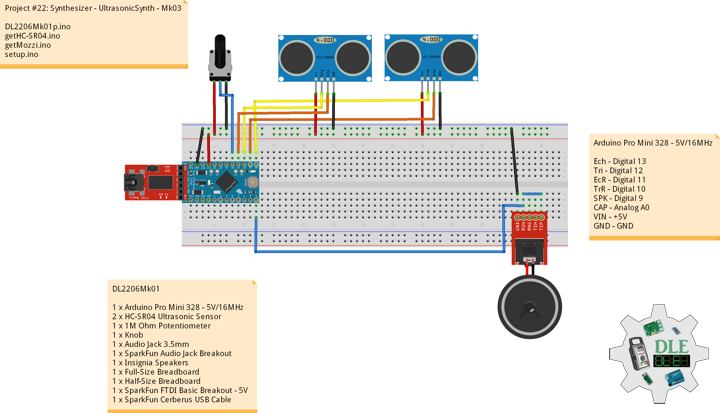
DL2204Mk01

1 x Arduino Pro Mini 328 – 5V/16MHz
2 x HC-SR04 Ultrasonic Sensor
1 x 1M Ohm Potentiometer
1 x Knob
1 x Audio Jack 3.5mm
1 x SparkFun Audio Jack Breakout
1 x Insignia Speakers
1 x Full-Size Breadboard
1 x Half-Size Breadboard
1 x SparkFun FTDI Basic Breakout – 5V
1 x SparkFun Cerberus USB Cable

Arduino Pro Mini 328 – 5V/16MHz

Ech – Digital 13
Tri – Digital 12
EcR – Digital 11
TrR – Digital 10
SPK – Digital 9
CAP – Analog A0
VIN – +5V
GND – GND

——

DL2206Mk01p.ino

/* ***** Don Luc Electronics © *****
Software Version Information
Project #22: Synthesizer - UltrasonicSynth - Mk03
22-03
DL2206Mk01p.ino
1 x Arduino Pro Mini 328 - 5V/16MHz
2 x HC-SR04 Ultrasonic Sensor
1 x 1M Ohm Potentiometer
1 x Knob
1 x Audio Jack 3.5mm
1 x SparkFun Audio Jack Breakout
1 x Insignia Speakers
1 x Full-Size Breadboard
1 x Half-Size Breadboard
1 x SparkFun FTDI Basic Breakout - 5V
1 x SparkFun Cerberus USB Cable
*/

// Include the Library Code
// Mozzi
#include <MozziGuts.h>
// Oscillator
#include <Oscil.h>
// Table for Oscils to play
#include <tables/cos2048_int8.h>
// Smoothing Control
#include <Smooth.h>
// Maps unpredictable inputs to a range
#include <AutoMap.h>

// Desired carrier frequency max and min, for AutoMap
const int MIN_CARRIER_FREQ = 22;
const int MAX_CARRIER_FREQ = 440;

// Desired intensity max and min, for AutoMap, note they're inverted for reverse dynamics
const int MIN_INTENSITY = 450;
const int MAX_INTENSITY = 50;

// Desired mod speed max and min, for AutoMap, note they're inverted for reverse dynamics
const int MIN_MOD_SPEED = 450;
const int MAX_MOD_SPEED = 50;

// Maps unpredictable inputs to a range
AutoMap kMapCarrierFreq(0,1023,MIN_CARRIER_FREQ,MAX_CARRIER_FREQ);
AutoMap kMapIntensity(0,1023,MIN_INTENSITY,MAX_INTENSITY);
AutoMap kMapModSpeed(0,1023,MIN_MOD_SPEED,MAX_MOD_SPEED);

// Set the input for the knob to analog pin 0
const int KNOB_PIN = A0;
// Set the analog input for fm_intensity
int LDR1_PIN;
// Set the analog input for mod rate
int LDR2_PIN;

// Table for Oscils to play
Oscil<COS2048_NUM_CELLS, AUDIO_RATE> aCarrier(COS2048_DATA);
Oscil<COS2048_NUM_CELLS, AUDIO_RATE> aModulator(COS2048_DATA);
Oscil<COS2048_NUM_CELLS, CONTROL_RATE> kIntensityMod(COS2048_DATA);

// Brightness (harmonics)
int mod_ratio = 5;
// Carries control info from updateControl to updateAudio
long fm_intensity;

// Smoothing for intensity to remove clicks on transitions
float smoothness = 0.95f;
Smooth <long> aSmoothIntensity(smoothness);

// Trigger pin 12 to pitch distance sensor
const int iTrigPitch = 12;
// Echo Receive pin 13 to pitch distance sensor
const int iEchoPitch = 13;
// Define the useable range of the pitch sensor
const int pitchLowThreshold = 450;
const int pitchHighThreshold = 50;    
// Stores the distance measured by the distance sensor
float distance = 0;
// Trigger pin 10 to rate distance sensor
const int iTrigRate = 10;
// Echo Receive pin 13 to pitch distance sensor
const int iEchoRate = 11;
// Define the useable range of the pitch sensor
const int rateLowThreshold = 450;
const int rateHighThreshold = 50;    
// Stores the distance measured by the distance sensor
float rate = 0;

// Mini Speaker
int SPK = 9;

// Software Version Information
String sver = "22-03";

void loop() {

  // Audio Hook
  audioHook();
  
}

getHC-SR04.ino

// HC-SR04 Ultrasonic Sensor
// Setup HC-SR04
void setupHCSR04() {

  // The trigger iTrig Pitch will output pulses of electricity
  pinMode(iTrigPitch, OUTPUT);
  // The echo iEcho will measure the duration of pulses coming back from the distance sensor
  pinMode(iEchoPitch, INPUT);

  // The trigger iTrig Rate will output pulses of electricity
  pinMode(iTrigRate, OUTPUT);
  // The echo iEcho will measure the duration of pulses coming back from the distance sensor
  pinMode(iEchoRate, INPUT);
  
}
// Distance
float isDistance() {
  
  // Variable to store the time it takes for a ping to bounce off an object
  float echoTime;
  // Variable to store the distance calculated from the echo time
  float calculatedDistance;

  // Send out an ultrasonic pulse that's 10ms long
  digitalWrite(iTrigPitch, HIGH);
  delayMicroseconds(10);
  digitalWrite(iTrigPitch, LOW);

  // Use the pulseIn command to see how long it takes for the
  // pulse to bounce back to the sensor
  echoTime = pulseIn(iEchoPitch, HIGH);

  // Calculate the distance of the object that reflected the pulse
  // (half the bounce time multiplied by the speed of sound)
  // cm = 58.0
  calculatedDistance = echoTime / 58.0;

  // Send back the distance that was calculated
  return calculatedDistance;
  
}
// Rate
float isRate() {
  
  // Variable to store the time it takes for a ping to bounce off an object
  float echoTime;
  // Variable to store the distance calculated from the echo time
  float calculatedDistance;

  // Send out an ultrasonic pulse that's 10ms long
  digitalWrite(iTrigRate, HIGH);
  delayMicroseconds(10);
  digitalWrite(iTrigRate, LOW);

  // Use the pulseIn command to see how long it takes for the
  // pulse to bounce back to the sensor
  echoTime = pulseIn(iEchoRate, HIGH);

  // Calculate the distance of the object that reflected the pulse
  // (half the bounce time multiplied by the speed of sound)
  // cm = 58.0
  calculatedDistance = echoTime / 58.0;

  // Send back the distance that was calculated
  return calculatedDistance;
  
}

getMozzi.ino

// Mozzi
// Update Control
void updateControl(){

  // Variable to store the distance measured by the sensor
  distance = isDistance();
  // Low Threshold
  if ( distance >= pitchLowThreshold) {

    // pitchLowThreshold
    distance = pitchLowThreshold;
    
  }
  // High Threshold
  if ( distance < pitchHighThreshold){
    
    // pitchHighThreshold
    distance = pitchHighThreshold;
    
  }

  // Variable to store the distance measured by the sensor
  rate = isRate();
  // Low Threshold
  if ( rate >= rateLowThreshold) {

    // rateLowThreshold
    rate = rateLowThreshold;
    
  }
  // High Threshold
  if ( rate < rateHighThreshold){
    
    // rateHighThreshold
    rate = rateHighThreshold;
    
  }

  // Read the knob
  // Value is 0-1023
  int knob_value = mozziAnalogRead(KNOB_PIN);

  // Map the knob to carrier frequency
  int carrier_freq = kMapCarrierFreq(knob_value);

  // Calculate the modulation frequency to stay in ratio
  int mod_freq = carrier_freq * mod_ratio;

  // Set the FM oscillator frequencies
  aCarrier.setFreq(carrier_freq);
  aModulator.setFreq(mod_freq);

  // Read the light dependent resistor on the width
  LDR1_PIN = distance;
  int LDR1_value = LDR1_PIN;

  int LDR1_calibrated = kMapIntensity(LDR1_value);

  // Calculate the fm_intensity
  // Shift back to range after 8 bit multiply
  fm_intensity = ((long)LDR1_calibrated * (kIntensityMod.next()+128))>>8;
  
  // Read the light dependent resistor on the speed
  LDR2_PIN = rate;
  int LDR2_value= LDR2_PIN;

  // Use a float here for low frequencies
  float mod_speed = (float)kMapModSpeed(LDR2_value)/1000;

  kIntensityMod.setFreq(mod_speed);
  
}
// Update Audio
int updateAudio()
{

  // Update Audio
  long modulation = aSmoothIntensity.next(fm_intensity) * aModulator.next();
  return aCarrier.phMod(modulation);

}

setup.ino

// Setup
void setup() {

  // Setup HC-SR04
  setupHCSR04();

  // Delay
  delay( 200 );

  // Mozzi Start
  startMozzi();

}

——

People can contact us: https://www.donluc.com/?page_id=1927

Technology Experience

  • Single-Board Microcontrollers (PIC, Arduino, Raspberry Pi,Espressif, etc…)
  • IoT
  • Robotics
  • Camera and Video Capture Receiver Stationary, Wheel/Tank and Underwater Vehicle
  • Unmanned Vehicles Terrestrial and Marine
  • Research & Development (R & D)

Instructor and E-Mentor

  • IoT
  • PIC Microcontrollers
  • Arduino
  • Raspberry Pi
  • Espressif
  • Robotics

Follow Us

J. Luc Paquin – Curriculum Vitae – 2022 English & Español
https://www.jlpconsultants.com/luc/

Web: https://www.donluc.com/
Web: https://www.jlpconsultants.com/
Facebook: https://www.facebook.com/neosteam.labs.9/
YouTube: https://www.youtube.com/channel/UC5eRjrGn1CqkkGfZy0jxEdA
Twitter: https://twitter.com/labs_steam
Pinterest: https://www.pinterest.com/NeoSteamLabs/
Instagram: https://www.instagram.com/neosteamlabs/

Don Luc
Project #23: E-Textiles – Coin Cell Battery – Mk08

——

#DonLucElectronics #DonLuc #ETextiles #Wearable #FLORA #BME280 #CCS811 #CoinCell #RTC #SD #Arduino #Project #Programming #Electronics #Microcontrollers #Consultant

——

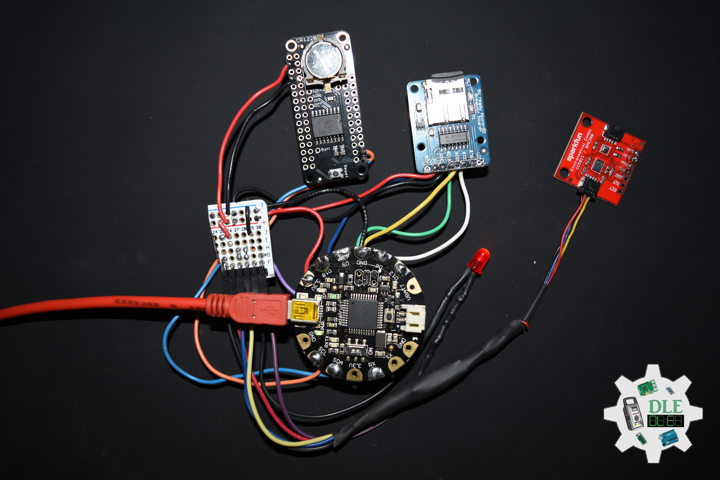
Coin Cell Battery

——

Coin Cell Battery

——

Coin Cell Battery

——

Coin Cell Battery Holder – 2 x CR2032 (Enclosed)

This is a simple coin cell battery holder that can enclose two CR2032 batteries inside itself, and safely kept closed via two phillips head screws. Each battery holder will run batteries in series, output up to 6V, and is equipped with an On/Off slide switch and two 6″ power wires (one positive and one negative) on the back.

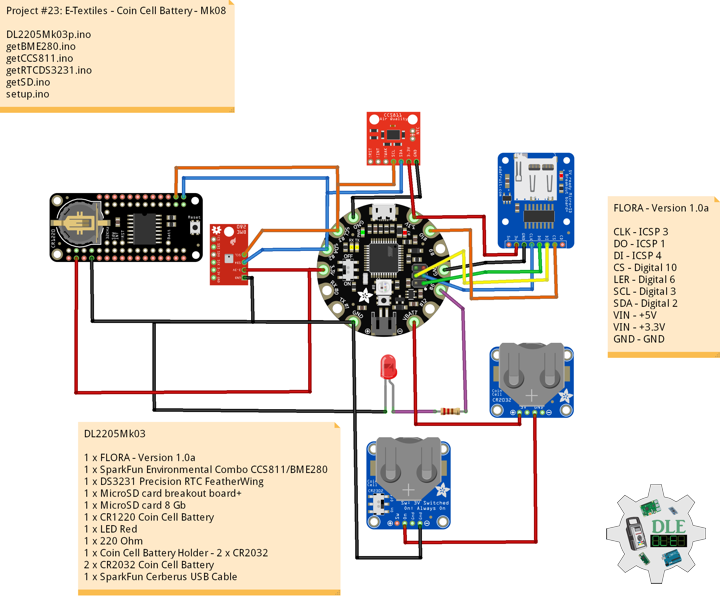
DL2205Mk03

1 x FLORA – Version 1.0a
1 x SparkFun Environmental Combo CCS811/BME280
1 x DS3231 Precision RTC FeatherWing
1 x MicroSD card breakout board+
1 x MicroSD card 8 Gb
1 x CR1220 Coin Cell Battery
1 x LED Red
1 x 220 Ohm
1 x Coin Cell Battery Holder – 2 x CR2032
2 x CR2032 Coin Cell Battery
1 x SparkFun Cerberus USB Cable

FLORA – Version 1.0a

CLK – ICSP 3
DO – ICSP 1
DI – ICSP 4
CS – Digital 10
LER – Digital 6
SCL – Digital 3
SDA – Digital 2
VIN – +5V
VIN – +3.3V
GND – GND

——

DL2205Mk03p.ino

/* ***** Don Luc Electronics © *****
Software Version Information
Project #23: E-Textiles - Coin Cell Battery - Mk08
23-08
DL2205Mk03p.ino
1 x FLORA - Version 1.0a
1 x SparkFun Environmental Combo CCS811/BME280
1 x DS3231 Precision RTC FeatherWing
1 x MicroSD card breakout board+
1 x MicroSD card 8 Gb
1 x CR1220 Coin Cell Battery
1 x LED Red
1 x 220 Ohm
1 x Coin Cell Battery Holder - 2 x CR2032
2 x CR2032 Coin Cell Battery
1 x SparkFun Cerberus USB Cable
*/

// Include the Library Code
// Wire
#include <Wire.h>
// SparkFun BME280 - Humidity, Temperature, Altitude and Barometric Pressure
#include <SparkFunBME280.h>
// SparkFun CCS811 - eCO2 & tVOC
#include <SparkFunCCS811.h>
// Date and time DS3231 RTC
#include <RTClib.h>
// Serial Peripheral Interface (SPI)
#include <SPI.h>
// Secure Digital (SD Card)
#include <SD.h>

// SparkFun BME280 - Temperature, Humidity, Altitude and Barometric Pressure
BME280 myBME280;
// Temperature Celsius
float BMEtempC = 0;
// Humidity
float BMEhumid = 0;
// Altitude Meters
float BMEaltitudeM = 0;
// Barometric Pressure
float BMEpressure = 0;

// SparkFun CCS811 - eCO2 & tVOC
// Default I2C Address
#define CCS811_ADDR 0x5B 
CCS811 myCCS811(CCS811_ADDR);
// eCO2
float CCS811CO2 = 0;
// TVOC
float CCS811TVOC = 0;

// Date and time functions using a DS3231 RTC
RTC_DS3231 RTC;
String sDate;
String sTime;

// Secure Digital (SD Card)
const int chipSelect = 10;
String zzzzzz = "";

// LED Red
const int iLEDR = 6;

// Software Version Information
String sver = "23-08";

void loop() {

  // SparkFun BME280 - Temperature, Humidity, Altitude and Barometric Pressure
  isBME280();

  // SparkFun CCS811 - eCO2 & tVOC
  isCCS811();

  // Dates and Time
  timeRTC();

  // MicroSD Card
  isSD();

  // 1 Seconds
  delay( 1000 );

}

getBME280.ino

// SparkFun BME280 - Temperature, Humidity, Altitude and Barometric Pressure
// isBME280 - Temperature, Humidity, Altitude and Barometric Pressure
void isBME280(){

  // Temperature Celsius
  BMEtempC = myBME280.readTempC();
  // Humidity
  BMEhumid = myBME280.readFloatHumidity() ;
  // Altitude Meters
  BMEaltitudeM = myBME280.readFloatAltitudeMeters();
  // Barometric Pressure
  BMEpressure = myBME280.readFloatPressure();
  
}

getCCS811.ino

// CCS811 - eCO2 & tVOC
// isCCS811 - eCO2 & tVOC
void isCCS811(){

  // This sends the temperature & humidity data to the CCS811
  myCCS811.setEnvironmentalData(BMEhumid, BMEtempC);

  // Calling this function updates the global tVOC and eCO2 variables
  myCCS811.readAlgorithmResults();

  // eCO2 Concentration
  CCS811CO2 = myCCS811.getCO2();
  
  // tVOC Concentration
  CCS811TVOC = myCCS811.getTVOC();
  
}

getRTCDS3231.ino

// DS3231 Precision RTC
// Setup RTC
void setupRTC() {

  // DS3231 Precision RTC   
  RTC.begin();
  if (! RTC.begin()) {
    
    while (1);
    
  }
  
  DateTime now = RTC.now();

  if (RTC.lostPower()) {
    
    // Following line sets the RTC to the date & time this sketch was compiled
    RTC.adjust(DateTime(F(__DATE__), F(__TIME__)));
    // This line sets the RTC with an explicit date & time, for example to set
    // August 2, 2021 at 13:53:0 you would call:
    // RTC.adjust(DateTime(2022, 4, 26, 11, 39, 0));
    
  }
  
}
// timeRTC
void timeRTC() {

    // DS3231 Precision RTC
    sDate = "";
    sTime = "";
    // Date Time
    DateTime now = RTC.now();

    // sData
    sDate += String(now.year(), DEC);
    sDate += "/";
    sDate += String(now.month(), DEC);
    sDate += "/";
    sDate += String(now.day(), DEC);
  
    // sTime
    sTime += String(now.hour(), DEC);
    sTime += ":";
    sTime += String(now.minute(), DEC);
    sTime += ":";
    sTime += String(now.second(), DEC);

}

getSD.ino

// MicroSD Card
// MicroSD Setup
void setupSD() {

    // MicroSD Card
   // See if the card is present and can be initialized:
  if (!SD.begin(chipSelect)) {

    // Don't do anything more:
    while (1);
    
  }

}
// MicroSD Card
void isSD() {

  zzzzzz = "";

  // Version|Date|Time|Temperature Celsius|Humidity|Altitude Meters|Barometric Pressure
  //|eCO2 Concentration|tVOC Concentration|
  zzzzzz = sver + "|" + sDate + "|" + sTime + "|" 
  + BMEtempC + "|" + BMEhumid + "|" + BMEaltitudeM + "|" + BMEpressure + "|"
  + CCS811CO2 + "|" + CCS811TVOC + "|";

  // Open the file. Note that only one file can be open at a time,
  // so you have to close this one before opening another.
  File dataFile = SD.open("DLE22Log.txt", FILE_WRITE);

  // If the file is available, write to it:
  if (dataFile) {
    
    // Write
    dataFile.println( zzzzzz );
    dataFile.close();

  }

}

setup.ino

// Setup
void setup() {

  // Delay
  delay( 100 );
  
  // Set up I2C bus
  Wire.begin();

  // Delay
  delay( 50 );

  // SparkFun BME280 - Temperature, Humidity, Altitude and Barometric Pressure
  myBME280.begin();

  // CCS811 - eCO2 & tVOC
  myCCS811.begin();

  // Setup RTC
  setupRTC();

  //MicroSD Card
  setupSD();

  // LED Red
  pinMode( iLEDR , OUTPUT);
  // Turn the LED Red on HIGH
  digitalWrite( iLEDR , HIGH);

}

——

People can contact us: https://www.donluc.com/?page_id=1927

Technology Experience

  • Single-Board Microcontrollers (PIC, Arduino, Raspberry Pi,Espressif, etc…)
  • IoT
  • Robotics
  • Camera and Video Capture Receiver Stationary, Wheel/Tank and Underwater Vehicle
  • Unmanned Vehicles Terrestrial and Marine
  • Research & Development (R & D)

Instructor and E-Mentor

  • IoT
  • PIC Microcontrollers
  • Arduino
  • Raspberry Pi
  • Espressif
  • Robotics

Follow Us

J. Luc Paquin – Curriculum Vitae – 2022 English & Español
https://www.jlpconsultants.com/luc/

Web: https://www.donluc.com/
Web: https://www.jlpconsultants.com/
Facebook: https://www.facebook.com/neosteam.labs.9/
YouTube: https://www.youtube.com/channel/UC5eRjrGn1CqkkGfZy0jxEdA
Twitter: https://twitter.com/labs_steam
Pinterest: https://www.pinterest.com/NeoSteamLabs/
Instagram: https://www.instagram.com/neosteamlabs/

Don Luc
Project #23: E-Textiles – MicroSD Card – Mk07

——

#DonLucElectronics #DonLuc #ETextiles #Wearable #FLORA #BME280 #CCS811 #RTC #SD #Arduino #Project #Programming #Electronics #Microcontrollers #Consultant

——

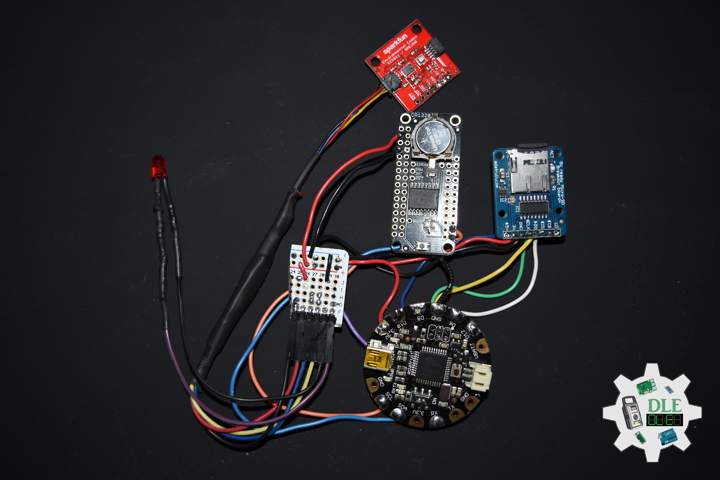
MicroSD Card

——

MicroSD Card

——

MicroSD Card

——

MicroSD Card Breakout Board+

Not just a simple breakout board, this microSD adapter goes the extra mile designed for ease of use.

  • Onboard 5 Volt – 3 Volt regulator provides 150mA for power-hungry cards.
  • 3 Volt level shifting means you can use this with ease on either 3 Volt or 5 Volt systems.
  • Uses a proper level shifting chip, not resistors, less problems, and faster read/write access.
  • Use 3 or 4 digital pins to read and write 8 Gb of storage.
  • Activity LED lights up when the SD card is being read or written.
  • Push-push socket with card slightly over the edge of the PCB so its easy to insert and remove.
  • Comes with 0.1″ header, unattached, so you can get it on a breadboard or use wires your choice.

To use with an Arduino, connect GND to ground, 5 Volt – 3 Volt to 5 Volt – 3 Volt, CLK to pin 13, DO to pin 12, DI to pin 11, and CS to pin 10. Then you can use the Arduino IDE’s SD library which supports FAT and FAT32 SD cards.

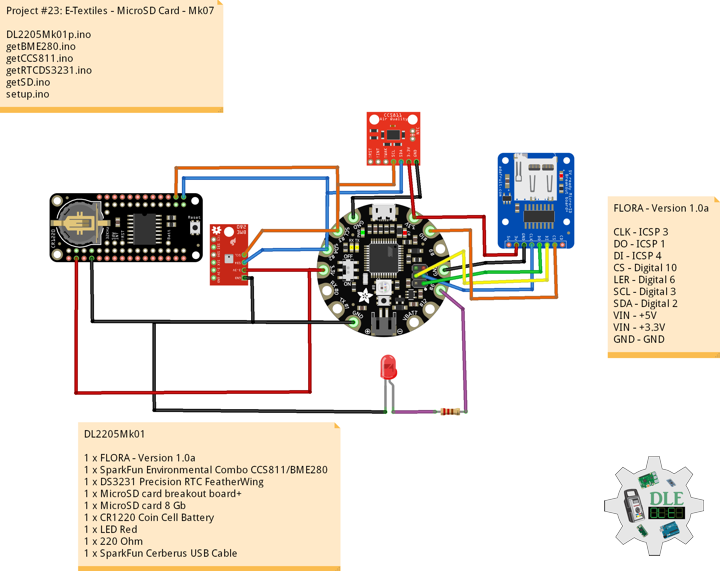
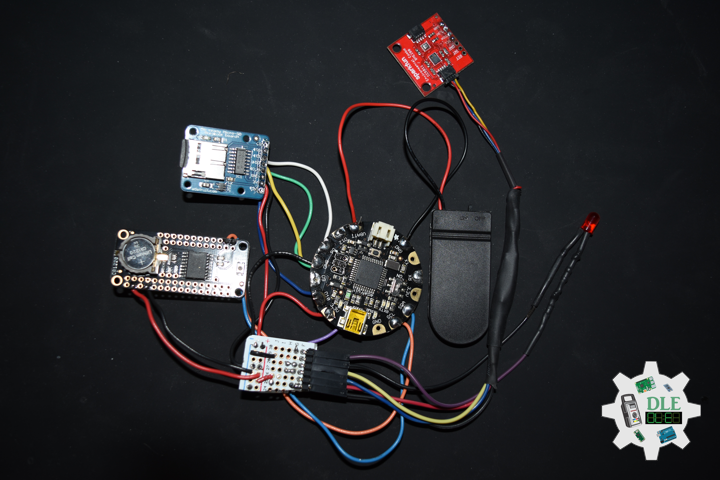
DL2205Mk01

1 x FLORA – Version 1.0a
1 x SparkFun Environmental Combo CCS811/BME280
1 x DS3231 Precision RTC FeatherWing
1 x MicroSD card breakout board+
1 x MicroSD card 8 Gb
1 x CR1220 Coin Cell Battery
1 x LED Red
1 x 220 Ohm
1 x SparkFun Cerberus USB Cable

FLORA – Version 1.0a

CLK – ICSP 3
DO – ICSP 1
DI – ICSP 4
CS – Digital 10
LER – Digital 6
SCL – Digital 3
SDA – Digital 2
VIN – +5V
VIN – +3.3V
GND – GND

——

DL2205Mk01p.ino

/* ***** Don Luc Electronics © *****
Software Version Information
Project #23: E-Textiles - MicroSD Card - Mk07
23-07
DL2205Mk01p.ino
1 x FLORA - Version 1.0a
1 x SparkFun Environmental Combo CCS811/BME280
1 x DS3231 Precision RTC FeatherWing
1 x MicroSD card breakout board+
1 x MicroSD card 8 Gb
1 x CR1220 Coin Cell Battery
1 x LED Red
1 x 220 Ohm
1 x SparkFun Cerberus USB Cable
*/

// Include the Library Code
// Wire
#include <Wire.h>
// SparkFun BME280 - Humidity, Temperature, Altitude and Barometric Pressure
#include <SparkFunBME280.h>
// SparkFun CCS811 - eCO2 & tVOC
#include <SparkFunCCS811.h>
// Date and time DS3231 RTC
#include <RTClib.h>
// Serial Peripheral Interface (SPI)
#include <SPI.h>
// Secure Digital (SD Card)
#include <SD.h>

// SparkFun BME280 - Temperature, Humidity, Altitude and Barometric Pressure
BME280 myBME280;
// Temperature Celsius
float BMEtempC = 0;
// Humidity
float BMEhumid = 0;
// Altitude Meters
float BMEaltitudeM = 0;
// Barometric Pressure
float BMEpressure = 0;

// SparkFun CCS811 - eCO2 & tVOC
// Default I2C Address
#define CCS811_ADDR 0x5B 
CCS811 myCCS811(CCS811_ADDR);
// eCO2
float CCS811CO2 = 0;
// TVOC
float CCS811TVOC = 0;

// Date and time functions using a DS3231 RTC
RTC_DS3231 RTC;
String sDate;
String sTime;

// Secure Digital (SD Card)
const int chipSelect = 10;
String zzzzzz = "";

// LED Red
const int iLEDR = 6;

// Software Version Information
String sver = "23-07";

void loop() {

  // SparkFun BME280 - Temperature, Humidity, Altitude and Barometric Pressure
  isBME280();

  // SparkFun CCS811 - eCO2 & tVOC
  isCCS811();

  // Dates and Time
  timeRTC();

  // MicroSD Card
  isSD();

  // 1 Seconds
  delay( 1000 );

}

getBME280.ino

// SparkFun BME280 - Temperature, Humidity, Altitude and Barometric Pressure
// isBME280 - Temperature, Humidity, Altitude and Barometric Pressure
void isBME280(){

  // Temperature Celsius
  BMEtempC = myBME280.readTempC();
  // Humidity
  BMEhumid = myBME280.readFloatHumidity() ;
  // Altitude Meters
  BMEaltitudeM = myBME280.readFloatAltitudeMeters();
  // Barometric Pressure
  BMEpressure = myBME280.readFloatPressure();
  
}

getCCS811.ino

// CCS811 - eCO2 & tVOC
// isCCS811 - eCO2 & tVOC
void isCCS811(){

  // This sends the temperature & humidity data to the CCS811
  myCCS811.setEnvironmentalData(BMEhumid, BMEtempC);

  // Calling this function updates the global tVOC and eCO2 variables
  myCCS811.readAlgorithmResults();

  // eCO2 Concentration
  CCS811CO2 = myCCS811.getCO2();
  
  // tVOC Concentration
  CCS811TVOC = myCCS811.getTVOC();
  
}

getRTCDS3231.ino

// DS3231 Precision RTC
// Setup RTC
void setupRTC() {

  // DS3231 Precision RTC   
  RTC.begin();
  if (! RTC.begin()) {
    
    while (1);
    
  }
  
  DateTime now = RTC.now();

  if (RTC.lostPower()) {
    
    // Following line sets the RTC to the date & time this sketch was compiled
    RTC.adjust(DateTime(F(__DATE__), F(__TIME__)));
    // This line sets the RTC with an explicit date & time, for example to set
    // August 2, 2021 at 13:53:0 you would call:
    // RTC.adjust(DateTime(2022, 4, 26, 11, 39, 0));
    
  }
  
}
// timeRTC
void timeRTC() {

    // DS3231 Precision RTC
    sDate = "";
    sTime = "";
    // Date Time
    DateTime now = RTC.now();

    // sData
    sDate += String(now.year(), DEC);
    sDate += "/";
    sDate += String(now.month(), DEC);
    sDate += "/";
    sDate += String(now.day(), DEC);
  
    // sTime
    sTime += String(now.hour(), DEC);
    sTime += ":";
    sTime += String(now.minute(), DEC);
    sTime += ":";
    sTime += String(now.second(), DEC);

}

getSD.ino

// MicroSD Card
// MicroSD Setup
void setupSD() {

    // MicroSD Card
   // See if the card is present and can be initialized:
  if (!SD.begin(chipSelect)) {

    // Don't do anything more:
    while (1);
    
  }

}
// MicroSD Card
void isSD() {

  zzzzzz = "";

  // Version|Date|Time|Temperature Celsius|Humidity|Altitude Meters|Barometric Pressure
  //|eCO2 Concentration|tVOC Concentration|
  zzzzzz = sver + "|" + sDate + "|" + sTime + "|" 
  + BMEtempC + "|" + BMEhumid + "|" + BMEaltitudeM + "|" + BMEpressure + "|"
  + CCS811CO2 + "|" + CCS811TVOC + "|";

  // Open the file. Note that only one file can be open at a time,
  // so you have to close this one before opening another.
  File dataFile = SD.open("DLE22Log.txt", FILE_WRITE);

  // If the file is available, write to it:
  if (dataFile) {
    
    // Write
    dataFile.println( zzzzzz );
    dataFile.close();

  }

}

setup.ino

// Setup
void setup() {

  // Delay
  delay( 100 );
  
  // Set up I2C bus
  Wire.begin();

  // Delay
  delay( 50 );

  // SparkFun BME280 - Temperature, Humidity, Altitude and Barometric Pressure
  myBME280.begin();

  // CCS811 - eCO2 & tVOC
  myCCS811.begin();

  // Setup RTC
  setupRTC();

  //MicroSD Card
  setupSD();

  // LED Red
  pinMode( iLEDR , OUTPUT);
  // Turn the LED Red on HIGH
  digitalWrite( iLEDR , HIGH);

}

——

People can contact us: https://www.donluc.com/?page_id=1927

Technology Experience

  • Single-Board Microcontrollers (PIC, Arduino, Raspberry Pi,Espressif, etc…)
  • IoT
  • Robotics
  • Camera and Video Capture Receiver Stationary, Wheel/Tank and Underwater Vehicle
  • Unmanned Vehicles Terrestrial and Marine
  • Research & Development (R & D)

Instructor and E-Mentor

  • IoT
  • PIC Microcontrollers
  • Arduino
  • Raspberry Pi
  • Espressif
  • Robotics

Follow Us

J. Luc Paquin – Curriculum Vitae – 2022 English & Español
https://www.jlpconsultants.com/luc/

Web: https://www.donluc.com/
Web: https://www.jlpconsultants.com/
Facebook: https://www.facebook.com/neosteam.labs.9/
YouTube: https://www.youtube.com/channel/UC5eRjrGn1CqkkGfZy0jxEdA
Twitter: https://twitter.com/labs_steam
Pinterest: https://www.pinterest.com/NeoSteamLabs/
Instagram: https://www.instagram.com/neosteamlabs/

Don Luc
Project #23: E-Textiles – DS3231 Precision RTC – Mk06

——

#DonLucElectronics #DonLuc #ETextiles #Wearable #FLORA #MicroOLED #BME280 #CCS811 #RTC #Arduino #Project #Programming #Electronics #Microcontrollers #Consultant

——

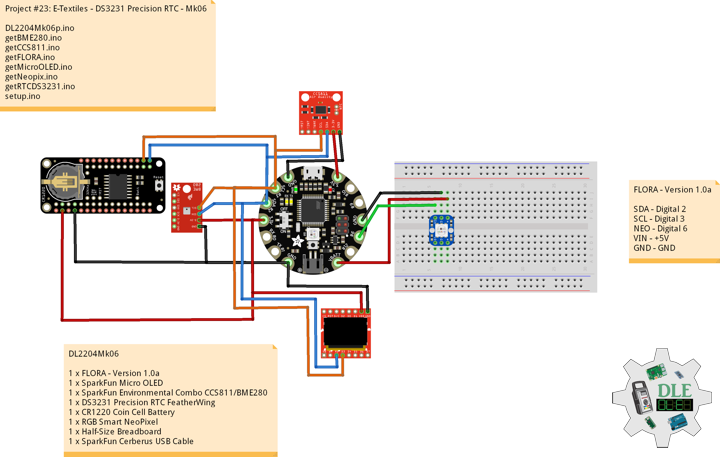
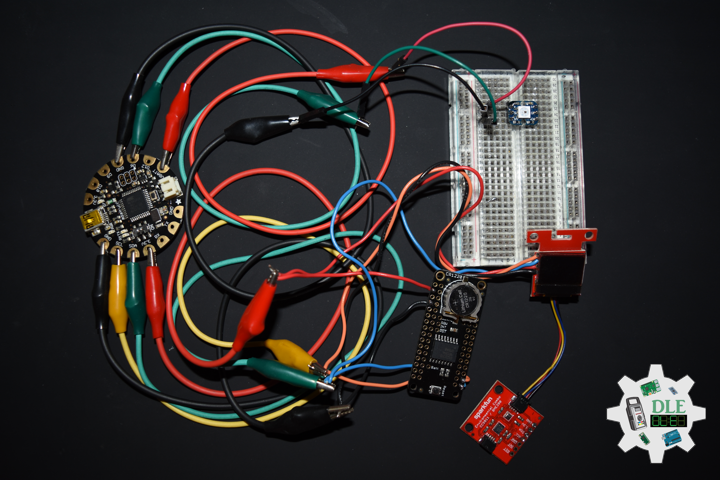
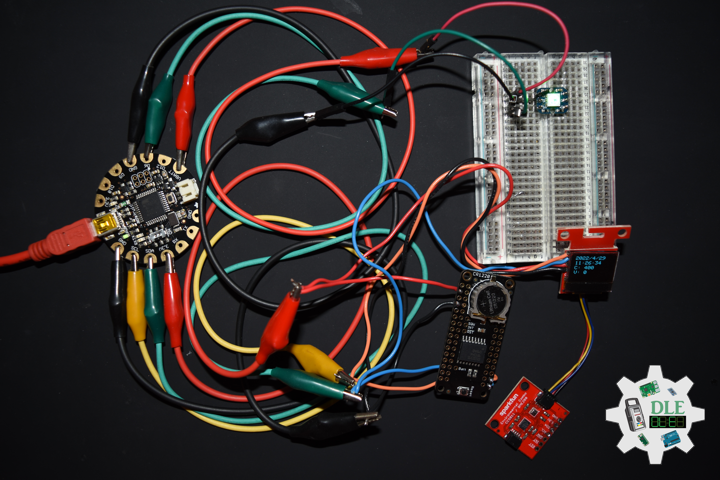
DS3231 Precision RTC

——

DS3231 Precision RTC

——

DS3231 Precision RTC

——

DS3231 Precision RTC FeatherWing

A Feather board without ambition is a Feather board without FeatherWings. This is the DS3231 Precision RTC FeatherWing it adds an extremely accurate I2C-integrated Real Time Clock (RTC) with a Temperature Compensated Crystal Oscillator (TCXO). This RTC is the most precise you can get in a small, low power package.

Most RTCs use an external 32kHz timing crystal that is used to keep time with low current draw. And that’s all well and good, but those crystals have slight drift, particularly when the temperature changes, the temperature changes the oscillation frequency very very very slightly but it does add up. This RTC is in a beefy package because the crystal is inside the chip, and right next to the integrated crystal is a temperature sensor. That sensor compensates for the frequency changes by adding or removing clock ticks so that the timekeeping stays on schedule.

With a CR1220 12mm coin cell plugged into the top of the FeatherWing, you can get years of precision time keeping, even when main power is lost. Great for datalogging and clocks or anything where you need to really know the time.

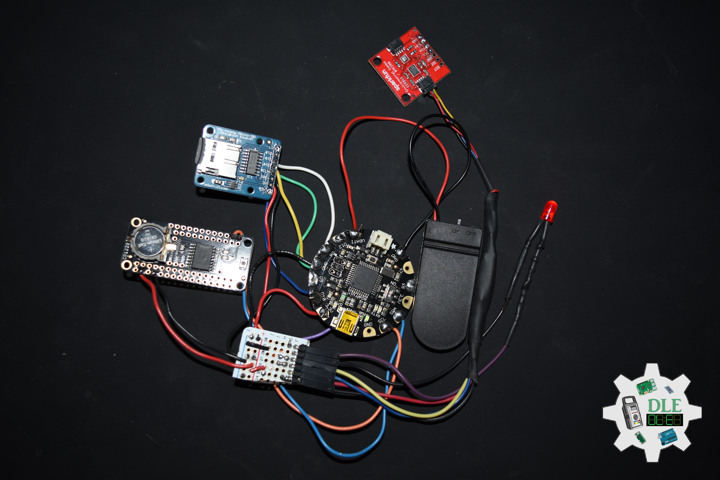
DL2204Mk06

1 x FLORA – Version 1.0a
1 x SparkFun Micro OLED
1 x SparkFun Environmental Combo CCS811/BME280
1 x DS3231 Precision RTC FeatherWing
1 x CR1220 Coin Cell Battery
1 x RGB Smart NeoPixel
1 x Half-Size Breadboard
1 x SparkFun Cerberus USB Cable

FLORA – Version 1.0a

SDA – Digital 2
SCL – Digital 3
NEO – Digital 6
VIN – +5V
GND – GND

——

DL2204Mk06p.ino

/* ***** Don Luc Electronics © *****
Software Version Information
Project #23: E-Textiles - DS3231 Precision RTC - Mk06
23-06
DL2204Mk06p.ino
1 x FLORA - Version 1.0a
1 x SparkFun Micro OLED
1 x SparkFun Environmental Combo CCS811/BME280
1 x DS3231 Precision RTC FeatherWing
1 x CR1220 Coin Cell Battery
1 x RGB Smart NeoPixel
1 x Half-Size Breadboard
1 x SparkFun Cerberus USB Cable
*/

// Include the Library Code
// Wire
#include <Wire.h>
// NeoPixels
#include <Adafruit_NeoPixel.h>
// SparkFun Micro OLED
#include <SFE_MicroOLED.h>
// SparkFun BME280 - Humidity, Temperature, Altitude and Barometric Pressure
#include <SparkFunBME280.h>
// SparkFun CCS811 - eCO2 & tVOC
#include <SparkFunCCS811.h>
// Date and time DS3231 RTC
#include <RTClib.h>

// NeoPixels
// On digital pin 6
#define PIN 6
// NeoPixels NUMPIXELS = 1
#define NUMPIXELS 1
// Pixels
Adafruit_NeoPixel pixels = Adafruit_NeoPixel(NUMPIXELS, PIN, NEO_GRB + NEO_KHZ800);
// Red
int red = 0;
// Green
int green = 0;
// Blue
int blue = 0;
// Neopix
int iNeo = 0;
// Value
int zz = 0;

// SparkFun Micro OLED
#define PIN_RESET 9
#define DC_JUMPER 1
// I2C declaration
MicroOLED oled(PIN_RESET, DC_JUMPER);

// SparkFun BME280 - Temperature, Humidity, Altitude and Barometric Pressure
BME280 myBME280;
// Temperature Celsius
float BMEtempC = 0;
// Humidity
float BMEhumid = 0;
// Altitude Meters
float BMEaltitudeM = 0;
// Barometric Pressure
float BMEpressure = 0;

// SparkFun CCS811 - eCO2 & tVOC
// Default I2C Address
#define CCS811_ADDR 0x5B 
CCS811 myCCS811(CCS811_ADDR);
// eCO2
float CCS811CO2 = 0;
// TVOC
float CCS811TVOC = 0;

// Date and time functions using a DS3231 RTC
RTC_DS3231 RTC;
String sDate;
String sTime;

// Software Version Information
String sver = "23-06";

void loop() {

  // SparkFun BME280 - Temperature, Humidity, Altitude and Barometric Pressure
  isBME280();

  // SparkFun CCS811 - eCO2 & tVOC
  isCCS811();

  // FLORA
  isFLORA();

  // Dates and Time
  timeRTC();

  // Micro OLED
  isMicroOLED();
 
}

getBME280.ino

// SparkFun BME280 - Temperature, Humidity, Altitude and Barometric Pressure
// isBME280 - Temperature, Humidity, Altitude and Barometric Pressure
void isBME280(){

  // Temperature Celsius
  BMEtempC = myBME280.readTempC();
  // Humidity
  BMEhumid = myBME280.readFloatHumidity() ;
  // Altitude Meters
  BMEaltitudeM = myBME280.readFloatAltitudeMeters();
  // Barometric Pressure
  BMEpressure = myBME280.readFloatPressure();
  
}

getCCS811.ino

// CCS811 - eCO2 & tVOC
// isCCS811 - eCO2 & tVOC
void isCCS811(){

  // This sends the temperature & humidity data to the CCS811
  myCCS811.setEnvironmentalData(BMEhumid, BMEtempC);

  // Calling this function updates the global tVOC and eCO2 variables
  myCCS811.readAlgorithmResults();

  // eCO2 Concentration
  CCS811CO2 = myCCS811.getCO2();
  
  // tVOC Concentration
  CCS811TVOC = myCCS811.getTVOC();
  
}

getFLORA.ino

// FLORA
// isFLORA
void isFLORA() {

  // FLORA = Temperature Celsius
  // BMEtempC

  // FLORA = Temperature Celsius
  if ( BMEtempC >= 50 ) {

    // 40 <= Temperature Celsius < 50~~~
    zz = 2;
    isNUMPIXELS();

  } else if ( BMEtempC >= 40 ) {

    // 30 <= Temperature Celsius < 40
    zz = 3;
    isNUMPIXELS();
    
  }  else if ( BMEtempC >= 30 ) {

    // 20 <= Temperature Celsius < 30
    zz = 4;
    isNUMPIXELS();
    
  } else if ( BMEtempC >= 20 ) {

    // 10 <= Temperature Celsius < 20
    zz = 0;
    isNUMPIXELS();
    
  } else if ( BMEtempC >= 10 ) {

    // ~~~0 <= Temperature Celsius < 10
    zz = 1;
    isNUMPIXELS();
    
  }
    
}

getMicroOLED.ino

// SparkFun Micro OLED
// Setup Micro OLED
void setupMicroOLED() {

  // Initialize the OLED
  oled.begin();
  // Clear the display's internal memory
  oled.clear(ALL);
  // Display what's in the buffer (splashscreen)
  oled.display();

  // Delay 1000 ms
  delay(1000);

  // Clear the buffer.
  oled.clear(PAGE);
  
}
// Micro OLED
void isMicroOLED() {

  // Text Display BME280
  // Clear the display
  oled.clear(PAGE);
  // Set cursor to top-left
  oled.setCursor(0, 0);
  // Set font to type 0
  oled.setFontType(0);
  // Temperature Celsius
  oled.print("T: ");
  oled.print(BMEtempC, 2);
  oled.setCursor(0, 10);
  // Humidity
  oled.print("H: ");
  oled.print(BMEhumid, 0);
  oled.setCursor(0, 20);
  // Altitude Meters
  oled.print("A: ");
  oled.print(BMEaltitudeM, 1);
  oled.setCursor(0, 30);
  // Barometric Pressure
  oled.print("P: ");
  oled.print(BMEpressure, 0);
  oled.display();

  // Delay
  delay( 2000 );

  // Text Display CCS811
  // Clear the display
  oled.clear(PAGE);
  // Set cursor to top-left
  oled.setCursor(0, 0);
  // Set font to type 0
  oled.setFontType(0);
  // Date
  oled.setCursor(0, 0);
  oled.print(sDate);
  // Time
  oled.setCursor(0, 10);
  oled.print(sTime);
  // eCO2 Concentration
  oled.setCursor(0, 20);
  oled.print("C: ");
  oled.print(CCS811CO2, 0);
  // tVOC Concentration
  oled.setCursor(0, 30);
  oled.print("V: ");
  oled.print(CCS811TVOC, 0);  
  oled.display();

  // Delay
  delay( 2000 );

}

getNeopix.ino

// NeoPixels
// Neopix
void isNeopix() 
{ 

    // Pixels
    pixels.setBrightness( 150 );
    // Pixels color takes RGB values, from 0,0,0 up to 255,255,255
    pixels.setPixelColor( iNeo, pixels.Color(red,green,blue) ); 
    // This sends the updated pixel color to the hardware
    pixels.show(); 
    // Delay for a period of time (in milliseconds)
    delay(50);     
  
}
// isNUMPIXELS
void isNUMPIXELS()
{

  // Neopix Value
  switch ( zz ) {  
    case 0:
      // NeoPixels Green
      // Red
      red = 0;
      // Green
      green = 255;
      // Blue
      blue = 0;
      // Neopix
      iNeo = 0;   
      isNeopix();
      break;  
    case 1:
      // NeoPixels Blue
      // Red
      red = 0;
      // Green
      green = 0;
      // Blue
      blue = 255;
      // Neopix
      iNeo = 0;
      isNeopix();
      break;
    case 2:
      // NeoPixels Red
      // Red
      red = 255;
      // Green
      green = 0;
      // Blue
      blue = 0;
      // Neopix
      iNeo = 0;   
      isNeopix();
      break;
    case 3:
      // NeoPixels Yellow
      // Red
      red = 255;
      // Green
      green = 255;
      // Blue
      blue = 0;
      // Neopix
      iNeo = 0;
      isNeopix();
      break;
    case 4:
      // NeoPixels Magenta
      // Red
      red = 255;
      // Green
      green = 0;
      // Blue
      blue = 255;
      // Neopix
      iNeo = 0;
      isNeopix();
      break;
    case 5:
      // NeoPixels Cyan
      // Red
      red = 0;
      // Green
      green = 255;
      // Blue
      blue = 255;
      // Neopix
      iNeo = 0;
      isNeopix();
      break;
    case 6:
      // NeoPixels White
      // Red
      red = 255;
      // Green
      green = 255;
      // Blue
      blue = 255;
      // Neopix
      iNeo = 0;
      isNeopix();    
      break;
  }
  
}
// isNUMPIXELSoff
void isNUMPIXELSoff()
{

   // Black Off
   // NeoPixels
   // Red
   red = 0;
   // Green
   green = 0;
   // Blue
   blue = 0;
   isNeopix();
 
}

getRTCDS3231.ino

// DS3231 Precision RTC
// Setup RTC
void setupRTC() {

  // DS3231 Precision RTC   
  RTC.begin();
  if (! RTC.begin()) {
    while (1);
  }
  
  DateTime now = RTC.now();

  if (RTC.lostPower()) {
    
    // Following line sets the RTC to the date & time this sketch was compiled
    RTC.adjust(DateTime(F(__DATE__), F(__TIME__)));
    // This line sets the RTC with an explicit date & time, for example to set
    // August 2, 2021 at 13:53:0 you would call:
    // RTC.adjust(DateTime(2022, 4, 26, 11, 39, 0));
    
  }
  
}
// timeRTC
void timeRTC() {

    // DS3231 Precision RTC
    sDate = "";
    sTime = "";
    // Date Time
    DateTime now = RTC.now();

    // sData
    sDate += String(now.year(), DEC);
    sDate += "/";
    sDate += String(now.month(), DEC);
    sDate += "/";
    sDate += String(now.day(), DEC);
  
    // sTime
    sTime += String(now.hour(), DEC);
    sTime += ":";
    sTime += String(now.minute(), DEC);
    sTime += ":";
    sTime += String(now.second(), DEC);

}

setup.ino

// Setup
void setup() {

  // NeoPixels
  // This initializes the NeoPixel library
  pixels.begin();
  // Delay for a period of time (in milliseconds)
  delay(50);
  // isNUMPIXELS Off
  isNUMPIXELSoff();

  // Set up I2C bus
  Wire.begin();

  // Delay for a period of time (in milliseconds)
  delay(50);
  // SparkFun BME280 - Temperature, Humidity, Altitude and Barometric Pressure
  myBME280.begin();

  // CCS811 - eCO2 & tVOC
  myCCS811.begin();

  // Setup RTC
  setupRTC();

  // Setup Micro OLED
  setupMicroOLED();

}

——

People can contact us: https://www.donluc.com/?page_id=1927

Technology Experience

  • Single-Board Microcontrollers (PIC, Arduino, Raspberry Pi,Espressif, etc…)
  • IoT
  • Robotics
  • Camera and Video Capture Receiver Stationary, Wheel/Tank and Underwater Vehicle
  • Unmanned Vehicles Terrestrial and Marine
  • Research & Development (R & D)
  • Desktop Applications (Windows, OSX, Linux, Multi-OS, Multi-Tier, etc…)
  • Mobile Applications (Android, iOS, Blackberry, Windows Mobile, Windows CE, etc…)
  • Web Applications (LAMP, Scripting, Java, ASP, ASP.NET, RoR, Wakanda, etc…)
  • Social Media Programming & Integration (Facebook, Twitter, YouTube, Pinterest, etc…)
  • Content Management Systems (WordPress, Drupal, Joomla, Moodle, etc…)
  • Bulletin Boards (phpBB, SMF, Vanilla, jobberBase, etc…)
  • eCommerce (WooCommerce, OSCommerce, ZenCart, PayPal Shopping Cart, etc…)

Instructor and E-Mentor

  • IoT
  • PIC Microcontrollers
  • Arduino
  • Raspberry Pi
  • Espressif
  • Robotics
  • DOS, Windows, OSX, Linux, iOS, Android, Multi-OS
  • Linux-Apache-PHP-MySQL

Follow Us

J. Luc Paquin – Curriculum Vitae – 2022 English & Español
https://www.jlpconsultants.com/luc/

Web: https://www.donluc.com/
Web: https://www.jlpconsultants.com/
Facebook: https://www.facebook.com/neosteam.labs.9/
YouTube: https://www.youtube.com/channel/UC5eRjrGn1CqkkGfZy0jxEdA
Twitter: https://twitter.com/labs_steam
Pinterest: https://www.pinterest.com/NeoSteamLabs/
Instagram: https://www.instagram.com/neosteamlabs/

Don Luc