
——
#DonLucElectronics #DonLuc #ConductivitySwitch #FireBeetle2ESP32E #ESP32 #DFRobot #Display #IoT #Project #Fritzing #Programming #Electronics #Microcontrollers #Consultant
——
——

——
——
Gravity: Conductivity Sensor Switch
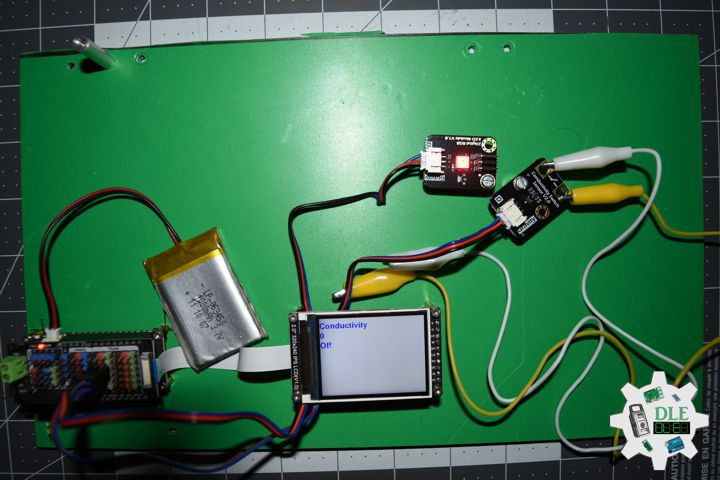
The Gravity Conductivity Sensor Switch module can be used to detect if an object has electrical conductivity. Its maximum detection value is 10 Mega Ohm. It can detect not only coins, wires, metal and other good conductors, but also the human body, fruit, plants and other conductors.
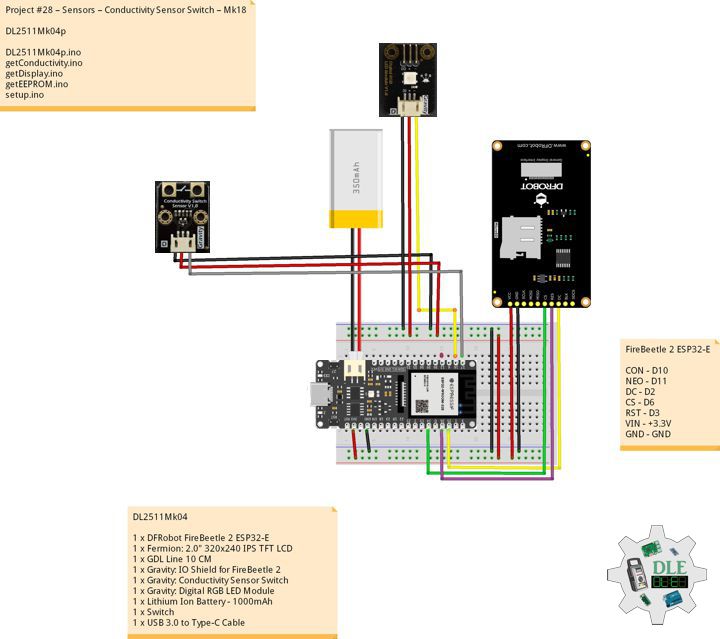
DL2511Mk04
1 x DFRobot FireBeetle 2 ESP32-E
1 x Fermion: 2.0″ 320×240 IPS TFT LCD
1 x GDL Line 10 CM
1 x Gravity: IO Shield for FireBeetle 2
1 x Gravity: Conductivity Sensor Switch
1 x Gravity: Digital RGB LED Module
1 x Lithium Ion Battery – 1000mAh
1 x Switch
1 x USB 3.0 to Type-C Cable
DL2511Mk04p
DL2511Mk04p.ino
/****** Don Luc Electronics © ******
Software Version Information
Project #28 – Sensors – Conductivity Sensor Switch – Mk18
28-18
DL2511Mk04p.ino
DL2511Mk04
1 x DFRobot FireBeetle 2 ESP32-E
1 x Fermion: 2.0" 320x240 IPS TFT LCD
1 x GDL Line 10 CM
1 x Gravity: IO Shield for FireBeetle 2
1 x Gravity: Conductivity Sensor Switch
1 x Gravity: Digital RGB LED Module
1 x Lithium Ion Battery - 1000mAh
1 x Switch
1 x USB 3.0 to Type-C Cable
*/

// Include the Library Code
// EEPROM Library to Read and Write EEPROM
// with Unique ID for Unit
#include "EEPROM.h"
// Arduino
#include "Arduino.h"
// DFRobot Display GDL API
#include <DFRobot_GDL.h>
// Adafruit NeoPixel
#include <Adafruit_NeoPixel.h>

// Conductivity
int iConductivity = D10;
// Value
int iVal;
// OO
String sOO;

// Which pin on the Arduino is connected to the NeoPixels?
#define iNeo D11
// How many NeoPixels are attached to the Arduino?
#define NUMPIXELS 1
// When setting up the NeoPixel library.
Adafruit_NeoPixel pixels(NUMPIXELS, iNeo, NEO_GRB + NEO_KHZ800);

// Defined ESP32
#define TFT_DC  D2
#define TFT_CS  D6
#define TFT_RST D3

/*dc=*/ /*cs=*/ /*rst=*/
// DFRobot Display 240x320
DFRobot_ST7789_240x320_HW_SPI screen(TFT_DC, TFT_CS, TFT_RST);

// EEPROM Unique ID Information
#define EEPROM_SIZE 64
String uid = "";

// Software Version Information
String sver = "28-18";

void loop() {

  // isConductivity
  isConductivity();

  // isDisplayConductivity
  isDisplayConductivity();

  // Delay
  delay( 1000 );

}
getConductivity.ino
// Conductivity
// isConductivity
void isConductivity(){

  // Set all pixel colors to 'Off'
  pixels.clear();

  // Read the value from the sensor:
  iVal = digitalRead(iConductivity);

  // Sound Sensor
  if( iVal == HIGH ) {

       // The first NeoPixel in a strand is #0, second is 1, all the way up
       // to the count of pixels minus one. // For each pixel...
       for(int i=0; i<NUMPIXELS; i++) {

          // pixels.Color() takes RGB values, from 0,0,0 up to 255,255,255
          // Green
          pixels.setPixelColor(i, pixels.Color(0, 255, 0));

          // Send the updated pixel colors to the hardware.
          pixels.show();

        }

    // On
    sOO = "On";

  }
   else{

      // The first NeoPixel in a strand is #0, second is 1, all the way up
       // to the count of pixels minus one. // For each pixel...
       for(int i=0; i<NUMPIXELS; i++) {

          // pixels.Color() takes RGB values, from 0,0,0 up to 255,255,255
          // Red
          pixels.setPixelColor(i, pixels.Color(255, 0, 0));

          // Send the updated pixel colors to the hardware.
          pixels.show();

      }

    // Off
    sOO = "Off";

  }

}
getDisplay.ino
// DFRobot Display 240x320
// DFRobot Display 240x320 - UID
void isDisplayUID(){

  // DFRobot Display 240x320
  // Text Display
  // Text Wrap
  screen.setTextWrap(false);
  // Rotation
  screen.setRotation(3);
  // Fill Screen => black
  screen.fillScreen(0x0000);
  // Text Color => white
  screen.setTextColor(0xffff);
  // Font => Free Sans Bold 12pt
  screen.setFont(&FreeSansBold12pt7b);
  // TextSize => 1.5
  screen.setTextSize(1.5);
  // Don Luc Electronics
  screen.setCursor(0, 30);
  screen.println("Don Luc Electronics");
  // SD
  screen.setCursor(0, 60);
  screen.println("Conductivity");
  // Version
  screen.setCursor(0, 90);
  screen.println("Version");
  screen.setCursor(0, 120);
  screen.println( sver );
  // EEPROM
  screen.setCursor(0, 150);
  screen.println("EEPROM");
  screen.setCursor(0, 180);
  screen.println( uid );

}
// isDisplayConductivity
void isDisplayConductivity(){

  // DFRobot Display 240x320
  // Text Display
  // Text Wrap
  screen.setTextWrap(false);
  // Rotation
  screen.setRotation(3);
  // Fill Screen => white
  screen.fillScreen(0xffff);
  // Text Color => blue
  screen.setTextColor(0x001F);
  // Font => Free Sans Bold 12pt
  screen.setFont(&FreeSansBold12pt7b);
  // TextSize => 1.5
  screen.setTextSize(1.5);
  // Sound Sensor
  screen.setCursor(0, 30);
  screen.println("Conductivity");
  // Val
  screen.setCursor(0, 60);
  screen.println( iVal );
  // On Off
  screen.setCursor(0, 90);
  screen.println( sOO );


}
getEEPROM.ino
// EEPROM
// isUID EEPROM Unique ID
void isUID() {

  // Is Unit ID
  uid = "";
  for (int x = 0; x < 7; x++)
  {
    uid = uid + char(EEPROM.read(x));
  }

}
setup.ino
// Setup
void setup()
{

  // Delay
  delay( 100 );

  // EEPROM Size
  EEPROM.begin(EEPROM_SIZE);

  // EEPROM Unique ID
  isUID();

  // Delay
  delay( 100 );

  // INITIALIZE NeoPixel strip object
  pixels.begin();

  // Delay
  delay(100);

  // DFRobot Display 240x320
  screen.begin();

  // Delay
  delay(100);

  // Conductivity
  pinMode(iConductivity,INPUT);

  // Delay
  delay(100);

  // DFRobot Display 240x320 - UID
  // Don Luc Electronics
  // Version
  // EEPROM
  isDisplayUID();

  // Delay 5 Second
  delay( 5000 );

}
——
People can contact us: https://www.donluc.com/?page_id=1927
Consultant, R&D, Electronics, IoT, Teacher and Instructor
- Programming Language
- Single-Board Microcontrollers (PIC, Arduino, Raspberry Pi, Arm, Silicon Labs, Espressif, Etc…)
- IoT
- Wireless (Radio Frequency, Bluetooth, WiFi, Etc…)
- Robotics
- Automation
- Camera and Video Capture Receiver Stationary, Wheel/Tank , Underwater and UAV Vehicle
- Unmanned Vehicles Terrestrial, Marine and UAV
- Machine Learning
- Artificial Intelligence (AI)
- RTOS
- Sensors, eHealth Sensors, Biosensor, and Biometric
- Research & Development (R & D)
- Consulting
Follow Us
Luc Paquin – Curriculum Vitae – 2024
https://www.donluc.com/luc/
Web: https://www.donluc.com/
Facebook: https://www.facebook.com/neosteam.labs.9/
YouTube: https://www.youtube.com/@thesass2063
Twitter: https://twitter.com/labs_steam
Pinterest: https://www.pinterest.com/NeoSteamLabs/
Instagram: https://www.instagram.com/neosteamlabs/
DFRobot: https://learn.dfrobot.com/user-10186.html
Elecrow: https://www.elecrow.com/share/sharepj/center/no/760816d385ebb1edc0732fd873bfbf13
TikTok: https://www.tiktok.com/@luc.paquin8
Hackster: https://www.hackster.io/luc-paquin
LinkedIn: https://www.linkedin.com/in/jlucpaquin/
Don Luc