——
#DonLucElectronics #DonLuc #Potentiometer #DCMotor #Robotics #ArduinoUNO #Display #IoT #Project #Fritzing #Programming #Electronics #Microcontrollers #Consultant
——
——
——
——
Gravity: Analog Rotation Potentiometer Sensor
It is based on multi-turn precision potentiometer. It can rotate up to 10 laps. If the sensor input 5V voltage power, then the 5000mV will be divided into 3600 portions ( 10 laps ), when you adjust the rotation of the 3 degrees and then the voltage will have 2mV change, so you can accurately achieve the effect of voltage with small changes. and it is easy to be connected to Arduino with our sensor expansion board.
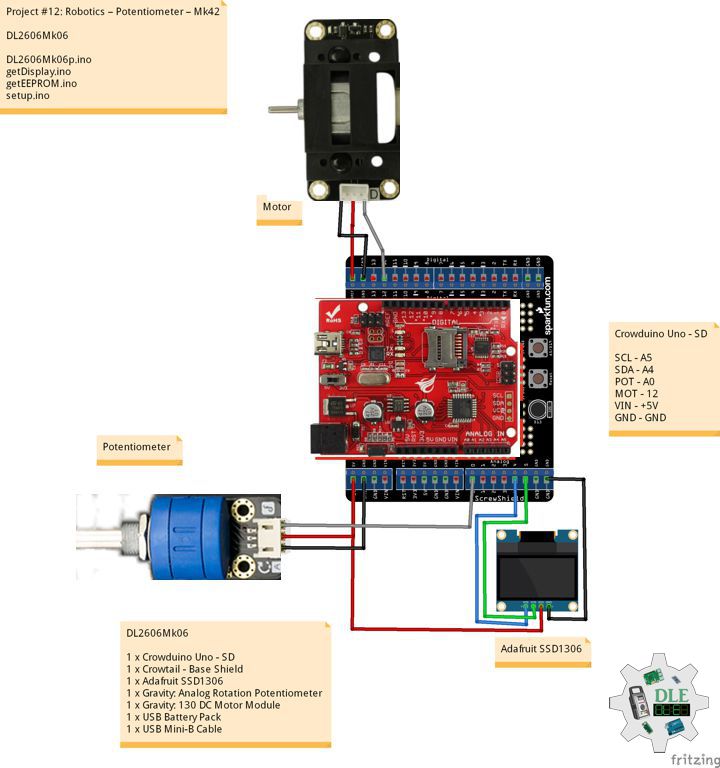
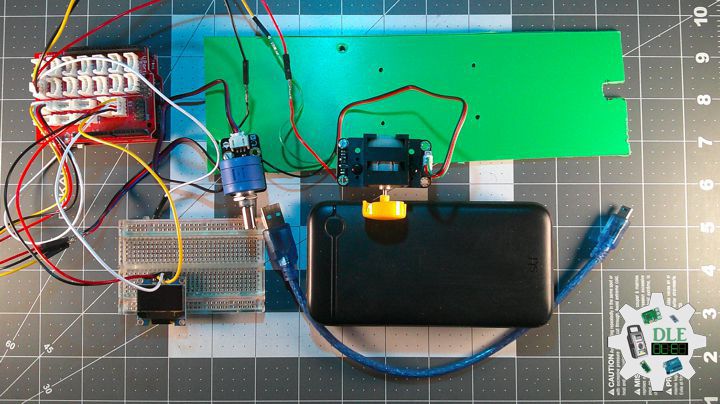
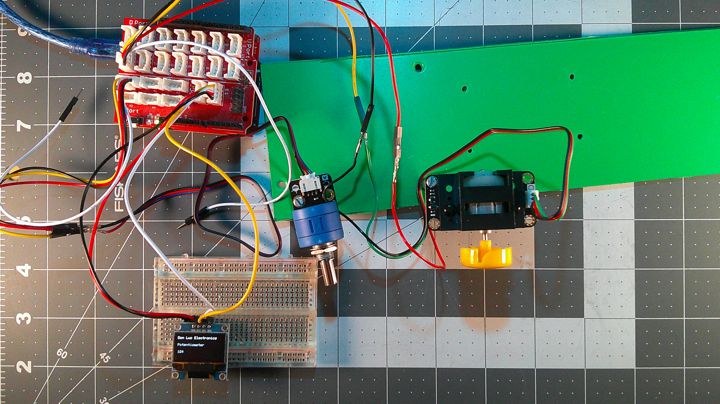
DL2606Mk06
1 x Crowduino Uno – SD
1 x Crowtail – Base Shield
1 x Adafruit SSD1306
1 x Gravity: Analog Rotation Potentiometer Sensor
1 x Gravity: 130 DC Motor Module
1 x USB Battery Pack
1 x USB Mini-B Cable
DL2606Mk06p
DL2606Mk06p.ino
/****** Don Luc Electronics © ******
Software Version Information
Project #12: Robotics – Potentiometer – Mk42
12-42
DL2606Mk06p.ino
DL2606k06
1 x Crowduino Uno - SD
1 x Crowtail - Base Shield
1 x Adafruit SSD1306
1 x Gravity: Analog Rotation Potentiometer Sensor
1 x Gravity: 130 DC Motor Module
1 x USB Battery Pack
1 x USB Mini-B Cable
*/

// Include the Library Code
// EEPROM Library to Read and Write EEPROM with Unique ID for Unit
#include "EEPROM.h"
// Wire
#include <Wire.h>
// Adafruit SSD1306
#include <Adafruit_SSD1306.h>

// Adafruit SSD1306
#define SCREEN_WIDTH 128
#define SCREEN_HEIGHT 64
#define OLED_RESET -1
Adafruit_SSD1306 display(SCREEN_WIDTH, SCREEN_HEIGHT, &Wire, OLED_RESET);

// Motor drive pin 12
int motorPin = 12;
// Define motor speed
int motorSpeed;

// iPot
int iPot = A0;
// Pot State
int iPotState = 0;

// Software Version Information
// EEPROM Unique ID Information
String uid = "";

// Software Version Information
String sver = "12-42";

void loop() {

  // Read the analog in value:
  iPotState = analogRead(iPot);

  // Map it to the range of the analog out
  motorSpeed = map(iPotState, 0, 1023, 0, 255);

  // PWM speed control
  analogWrite(motorPin, motorSpeed);

  // isDisplay Potentiometer
  isDisplayPotentiometer();

  // Delay
  delay( 20 );

}
getDisplay.ino
// Adafruit SSD1306
// isDisplayUID
void isDisplayUID(){

    // Intentar ambas direcciones
  if(!display.begin(SSD1306_SWITCHCAPVCC, 0x3C)) {
    //Serial.println("Error con 0x3C, probando 0x3D...");
    if(!display.begin(SSD1306_SWITCHCAPVCC, 0x3D)) {
      //Serial.println("Error OLED en ambas direcciones");
      return;
    }
  }

  // Clear Display
  display.clearDisplay();
  display.setTextSize(1);
  display.setTextColor(SSD1306_WHITE);
  // Don Luc Electronics
  display.setCursor(0,0);
  display.println("Don Luc Electronics");
  // Motor Drive
  display.setCursor(0,10);
  display.print("Potentiometer");
 // Version
  display.setCursor(0,20);
  display.print("Version");
  display.setCursor(0,30);
  display.print( sver );
  // EEPROM
  display.setCursor(0,40);
  display.print("EEPROM");
  display.setCursor(0,50);
  display.print( uid );
  // Display
  display.display();

}
// isDisplay Potentiometer
void isDisplayPotentiometer(){

  // Clear Display
  display.clearDisplay();
  display.setTextSize(1);
  display.setTextColor(SSD1306_WHITE);
  // Don Luc Electronics
  display.setCursor(0,0);
  display.println("Don Luc Electronics");
  // Motor Drive
  display.setCursor(0,20);
  display.print("Potentiometer");
  // HIGH or LOW
  display.setCursor(0,40);
  display.print( motorSpeed );
  // Display
  display.display();

}
getEEPROM.ino
// isUID EEPROM Unique ID
void isUID()
{

  // Is Unit ID
  uid = "";
  for (int x = 0; x < 7; x++)
  {
    uid = uid + char(EEPROM.read(x));
  }

}
setup.ino
// Setup
void setup()
{

  // Delay
  delay( 100 );

  // EEPROM Unique ID
  isUID();

  // Delay
  delay( 100 );

  // DFRobot Display 320x480 - UID
  // Don Luc Electronics
  // Version
  // EEPROM
  isDisplayUID();

  // Wait for the sensor to heat up for 20 seconds
  delay( 5000 );

}
——
People can contact us: https://www.donluc.com/?page_id=1927
Consultant, R&D, Electronics, IoT, Teacher and Instructor
- Programming Language
- Single-Board Microcontrollers (PIC, Arduino, Raspberry Pi, Arm, Silicon Labs, Espressif, Etc…)
- IoT
- Wireless (Radio Frequency, Bluetooth, WiFi, Etc…)
- Robotics
- Automation
- Camera and Video Capture Receiver Stationary, Wheel/Tank , Underwater and UAV Vehicle
- Unmanned Vehicles Terrestrial, Marine and UAV
- Machine Learning
- Artificial Intelligence (AI)
- RTOS
- Sensors, eHealth Sensors, Biosensor, and Biometric
- Research & Development (R & D)
- Consulting
Follow Us
Luc Paquin – Curriculum Vitae – 2026
https://www.donluc.com/luc/LucPaquinCVEng2026Mk01.pdf
https://www.donluc.com/luc/
Web: https://www.donluc.com/
Web: https://www.jlpconsultants.com/
Facebook: https://www.facebook.com/neosteam.labs.9/
YouTube: https://www.youtube.com/@thesass2063
DFRobot: https://learn.dfrobot.com/user-10186.html
TikTok: https://www.tiktok.com/@luc.paquin8
Hackster: https://www.hackster.io/luc-paquin
LinkedIn: https://www.linkedin.com/in/jlucpaquin/
Don Luc