
——
#DonLucElectronics #DonLuc #DCMotor #Robotics #FireBeetle2ESP32E #ESP32 #Display #IoT #Project #Fritzing #Programming #Electronics #Microcontrollers #Consultant
——
——
——
——
Gravity: 130 DC Motor Module
Gravity: 130 DC Motor Module combines a classic 130-size brushed motor with an onboard transistor control circuit, creating a compact actuator solution for rapid prototyping and embedded motion projects. The integrated switching stage allows direct digital control from popular development platforms such as Arduino without requiring a separate motor driver board. A standardized Gravity pin connector simplifies wiring and improves reliability during experimentation. This small DC motor unit supports PWM-based speed control, making the module suitable for robotics mechanisms, airflow experiments, and interactive hardware builds where quick installation and stable power switching are important.
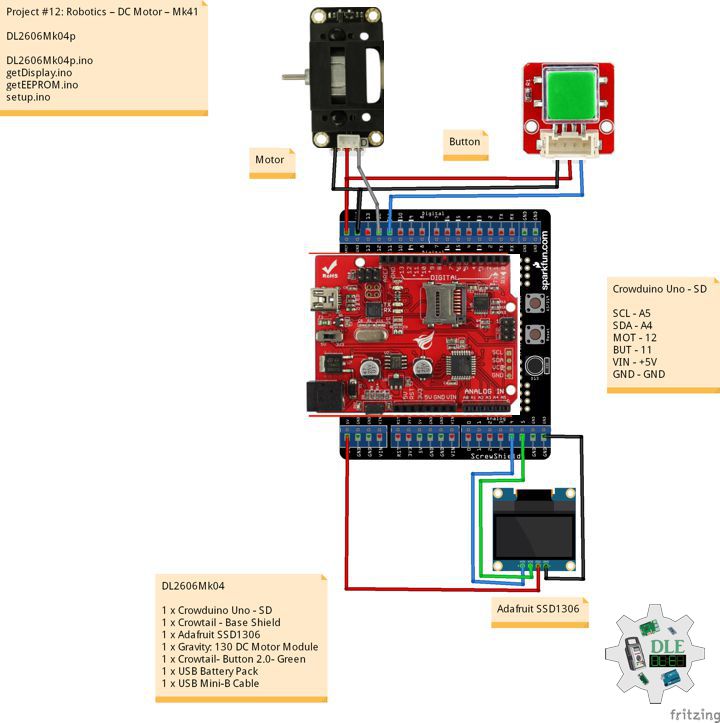
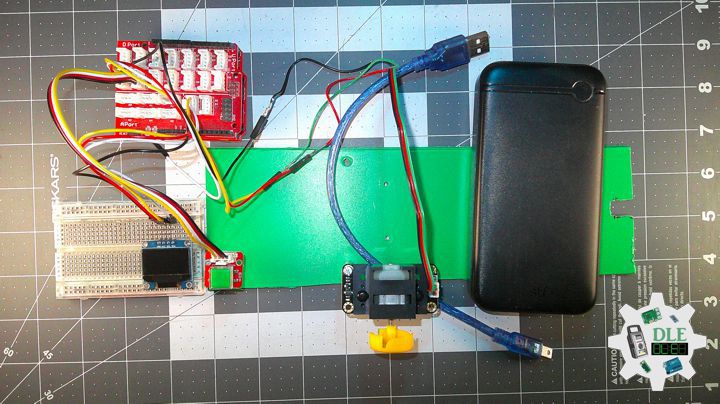
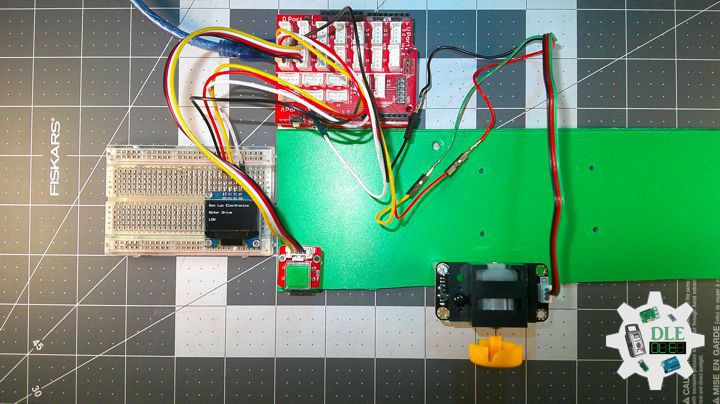
DL2606Mk04
1 x Crowduino Uno – SD
1 x Crowtail – Base Shield
1 x Adafruit SSD1306
1 x Gravity: 130 DC Motor Module
1 x Crowtail- Button 2.0- Green
1 x USB Battery Pack
1 x USB Mini-B Cable
DL2606Mk04p
DL2606Mk04p.ino
/****** Don Luc Electronics © ******
Software Version Information
Project #12: Robotics – DC Motor – Mk41
12-41
DL2606Mk04p.ino
DL2606k04
1 x Crowduino Uno - SD
1 x Crowtail - Base Shield
1 x Adafruit SSD1306
1 x Gravity: 130 DC Motor Module
1 x Crowtail- Button 2.0- Green
1 x USB Battery Pack
1 x USB Mini-B Cable
*/

// Include the Library Code
// EEPROM Library to Read and Write EEPROM with Unique ID for Unit
#include "EEPROM.h"
// Wire
#include <Wire.h>
// Adafruit SSD1306
#include <Adafruit_SSD1306.h>

// Adafruit SSD1306
#define SCREEN_WIDTH 128
#define SCREEN_HEIGHT 64
#define OLED_RESET -1
Adafruit_SSD1306 display(SCREEN_WIDTH, SCREEN_HEIGHT, &Wire, OLED_RESET);

// Motor drive pin 12
int motorPin = 12;
// Define motor speed
int motorSpeed;
String sOne = "";

// iButton
int iButton = 11;
// Button State
int iButtonState = 0;

// Software Version Information
// EEPROM Unique ID Information
String uid = "";

// Software Version Information
String sver = "12-41";

void loop() {

  // Read the input pin:
  iButtonState = digitalRead(iButton);

  if (iButtonState == HIGH) {

   // PWM speed control
   motorSpeed = 255;
   analogWrite(motorPin, motorSpeed);
   sOne = "HIGH";

  }
  else {

   // PWM speed control
   motorSpeed = 0;
   analogWrite(motorPin, motorSpeed);
   sOne = "LOW";

  }

  // isDisplay Motor
  isDisplayMotor();

}
getDisplay.ino
// Adafruit SSD1306
// isDisplayUID
void isDisplayUID(){

    // Intentar ambas direcciones
  if(!display.begin(SSD1306_SWITCHCAPVCC, 0x3C)) {
    //Serial.println("Error con 0x3C, probando 0x3D...");
    if(!display.begin(SSD1306_SWITCHCAPVCC, 0x3D)) {
      //Serial.println("Error OLED en ambas direcciones");
      return;
    }
  }

  // Clear Display
  display.clearDisplay();
  display.setTextSize(1);
  display.setTextColor(SSD1306_WHITE);
  // Don Luc Electronics
  display.setCursor(0,0);
  display.println("Don Luc Electronics");
  // Motor Drive
  display.setCursor(0,10);
  display.print("Motor Drive");
 // Version
  display.setCursor(0,20);
  display.print("Version");
  display.setCursor(0,30);
  display.print( sver );
  // EEPROM
  display.setCursor(0,40);
  display.print("EEPROM");
  display.setCursor(0,50);
  display.print( uid );
  // Display
  display.display();

}
// isDisplay Motor
void isDisplayMotor(){

  // Clear Display
  display.clearDisplay();
  display.setTextSize(1);
  display.setTextColor(SSD1306_WHITE);
  // Don Luc Electronics
  display.setCursor(0,0);
  display.println("Don Luc Electronics");
  // Motor Drive
  display.setCursor(0,20);
  display.print("Motor Drive");
  // HIGH or LOW
  display.setCursor(0,40);
  display.print( sOne );
  // Display
  display.display();

}
getEEPROM.ino
// isUID EEPROM Unique ID
void isUID()
{

  // Is Unit ID
  uid = "";
  for (int x = 0; x < 7; x++)
  {
    uid = uid + char(EEPROM.read(x));
  }

}
setup.ino
// Setup
void setup()
{

  // Delay
  delay( 100 );

  // EEPROM Unique ID
  isUID();

  // Delay
  delay( 100 );

  // iButton
  pinMode(iButton, INPUT);

  // Delay
  delay( 100 );

  // DFRobot Display 320x480 - UID
  // Don Luc Electronics
  // Version
  // EEPROM
  isDisplayUID();

  // Wait for the sensor to heat up for 20 seconds
  delay( 5000 );

}
——
People can contact us: https://www.donluc.com/?page_id=1927
Consultant, R&D, Electronics, IoT, Teacher and Instructor
- Programming Language
- Single-Board Microcontrollers (PIC, Arduino, Raspberry Pi, Arm, Silicon Labs, Espressif, Etc…)
- IoT
- Wireless (Radio Frequency, Bluetooth, WiFi, Etc…)
- Robotics
- Automation
- Camera and Video Capture Receiver Stationary, Wheel/Tank , Underwater and UAV Vehicle
- Unmanned Vehicles Terrestrial, Marine and UAV
- Machine Learning
- Artificial Intelligence (AI)
- RTOS
- Sensors, eHealth Sensors, Biosensor, and Biometric
- Research & Development (R & D)
- Consulting
Follow Us
Luc Paquin – Curriculum Vitae – 2026
https://www.donluc.com/luc/LucPaquinCVEng2026Mk01.pdf
https://www.donluc.com/luc/
Web: https://www.donluc.com/
Web: https://www.jlpconsultants.com/
Facebook: https://www.facebook.com/neosteam.labs.9/
YouTube: https://www.youtube.com/@thesass2063
DFRobot: https://learn.dfrobot.com/user-10186.html
TikTok: https://www.tiktok.com/@luc.paquin8
Hackster: https://www.hackster.io/luc-paquin
LinkedIn: https://www.linkedin.com/in/jlucpaquin/
Don Luc